Czytelnik słabowidzący nie rozróżnia czarnego tekstu na białej stronie przy domyślnym kontraście, dlatego prosi o tryb ciemny. Naiwna odpowiedź to odwrócenie każdego piksela wyrenderowanej strony. Taka funkcja trafia na produkcję w tydzień i psuje się następnego dnia: skanowane fotografie wracają jak negatywy filmowe, żółte podkreślenia czytelnika zamieniają się w nieczytelną niebieską plamę, a ktoś pyta, dlaczego wydruk wyszedł całkiem czarny. Ta funkcja naprawdę jest warta zbudowania i naprawdę łatwo zrobić ją tylko w połowie dobrze, a różnicę między tymi dwoma wynikami wypełnia jedna myśl: każda decyzja kolorystyczna ma swoje konkretne miejsce w potoku renderowania, a inwersja to złe narzędzie zastosowane na złym etapie. Kod tutaj korzysta z PDFium Component, komponentu przeglądarkowego opartego na PDFium dla Delphi, C++Buildera i Lazarusa, którego API renderowania udostępnia te etapy osobno
Filtry to stan prezentacji, nigdy stan dokumentu
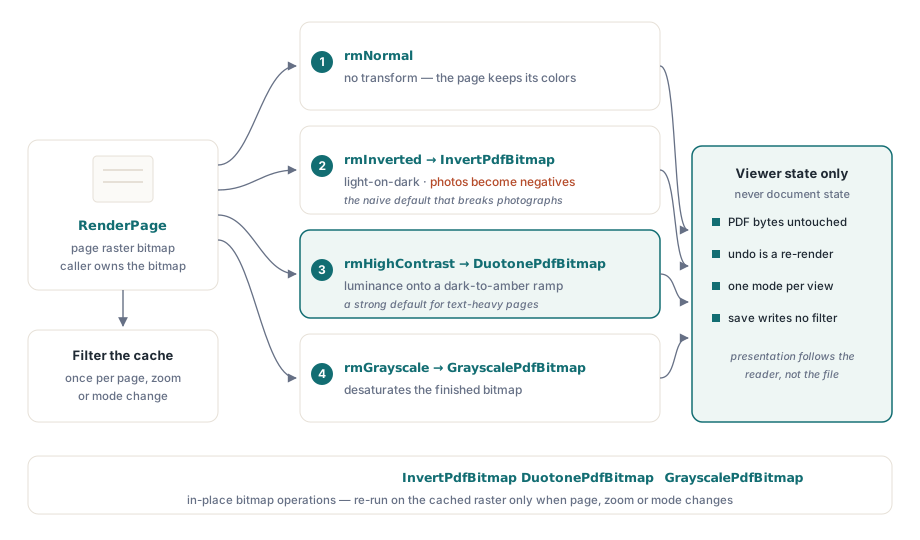
Jedna reguła chroni tu przed najgorszą kategorią błędów: tryb czytania zmienia sposób wytworzenia lub przetworzenia bitmapy — i nic więcej. Bajty PDF pozostają nietknięte, każdy tryb jest odwracalny przez ponowne renderowanie, a „zapis” nigdy nie zapisuje przefiltrowanego wyglądu z powrotem do pliku. Brzmi to banalnie, dopóki recenzent prawny nie wydrukuje umowy przy aktywnym filtrze i nie złoży odwróconej wersji do akt. Wtedy pytanie „czy druk używa własnego wyglądu dokumentu, czy tego z ekranu” okazuje się zasługiwać na wyraźną odpowiedź w specyfikacji, a nie na przypadkowy skutek ścieżki kodu. Trzymaj ustawienie filtra w stanie przeglądarki, stosuj je w czasie renderowania i każdej ścieżce eksportu każ zadeklarować, którego wyglądu używa
Ta reguła opłaca się dwukrotnie. Odwracalność przychodzi za darmo, bo przełączenie trybu renderuje ponownie z niezmienionego źródła: nie trzeba utrzymywać stosu cofania i nie ma sposobu, aby seria zmian trybu zdegradowała stronę. Scenariusze wielookienne pozostają spójne z tego samego powodu. Dwa widoki jednego dokumentu mogą działać w różnych trybach, ponieważ każdy widok posiada własny stan prezentacji, podczas gdy obiekt dokumentu pozostaje współdzielony
Najpierw renderowanie, potem przekształcenie
Wspierany wzorzec to przetwarzanie bitmapy po renderowaniu: RenderPage wytwarza rastrowy obraz strony, a następnie przebieg przekształcenia go koryguje. Komponent dostarcza trzy przekształcenia jako operacje na bitmapie w miejscu, InvertPdfBitmap, DuotonePdfBitmap i GrayscalePdfBitmap, dzięki czemu przełączenie trybu staje się czystą dwuetapową funkcją:
function TViewerForm.RenderWithMode(W, H: Integer): TBitmap;
begin
  Result := Pdf.RenderPage(0, 0, W, H, ro0, [reAnnotations]);
  case FReadingMode of
    rmInverted:     InvertPdfBitmap(Result);
    rmHighContrast: DuotonePdfBitmap(Result, clBlack, $0000C8FF);  // ciemne tło, bursztynowy tekst
    rmGrayscale:    GrayscalePdfBitmap(Result);
  end;
  // rmNormal przechodzi bez zmian: dokument zachowuje własne kolory
end;
Z tej konstrukcji wynikają dwie rzeczy. Po pierwsze, koszt przekształcenia jest proporcjonalny do rozmiaru bitmapy, więc ta praca należy tam, gdzie buforowane są wyniki renderowania: przefiltruj raz buforowaną bitmapę, a nie przy każdym malowaniu. Po drugie, ponieważ przekształcenie działa na gotowym rastrze, obejmuje tekst, grafikę wektorową, obrazy i wygląd adnotacji dokładnie tak samo. Ta jednolitość to właśnie to, co zwykła inwersja psuje w fotografiach. Z tego powodu przekształcenie duotone lepiej nadaje się jako domyślne dla dokumentów bogatych w tekst, bo odwzorowuje luminancję na wybranej rampie kolorów od ciemnego do jasnego zamiast negować barwy; inwersja pozostaje dostępna jako jawny wybór dla czytelników, którzy jej chcą. Ostrzejsze krawędzie glifów to osobna dźwignia. Opcja renderowania reNoSmoothText wyłącza wygładzanie tekstu w czasie renderowania i dobrze współgra z trybem wysokiego kontrastu przy dużym powiększeniu
Dwie skale szarości, które się nie zgadzają
Opcje renderowania obejmują reGrayscale, które wygląda jak skrót omijający krok przetwarzania końcowego. To nie ta sama operacja:

// Poziom silnika: skala szarości stosowana podczas rasteryzacji
GrayA := Pdf.RenderPage(0, 0, W, H, ro0, [reGrayscale]);

// Post-processing: renderuj w kolorze, skonwertuj gotową bitmapę
GrayB := Pdf.RenderPage(0, 0, W, H);
GrayscalePdfBitmap(GrayB);
Opcja na poziomie silnika obejmuje wyjście rastrowe treści obrazowej, ale nie sięga wypełnień wektorowych ani kolorów tekstu, więc strona z kolorowymi nagłówkami może wrócić z szarymi fotografiami i uparcie niebieskimi nagłówkami. GrayscalePdfBitmap na gotowej bitmapie konwertuje wszystko, bezwarunkowo. Opcja renderowania wciąż ma swoje miejsce, gdy chcesz mieć odsycone obrazy przy zachowaniu koloru tekstu jako sygnału, co część czytelników słabowidzących wyraźnie preferuje. Ale jeśli wymóg brzmi „strona w skali szarości”, to wersją, która go spełnia, jest przetwarzanie końcowe. Którąkolwiek drogę wybierzesz, miej na uwadze oba style przeciążeń RenderPage. Forma funkcyjna zwraca bitmapę, którą wywołujący posiada i musi zwolnić, a to nabiera znaczenia, gdy tylko filtry rozmnożą liczbę renderowanych bitmap w obiegu
Tła, znaczniki zaznaczenia i pułapka PageColor
Nie każda regulacja komfortu jest przekształceniem. Zamiana białego tła strony na ciepły ton często wystarcza sama w sobie dla czytelników wrażliwych na olśnienie, a ma dedykowaną właściwość. Ta właściwość niesie regułę zasięgu, na której wielu ludzi się wykłada:
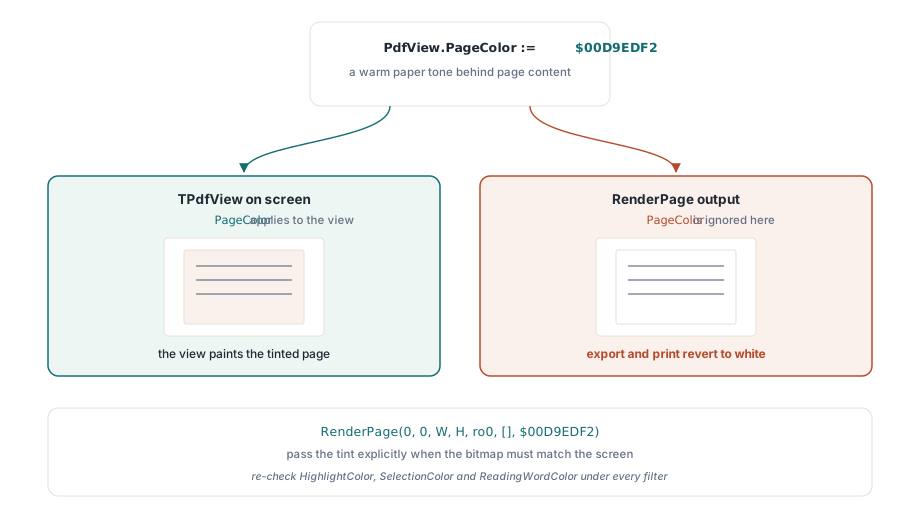
// Wpływa tylko na widok na ekranie
PdfView.PageColor := $00D9EDF2;  // ciepły odcień papieru za treścią strony

// Wynik RenderPage ignoruje PageColor; przekaż kolor jawnie
Bmp := Pdf.RenderPage(0, 0, W, H, ro0, [], $00D9EDF2);
PageColor zmienia to, co wyświetla TPdfView, ale bitmapy wytworzone przez RenderPage zachowują domyślną biel, chyba że parametr Color stanowi inaczej. Objaw jest niezawodny: ekran pokazuje stronę z odcieniem, użytkownik eksportuje lub drukuje, a wyjście wraca do bieli. Zapisz to pod tę samą decyzję polityki eksportu co z pierwszej sekcji
Pozostałe właściwości kolorów definiują znaczniki nakładane: HighlightColor dla trafień wyszukiwania, SelectionColor dla zaznaczania tekstu przez użytkownika, ReadingWordColor dla kursora wypowiadanego słowa. Każdą z nich trzeba sprawdzić na nowo pod każdym filtrem, który oferujesz. Bursztynowy kursor czytania, który działa na bieli, znika po inwersji; blade niebieskie zaznaczenie rozpływa się na tle wysokiego kontrastu. Utrzymuj osobne palety nakładek dla każdego trybu zamiast jednego globalnego zbioru i testuj kombinacje celowo. Filtry plus synteza mowy to normalna konfiguracja dla czytelników, którym ta funkcja służy, a nie przypadek brzegowy. Sam mechanizm nakładek opisuje artykuł o dostępnym czytniku
Liczby, weryfikacja i kwestia drukowania
WCAG 2.1 zamienia tę funkcję w coś, co da się zmierzyć. Kryterium sukcesu 1.4.3 wymaga współczynnika kontrastu 4,5:1 dla tekstu głównego, a 1.4.6 podnosi go do 7:1 dla kontrastu wzmocnionego. Sprawdź punktowo swój tryb wysokiego kontrastu względem tych wartości analizatorem kontrastu uruchomionym na rzeczywistym wyjściu renderowania. Tekst na obrazach i tekst w polach formularzy to miejsca, gdzie współczynniki po cichu zawodzą, nawet gdy tekst główny przechodzi
Drukowanie zasługuje na własną decyzję, a możliwą do obrony wartością domyślną jest własny wygląd dokumentu, z „drukowaniem jak na ekranie” oferowanym jako jawny wybór użytkownika. Wydrukowana strona jest dowodem w większej liczbie przepływów pracy, niż autorzy przeglądarek zwykli zakładać, a odwrócony wydruk umowy to incydent wsparcia o prawnym podtekście. Jeszcze jedno połączenie ma znaczenie dla wydajności: filtrowane renderowanie podwaja pracę na bitmapie przy każdym przełączeniu trybu, więc nie stosuj przekształcenia przy każdej wiadomości malowania. Buforuj przefiltrowaną bitmapę i uruchamiaj przekształcenie ponownie tylko wtedy, gdy strona, powiększenie lub tryb faktycznie się zmienią. Strategia buforowania, która czyni to tanim, mieszka w artykule o pamięci podręcznej renderowania i wydajności powiększania
Jedną rzecz warto rozstrzygnąć w interfejsie użytkownika, a nie w kodzie: który tryb powinien być domyślny. Nie ma jednej odpowiedzi, więc zaoferuj cały zestaw i pozwól czytelnikowi wybrać. Wysoki kontrast pasuje do większości czytania tekstów, inwersja odpowiada czytelnikom, którzy konkretnie chcą jasnego na ciemnym, skala szarości redukuje szum kolorów, a odcień tła radzi sobie z wrażliwością na olśnienie. Zapisuj wybór per użytkownik, przywracaj go przy starcie i utrzymuj jednoklawiszową drogę powrotu do normalności, bo czytelnik, który wpadnie w tryb, którego nie potrafi czytać, potrzebuje szybkiej drogi wyjścia
Użyte tutaj opcje renderowania, przekształcenia bitmap i właściwości kolorów widoku dostarczane są razem z produktem PDFium Component dla Delphi, C++Buildera i Lazarusa/FPC, z pełnym kodem źródłowym, dzięki czemu implementacje przekształceń można audytować lub rozszerzać