소리 내어 읽기 기능은 음성 외에도 눈에 띄는 한 가지 역할을 합니다. 각 단어를 말할 때 페이지에서 해당 단어를 강조 표시하고 시야에 유지해야 합니다. 이를 위해서는 음성 엔진이 읽고 있는 것과 동일한 문자 스트림에 색인된 모든 단어의 경계 상자가 필요합니다. 상자를 구했지만 색인을 놓치면 하이라이트가 오디오보다 한두 단어 뒤처지게 됩니다. 색인을 구했지만 페이지 상태를 잘못 처리하면 하이라이트가 완전히 엉뚱한 페이지에 표시됩니다. 이 중 음성 부분, 즉 합성기 자체는 거의 고장나지 않는 부분입니다. SAPI는 문자에 대한 단어 경계를 보고합니다. 문제가 발생하는 부분은 음성 버퍼의 문자 오프셋과 렌더링된 페이지의 직사각형 사이의 얇은 매핑 계층입니다
PDFium Component는 Delphi, C++Builder 및 Lazarus를 위해 이러한 매핑을 제공하며, v1.53부터 단어 상자를 사용할 수 있고 v1.56부터 추적 커서를 사용할 수 있습니다. 표면은 의도적으로 좁게 설정되어 있습니다. 페이지의 단어 상자를 반환하는 호출, 문자 오프셋을 그려진 하이라이트로 변환하는 트래커, 그리고 색상 및 자동 스크롤에 대한 몇 가지 속성이 있습니다. 좁지만, 항목을 호출하는 순서에 따라 기능이 작동할지 여부가 결정되며, 아래의 대부분의 실패는 잘못된 순서로 올바른 함수를 호출할 때 발생합니다
문자는 단어가 아니며 TTS 엔진은 문자로 말합니다
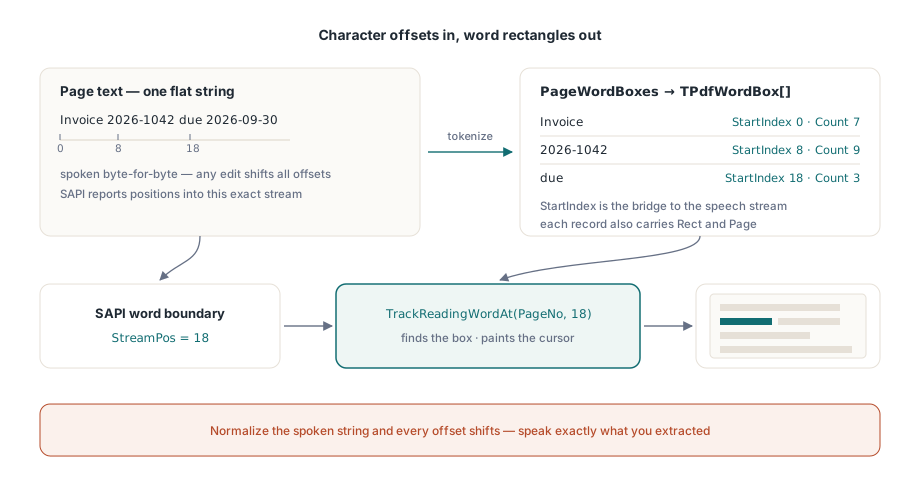
음성 엔진은 평면 문자열을 소비하고 해당 문자열 내의 문자 위치로 진행 상황을 보고합니다. PDF 페이지에는 페이지 공간에 배치된 글리프가 있으며, 여기서 "단어"는 글리프 런의 휴리스틱 클러스터입니다. 합성기에 전달하는 텍스트가 단어 상자가 계산된 텍스트와 바이트 단위로 동일하지 않으면 두 좌표계는 아무것도 공유하지 않습니다. 이것이 첫 번째 규칙이며, 이 규칙은 예외를 허용하지 않습니다. 공백을 정규화하거나, 소프트 하이픈을 제거하거나, 음성으로 말하기 전에 추출된 텍스트를 "정리"하면 다운스트림의 모든 오프셋이 알림 없이 잘못됩니다. 추출한 내용을 그대로 말하거나, 명시적인 오프셋 리매핑 테이블을 유지하십시오. 실제 문서에서 살아남을 수 있는 세 번째 옵션은 없습니다
리매핑 테이블은 가상의 엣지 케이스가 아닙니다. UI에 음성 페이지 알림("5페이지")이 삽입되거나 합성기를 위해 약어가 확장되는 순간, 음성 문자열은 추출된 문자열에서 벗어납니다. 각 삽입의 위치와 길이를 기록한 다음, 모든 추적 호출 전에 누적된 조정값을 빼십시오. 대략 20줄 정도의 기록 관리일 뿐이며, 이는 다음 기능 요청에도 살아남는 하이라이트와 누군가 음성 제목을 처음 요청할 때 깨지는 하이라이트 사이의 차이를 만듭니다
단어 상자가 제공하는 것
각 TPdfWordBox 레코드는 단어의 텍스트, 페이지 텍스트 내의 StartIndex 및 문자 Count, 페이지 공간 Rect, 그리고 1 기반 Page 번호를 전달합니다. StartIndex 필드는 두 좌표계 사이의 다리 역할을 합니다. 이것은 SAPI가 읽으면서 반환할 오프셋과 동일합니다. PageWordBoxes는 활성 페이지에 대한 전체 배열을 반환합니다
procedure TReaderForm.PreparePage(PageNo: Integer);
begin
  PdfView.PageNumber := PageNo;   // 뷰의 단어 상자는 표시된 페이지를 추적합니다

  FWords := PdfView.PageWordBoxes;
  FPageText := BuildSpeechText(FWords);   // 순서대로 Word.Text를 연결합니다

  if Length(FWords) = 0 then
    HandleImageOnlyPage(PageNo);          // 텍스트 레이어가 없는 스캔본
end;
순서를 지정하는 주석은 하중을 지탱하는 중요한 부분입니다. 뷰어의 PageWordBoxes는 현재 뷰에 표시된 페이지의 텍스트 레이어를 토큰화하므로, 뷰를 먼저 탐색하고 두 번째로 추출해야 합니다. 열린 문서만 있으면 되며 렌더링은 필요하지 않습니다. (문서 컴포넌트인 TPdf는 헤드리스(headless) 사용을 위해 Pdf.PageNumber에 키가 지정된 자체 PageWordBoxes 노출합니다. 이 두 페이지 번호는 서로 독립적이므로 주의가 필요합니다.) 시각적으로 콘텐츠가 있는 페이지에서 결과가 비어 있다면 텍스트 레이어가 없는 스캔본이라는 뜻입니다. 아무런 설명 없이 음성이 끊기게 두는 대신 이를 OCR로 전달하거나 최소한 "4페이지에는 읽을 수 있는 텍스트가 없습니다"와 같이 알려야 합니다
SAPI 단어 경계를 트래커에 연결하기
뷰어의 TrackReadingWordAt은 전체 기능의 핵심입니다. 페이지 번호와 문자 인덱스를 지정하면, 해당 문자가 포함된 단어 상자를 찾아 읽기 커서를 그리고 단어 인덱스를 반환하며, 인덱스가 단어 사이에 있으면 -1을 반환합니다. SAPI의 단어 경계 알림은 이 함수가 필요로 하는 바로 그 문자 위치를 제공합니다
procedure TReaderForm.OnSpeechWordBoundary(StreamPos: Integer);
var
  WordIdx: Integer;
begin
  // 한 번의 호출로 오프셋을 단어 상자에 매핑하고 하이라이트를 이동합니다
  WordIdx := PdfView.TrackReadingWordAt(FPageNo, StreamPos);
  if WordIdx < 0 then
    Exit;                     // 경계가 어떤 단어의 외부로 떨어짐: 마지막 하이라이트 유지
end;
여기서는 두 가지 방어적 세부 사항이 유용하게 쓰입니다. 첫째, TrackReadingWordAt은 추적되는 페이지에 대한 자체 단어 상자 캐시를 유지하고 페이지가 변경될 때마다 자동으로 다시 빌드하므로, 경계가 아무리 빨리 도착하더라도 경계당 비용이 일정하게 유지됩니다. 둘째, 이 함수는 넉넉하게 경계 검사를 수행하지 않습니다. 페이지의 문자 수와 같거나 그 이상의 인덱스는 마지막 단어로 고정하는 대신 -1을 반환합니다. 구두점 모음과 단어 사이의 공백은 정당하게 어떤 단어에도 속하지 않는 경계를 생성하므로 -1을 에러가 아닌 "이전 하이라이트 유지"로 취급해야 합니다. 모든 -1을 기록하다가는 감당하기 힘들어질 수 있습니다. 대신 페이지당 이를 세고, 비율이 급증하는 페이지가 있는지 주의 깊게 살펴보십시오. 이는 대개 첫 번째 규칙에서 텍스트 정규화 불일치가 발생했음을 의미하기 때문입니다
커서 자체: 색상, 추적, 및 정리
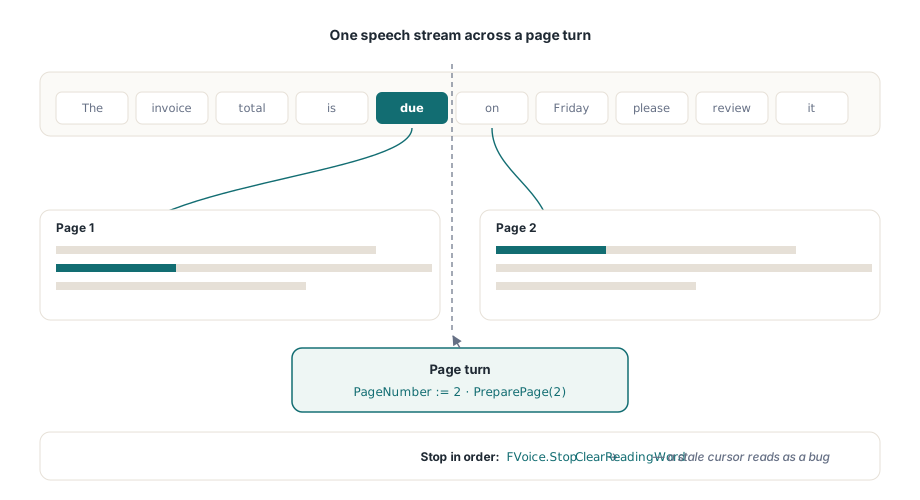
SetReadingWord는 단어 상자를 직접 보유하고 있을 때 하이라이트를 직접 그리고, ReadingWordColor는 스타일을 지정하며, ReadingWordFollow := True는 음성으로 나오는 단어가 계속 보이도록 뷰를 스크롤합니다. 이 마지막 속성은 제값을 톡톡히 합니다. 수작업으로 만든 "현재 단어를 중앙에 맞추기" 스크롤은 줄이 바뀔 때마다 페이지가 비틀거리게 만들고, 움직임에 민감한 독자들은 1분 안에 전체 기능을 꺼버릴 것입니다. 하이라이트는 활성 TPdfView에 현재 표시된 페이지에만 렌더링되므로, 다중 페이지 읽기에서는 PageNumber를 음성에 맞춰 진행시킨 다음, 첫 번째 경계 이벤트가 발생하기 전에 새 페이지에 대한 준비 단계를 다시 실행해야 합니다. 이를 생략하면 매 페이지의 처음 몇 개 하이라이트가 이전의 좌표를 가리키게 됩니다
procedure TReaderForm.StopReading;
begin
  FVoice.Stop;                // 먼저 SAPI 재생 중단
  PdfView.ClearReadingWord;   // 그런 다음 하이라이트를 제거합니다. 남아있는 커서는 버그로 인식됩니다
end;
종료 시의 대칭성은 하이라이트를 정직하게 유지합니다. 모든 일시 정지, 중지, 그리고 페이지 전환 경로의 끝은 ClearReadingWord로 끝나야 합니다. 이것을 생략하면 중지된 페이지에 호박색 사각형이 남아 정확히 결함처럼 보이게 되며, 실제로 고장난 것이 아무것도 없더라도 모든 테스터가 리포팅할 만한 유형의 문제가 됩니다
문서 크기보다 음성 속도가 이 파이프라인에 더 큰 스트레스를 줍니다. 분당 300단어의 경우 경계 이벤트가 200밀리초마다 도착하며, 가장 빠른 SAPI 속도에서는 눈이 편안하게 추적할 수 있는 것보다 더 빨리 도착합니다. 이에 대한 올바른 대응은 대기열(queue)에 넣는 것이 아니라 통합(coalesce)하는 것입니다. 하이라이트 업데이트가 여전히 보류 중인 상태에서 새 경계가 도착하면 오래된 것을 버리고 최신 것을 그리십시오. 모든 단어를 순서대로 방문하지만 0.5초가 지연되는 커서는 고장난 것처럼 느껴지지만, 가끔 단어를 건너뛰더라도 음성과 동기화된 상태를 유지하는 커서는 그렇지 않습니다
데모와 제품을 구분하는 엣지 케이스
몇 가지 문서 범주는 취약한 부분(seams)을 드러냅니다. 결합 문자가 가장 미묘합니다. 기본 글자와 결합 발음 구별 기호와 같은 유니코드 시퀀스는 시각적 단어가 암시하는 것보다 더 많은 문자 인덱스를 차지할 수 있으므로, 글리프당 하나의 인덱스를 가정하는 모든 오프셋 연산은 천천히 어긋나게 됩니다. 이것이 단어 번호를 수동으로 계산하는 대신 TrackReadingWordAt이 매핑을 소유하도록 해야 하는 가장 강력한 주장입니다. 하이픈 연결은 더 평범하지만 더 일반적입니다. 줄 바꿈에 걸쳐 분리된 단어는 두 개의 상자가 되며, 단일 토큰으로 음성을 말하는 경우 후반부에 대한 경계 이벤트는 첫 번째 상자로 해석됩니다. 이는 보통 문제가 되지 않지만, 하나의 결정이므로 뒤늦게 발견하는 대신 의도적으로 결정하십시오. 태깅은 읽기 순서 자체를 변경합니다. 문서에 적절한 구조 태그(ISO 14289, PDF/UA의 영역)가 있으면 단어 배열은 논리적 구조를 따릅니다. 태그가 없으면 레이아웃 휴리스틱으로 대체되어 태그가 없는 2단 페이지는 두 단을 가로질러 똑바로 읽을 수 있습니다. 회전된 페이지는 마지막으로 흔히 나타나는 문제입니다. 각 단어의 Rect는 페이지 공간에서 여전히 올바르게 경계를 지정하지만, 가로 흐름에 맞게 조정된 뷰포트 추적 정책은 텍스트가 세로로 흐를 때 거슬리게 스크롤되므로, 회귀 테스트 세트에 회전된 문서를 하나 이상 유지하십시오. 읽기 순서 처리, ReadingUnits를 통한 문장 단위, 그리고 더 광범위한 보조 기술 스택에 대해서는 Delphi에서 액세스 가능한 PDF 리더 구축하기를 참조하십시오
플랫폼 제약 조건 중 하나가 배포를 결정합니다. SAPI는 Windows 전용입니다. 단어 상자와 추적 API는 Lazarus 및 FPC에서 바이트 단위로 동일하지만 Linux 및 macOS 빌드에는 동일한 경계 이벤트 뒤에 다른 합성기가 연결되어야 합니다. 이 설정은 Lazarus 및 FPC에서 뷰어 실행하기에서 다룹니다. 음성 속도가 빨라지면 하이라이트 비용도 페이지 캐시와 상호 작용하며, 렌더링 캐싱 및 확대/축소 성능의 예산 연산은 여기서도 변경 없이 적용됩니다
단일 단어 하이라이팅이 잘못된 단위일 때
단어 수준의 노래방 기능이 독자가 항상 원하는 것은 아닙니다. 음성 속도가 빠를 때 단어마다 깜박이는 커서는 그 자체로 시각적 노이즈가 되며, 일부 청취자는 단일 단어의 점멸(strobe)보다 문장을 따라가는 것을 더 편안하게 느낍니다. 이 경우 컴포넌트는 더 큰 단위를 노출합니다. ReadingUnits는 각각 자체 하이라이트 직사각형을 가진 문장 및 블록 수준 단위를 반환하며, SetReadingWord 대신 SetReadingHighlight를 사용하여 그립니다. 연결 형태는 동일합니다. 경계 오프셋은 여전히 어떤 단위에 불을 밝힐지 결정하지만, 강조하는 단위는 단일 토큰이 아니라 절이나 줄에 걸쳐 있습니다. 느린 독자와 고속 재생 모두 이 기능을 선호하는 경향이 있으며, 설정 이면에서 두 가지 모드를 모두 제공하는 것을 막을 수는 없습니다
이 기능을 바탕으로 빌드하기 전에 버전 최소 사양(floors)을 확인해 둘 가치가 있습니다. 단어 상자에는 PDFium Component v1.53 이상이 필요하고 추적 커서에는 v1.56 이상이 필요합니다. 전체 읽기 API, 문장 수준 단위, 그리고 작동하는 소리 내어 읽기 데모는 PDFium Component 제품 페이지에 있습니다