단순한 PDF 뷰어에서 확대/축소 버튼을 길게 누른 채 CPU 그래프를 살펴보세요. 자동 반복되는 확대/축소 컨트롤을 한 번 누르면 초당 12번 이상의 확대/축소 단계가 실행되며, 각 단계에서 표시되는 페이지의 전체 품질 재렌더링이 시작되면 렌더링이 완료되는 속도보다 렌더링 작업이 쌓이는 속도가 더 빠릅니다. 페이지가 분리되어 있을 때는 A4 스캔에 180ms 정도 걸리며 잘 래스터화되지만, 이제 사용자가 이미 지나친 작업에 대해 180ms 렌더링을 12번이나 실행하고 있습니다. 뷰어가 잠기고 코어가 100%로 고정되며, 화면이 따라잡을 때쯤이면 사용자는 이미 4번의 렌더링 전 확대/축소 수준에서 멈춰 있습니다. 이에 대한 해결책은 더 빠른 래스터화기가 아닙니다. 그것은 완성된 페이지를 즉시 반환하는 캐시와, 작업이 오래되는 순간 이를 즉각 중단하려는 렌더 루프입니다
PDFium Component는 이 두 가지를 위한 부품을 제공하며 정책에는 관여하지 않습니다. 호출자가 소유하는 비트맵, 취소 토큰을 사용하는 점진적 렌더러, 크기 조정 시 확대/축소를 다시 계산하는 맞춤 모드, 전체를 래스터화하기에는 너무 큰 페이지를 위한 타일링 호출을 얻을 수 있습니다. 여기서 의도적으로 제공하지 않는 것은 캐시 자체입니다. 왜냐하면 올바른 제거(eviction) 정책은 뷰포트, 플랫폼의 메모리 한계, 사용자의 스크롤 방식에 따라 달라지기 때문입니다. 그 결정은 여러분이 올바르게 내려야 할 몫이며, 잘못될 경우 멈춤과 누수라는 결과가 초래됩니다
밀리초와 메가바이트가 사용되는 곳
어떤 것을 설계하기 전에 먼저 비용을 수치화하세요. 96 DPI의 A4 페이지는 대략 794 x 1123 픽셀이며, 32비트 비트맵으로는 약 3.5MB입니다. 이를 200%로 확대하면 4배가 됩니다. 고해상도(high-DPI) 디스플레이에서 400%인 경우 50~60MB의 단일 페이지 비트맵을 할당하고 채우게 되며, 연속 스크롤 뷰어는 한 번에 여러 페이지를 활성 상태로 유지합니다. 래스터화 비용은 출력 픽셀을 따라가므로 확대/축소 비율이 두 배가 될 때마다 렌더링 시간과 메모리가 약 4배씩 함께 증가합니다
그 계산에서 두 가지 결과가 곧바로 나옵니다. 확대/축소 수준을 무시하는 캐시 키는 가치가 없습니다. 가속화해야 하는 바로 그 제스처인 확대/축소가 매번 새로운 비트맵을 생성하기 때문입니다. 그리고 무제한 캐시는 사용자가 가장 심하게 확대하는 문서(빽빽한 소유권 증서 스캔, 엔지니어링 도면, 대형 지도 등)에서 정확히 32비트 프로세스의 주소 공간을 고갈시킵니다. 캐시는 정확하게 키를 설정하고 단단히 제한해야 하며, 둘 다 선택 사항이 아닙니다
캐시 키에 포함되어야 할 항목
캐시된 비트맵은 해당 픽셀을 형성한 모든 입력이 여전히 일치할 때만 안전하게 재사용할 수 있습니다. 즉, 페이지 번호, 유효 확대/축소(또는 동등한 출력 픽셀 치수), 회전, 모니터 DPI 및 비트맵이 생성될 때 적용되었던 렌더 옵션을 의미합니다. reAnnotations를 사용하여 렌더링된 페이지는 주석이 없는 같은 페이지와는 다른 이미지이며, reGrayscale을 통한 그레이스케일 패스는 또 다릅니다. 키에서 이 중 하나라도 누락되면 버그는 뻔합니다. 리뷰어가 코멘트를 삭제한 후에도 남아있는 주석 오버레이, 또는 사용자가 노트북 패널에서 외부 4K 모니터로 창을 끌어서 오래된 비트맵 아래에서 DPI가 변경되는 순간 흐려지는 페이지 등이 그것입니다
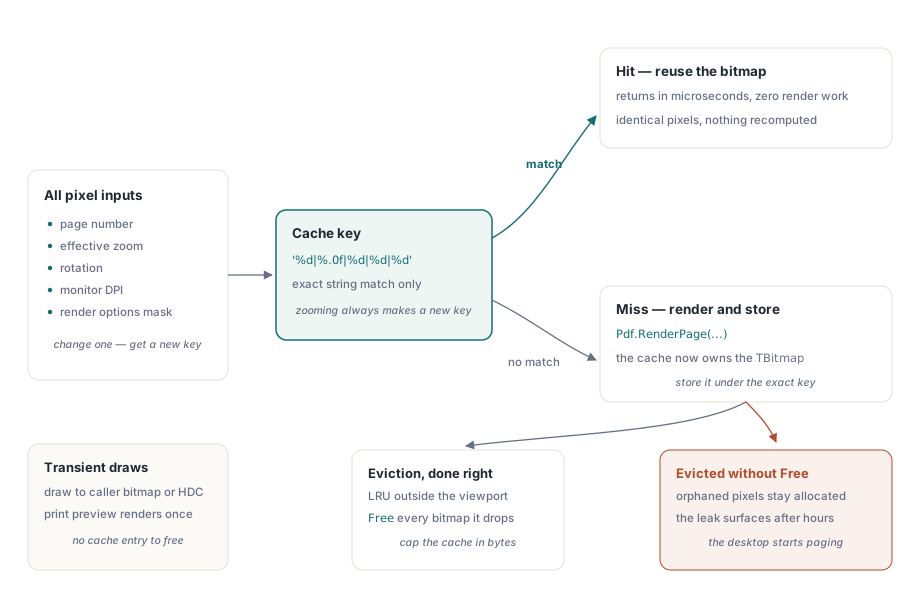
function TPageCache.Acquire(Pdf: TPdf; PageNo: Integer; ZoomPct: Single;
  Rotation: TRotation; Opts: TRenderOptions): TBitmap;
var
  Key: string;
begin
  Key := Format('%d|%.0f|%d|%d|%d',
    [PageNo, ZoomPct, Ord(Rotation), Screen.PixelsPerInch, OptionsMask(Opts)]);
  if FBitmaps.TryGetValue(Key, Result) then
    Exit;

  Pdf.PageNumber := PageNo;
  Result := Pdf.RenderPage(0, 0, OutputWidth(PageNo, ZoomPct),
    OutputHeight(PageNo, ZoomPct), Rotation, Opts);
  FBitmaps.Add(Key, Result);   // 이제 cache가 이 bitmap을 소유
end;
히트가 발생하면 마이크로초 단위로 반환되며, 이것이 핵심입니다. 더 어려운 질문은 캐시에서 떨어져 나가는 비트맵에 무슨 일이 일어나느냐 하는 것이며, 이는 결국 비트맵을 누가 소유하느냐에 대한 질문이 됩니다
비트맵을 누가 해제하는가
RenderPage의 함수 형태는 호출자가 소유하는 TBitmap을 반환합니다. 일회성 내보내기에서는 해당 소유권이 명백하고 지키기 쉽습니다. 캐시 내부에서는 이 비트맵이 Delphi PDF 뷰어에서 가장 흔한 단일 누수 원인이 됩니다. 왜냐하면 이제 딕셔너리가 각 비트맵에 대한 유일한 참조를 가지며, 일반적인 TDictionary는 관리되는 타입(managed types)인 경우에만 키와 값을 자동으로 해제하기 때문입니다. TBitmap은 그렇지 않습니다. Free를 호출하지 않고 항목을 제거하면 아무것도 가리키지 않는 상태로 픽셀이 할당된 채 남게 됩니다
이것이 빠져나가는 이유는 타이밍 때문입니다. 10분간의 스모크 테스트는 눈치챌 만큼 개별 페이지를 충분히 확대하지 않습니다. 누수는 누군가 긴 문서를 두어 시간 동안 스크롤하고 확대한 후에야 나타나며, 그 시점에 프로세스는 수백 개의 버려진 페이지 비트맵을 보유하고 기기는 페이징을 시작합니다. 그렇기 때문에 제거(eviction)는 나중 버전이 아니라 캐시의 첫 번째 버전에 포함되어야 합니다. 너비, 높이, 4를 곱하여 계산된 예상 바이트 수로 캐시를 제한하고, 뷰포트와 프리패치 창 밖에 있는 가장 오래전에 사용된(LRU) 페이지를 제거하며, 제거할 때마다 모든 비트맵을 해제하세요. 진정으로 일시적인 그리기의 경우, 호출자가 제공한 TBitmap이나 곧바로 HDC에 렌더링하는 오버로드를 사용하면 소유권 문제를 완전히 건너뛸 수 있습니다. 각 시트를 한 번만 렌더링하고 캐싱해도 얻는 것이 없으므로 인쇄 미리 보기가 가장 명백한 사례입니다
점진적 렌더링 및 정직한 취소
일반적인 RenderPage 오버로드는 페이지가 완료될 때까지 차단되며, 이는 사용자가 확대/축소 컨트롤을 여전히 움직이고 있을 때는 전혀 원하지 않는 동작입니다. 이를 위해 RenderPageProgressive를 사용합니다. 이 함수는 IPdfCancellationToken을 가져와서 prsDone, prsCancelled 또는 prsFailed 중 하나를 반환합니다. 사람들을 헷갈리게 하는 동작의 세부 사항은 취소가 즉각적이지 않다는 것입니다. 토큰은 렌더 내부의 청크 경계에서 폴링되므로, 청크 중간에 시그널을 보낸 토큰은 해당 청크가 완료될 때만 효력을 발생합니다. 복잡한 페이지에서 요청과 중단 사이의 대기 시간은 수십 밀리초에 달합니다. 그 차이를 없는 셈 치지 말고 그 주변을 설계하세요. 새로운 확대/축소 값이 도착하는 즉시 이전 토큰을 취소하되, 이전 렌더링이 여러분이 중단을 요청한 순간에 멈출 것이라고 가정하지 마세요
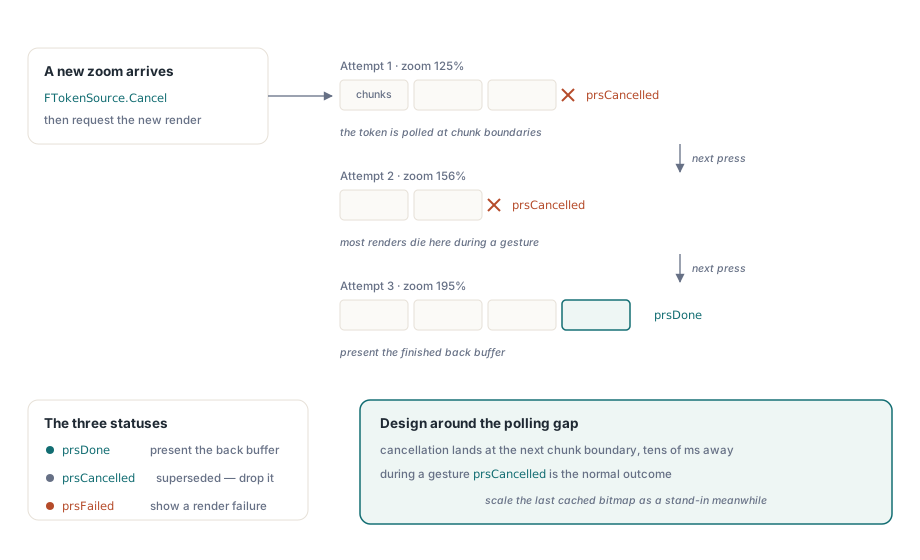
procedure TViewerForm.RequestRender(TargetZoom: Single);
var
  Status: TPdfProgressiveStatus;
begin
  if FTokenSource <> nil then
    FTokenSource.Cancel;           // 이전 in-flight render를 폐기
  FTokenSource := TPdfCancellationTokenSource.New;  // FPdfAsync unit

  Status := Pdf.RenderPageProgressive(FBackBuffer, 0, 0,
    FBackBuffer.Width, FBackBuffer.Height, FTokenSource.Token,
    ro0, [reAnnotations]);

  case Status of
    prsDone:      PresentBackBuffer;
    prsCancelled: ;                // superseded by a newer request: drop silently
    prsFailed:    ShowRenderFailure;
  end;
end;
상호 작용 중에 prsCancelled는 정상적인 결과이지 예외적인 것이 아닙니다. 확대/축소 제스처가 시작하는 렌더링의 대부분은 완료되기 전에 대체되므로, 취소를 일상적인 일로 취급하고 결과를 조용히 버리세요. 모든 취소를 경고로 로깅하는 렌더 대기열은 실제로 중요한 단 하나의 실패를 수천 줄의 노이즈 아래 묻어버릴 것입니다. 실제 렌더링이 실행되는 동안 화면이 죽은 것처럼 보이지 않게 하려면, 점진적 경로를 저렴한 대안과 결합하세요. 이전에 캐시된 비트맵을 새로운 확대/축소 비율로 확장하여 즉시 제공하는 것입니다. 100~200밀리초 동안 부드럽게 보일 수 있지만 사용자에게는 즉각적으로 느껴지며, 전체 품질의 렌더링이 완료되거나 다음 제스처에 의해 취소되는 데 필요한 시간을 벌어줍니다
확대/축소가 조용히 끄는 맞춤 모드
pfmFitPage 또는 pfmFitWidth로 설정된 뷰어의 FitMode 속성은 창 크기가 변경될 때 페이지가 계속 맞도록 크기를 조정할 때마다 확대/축소 비율을 다시 계산합니다. 여기서 문제점은 Zoom을 직접 할당하면 FitMode가 다시 pfmNone으로 재설정된다는 것입니다. 기본값으로는 이게 맞습니다. 고의로 150%를 입력한 사용자는 다음 창 크기 조정에서 이 값이 버려지길 원치 않습니다. 하지만 이는 확대 버튼을 Zoom := Zoom * 1.25로 연결한 후 왜 첫 클릭 후 너비 맞춤이 응답하지 않는지 알 수 없는 사람을 놀라게 합니다. 툴바에서 명시적 확대/축소와 맞춤 모드를 모두 제공하는 경우, 사용자의 마지막 맞춤 선택을 여러분이 직접 기억하고 사용자가 맞춤 버튼을 다시 누를 때 이를 재할당해야 합니다. 컴포넌트는 확대/축소 할당이 방금 지운 모드를 복원하지 않으며, 그러도록 되어 있지도 않습니다
옹호할 수 있는 메모리 예산
명문화할 수 있는 예산이 곧 코드 리뷰에서 주장할 수 있는 예산이므로 구체적인 시나리오에서 시작하세요. 연속 스크롤이 보이는 페이지와 위아래에 미리 가져온 한 페이지, 그리고 축소판 스트립을 유지한다고 가정해 봅시다. 96 DPI 디스플레이에서 100%일 때 이 세 개의 풀 사이즈 비트맵은 각각 약 3.5MB로, 이는 아무것도 아닙니다. 하지만 4K 디스플레이에서 300%일 때는 동일한 세 비트맵이 각각 대략 30MB에 달하며, 이는 캐시가 단일 기록 페이지를 유지하기도 전의 이야기입니다. 증가는 문서가 아니라 제스처에 있습니다
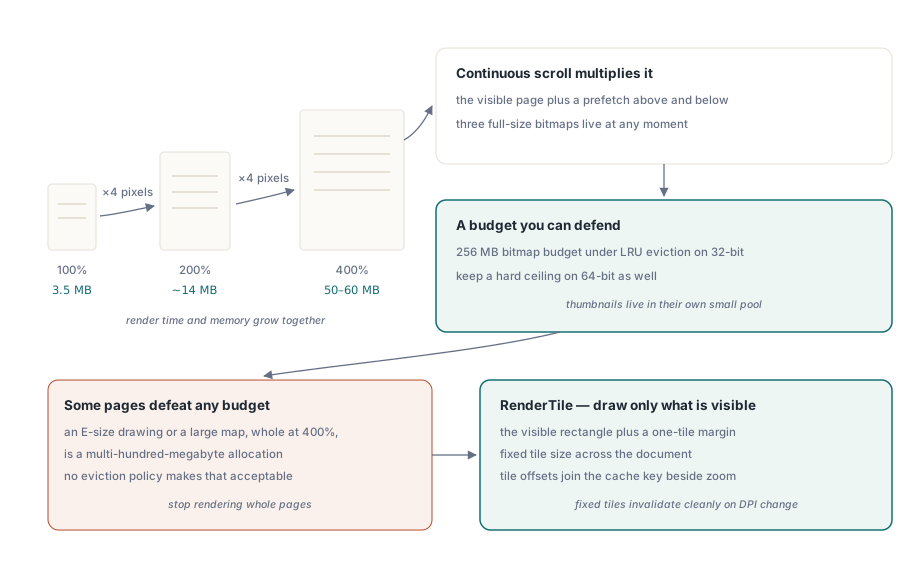
32비트 Delphi 프로세스를 위한 견고한 기본값은 LRU 제거를 사용하는 256MB 비트맵 예산입니다. 64비트에서는 물리적 RAM에 따라 확장할 수 있지만, 그럼에도 불구하고 굳건한 상한선을 유지해야 합니다. 여러분이 방어하려는 실패는 프로세스 충돌이 아니기 때문입니다. 뷰어는 기술적으로 계속 실행되고 사용자는 왜 다른 모든 것이 느려졌는지 의아해하는 동안, 전체 시스템이 페이지 파일을 스래싱(thrashing)하는 것이 진짜 문제입니다. 엄격한 상한선은 예측 가능하게 실패하지만, 제한 없는 캐시는 데스크톱 환경 전체를 길동무로 삼아 실패합니다. 축소판은 별도로 취급해야 합니다. 각각을 작은 목표 크기로 한 번만 렌더링하고 LRU 로직이 건드리지 않는 별도의 풀에 보관하세요. 60MB짜리 전체 페이지 비트맵을 축소하여 120픽셀 축소판을 다시 생성하는 것은 우표를 만드는 가장 낭비적인 방법입니다
일부 단일 페이지는 그 어떤 예산도 무너뜨립니다. E 사이즈 엔지니어링 도면이나 대형 지도를 400%로 전체 렌더링하는 것은 수백 메가바이트의 할당이며, 어떤 제거 정책으로도 이를 수용할 수 없습니다. 그 해답은 전체 페이지 렌더링을 중단하는 것입니다. RenderTile은 명목상 PageWidth 곱하기 PageHeight로 크기가 조정된 페이지 내에서 픽셀 오프셋 (Left, Top)에 있는 영역만 래스터화합니다. 따라서 가시 영역과 부드러운 패닝을 위한 1타일 여백만 렌더링하고, 확대/축소 비율과 함께 타일 오프셋을 캐시 키에 포함시킵니다. 문서 전체에서 타일 크기를 고정으로 유지하세요. 고정 타일은 DPI가 변경될 때 전체 그리드를 깔끔하게 무효화하는 반면, 가변 타일은 약간 다른 비율로 렌더링된 영역 사이의 눈에 보이는 이음새를 쫓게 만듭니다
두 가지 인접 기능이 이 모든 것에 조용히 비용을 추가합니다. 그레이스케일이나 반전과 같은 색상 필터 패스는 렌더링 후에 실행되고 매번 두 번째 풀 사이즈 비트맵을 생성하여, 이 필터를 사용하는 뷰의 페이지당 메모리 점유 공간을 두 배로 늘립니다. 이 비용은 Delphi PDF 뷰어의 저시력용 색상 필터링의 주제입니다. 그리고 텍스트 음성 변환(TTS) 중에 단어를 강조하는 뷰어는 발음되는 단어마다 렌더링된 뷰를 무효화하므로, 강조 다시 그리기와 음성 속도 간의 상호 작용이 처음 보이는 것보다 더 중요합니다. 이는 단어별 TTS 하이라이팅에서 다루고 있습니다
렌더링 오버로드, 점진적 상태 코드 및 뷰어 컴포넌트 자체는 PDFium Component의 제품 페이지에 문서화되어 있습니다