Delphi와 Lazarus는 동일한 Object Pascal을 컴파일하며, 바로 이러한 표면적인 유사성 때문에 두 환경 사이에서 뷰어를 포팅하는 과정에서 착각하기 쉽습니다. 두 툴체인은 PDF 작업에 중요한 세 가지 부분에서 차이를 보입니다. 첫째, 기본 string 타입이 Delphi에서는 UTF-16인 반면 LCL 애플리케이션에서는 UTF-8입니다. 둘째, VCL과 LCL은 각자의 컨트롤, 대화 상자, 폼 스트리밍 형식을 가진 서로 다른 시각적 프레임워크입니다. 셋째, Delphi 바이너리는 Windows를 타겟으로 하지만 FPC 바이너리는 Linux나 macOS를 향할 수 있습니다. 이러한 차이점 중 어느 것도 컴파일 타임에는 나타나지 않습니다. 단일 소스 트리에서 VCL 및 LCL 버전을 모두 제공하는 PDFium Component를 기반으로 구축된 뷰어는 약간의 유닛 이름 변경과 몇 개의 {$IFDEF FPC} 블록만 추가하면 Lazarus에서 문제없이 컴파일됩니다. 문제는 나중에 실제 데이터와 실제 배포 환경에서 Delphi 빌드가 은연중에 가정하고 있던 부분들이 드러날 때 발생합니다
그 중 네 가지 가정이 주로 많은 시간을 허비하게 만드는 원인입니다. UI 경계에서의 텍스트 인코딩, 두 개의 폼 복사본을 유지하려는 유혹, 런타임에 네이티브 엔진 바이너리가 해석되는 방식, 그리고 SAPI가 없는 플랫폼에서 텍스트 음성 변환(TTS)이 작동하지 않는 순간입니다. 각각의 문제는 미리 알고 있다면 쉽게 해결할 수 있지만, 그렇지 않다면 원인을 추적하는 데 많은 비용이 듭니다
동일한 Pascal, 그러나 다른 문자열 페이로드
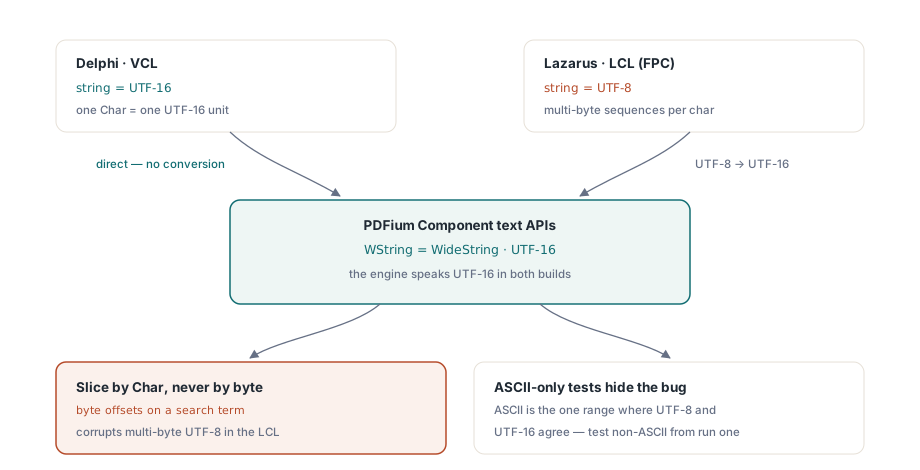
Delphi의 기본 string은 2009년부터 UTF-16이었습니다. 반면 Lazarus와 Free Pascal은 LCL 애플리케이션에서 UTF-8을 기본으로 사용합니다. 컴포넌트의 텍스트 처리 API는 FPC 빌드에서 WideString으로 별칭(alias)되는 WString 타입을 통해 UTF-16을 사용하므로, LCL UI와 PDF 엔진 사이에서 텍스트가 교차하는 모든 경계는 변환 지점이 됩니다
간단한 할당에서는 변환이 자동으로 이루어지며, 대부분의 코드에서는 이를 고려할 필요가 없습니다. 다음 두 가지 습관이 인코딩 버그를 방지합니다. 첫째, 바이트 수준의 조작 없이 텍스트를 그대로 전달하십시오. 검색어를 바이트 오프셋으로 분할하는 코드는 1개의 Char가 1개의 UTF-16 단위인 Delphi에서는 작동하지만, LCL에서는 멀티바이트 UTF-8을 손상시킵니다. 둘째, 첫 실행부터 ASCII가 아닌 데이터로 테스트하십시오. 독일어 파일 이름, 키릴 문자 검색어, 악센트가 있는 작성자 이름이 포함된 문서 메타데이터 등을 활용하세요. 순수 ASCII 테스트 데이터는 모든 인코딩 결함을 숨깁니다. ASCII는 UTF-8과 UTF-16이 문자당 바이트 수가 일치하는 유일한 범위이기 때문입니다. 버그는 항상 존재하지만, 뮌헨의 고객이 테스트하지 않은 파일을 열기 전까지 ASCII가 이를 교묘하게 숨길 뿐입니다
IDE별 분기(fork)가 아닌 하나의 조건부 블록
처음 십여 개의 IFDEF를 작성하고 나면, 코드베이스가 마치 하나의 저장소에 두 개의 프로젝트가 들어 있는 것처럼 느껴지기 시작하여 IDE별로 분기(fork)하고 싶은 유혹이 들 수 있습니다. 하지만 이는 잘못된 방법입니다. 진정한 차이점은 하나의 공유된 선언 블록으로 통합될 수 있으며, 프로젝트를 분기하면 그 이후부터 발생하는 모든 버그 수정 비용이 두 배로 증가합니다. 조건부 계층을 다음과 같이 작게 유지하십시오
{$IFDEF FPC}
uses
  LCLType, Forms, Graphics, Controls;

type
  WString = WideString;   // 컴포넌트 텍스트 API는 UTF-16
  TBytes  = array of Byte;
{$ELSE}
uses
  Winapi.Windows, Vcl.Forms, Vcl.Graphics, Vcl.Controls;
{$ENDIF}
이 블록 아래의 모든 내용은 두 IDE에서 동일하게 컴파일됩니다. 문서 처리, 페이지 탐색, 렌더링 호출 등에서 TPdf와 TPdfView는 VCL 및 LCL 버전에서 동일한 인터페이스를 노출하므로, 뷰어의 대부분은 컴파일러 조건문을 보지 못합니다. 이렇게 유지하는 것은 기발한 꼼수가 아니라 구조적인 원칙입니다. 공유되는 PDF 로직은 프레임워크에 종속된 대화 상자나 패널을 가져오지 않는 유닛에 존재합니다. 플랫폼 규칙을 따르는 인쇄 대화 상자나 파일 선택기처럼 실제로 차이가 나는 소수의 요소들은 프레임워크당 한 번씩 구현되는 얇은 인터페이스 뒤에 숨겨집니다. IFDEF 블록은 40개의 유닛 전체에 컴파일러 지시문을 흩뿌리는 대신, 향후 플랫폼의 차이가 안착할 수 있는 유일한 장소가 됩니다
두 개의 디자이너가 아닌, 코드로 폼 생성하기
폼 스트리밍은 다중 IDE 프로젝트가 조용히 망가지는 지점입니다. 동일한 폼을 설명한다고 주장하는 .dfm 파일과 .lfm 파일은 속성별로 점차 달라지며, 두 파일의 형식이 전혀 다르기 때문에 아무도 diff로 확인할 수 없는 이유로 인해 결국 두 빌드가 다르게 동작하게 됩니다. 런타임에 뷰어를 생성하면 이 모든 문제를 우회할 수 있습니다. 일반 코드처럼 버전 제어되는 단 하나의 생성자 시퀀스만 존재하며, 이는 두 플랫폼 모두에서 동일하게 읽힙니다
procedure TViewerForm.FormCreate(Sender: TObject);
begin
  Pdf := TPdf.Create(Self);

  PdfView := TPdfView.Create(Self);
  PdfView.Parent := Self;
  PdfView.Align := alClient;
  PdfView.Pdf := Pdf;
  PdfView.FitMode := pfmFitWidth;

  if ParamCount > 0 then
  begin
    Pdf.FileName := ParamStr(1);
    Pdf.Active := True;   // 문서를 엽니다; 이후 PageCount 유효
  end;
end;
할당 순서 자체는 실질적인 역할을 하는 한 줄의 코드보다 덜 중요합니다. PdfView.Pdf := Pdf는 시각적 컨트롤을 문서 컴포넌트에 바인딩하며, 그 시점부터 PageNumber를 통한 페이지 탐색과 FitMode를 통한 맞춤 동작은 VCL과 LCL에서 동일하게 반응합니다. 사용자가 버그로 보고하기 전에 알아두어야 할 프레임워크 간의 특이한 점이 하나 있습니다. 수동으로 Zoom을 할당하면 두 프레임워크 모두에서 FitMode가 다시 pfmNone으로 돌아갑니다. 따라서 툴바에서 "너비 맞춤"을 고정된 기본 설정으로 처리한다면, 프로그래밍 방식으로 확대를 수행한 후 맞춤 모드를 다시 할당해야 합니다. 그렇지 않으면 코드가 처음 줌 수준을 건드리는 순간부터 그 설정이 은밀하게 해제됩니다
IDE가 결코 경고하지 않는 바이너리 문제
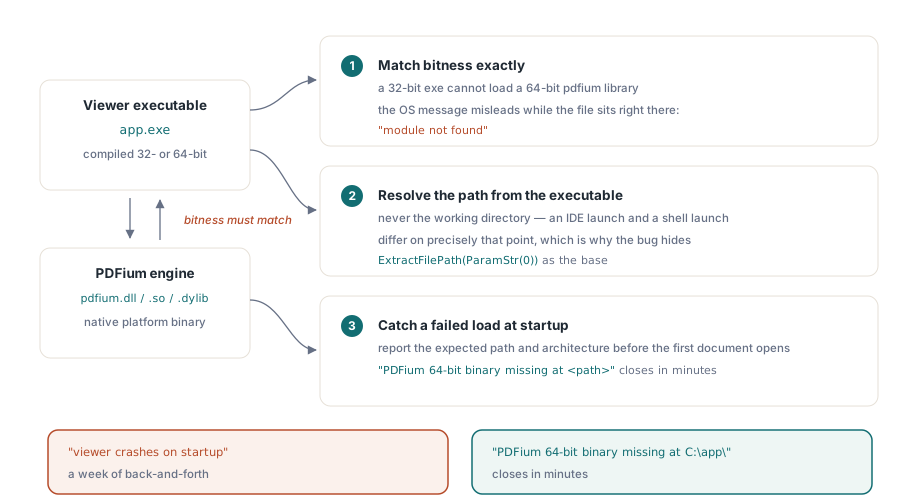
이 컴포넌트는 네이티브 플랫폼 바이너리로 제공되는 PDFium 엔진을 래핑하며, 이 바이너리가 "IDE에서는 잘 작동하지만 설치된 바로 가기에서는 실패합니다"라는 보고의 거의 모든 원인이 됩니다. 세 가지 규칙이 그 원인의 대부분을 설명합니다. 첫째, 비트(bitness) 수가 정확히 일치해야 합니다. 32비트 실행 파일은 64비트 pdfium 라이브러리를 로드할 수 없으며, 운영 체제가 반환하는 메시지(일부 Windows 버전에서는 "지정된 모듈을 찾을 수 없습니다")는 라이브러리 파일이 실행 파일 바로 옆에 있음에도 불구하고 활발하게 오해를 불러일으킵니다. 둘째, 라이브러리 경로는 작업 디렉터리가 아닌 실행 파일을 기준으로 확인하십시오. IDE 실행과 셸 실행은 정확히 이 지점에서 차이가 나며, 이것이 개발 과정에서 버그가 숨어 있는 이유입니다. 셋째, 첫 번째 문서를 열기 전에 로드 실패를 포착하여 예상 경로와 아키텍처를 명시하여 보고하십시오. "PDFium 64비트 바이너리가 <경로>에 없습니다"라고 적힌 지원 티켓은 몇 분 안에 해결되지만, "시작 시 뷰어가 충돌합니다"라는 내용의 티켓은 일주일 내내 실랑이를 벌이게 만듭니다
작업하는 김에 실행 파일과 함께 엔진 바이너리의 버전도 함께 지정하십시오. PDFium은 빠르게 업데이트되며, 애플리케이션은 업데이트하면서 디스크에 오래된 라이브러리를 남겨두는 설치 관리자는 사무실 내 그 누구도 재현할 수 없는 충돌을 일으킵니다. 사무실의 모든 컴퓨터에는 우연히도 일치하는 버전 쌍이 보관되어 있기 때문입니다. 라이브러리를 빌드 결과물의 일부로 취급하고, 그것이 로드하는 실행 파일과 동일한 설치 관리자, 동일한 버전 스탬프, 동일한 롤백 경로를 적용하십시오
Lazarus IDE에서 컴포넌트 등록하기
런타임 생성에는 디자인 타임 등록이 전혀 필요하지 않으며, 이는 코드로 자체 UI를 빌드하는 뷰어에 있어 가장 깔끔한 설정입니다. 디자인 타임 작업을 위해 Lazarus 팔레트에 컴포넌트를 추가하고 싶다면, 패키지를 설치하고 Lib/FPC/PDFiumLaz.lpk에 있는 전용 등록 유닛인 PDFiumLazReg가 이를 처리하도록 하십시오. 이 유닛은 의도적으로 디자인 타임으로 표시되어 있습니다. 배포용 실행 파일에 절대 링크되어서는 안 되는 IDE 속성 편집기 인터페이스를 참조하기 때문입니다
이 부분을 잘못 설정하면 애플리케이션이 알 수 없는 이유로 IDE 패키지에 의존하게 되는 증상이 나타나며, 이는 Lazarus가 설치된 적이 없는 첫 번째 고객의 컴퓨터에서 배포 실패로 나타납니다
Windows 외 환경에서의 음성 및 화면 판독기
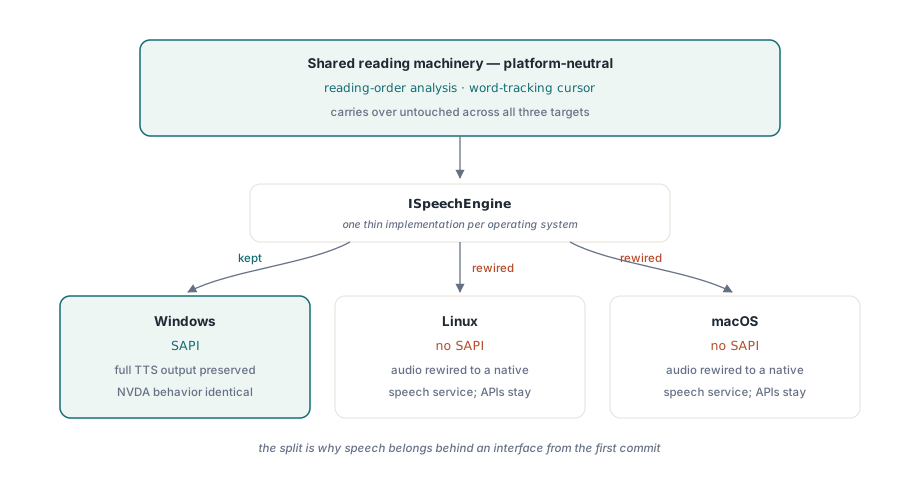
텍스트 음성 변환(TTS)은 크로스 플랫폼 이야기가 무너지는 유일한 기능이며, 이는 컴포넌트가 아닌 운영 체제 수준에서 발생합니다. Windows의 일반적인 TTS 백엔드인 SAPI는 Windows에만 존재합니다. 여전히 Windows를 타겟으로 하는 Lazarus 빌드는 완전한 SAPI 출력과 원본 Delphi가 가졌던 동일한 NVDA 호환 동작을 유지하므로, Windows-to-Windows 포팅은 이 부분에서 잃는 것이 없으며, NVDA 사용자는 두 빌드를 구분할 수 없습니다
하지만 Linux나 macOS 타겟이라면 상황이 다릅니다. 호출할 SAPI가 없으므로, 오디오 출력을 네이티브 음성 서비스에 다시 연결해야 하는 반면 상위 읽기 API는 그대로 유지됩니다. 이러한 분리는 첫 커밋부터 음성 기능을 인터페이스 뒤에 두어야 하는 이유가 됩니다. 읽기 순서 분석과 단어 추적 커서는 플랫폼 중립적이므로 그대로 유지되며, 소리를 실제로 생성하는 얇은 계층만 플랫폼에 맞게 변경하면 됩니다. 접근성 있는 판독기(accessible reader)에 대한 문서에서 이 읽기 메커니즘을 심도 있게 다룹니다
포팅이 완료되었다고 선언하기 전의 패리티(parity) 체크리스트
다음 테스트 항목들은 실패가 드러나는 경향을 고려하여 대략적인 순서대로 나열한 것으로, 실제 회귀 버그(regression)를 잡아냅니다. 경로에 비 ASCII 문자가 포함된 문서를 엽니다. 비 ASCII 문자가 포함된 용어를 검색하고 결과가 올바른 위치에 강조 표시되는지 확인합니다. 제공하는 각 위젯 세트에서 마우스 휠 스크롤, 드래그 선택, 키보드 페이지 탐색을 실행해 보십시오. 포커스 처리와 휠 동작은 LCL에서 위젯 세트의 영향을 가장 많이 받는 부분이기 때문입니다. 100%, 150%, 200% 디스플레이 배율에서 렌더링을 확인하십시오. 마지막으로 IDE 빌드가 아닌 설치된 빌드를 IDE가 설치된 적이 없는 컴퓨터에서 실행해 보십시오. 이 테스트만이 바이너리 확인 과정을 가장 정직하게 테스트할 수 있는 방법입니다. 다른 모든 것은 통과하면서 이 테스트만 은밀하게 실패할 수 있습니다
렌더링 처리량은 두 버전 간에 변경 없이 그대로 유지되므로, 렌더 캐시 및 확대/축소 성능에 대한 문서의 캐싱 접근 방식은 VCL 버전과 정확히 동일하게 LCL 뷰어에 적용됩니다
이러한 점들이 결코 LCL 버전을 열등하게 만들지는 않습니다. TPdf, TPdfView, 렌더링, 폼, 텍스트 추출, 접근성 API 등 핵심 인터페이스는 양쪽 모두 동일하며 컴파일한 IDE와 무관하게 똑같이 동작합니다. 추적할 가치가 있는 모든 차이점은 버전에 종속된 것이 아니라 플랫폼에 종속된 것입니다. SAPI 음성은 Windows 전용이고, 대화 상자는 각 프레임워크의 규칙을 따르며, 바이너리는 로드되는 아키텍처와 일치해야 합니다. 인코딩 경계, 런타임 폼, 바이너리 확인만 제대로 파악하면 포팅의 나머지 부분은 컴파일러가 알아서 처리해 주는 기계적인 작업에 불과합니다
여기서 설명한 VCL 및 LCL 버전은 Delphi, C++Builder, Lazarus/FPC용 소스 코드와 동일한 공개 API를 포함하여 PDFium Component로 함께 제공됩니다