리포트를 생성한다는 것은 결국 세 가지를 페이지 위에 배치하고 그것들이 자리를 두고 서로 어긋나지 않게 만드는 일로 귀결된다: 정해진 좌표에 놓이는 텍스트, 서버에서도 데스크톱과 똑같이 렌더링되는 폰트, 그리고 알맞은 크기로 맞춘 이미지다. 리포트 라이브러리가 하는 다른 모든 일은 이 세 가지를 중심으로 짜여 있다. Delphi와 C++Builder를 위한 losLab의 PDF 생성 라이브러리인 HotPDF는 이 셋 각각을 페이지 객체에 대한 직접 호출로 제공하며, 진짜로 걸리적거리는 것은 그 아래에 깔린 좌표계뿐인데, 이는 익숙한 VCL 캔버스와 정반대 방향으로 동작한다. 이 방향부터 먼저 확실히 해 두면 나머지 레이아웃 작업은 더 이상 골치를 썩이지 않는다
텍스트 배치와 왼쪽 아래 원점
거의 모든 사람의 첫 리포트는 거꾸로 뒤집혀 나온다. 제목은 아래쪽 가장자리 근처에 놓이고, 그 아래 각 줄은 위쪽을 향해 올라간다. 고장 난 곳은 전혀 없다. ISO 32000-1 §8.3에 정의된 PDF 사용자 공간은 원점을 왼쪽 아래 모서리에 두고 Y가 위로 커지는데, 이는 왼쪽 위에서 Y가 아래로 커지는 GDI 캔버스를 거울에 비춘 모습이다. 이 방향과 화해하는 데 5분만 들이면, 숫자가 더 이상 말이 안 될 때 결국 다시 짜야 할 레이아웃을 미리 아낄 수 있다
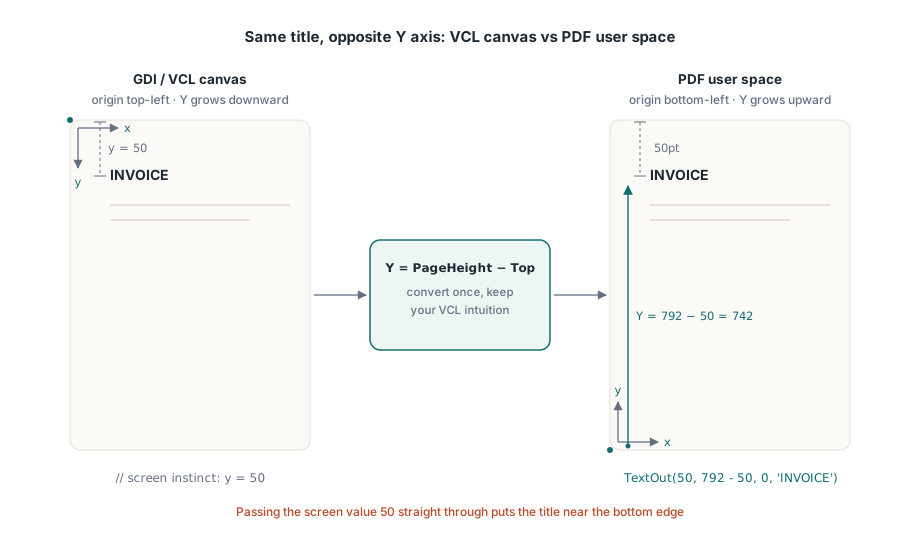
페이지 객체의 중심 호출은 TextOut(X, Y, Angle, Text)다. X와 Y는 왼쪽 아래 모서리로부터 포인트 단위로 텍스트 위치를 지정하고, Angle은 이를 도(degree) 단위로 회전시키는데, 이것이 별도의 특수 지원 없이도 대각선 DRAFT나 COPY 스탬프를 그릴 수 있는 방법이다. VCL에 익숙한 직관을 계속 활용할 수 있게 해 주는 요령은, Y를 페이지 높이에서 위쪽으로부터 원하는 거리를 뺀 값으로 표현하는 것이다:
var
  Pdf: THotPDF;
begin
  Pdf := THotPDF.Create(nil);
  try
    Pdf.FileName := 'invoice-0001.pdf';
    Pdf.BeginDoc;
    Pdf.CurrentPage.SetFont('Arial', [fsBold], 16);
    Pdf.CurrentPage.TextOut(50, 792 - 50, 0, 'INVOICE');       // Letter 용지 상단에서 50pt
    Pdf.CurrentPage.SetFont('Arial', [], 10);
    Pdf.CurrentPage.TextOut(50, 792 - 70, 0, 'Date: 2026-06-11');
    Pdf.CurrentPage.TextOut(300, 400, 45, 'COPY');              // 회전된 스탬프
    Pdf.AddPage;                                                // 이제 CurrentPage는 이곳을 가리킴
    Pdf.CurrentPage.SetFont('Arial', [], 10);                   // 폰트 상태는 이어지지 않음
    Pdf.CurrentPage.TextOut(50, 742, 0, 'Page 2 detail rows');
    Pdf.EndDoc;
  finally
    Pdf.Free;
  end;
end;
이 목록에 있는 두 가지 상태 유지 동작이 2페이지에서만 나타나는 버그 대부분의 원인이다. AddPage는 방금 만든 페이지를 가리키도록 CurrentPage를 다시 지정하므로, 이전에 캐시해 둔 페이지 참조는 더 이상 기대한 곳에 그려지지 않는다. 폰트 선택도 문서 단위가 아니라 페이지 단위로 이루어진다. AddPage 이후에 SetFont를 빼먹으면, 새 페이지의 첫 TextOut은 세 페이지 전에 설정해 둔 굵은 제목 폰트가 아니라 그 페이지가 시작할 때의 기본값으로 되돌아간다. 안전한 습관은 "새 페이지 시작"과 "텍스트 상태 재설정"을 리포트 루프 안에서 떼어놓을 수 없는 하나의 단계로 다루는 것이다
데스크톱뿐 아니라 서버에도 존재하는 폰트
대부분의 폰트 문제는 사실 변장한 배포 문제다. 개발 컴퓨터에는 회사 폰트가 설치되어 있으므로 리포트는 화면에서 올바르게 보이고 그대로 배포된다. 프로덕션 호스트는 그 폰트가 한 번도 설치된 적 없는 서비스 계정 아래에서 작업을 실행하고, 렌더러는 조용히 찾을 수 있는 다른 폰트로 대체해 버리며, 이 사실을 처음 알게 되는 사람은 왜 레터헤드가 바뀌었냐고 묻는 고객이다. 이를 벗어나는 방법은 OS 폰트 디렉터리를 더 이상 신뢰하지 않고, 설치 프로그램이 디스크에 넣어 둔 파일에서 폰트를 로드하는 것이다. HotPDF의 Unicode 등록 호출은 경로를 받아 정확히 그 일을 한다:
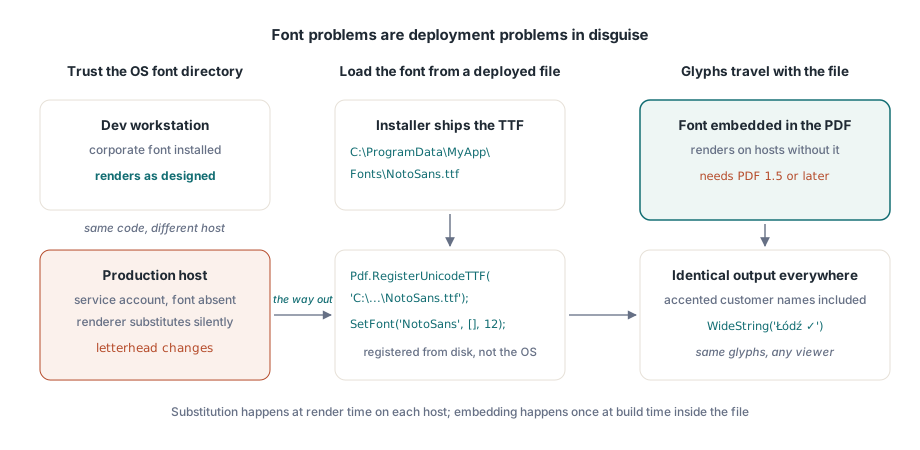
Pdf.RegisterUnicodeTTF('C:\ProgramData\MyApp\Fonts\NotoSans.ttf');
Pdf.CurrentPage.SetFont('NotoSans', [], 12);
Pdf.CurrentPage.TextOut(50, 700, 0, WideString('Łódź - Ünïcode test ✓'));TextOut은 WideString을 직접 받는데, 이는 처음 보이는 것보다 훨씬 중요한 부분이다. 악센트가 붙은 고객 이름, 독일의 거리명, 폴란드의 도시명: 이런 것들은 예외적인 경우가 아니라 고객 테이블에 흔히 들어 있는 정상적인 내용이며, 등록한 폰트가 실제로 해당 글리프를 담고 있는 한 하드코딩한 ASCII 레이블과 똑같은 호출을 거쳐 간다. 임베딩된 폰트에는 버전 제약이 하나 따라온다: 문서는 반드시 PDF 1.5 이상이어야 하므로, 관련 없는 다른 요구 사항 때문에 더 오래된 버전에 묶여 있다면 바로 그 부분이 조용히 깨질 것이다. 아랍어나 히브리어 같은 오른쪽에서 왼쪽으로 쓰는 문자 체계는 단순한 글리프 조회가 아니라 진짜 셰이핑이 필요하며, 이는 별도의 파이프라인을 갖는다; HotPDF의 복합 문자 체계 텍스트 셰이핑에 관한 글을 참고하라
설치된 어떤 폰트로도 필요한 것을 표현할 수 없을 때, 예를 들어 수표에 쓰이는 MICR 문자나 독자적인 기호 집합 같은 경우, Type 3 폰트가 그 공백을 메워 준다. 각 글리프는 RegisterType3Font와 AddType3Glyph를 통해 작은 콘텐츠 스트림으로 정의한다. API의 특수한 구석에 해당하는 기능이라 자주 손댈 일은 없지만, 수백 개의 작은 기호 비트맵을 페이지 곳곳에 흩뿌리는 것보다는 훨씬 깔끔하다
이미지: 가운데 인자는 모서리가 아니라 너비와 높이다
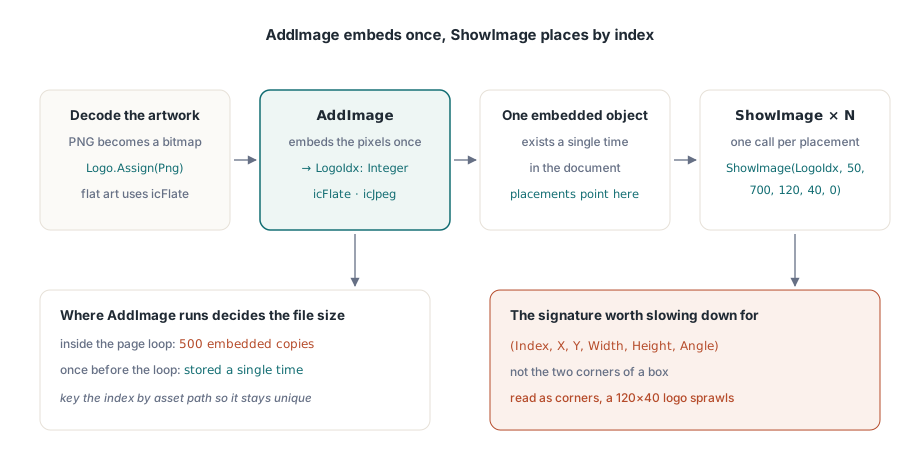
이미지 처리는 두 단계로 나뉘며, 이 둘을 분리해 두는 것이 핵심이다. AddImage는 TBitmap이나 TJPEGImage를 받아 한 번만 임베딩하고 인덱스를 돌려준다. PNG 아트워크는 여기 도달하기 전에 비트맵으로 디코딩되어 있어야 한다. 그런 다음 ShowImage가 원하는 곳에 원하는 만큼 그 인덱스를 그린다. ShowImage의 인자 순서는 천천히 읽어 볼 만한 유일한 지점이다:
var
  Png: TPngImage;
  Logo: TBitmap;
  LogoIdx: Integer;
begin
  Png := TPngImage.Create;
  Logo := TBitmap.Create;
  try
    Png.LoadFromFile('brand-logo.png');
    Logo.Assign(Png);                       // PNG를 비트맵으로 디코딩
    LogoIdx := Pdf.AddImage(Logo, icFlate); // 단색 아트워크를 위한 무손실 압축
  finally
    Logo.Free;
    Png.Free;
  end;
  // (Index, X, Y, Width, Height, Angle): (X1, Y1, X2, Y2)가 아님
  Pdf.CurrentPage.ShowImage(LogoIdx, 50, 700, 120, 40, 0);
end;
위치 뒤에 오는 두 숫자는 너비와 높이다. 반대편 모서리의 좌표가 아니며, 맨 끝 인자는 도(degree) 단위의 회전각이다. 이 시그니처를 X1/Y1/X2/Y2 박스로 읽어 버리면, (50, 700)에 배치한 120x40 크기의 로고가 대신 그 지점에서 (120, 40)까지 늘어나 페이지 대부분을 뒤덮게 된다. 출력물을 보면 실수가 명백히 드러나는데도 소스 코드는 지극히 멀쩡해 보인다는 점이, 이 문제로 오후 한나절을 날려 버리게 만드는 요인이다. KeepImageAspectRatio의 기본값은 True이므로, 비율이 맞지 않는 박스는 이미지를 왜곡하는 대신 레터박스 처리한다; 정말로 늘려야 할 때만 False로 바꿔라
등록과 배치를 나누어 둔 효과는 긴 실행에서 빛을 발한다. AddImage는 픽셀을 한 번만 임베딩하고 그 인덱스를 쓰는 모든 ShowImage는 같은 임베딩된 객체를 다시 가리키므로, AddImage를 어디서 호출하느냐가 파일 크기를 결정한다. 500페이지짜리 명세서의 페이지 루프 안에서 이를 호출하면 같은 로고가 500번 임베딩된다. 루프 시작 전에 한 번만 호출해서 인덱스를 보관해 두면 로고는 단 한 번만 저장된다. 자산 경로를 키로 삼는 작은 딕셔너리만 있으면 서로 다른 이미지 각각이 정확히 한 번씩만 등록되도록 보장하기에 충분하다
코덱 선택은 크기를 좌우하는 또 다른 지렛대다. 스캔한 첨부 파일 같은 사진 콘텐츠는 JPEG가 제자리다: AddImage에 icJpeg를 넘기고 JpegQuality를 85 정도로 낮춰라. 이 속성은 100에서 시작하며 85와의 차이는 인쇄된 페이지에서는 눈에 띄지 않는다. 로고, 차트, 선 그림 같은 단색 아트워크는 icFlate가 제자리인데, 여기서는 무손실 압축이 이미 충분히 압축되어 있고 JPEG는 날카로운 가장자리 주변에 눈에 보이는 링잉을 번지게 만든다. 모든 페이지에 풀 품질 사진 한 장씩을 넣는 명세서 실행은 몇 기가바이트까지 부풀어 오를 수 있다; 같은 콘텐츠를 JPEG 85로 처리하면 크기가 대략 10분의 1로 줄어들며, 어떤 독자도 그 차이를 알아채지 못한다
패스 기본 요소로 그리는 선, 박스, 음영
테이블 헤더 아래의 가로선과 합계 숫자 뒤의 회색 박스는 이미지일 필요가 없다. 이를 벡터로 그리면 어떤 배율에서도 선명함을 유지하고, 인쇄해도 날카롭게 나오며, 파일에 거의 아무것도 더하지 않는다. HotPDF는 원시 PDF 콘텐츠 스트림이 쓰는 것과 같은 모델을 따른다: 패스를 만든 다음, 그것을 칠하는 연산자를 호출하는 방식이다
// 테이블 헤더 아래의 가로선
Pdf.CurrentPage.SetLineWidth(0.75);
Pdf.CurrentPage.MoveTo(50, 660);
Pdf.CurrentPage.LineTo(545, 660);
Pdf.CurrentPage.Stroke;

// 음영 처리된 합계 박스: X, Y, 너비, 높이
Pdf.CurrentPage.SetRGBFillColor(RGB(235, 235, 235));
Pdf.CurrentPage.Rectangle(395, 120, 150, 40);
Pdf.CurrentPage.Fill;
이 순서는 선택 사항이 아니다: 칠하기 상태를 설정하고, 패스를 구성한 다음, Stroke나 Fill을 호출하라. 만들었지만 칠하지 않은 패스는 페이지에 아무것도 기여하지 않는데, 선이 "나타나지 않는" 경우 거의 항상 이것이 원인이다. SetRGBFillColor는 TColor 하나를 받으므로 clNavy나 clBlack 같은 익숙한 VCL 상수를 그대로 넣을 수 있고, Rectangle은 두 모서리가 아니라 이미지 배치와 같은 너비-높이 인자를 쓴다. 얇은 선에 관해 한 가지 주의할 점: 대략 0.5포인트보다 얇은 것은 모니터에서는 우아해 보여도 600dpi 사무용 프린터에서는 사라져 버릴 수 있으므로, 인쇄를 견뎌야 하는 어떤 선이든 0.75pt를 합리적인 하한선으로 삼아라
샘플 데이터가 아니라 실제 데이터를 기준으로 한 페이지 나누기
레이아웃이 굳어지기 전에 바로잡아 둘 세부 사항이 하나 있다: 숫자 열은 오른쪽 끝을 기준으로 정렬해야 하는데, 이를 위한 방법은 각 값을 렌더링했을 때의 너비를 측정해서 열 경계로부터 뒤로 물려 배치하는 것이지, 문자열 앞에 공백을 채워 넣는 것이 아니다. 공백 채우기는 고정폭 폰트에서만 맞아떨어지는데, 재무 리포트를 고정폭 폰트로 조판하는 사람은 아무도 없다. 값을 먼저 FormatFloat 같은 Delphi의 로케일 인식 루틴에 통과시켜서, 너비를 측정하는 그 천 단위 구분 기호가 고객 로케일이 실제로 표시할 기호와 같도록 하라
페이지 나누기의 위험은 열 개의 짧은 행이 한 페이지에 다 들어가서 루프가 한 번도 끊길 필요가 없는 데모 데이터셋을 대상으로 그것을 작성한다는 데 있다. 프로덕션은 회사 이름이 140자에 달하는 고객과 4,000개의 항목이 있는 명세서를 던져 주며, 이제 루프는 매번 올바르게 끊겨야 한다. 견고하게 버티는 패턴은 각 행의 높이만큼 뺄 때마다 아래로 움직이는 Y 커서 하나와, 그 커서가 아래쪽 여백을 넘어서려는 순간 새 페이지를 시작하는 확인 로직이다. 여기서 "아래로"는 Y가 감소한다는 뜻인데, 왼쪽 아래 원점이 여전히 직관에 어긋나게 느껴지는 유일한 지점이 바로 여기다. 이 모든 것을 새 페이지에서 SetFont를 다시 실행하고 반복 헤더를 다시 그리는 일까지 포함한 하나의 루틴 안에 담아 두면, 페이지가 하나씩 어긋나는 버그는 발붙일 곳이 없어진다. 같은 리포트가 아카이브나 접근성 규칙도 만족해야 한다면, 바로 여기서 내리는 선택들, 즉 어떤 폰트를 임베딩할지, 출력물에 태그를 붙일지, 어떤 색 공간을 쓸지가 그 표준들이 감시하는 대상이다; 템플릿이 굳어지기 전에 HotPDF PDF/A, PDF/X, PDF/UA 가이드를 읽어 볼 가치가 있다
여기서 다룬 모든 호출, 즉 텍스트 배치, 폰트 등록, 이미지 임베딩, 패스 드로잉은 Delphi 및 C++Builder용 HotPDF Delphi Component에 포함되어 있으며, 그 레퍼런스는 이와 함께 있는 양식, 암호화, 서명 기능과 더불어 전체 출력 API를 문서화하고 있다