PDF/A, PDF/X, PDF/UA는 각각 장기 보관, 인쇄 교환, 접근성이라는 서로 다른 세 가지 문제를 푸는 서로 다른 세 개의 표준이다. 이들은 하나의 준수 양식에 있는 세 개의 체크박스가 아닌데도, 가장 흔한 실수는 이들을 마치 그런 것처럼 다루는 것이다. 완벽한 PDF/A 파일이 인쇄소에서는 무용지물일 수 있고, 완벽한 인쇄용 마스터 파일이 스크린 리더로는 읽을 수 없는 파일일 수 있다. 더 나쁜 것은, 세 표준 모두 파일이 어떻게 보이는지가 아니라 파일의 내부 구조에 대한 제약이라는 점이다. 소유한 모든 뷰어에서 멀쩡하게 열리는 문서라도 처음 검증을 시도하면 실패할 수 있으며, 실제로 그런 경우가 대부분이다
losLab의 네이티브 VCL PDF 라이브러리인 HotPDF는 적합성을 첫 페이지가 존재하기도 전에 선언하는 것으로 다룬다. 준수 속성을 설정하고, 표준이 요구하는 구조를 붙여 넣으면, 라이브러리는 저장 시점에 프로필과 모순되는 설정을 거부한다. 이는 일단 파일을 생성해 두고 후처리기가 나중에 이를 손봐 주기를 바라는 모델보다 훨씬 낫다. 이 표준들이 요구하는 것 대부분은 사후에 덧붙일 수 없는 것들이기 때문이다
세 가지 ISO 표준, 세 가지 서로 다른 약속
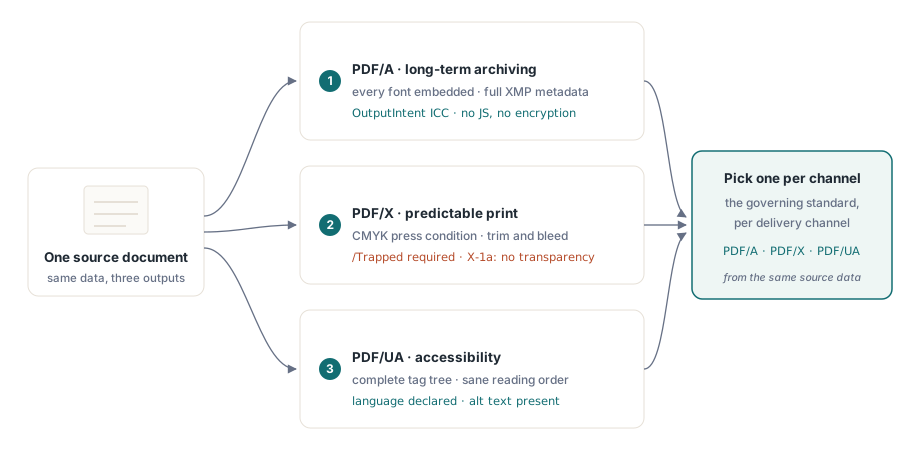
PDF/A(ISO 19005)는 시간에 관한 표준이다. 이 표준은 수십 년 뒤에도 파일이 똑같이 렌더링될 것을 약속하므로, 완전한 자기 완결성을 요구한다: 모든 폰트가 임베딩되어야 하고, 모든 색상은 OutputIntent를 통해 디바이스 독립적인 의미를 부여받아야 하며, 완전한 XMP 메타데이터가 있어야 하고, 동작이 실행 환경에 의존하는 것은 무엇이든 금지된다. 암호화와 JavaScript는 제외되는데, 2050년에도 해독기나 스크립트 엔진이 존재하리라는 것을 아무도 보장할 수 없기 때문이다
PDF/X(ISO 15930)는 종이 위의 색상에 관한 표준이다. 이 표준이 존재하는 이유는 디자이너가 인쇄소와 굳이 상의할 필요 없이 파일을 넘길 수 있게 하기 위함이며, 이는 곧 특성화된 인쇄 조건, 필수인 /Trapped 키, 정의된 재단선 및 도련 영역, 그리고 X-1a 방식에서는 RIP가 알아서 추측하게 만드는 라이브 투명도가 없어야 함을 의미한다. PDF/UA(ISO 14289)는 결과물을 누가 읽을 수 있는지에 관한 표준이다. 보조 기술은 완전한 태그 트리, 이치에 맞는 읽기 순서, 명시된 문서 언어, 그리고 텍스트가 아닌 모든 것에 대한 대체 텍스트를 필요로 한다
세 표준이 서로 다른 방향을 향하기 때문에, 셋 모두를 만족시키는 파일 하나를 쫓기보다는 출력 채널마다 적용할 표준을 따로 정하는 편이 낫다. CMYK 전용 인쇄용 마스터 파일은 색상을 전혀 보지 못하는 스크린 리더 사용자에게 건네줄 파일로는 정확히 잘못된 선택이며, 아카이브 프로필이 동적 동작을 봉쇄하는 것은 상호작용하는 요소와는 무엇이든 충돌한다. 같은 원본 데이터에서 채널별로 각각 생성하면 이 충돌 전체를 피해 갈 수 있다
PDF/A: 다들 잊어버리는 부분, OutputIntent
PDF/A 파일이 검증에 실패한다면 가장 먼저 확인해야 할 것이 OutputIntent다. 이는 눈에 보이는 어떤 것도 여기에 의존하지 않는다는 바로 그 이유 때문에 생성기들이 가장 자주 빼먹는 구조다. ISO 19005는 이것 하나를 요구한다: 문서의 디바이스 색상이 실제로 무엇을 의미하는지 못박아 두는 임베딩된 ICC 프로필이다. HotPDF는 이 프로필을 나중에 덧붙이는 것이 아니라 명시적인 입력값으로 다룬다:
var
  Pdf: THotPDF;
  ICC: TFileStream;
begin
  Pdf := THotPDF.Create(nil);
  try
    Pdf.FileName := 'invoice-archival.pdf';
    Pdf.PDFACompliance := 'B';            // 레벨 B: 시각적 충실도
    Pdf.Lang := 'en-US';
    Pdf.StandardFontEmulation := False;   // 실제 폰트를 임베딩, Base-14 에뮬레이션 사용 안 함
    ICC := TFileStream.Create('sRGB.icc', fmOpenRead);
    try
      Pdf.AddPDFAOutputIntent('sRGB IEC61966-2.1', '', ICC, 3, 'DeviceRGB');
    finally
      ICC.Free;
    end;
    Pdf.BeginDoc;
    Pdf.CurrentPage.SetFont('Arial', [], 11);
    Pdf.CurrentPage.TextOut(50, 760, 0, 'Archival invoice body');
    Pdf.EndDoc;
  finally
    Pdf.Free;
  end;
end;
여기서는 몇 가지 세부 사항이 합격과 실패를 가른다. StandardFontEmulation은 반드시 꺼져 있어야 한다: 에뮬레이션된 Base-14 폰트는 임베딩되지 않으며, ISO 19005 아래에서 임베딩은 타협의 여지가 없다. 암호화도 반드시 꺼진 상태여야 하므로, PDFACompliance와 ActivateProtection은 절대 함께 사용하지 말라; 암호화된 아카이브 파일은 검증기가 즉시 잡아내는 모순이다. AddPDFAOutputIntent의 컴포넌트 개수는 프로필과 일치해야 하는데, sRGB IEC61966-2.1 같은 RGB 프로필이라면 3, CMYK라면 4다. HotPDF는 기록하는 동안 선언된 인텐트에 대비해 DeviceRGB와 DeviceCMYK 사용을 추적하므로, RGB 인텐트 문서에 우연히 섞여 들어간 CMYK 채우기는 조용히 넘어가지 않고 보고되는 문제가 된다
ICC 프로필에 관해 한 가지 짚어 둘 것이 있다: 누군가 예전에 빌드 서버에 던져 둔 파일이 아니라 버전이 관리되는 배포 산출물로 취급하라. 이 프로필의 바이트는 생성하는 모든 문서에 임베딩되므로, 잘리거나 손상된 프로필은 배치 전체를 조용히 오염시키고, 그 사실은 검증 시점에야 드러난다. 설치 프로그램과 함께 배포하고, 실행 로그에 체크섬을 기록하고, 위에서 본 TFileStream 패턴을 통해 로드하라. 그러면 파일이 없을 때 아카이브 게이트에서 조용히 실패하는 대신 생성 시점에 요란하게 실패한다
인쇄용 PDF/X: Trapped, CMYK, 그리고 인쇄 프로필
인쇄용 마스터 파일에서는 색상 이야기가 뒤집힌다. 인쇄소는 특성화된 CMYK를 원하며, 이 표준은 정직한 대답이 "모르겠다"일 때조차 트래핑이 적용되었는지를 명시하도록 강제한다. /Trapped 키는 어느 경우든 필수다:
Pdf.PDFXCompliance := 'X-1a';
Pdf.Trapped := 'Unknown';        // ISO 15930 아래에서 필수 키
ICC := TFileStream.Create('FOGRA39.icc', fmOpenRead);
try
  Pdf.AddPDFXOutputIntent('FOGRA39 (ISO 12647-2:2004)', '', ICC, 4, 'DeviceCMYK');
finally
  ICC.Free;
end;
Pdf.BeginDoc;
// CMYK에 안전한 색상으로 그리기, 투명도 없음, 암호화 없음
Pdf.EndDoc;
CMYK 인쇄 프로필에서는 이제 컴포넌트 개수가 4가 된다. X-1a는 라이브 투명도도 금지하므로, 반투명 요소를 겹쳐 그리는 드로잉 코드는 모두 점검하라; 뷰어가 화면에서 합성해 보여주는 결과가 무엇이든, 그것이 정확히 RIP가 해석을 거부할 대상이다. 인쇄소에서 다른 특성화 데이터를 보내오면 프로필 바이트와 식별자 문자열만 교체하고 나머지 구조는 그대로 두라
PDF/UA: 구조는 만드는 순간 생성되지, 나중에 덧붙일 수 없다
접근성은 팀들이 가장 자주 맨 마지막에 덧붙이려고 시도하는 표준이며, 다른 두 표준보다 그런 접근을 훨씬 더 가혹하게 응징한다. 태그 트리는 콘텐츠가 논리적으로 만들어진 순서를 그대로 반영해야 하는데, 이는 파일을 이미 다 쓰고 난 뒤에는 더 이상 남아 있지 않은 정보다. PDFUACompliance를 설정하면 태그 출력이 켜지고, 구조 API는 진행하는 동안 각 드로잉 호출을 그 의미적 역할에 묶어 준다:
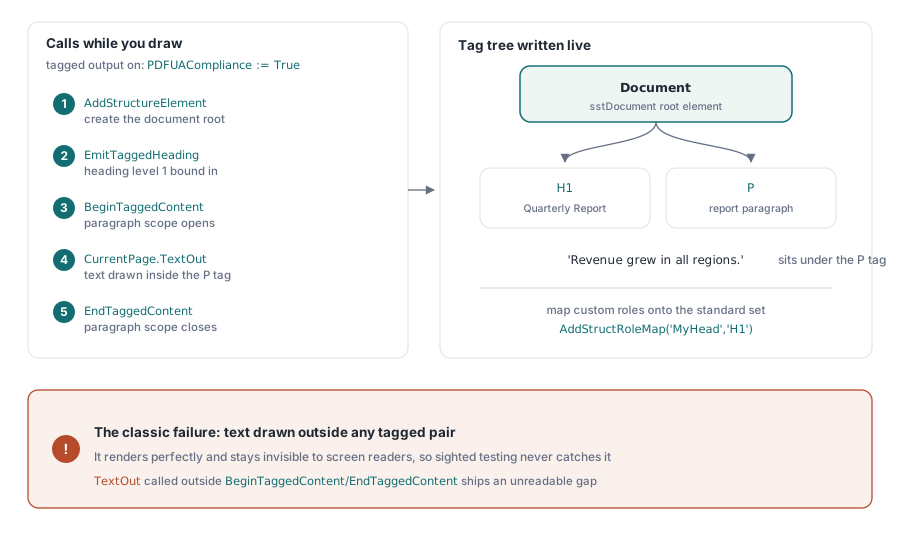
Pdf.PDFUACompliance := True;     // 태그 PDF를 자동으로 활성화함
Pdf.Lang := 'en-US';             // 명시적으로 설정할 것; 비워 두면 'en'으로 대체됨
Pdf.BeginDoc;

Root := Pdf.AddStructureElement(sstDocument, nil);
H1 := Pdf.EmitTaggedHeading(1, Root, 50, 700, 'Quarterly Report');
Para := Pdf.BeginTaggedContent('P', Root);
Pdf.CurrentPage.TextOut(50, 650, 0, 'Revenue grew in all regions.');
Pdf.EndTaggedContent;

Pdf.EndDoc;
주의해야 할 실패 유형은 BeginTaggedContent/EndTaggedContent 쌍 바깥에서 그려지는 텍스트다. 이런 텍스트는 렌더링은 완벽하게 되면서도 스크린 리더에게는 보이지 않으므로, 눈으로 보는 테스터는 결코 이를 잡아내지 못한다; 버그는 그대로 출시되고, 실제 보조 기술 사용자가 그 빈틈에 부딪혔을 때만 드러난다. 템플릿이 커스텀 구조 역할 이름을 쓴다면 AddStructRoleMap('MyHead', 'H1')로 표준 집합에 매핑해서 표준을 준수하는 리더가 그 의미를 알 수 있게 하라. ISO 14289는 언어 선언도 요구한다. HotPDF는 Lang이 비어 있으면 'en'으로 대체하지만, 이는 안전망일 뿐 실제 문서 언어를 설정하지 않아도 되는 이유는 아니다
검증: 뷰어가 아니라 검증기를 신뢰하라
파일이 뷰어에서 열린다는 사실은 적합성에 대해 아무것도 증명해 주지 않으므로, 검증은 렌더링이 아니라 구조를 검사하는 도구와 함께 릴리스 경로에 포함되어야 한다. PDF/A와 PDF/UA는 veraPDF가 기준이 되는 오픈 검증기다; 이 도구는 실패 사항을 ISO 조항 단위로 보고하는데, 이는 위의 설정으로 곧바로 다시 연결된다. PDF/X는 Adobe Acrobat의 프리플라이트 프로필이 여전히 실용적인 검사 수단인데, 인쇄 적합성은 문법만큼이나 색상 인텐트에 관한 문제이기 때문이다
생성기도 나름대로 제 역할을 한다. 저장 시점에 HotPDF는 기능 플래그를 설정된 PDF 버전에 맞춰 조정하며, 그 버전이 표현할 수 없는 기능은 조용히 낮춘다. 예를 들어 PDF 1.7 미만에서는 AES-256이 AES-128로 내려간다. EndDoc의 준수 게이트는 여기서 한발 더 나아가, PDFACompliance와 암호화를 함께 요청하는 것 같은 명백한 모순에 대해서는 아예 예외를 일으킨다. 이 둘 다 외부 검증기를 대체하지는 않는다. 그저 애초에 불가능한 설정이 검증기에까지 도달하지 못하게 막아 줄 뿐이다
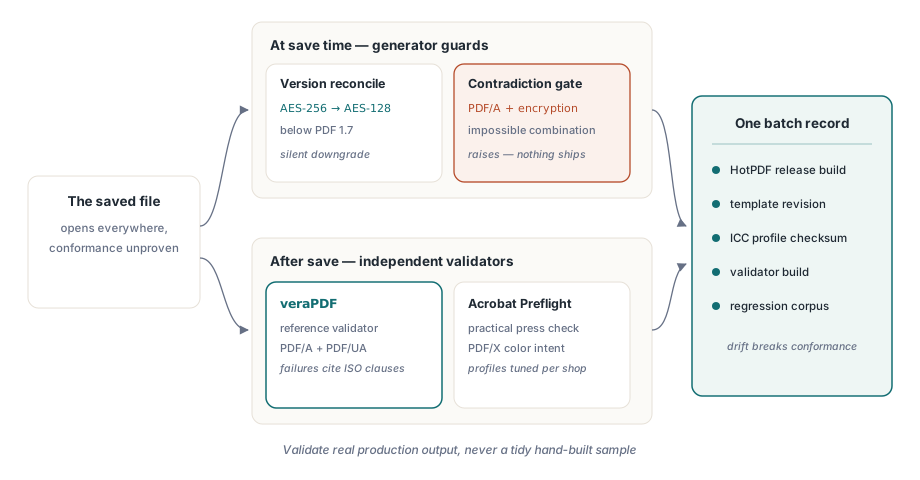
한 가지 습관이 계속해서 이득을 준다: 전체 준수 설정을 하나의 단위로 버전 관리하는 것이다. HotPDF 릴리스, 템플릿 리비전, ICC 프로필 체크섬, 승인해 준 검증기 빌드까지 모두 함께. 이 중 하나라도 다른 것들 아래에서 바뀌는 순간 적합성은 어긋나기 시작하며, 가장 끔찍한 감사는 5년 된 아카이브 파일을 만들어 낸 조합이 무엇이었는지 아무도 재구성할 수 없는 경우다. 배치마다 하나의 설정 기록을 남겨 두면 이 문제를 영구히 해결할 수 있다
마지막으로, 깔끔하게 손으로 만든 샘플이 아니라 실제 프로덕션 출력물에 검증기를 돌려라. 정말 아프게 무는 실패는 아무도 예상하지 못한 데이터에서 나온다: 인텐트는 RGB라고 되어 있는데 CMYK로 들어오는 고객 로고, 임베딩되지 않은 폰트가 슬쩍 끼어드는 템플릿 수정, 태그 트리 바깥에 텍스트를 그리는 새로운 코드 경로 등이다. 과거 사고마다 알려진 결함 파일을 하나씩 회귀 테스트 입력으로 보관해 두면 준수 게이트가 시간이 지나도 정직하게 유지된다. 이런 파이프라인의 렌더링 쪽에 대해서는 HotPDF로 하는 리포트 출력, 폰트, 이미지에 관한 글을 참고하고, 빌드에 검증기를 연결하는 방법은 PDF 프리플라이트 검사를 자동화하는 관련 글을 참고하라
이 예제에서 사용한 준수 속성, 출력 인텐트, 태깅 API는 Delphi 및 C++Builder용 HotPDF Delphi Component에 포함되어 있으며, 제품 페이지에는 여기서 다룬 모든 호출에 대한 전체 레퍼런스가 링크되어 있다