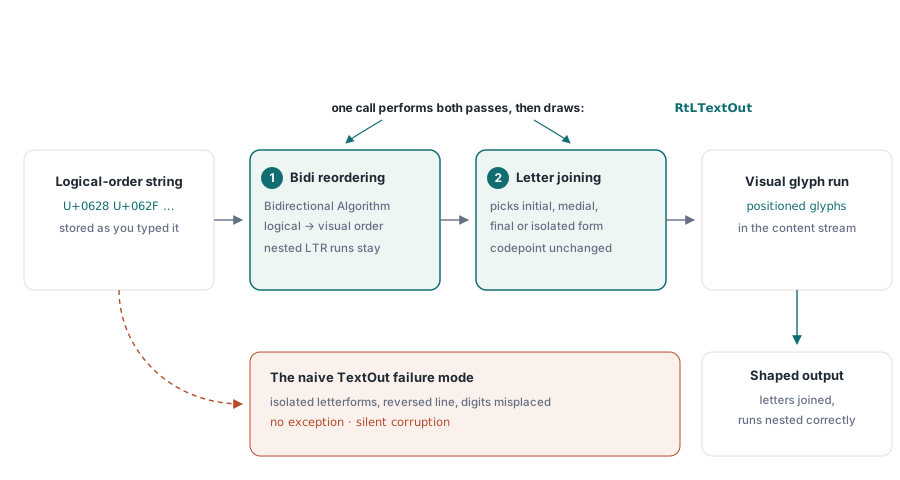
아랍어 구문 يوضح ملف PDF를 TextOut에 전달하고 그 결과를 열어보세요. 글자는 반대 방향으로 이어지고, 누군가 영어를 거꾸로 타이핑하고 매 문자마다 스페이스를 누른 것처럼 각 글자가 다음 글자 전에 보이는 간격을 둔 채 고립형(isolated form)으로 존재합니다. 어떤 예외도 발생하지 않았습니다. 어떤 경고도 인쇄되지 않았습니다. 출력이 단순히 잘못되었을 뿐이며, 아랍어가 의존하는 두 가지 별개의 변환이 일어니지 않았기 때문에 잘못된 것입니다. 그 두 변환이 무엇인지, 그리고 어떤 호출이 이를 수행하는지 아는 것이 복잡한 스크립트(complex-script) PDF 출력의 핵심입니다
HotPDF는 델파이 및 C++Builder를 위한 네이티브 VCL PDF 컴포넌트이며, 별개의 호출을 통해 여러분을 위해 오른쪽에서 왼쪽으로 쓰는 (right-to-left) 작업을 수행합니다. 또한 특정 위치에서 그 역할을 멈추므로 로캘을 커밋(commit)하기 전에 알아두어야 할 사항들이 있습니다. 이 문서는 그 개념과 실제 한계를 설명합니다; 호출 자체에 대한 실습 설정은 RtLTextOut 참조 문서에 있습니다
올바른 문자열이 여전히 잘못 인쇄되는 이유
유니코드는 텍스트를 논리적 순서, 즉 여러분이 타이핑하고 소리 내어 읽는 순서로 유지합니다. 렌더러는 시각적 순서로 글리프(glyph)를 배치해야 합니다. 왼쪽에서 오른쪽으로 쓰는 스크립트의 경우 이 두 순서가 일치하여 아무도 이에 대해 고민하지 않습니다. 아랍어와 히브리어의 경우는 그렇지 않으며, 단일 줄에서 방향이 혼합될 때(예: 라틴어 토큰 "PDF"를 포함하는 아랍어 문장 또는 숫자로 기록된 가격) 유니코드 양방향 알고리즘(Unicode Bidirectional Algorithm, UAX #9)은 왼쪽에서 오른쪽으로 쓰는 조각(fragment)이 오른쪽에서 왼쪽으로 쓰는 줄 내부에 정확히 어떻게 중첩될지 결정합니다. 이것이 첫 번째 변환인 재정렬(reordering)이며, 이를 건너뛰는 것이 바로 줄이 뒤집히는 원인입니다
두 번째는 문맥적 셰이핑(contextual shaping)입니다. 아랍어 문자는 단어 내 위치(어두, 어중, 어말 또는 독립)에 따라 다르게 그려집니다. 코드포인트(codepoint)는 전체적으로 동일하게 유지되며, 오직 글리프만 변경됩니다. 각 코드포인트를 기본 글리프로 바로 넘기는 파이프라인은 앞 단락에서 언급한 것처럼 정확히 끊어지고 고립된 형태의 결과물을 생성합니다. 히브리어는 문자가 연결되지 않기 때문에 이 단계를 건너뛰지만 여전히 재정렬이 필요합니다. 아랍어는 두 가지 모두 필요하며, 이것이 히브리어가 아닌 아랍어가 테스트용 문자열이 되는 이유입니다
데스크톱에서는 이것이 여러분의 문제가 아닙니다. VCL 폼이 아랍어를 TEdit에 그릴 때, 운영 체제의 텍스트 스택(text stack)이 조용히 이를 재정렬하고 모양을 다듬(shaping)습니다. 이 때문에 화면에서는 완벽해 보이던 문자열이 단순한 PDF에서는 깨져 나오는 것입니다. 콘텐츠 스트림은 편집 가능한 텍스트를 저장하지 않습니다. 위치가 지정된 글리프를 저장하므로 스트림을 출력하는 측에서는 예전에 OS가 처리하던 셰이핑 작업을 인계받아야 합니다. RtLTextOut은 그 작업을 되가져오는 호출입니다
RtLTextOut이 여러분을 위해 셰이핑하는 것
HotPDF는 라틴어 경로와 복잡한 스크립트 경로를 두 개의 서로 다른 메서드로 유지합니다. TextOut은 여러분이 부여한 것을 부여한 순서대로 인쇄합니다. RtLTextOut은 먼저 두 가지 변환(전체 줄에 걸친 양방향 재정렬 및 연결되는 스크립트에 대한 문맥적 분석)을 수행한 다음 인쇄합니다. 어떤 스크립트 규칙을 적용할지는 호출 자체를 통해서가 아니라 글꼴의 문자 셋(charset)을 통해 전달되므로 방향은 문자를 통해 추측하는 것이 아니라 모든 호출 위치(call site)에서 명시적인 선택이 됩니다. 매개변수별 설정, 문자 셋 값, 폰트 등록 단계, 그리고 컴파일 가능한 완전한 예제는 모두 RtLTextOut 참조 문서에 있습니다; 이 문서에서는 변환이 의미하는 바, 멈추는 위치 및 작동을 증명하는 방법에 중점을 둡니다
이런 높은 관점(altitude)에서도 하나의 사용 규칙이 중요합니다. RtLTextOut이 반전을 직접 수행하기 때문에 입력은 논리적 순서여야 합니다. 그리고 직접 이미 뒤집어 둔 문자열은 이중으로 뒤집혀 나오게 됩니다 — 참조 문서에서는 이 함정과 그 해결책을 설명합니다. 테스트에서 이 함정이 살아남는 이유를 여기서 언급할 가치가 있습니다. 이중으로 반전된 순수 아랍어 문자열은 완벽하게 올바르게 보일 수 있으며, 라틴어 단어나 숫자가 한 줄에 섞여 들어갈 때만 오류가 발생합니다. 삽입된 부분들이 UAX #9에서 지시하는 대로 더 이상 중첩되지 않기 때문입니다. 버그는 렌더링에 있는 것이 아니라, 이미 절반쯤 처리된 텍스트를 알고리즘에 공급하는 데 있습니다
이러한 동일한 혼합 방향 동작은 코드보다 리뷰어들을 더 당황스럽게 합니다. 오른쪽에서 왼쪽으로 진행되는 줄 안에서도 숫자와 삽입된 라틴 단어는 여전히 왼쪽에서 오른쪽으로 읽습니다. 양방향 레이아웃 작업을 해보지 않은 사람은 렌더링된 송장을 보고 계좌 번호가 주변의 아랍어와 비교할 때 "잘못된" 방향으로 읽히는 것을 확인하고 버그로 보고할 것입니다. 그것은 사양에 정확히 맞는(spec-correct) 결과입니다. 네이티브 화자의 첫 번째 검수 이전에 작성된 수용 기준에 짧은 메모를 남기면 그런 반복을 피할 수 있습니다
재정렬과 연결만으로 충분한 경우, 그리고 그렇지 않은 경우
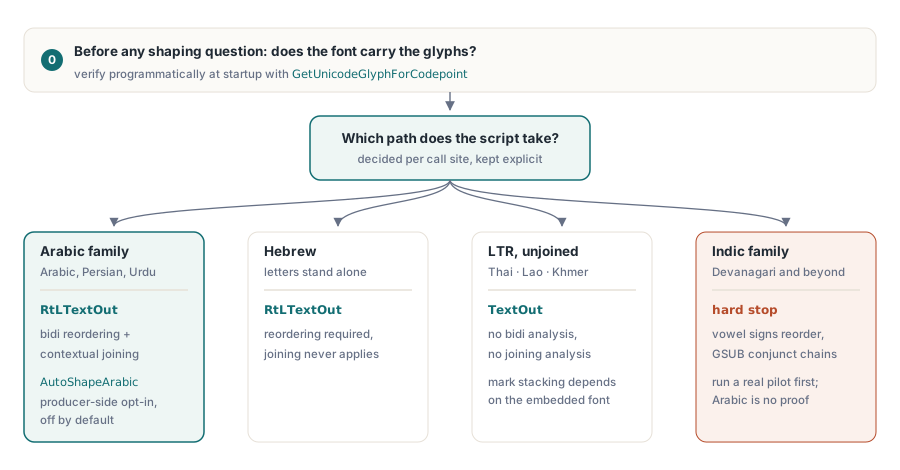
보고서, 인보이스, 계약서, 편지와 같은 아랍어 및 히브리어의 흐름 텍스트(running text)에 대해서는 재정렬과 상황에 맞는 연결로 전체 작업이 완료되며, RtLTextOut이 단독으로 이를 수행합니다. 그 경계는 타이포그래피가 연결(joining) 이상의 것을 요구할 때 나타납니다. 아랍어 측면에서 HotPDF의 해답은 선택형(opt-in) 프로듀서 측 셰이퍼(shaper)입니다: AutoShapeArabic := True로 설정하면 이 컴포넌트는 양방향 패스 전에 논리적 순서 흐름을 유니코드 표현 양식(Unicode Presentation Forms)으로 재작성합니다. 즉, 연결 형태는 논리적 인접성에 기반해 계산되며 합자(ligature) 접힘은 뷰어가 해결하도록 맡기지 않고 PDF가 실제로 전달하는 코드포인트에 구워집니다(baked). 이 스위치는 기본적으로 꺼져 있으며, 꺼져 있을 때 출력은 바이트 레벨에서 안정적(byte-stable)이므로 이를 켜는 것은 전역적 업그레이드가 아니라 문서 파이프라인마다 내리는 의도적인 결정입니다. 이 동일한 선택 모델은 Syriac, N'Ko, Adlam, Hanifi Rohingya 등 HotPDF가 모양을 다듬는 다른 연결형 RTL 스크립트(right-to-left scripts)로 확장되며, 각각은 아랍어 플래그와 유사한 자체적인 자동 셰이프 플래그를 가지고 있습니다
선택적 OpenType 기능은 또 다른 완전히 다른 메커니즘입니다. 임의 합자(discretionary ligature) 및 이와 유사한 단일 대체(single-substitution) 기능은 GetSingleSubstituteGlyph(GID, 'liga')를 통과하며, 이는 한 번에 하나씩 대체를 해석하고(입력 글리프 ID가 먼저, 그 다음 특징 태그) 특징이 적용되지 않을 때는 입력 글리프를 변경하지 않고 반환합니다. 이는 사용자가 직접 유지 관리하는 알려진 유한한 합자 목록을 구동하기에 충분합니다. 이것은 온전한 GSUB 엔진이 아니며, 야심 찬 로캘(locale) 계획이 어긋나는 지점이 바로 이 차이에 있습니다: 아랍어를 완벽하게 처리하는 셰이핑 파이프라인은 단지 재정렬과 연결(joining)을 시연한 것일 뿐, 그 이상은 아닙니다
스크립트별 지원 범위 (Coverage across scripts)
아랍어는 두 가지 변환을 모두 사용하며, 이것이 아랍어가 테스트 대상 문자열인 이유이자 아랍어 패스가 파이프라인이 작동한다는 가장 강력한 단일 증거인 이유입니다. 히브리어는 글자들이 각각 독립적이므로 재정렬은 필요하지만 연결은 필요 없습니다; 히브리어가 올바르게 렌더링되는데 아랍어가 분리되어 출력된다면 양방향 재정렬 부분은 잘 작동한 반면 문맥 분석(contextual) 부분은 전혀 실행되지 않은 것입니다. 페르시아어와 우르두어는 아랍어 스크립트에 얹혀가며 그 동작을 상속받지만, Nastaliq 스타일에 대한 우르두어의 선호는 네이티브 독자가 판단해야 할 가독성에 영향을 미치는 글꼴 결정 사항입니다
태국어는 완전히 다른 영역에 위치해 있습니다. 태국어는 왼쪽에서 오른쪽으로 읽으므로 양방향 작업이 필요 없고, 글자가 연결되지 않으므로 문맥 분석이 필요 없습니다; 태국어 문자열은 라틴어와 같이 일반적인 TextOut 경로를 거칩니다. 태국어가 가진 특징은 기본 자음의 위아래에 쌓이는 모음과 성조 표시(stacked mark)이며, 이것이 올바르게 위치하는지는 셰이핑 엔진의 도움 없이 자체적으로 겹치게(stack) 구축된 폰트에 달려 있습니다. 대부분의 전용 태국어 폰트는 그렇게 되어 있습니다. 비슷한 글꼴이 아닌 실제로 내장(embed)할 정확한 글꼴로 테스트하세요
데바나가리(Devanagari) 및 나머지 인도계(Indic) 언어군(family)은 솔직한 한계(hard stop)입니다. 그들의 모음 기호는 자음 무리 주위에서 재정렬되고 그들의 결합 문자는 문맥에 종속된 체인 대체를 통해 형성되는데, 이는 재정렬과 연결을 넘어선 온전한 GSUB 영역입니다. 인도계 로캘이 로드맵에 있다면 이를 약속하기 전에 실제 고객 문자열로 진짜 파일럿을 실행해 보세요 — 아랍어가 잘 작동한다는 것이 데바나가리도 그럴 것이라는 증거는 아닙니다. CJK 문자열, 쌓이는 분음 부호(diacritics)가 있는 베트남어 및 혼합 유럽 텍스트는 양방향 분석 없이 일반 경로를 따르며, 보고서 코드에서 두 경로를 물리적으로 분리해 두는 것이 좋습니다(RTL 흐름용 루틴 하나와 다른 모든 언어용 루틴 하나). 그래야 로캘 논리가 누군가 설정하기 잊어버리는 플래그 뒤에 숨겨지지 않고 호출부(call site)에서 보이게 됩니다
글리프 커버리지는 셰이핑이 실행되기도 전에 결정됩니다
셰이핑은 폰트에서 글리프를 선택합니다. 폰트에 글리프가 없으면 선택할 것도 없으며, 이 때문에 (개발자의 컴퓨터에서는 완벽하고 보이지 않는 폰트 대체를 거친 후 고객의 서버에서는 빈 상자가 표시되는) 전형적인 배포 실패가 셰이핑 문제가 아니라 커버리지 문제인 것입니다. 실질적인 해결책, 즉 기계에 설치되어 있다고 믿는 대신 직접 배포하는 글꼴을 등록하는 방법은 참조 기사에 단계별로 설명되어 있습니다. 개념적인 요점은 어떤 셰이핑 문제가 의미를 갖기도 전에 커버리지가 설정되어야 한다는 점, 그리고 출력을 눈으로 확인하는 대신 프로그래밍 방식으로 이를 설정할 수 있다는 점입니다
// RegisterUnicodeTTF 이후, 데이터가 실제로 사용하는
// 코드포인트에 대한 커버리지를 점검합니다
GID := Pdf.GetUnicodeGlyphForCodepoint($0628);  // U+0628 ARABIC LETTER BEH
LogGlyphAudit($0628, GID);
등록 자체에는 두 가지 제약 조건—내장(embedded) 유니코드 처리를 위한 PDF 1.5 기준과 폰트의 내장 허가권(permission bits)—이 따르며, 둘 다 RtLTextOut 참조 기사의 설정 단계와 나란히 다뤄집니다. 여기서 다뤄야 할 것은 감사(audit) 습관입니다: GetUnicodeGlyphForCodepoint가 여러분의 조기 경보 시스템입니다. 서비스가 시작될 때 여러분의 데이터가 실제로 사용하는 코드포인트 범위를 순회하고 반환되는 글리프 ID를 기록하세요. 그렇게 되면 커버리지 갭이 이미 고객에게 도달한 송장의 누락된 문자로 나타나는 대신, 롤아웃 중에 시작 로그의 한 줄로 나타나게 됩니다
읽기 순서는 글리프가 아닌 문서에 속합니다
모든 글리프를 올바르게 적용했더라도 아직 한 가지 할 일이 남았습니다. ISO 32000-1 §12.2는 문서의 전반적인 읽기 순서를 명시하는 /Direction이라는 뷰어 기본 설정(preference)을 정의합니다. 이는 어떤 글리프에도 영향을 주지 않습니다. 이 설정이 하는 일은 두 쪽(two-up) 펼침(spread) 배치를 어떻게 할지, 펼친 페이지(facing-page) 레이아웃이 어느 쪽에서 시작해야 하는지, 그리고 읽기 UI가 어느 방향으로 치우쳐야 하는지 뷰어에게 알려주는 것입니다. 이러한 내용은 단일 페이지에서는 나타나지 않으며, 이 때문에 잊혀지기 쉽습니다
// 문서 수준에서 오른쪽에서 왼쪽으로 읽는 순서를 선언합니다
Pdf.Direction := RightToLeft; // ViewerPreferences에 vpDirection을 추가합니다Direction을 설정하는 것이 전체 작업입니다: 속성 설정자(property setter)가 문서의 ViewerPreferences에 vpDirection을 추가하므로 한 줄의 코드로 기본 설정이 파일에 반영됩니다. 텍스트가 RtLTextOut을 통해 출력되는 경우 무료로 이 설정을 얻을 수 있습니다. 해당 호출이 부작용으로 문서 방향을 바꾸기 때문입니다 — 혼합 방향의 문서에서 이를 취소해야 하는 경우는 참조 기사에서 다룹니다. 여러분이 직접 설정해야 하는 경우는 다른 방식, 예를 들어 여러분이 미리 셰이프하여 업스트림(upstream)으로 보내고 일반 경로를 통해 그린 오른쪽에서 왼쪽(right-to-left) 문서의 경우입니다. 이를 생략해도 여러분이 보는 단일 페이지 증거물(proof)은 양쪽 모두 동일해 보입니다; 그러다 누군가 양면(duplex) 소책자를 인쇄하면 펼침면이 거꾸로 출력되는데, 그 원인은 몇 주 전에 생략된 단 한 줄의 코드 때문입니다
셰이프된 출력물 검증하기
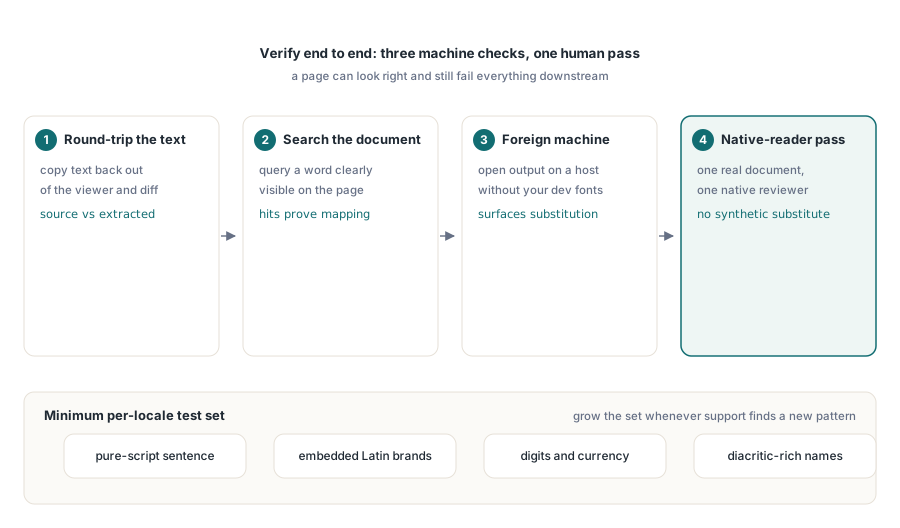
엔드-투-엔드로 검증하세요. 페이지는 정확해 보이지만 다운스트림의 모든 작업에는 쓸모가 없을 수 있기 때문입니다. 세 가지 확인을 통해 대부분의 문제를 찾을 수 있습니다. Acrobat에서 텍스트를 다시 복사하여 소스 문자열의 코드포인트와 대조해 보세요. 페이지에서 볼 수 있는 단어로 뷰어의 문서 내 검색을 실행해 보세요. 그리고 폰트 대체 문제를 드러낼 가능성이 높은, 여러분의 개발용 폰트가 없는 기기에서 결과물을 열어보세요. 이 중 어느 것도 원어민이 진짜 문서를 확인하는 것을 대체할 수는 없으며, 이는 인위적인 코퍼스(corpus)로는 잡을 수 없는 것들을 잡아냅니다. 해당 형식을 출시하기 전에 일정표에 리뷰를 잡아두세요
번역가가 작년에 보낸 자료를 재활용하는 대신 목적에 맞게 테스트 문자열을 고르세요. 각 로캘(locale)당 실행 가능한 최소 요건: 순수 스크립트로 된 문장 하나, 라틴어 브랜드명이 포함된 문장 하나, 숫자와 통화가 포함된 줄, 그리고 분음 부호나 결합 기호가 포함된 이름들입니다. 실제 고객의 이름은 채움 텍스트(filler text)가 건드리지 않는 가정들을 깨뜨리므로, 고객 지원 사례에서 이전에 보지 못한 패턴이 발견될 때마다 회귀 분석(regression) 세트가 한 문자열씩 늘어나도록 하세요
폰트 등록, 서브세팅(subsetting), 일상적인 텍스트 그리기 API는 HotPDF를 이용한 보고서 출력, 폰트, 이미지에 관한 기사에서 다룹니다. 동일한 문서가 접근성 프로필(accessibility profiles)도 충족해야 하는 경우, PDF/A 및 PDF/UA 유효성 검사 기사의 언어 태깅(language tagging)과 구조 규칙이 여기 셰이핑(shaping) 작업의 상단에 추가됩니다
위에서 설명한 오른쪽-왼쪽(right-to-left) 방향 및 유니코드 폰트 API는 델파이 및 C++Builder용 HotPDF 컴포넌트와 함께 제공되며, 제품 페이지에서 전체 텍스트 출력 참조를 연결합니다