読み上げ機能には音声以外に1つの可視的な役割があります。各単語が読まれるとき、ページ上でその単語をハイライトし、見えるようにしておく必要があります。そのためには、音声エンジンが読んでいるのと同じ文字ストリームにインデックス付きで、すべての単語の境界ボックスが必要です。ボックスを取得してもインデックス付けを見逃すと、ハイライトが音声から1〜2単語遅れます。インデックス付けを取得してもページ状態を誤って扱うと、ハイライトが完全に別のページに着地します。音声部分、つまりシンセサイザー自体はほとんど壊れない部分です。SAPIは文字単位で単語境界を報告します。壊れるのは、音声バッファ内の文字オフセットとレンダリングされたページ上の矩形との間の薄いマッピング層です
PDFium ComponentはDelphi、C++Builder、Lazarus向けにこのマッピングを提供しており、v1.53から単語ボックスが、v1.56から追跡カーソルが利用可能です。サーフェスは意図的に狭くなっています。ページの単語ボックスを返す呼び出し、文字オフセットをペイントされたハイライトに変換するトラッカー、色と自動スクロールのためのいくつかのプロパティです。狭い仕様ではありますが、呼び出す順序によって機能するかどうかが決まり、以下の失敗のほとんどは正しい関数を間違った順序で呼び出すことに起因します
文字は単語ではなく、TTSエンジンは文字単位で読む
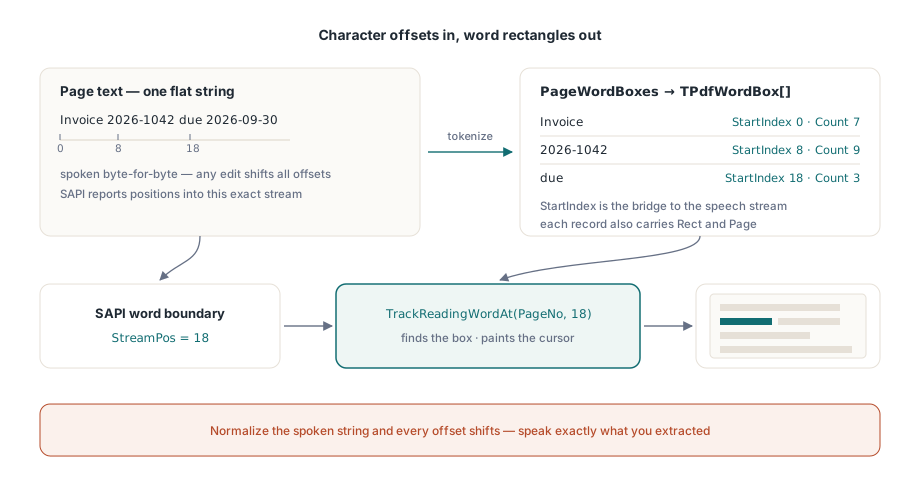
音声エンジンはフラット文字列を消費し、その文字列内の文字位置として進行を報告します。PDFページにはページ空間に配置されたグリフがあり、「単語」はグリフ実行のヒューリスティックなクラスターです。この2つの座標系は、シンセサイザーに渡すテキストが単語ボックスの計算に使われたテキストとバイト単位で一致しない限り、何も共有しません。これがルール1であり、容赦のないものです。抽出したテキストを読み上げる前に空白を正規化したり、ソフトハイフンを削除したり、その他「クリーンアップ」を行うと、すべての下流オフセットが静かに間違ったものになります。抽出したものをそのまま読み上げるか、明示的なオフセット再マッピングテーブルを保持するかのどちらかです。実際のドキュメントに耐える第3の選択肢はありません
再マッピングテーブルは仮想的なエッジケースではありません。UIが「5ページ目」などのページ告知を挿入したり、シンセサイザーのために略語を展開したりすると、読み上げ文字列が抽出された文字列と乖離します。各挿入の位置と長さを記録し、すべての追跡呼び出しの前に累積した調整量を差し引いてください。これはおよそ20行の記録作業であり、次の機能リクエストを乗り越えるハイライトと、誰かが読み上げ見出しを要求した最初の瞬間に壊れるハイライトの違いです
単語ボックスが提供するもの
各TPdfWordBoxレコードは、単語のテキスト、ページテキスト内のStartIndexと文字Count、ページ空間のRect、そして1ベースのPage番号を持ちます。StartIndexフィールドが2つの座標系の橋渡しをします。これはSAPIが読み取り時に返すオフセットと同じです。PageWordBoxesはアクティブなページのフル配列を返します:
procedure TReaderForm.PreparePage(PageNo: Integer);
begin
  PdfView.PageNumber := PageNo;   // ビューの単語ボックスは表示中のページを追跡する

  FWords := PdfView.PageWordBoxes;
  FPageText := BuildSpeechText(FWords);   // Word.Text を順番に連結する

  if Length(FWords) = 0 then
    HandleImageOnlyPage(PageNo);          // テキストレイヤーのないスキャン
end;順序のコメントは重要です。ビューアーのPageWordBoxesはビューが現在表示しているページのテキスト層をトークン化するため、まずビューを移動してから抽出してください。レンダリングは不要で、開いているドキュメントさえあれば十分です。(ドキュメントコンポーネントTPdfは、ヘッドレス使用のためにPdf.PageNumberをキーとした独自のPageWordBoxesを公開しています。2つのページ番号は独立しており、これ自体が別の落とし穴です。)ビジュアルコンテンツを持つページで空の結果が出た場合、画像のみのスキャンを意味します。OCRにルーティングするか、少なくとも告知(「4ページ目には読み取れるテキストがありません」)をしてください。説明なしに音声が沈黙したままにしないでください
SAPIの単語境界をトラッカーに接続する
ビューアー上のTrackReadingWordAtが機能全体の要です。ページ番号と文字インデックスを指定すると、その文字を含む単語ボックスを見つけ、その上に読み取りカーソルをペイントし、単語インデックスを返します。インデックスが単語間に収まる場合は−1を返します。SAPIの単語境界通知はまさにその必要な文字位置を提供します:
procedure TReaderForm.OnSpeechWordBoundary(StreamPos: Integer);
var
  WordIdx: Integer;
begin
  // オフセットを単語ボックスにマッピングし、1回の呼び出しでハイライトを移動する
  WordIdx := PdfView.TrackReadingWordAt(FPageNo, StreamPos);
  if WordIdx < 0 then
    Exit;                     // 境界がどの単語にも該当しない:直前のハイライトを保持する
end;2つの防御的な詳細がその場にあります。まず、TrackReadingWordAtは追跡されたページの単語ボックスキャッシュを自身で管理し、ページが変わると自動的に再構築されるため、境界がどれだけ速く到着しても境界ごとのコストは一定に保たれます。次に、寛大な境界チェックを行いません。ページの文字数以上のインデックスは、最終単語にクランプするのではなく−1を返します。−1を「前のハイライトを保持」として扱ってください。エラーとして扱わないでください。句読点の連続や単語間の空白は、合法的にいずれの単語にも属さない境界を生成するからです。すべての−1をログに残すと埋もれてしまいます。代わりにページごとにカウントし、比率が急上昇するページをよく調べてください。通常はルール1に遡るテキスト正規化の不一致を意味します
カーソル自体:色、追跡、クリーンアップ
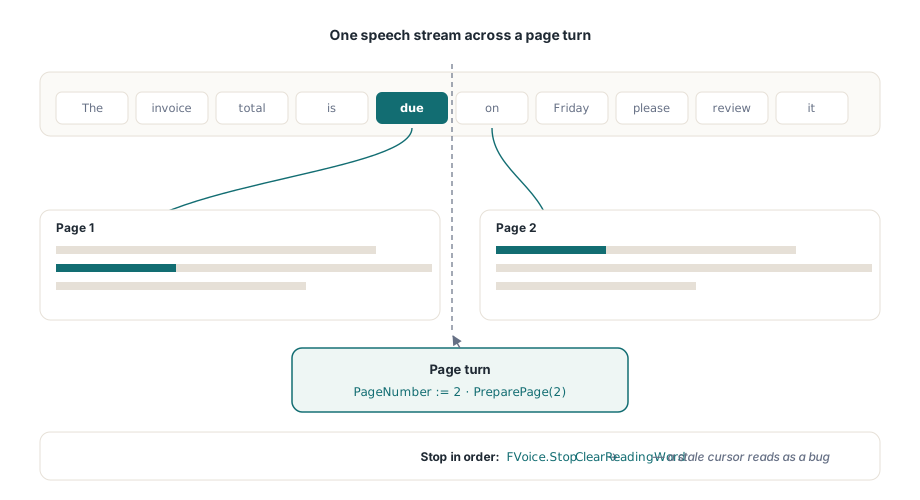
SetReadingWordは単語ボックスを自分で持っているときに直接ハイライトをペイントし、ReadingWordColorはそのスタイルを設定し、ReadingWordFollow := Trueは読まれている単語が見えるようにビューを最小限スクロールします。最後のプロパティがその場にある理由があります。手動で「現在の単語を中央に配置」するスクロールは、すべての改行でページをがたがたさせ、動きに敏感な読者は1分以内に機能全体をオフにするでしょう。ハイライトはアクティブなTPdfViewに現在表示されているページにのみレンダリングされるため、複数ページの読み上げでは音声と一緒にPageNumberを進め、最初の境界イベントが到着する前に新しいページの準備ステップを再実行する必要があります。これをスキップすると、各ページの最初のいくつかのハイライトが古い座標を指します
procedure TReaderForm.StopReading;
begin
  FVoice.Stop;                // まず SAPI の再生を停止する
  PdfView.ClearReadingWord;   // その後ハイライトを除去する。古いカーソルはバグとして見える
end;シャットダウン時の対称性がハイライトを正直に保ちます。すべての一時停止、停止、ページ切り替えパスはClearReadingWordで終わる必要があります。これを省略すると、停止したページに琥珀色の矩形が残り、バグに見えますが、実際には何も壊れていません。このことはすべてのテスターがファイルに書き留めるものです
ドキュメントのサイズよりも音声レートのほうがこのパイプラインに大きな負荷をかけます。毎分300単語では境界イベントが200msごとに届き、最速のSAPIレートではそれより速く届きます。正しい対応はキューに入れることではなく、統合することです。ハイライト更新がまだ保留中のときに新しい境界が届いた場合、古いものを削除して最新のものをペイントしてください。順番に各単語を訪問するが半秒遅れるカーソルは壊れているように感じられます。音声と同期を保ちながら時々単語をスキップするカーソルはそうではありません
デモと製品を分けるエッジケース
いくつかのドキュメントのカテゴリーが継ぎ目を露わにします。結合文字が最も微妙です。基本文字に結合ダイアクリティカルを加えたようなUnicodeシーケンスは、視覚的な単語が示すよりも多くの文字インデックスを占める可能性があり、1グリフにつき1インデックスを仮定するオフセット演算はゆっくりとずれていきます。これがTrackReadingWordAtにマッピングを任せる最も強い議論であり、手動で単語番号を計算するのではなくです。ハイフネーションはより平凡ですが、より一般的です。改行をまたいで分割された単語は2つのボックスになり、それを単一トークンとして読み上げると、2番目の半分の境界イベントは最初のボックスに解決されます。通常はそれで問題ありませんが、それは決定なので、気づかずに発見するのではなく意図的に決めてください。タグ付けは読み取り順序自体を変えます。ドキュメントが適切な構造タグ(ISO 14289、PDF/UAの領域)を持つ場合、単語のシーケンスは論理構造に従います。ない場合はレイアウトのヒューリスティックにフォールバックし、タグなしの2段組ページは両方の列を真横に読むことがあります。回転したページが最後の一般的なものです。各単語のRectは依然としてページ空間で正しく境界を定めていますが、水平フローに合わせたビューポート追跡ポリシーはテキストが垂直に流れると激しくスクロールするため、リグレッションセットに少なくとも1つの回転ドキュメントを含めてください。読み取り順序の処理、ReadingUnitsによる文単位、そしてより広いアクセシビリティスタックについては、DelphiでアクセシブルなPDFリーダーを構築するを参照してください
1つのプラットフォーム制約がデプロイメントを形作ります。SAPIはWindowsのみです。単語ボックスと追跡APIはLazarusとFPCでもバイト単位で同一ですが、LinuxとmacOSのビルドでは同じ境界イベントの背後に別のシンセサイザーを接続する必要があります。そのセットアップはLazarusとFPCでビューアーを実行するで説明されています。ハイライトのコストは音声レートが上昇するとページキャッシュとも相互作用し、レンダーキャッシュとズームパフォーマンスのバジェット計算はここでも変わらず適用されます
単語単位のハイライトが適切でない粒度のとき
単語単位のカラオケが読者に常に求められているわけではありません。高い音声レートでは単語ごとに点滅するカーソル自体が視覚的なノイズになり、一部のリスナーは単語の点滅よりも文単位で追いやすいと感じます。そのケースのために、コンポーネントはより粗い単位を公開しています。ReadingUnitsは文およびブロックレベルの単位を返します。各単位には独自のハイライト矩形があり、SetReadingWordの代わりにSetReadingHighlightでペイントします。接続の形は同じです。境界オフセットが引き続きどの単位を点灯させるかを駆動しますが、ハイライトする単位は単一トークンではなく節や行をまたがります。遅い読者と高レートの再生はどちらもそれを好む傾向があり、設定の背後に両方のモードを提供することは何も妨げません
これを構築する前にバージョンの下限を確認する価値があります。単語ボックスにはPDFium Component v1.53以降が、追跡カーソルにはv1.56が必要です。完全な読み上げAPI、文単位、そして動作する読み上げデモはPDFium Componentの製品ページにあります