視覚に障害のあるユーザーが、あなたの作った真新しい Delphi ビューアで四半期レポートを開き、NVDA をオンにする。すると、ページのフッター、続いて数字の列、そして本来なら晴眼者が真っ先に読むはずのタイトルが、この順で読み上げられる。あるいは、何も聞こえてこない。画面上の見た目は完璧で、まさにそこに落とし穴がある。レンダリングと読み上げはまったく別の問題であり、別のコードで解かれる。PDF がグリフを描く順序は、人がそれを聞くべき順序と一致する義務を何も負っていない。したがって、レンダリング呼び出しだけで組んだビューアは、非の打ちどころのない画像と、使い物にならないナレーションを同時に生み出す。Delphi、C++Builder、Lazarus 向けに PDFium エンジンをラップする VCL/LCL コンポーネントである PDFium Component が、独立した読み上げ用 API 群を備えているのはこのためである。描画用の API は、そもそも与えられていない読み上げ順序を回復することはできない
アクセシブルなリーダーの成否は 3 つの点にかかっている。スクリーンリーダーが読み上げられる順序を抽出できること、音声が今どこを話しているかに、見える単語カーソルを常に固定できること、そして文書がタグ付けされていない場合には推測してごまかすのではなく、そのことを正直に申告できることである。それぞれに明確な API が用意されており、細部を省くと必ず牙をむく落とし穴もある
読み上げ順序は描画順序ではなく構造ツリーに宿る
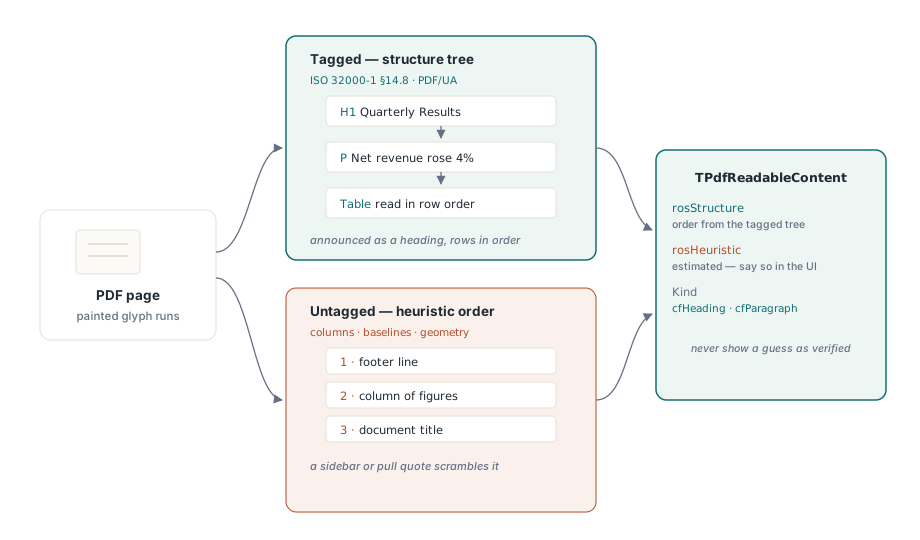
ISO 32000-1 §14.8 は、ページコンテンツの上に重なる要素のツリーとして論理構造を定義している。PDF/UA(ISO 14289-1)はさらに踏み込み、そのツリーを必須のものにする。実質的なコンテンツはすべて、読み上げ順序でそのツリーを通じて到達可能でなければならず、ページの装飾的要素はそのようにマークされ、読み飛ばされる。正しくタグ付けされたレポートは、「四半期業績」がレベル 2 の見出しであること、合計欄がヘッダーセルを持つ表であることを知っている。タグ付けされていないレポートは、たまたま文書らしく見えているだけの、配置されたグリフの塊にすぎない
ReadablePageContent は、構造ツリーが存在する場合はそれをたどり、cfHeading や cfParagraph のような値を持つ意味的な Kind でタグ付けされた断片を返す。これにより UI は、太字の行をただの本文として読み上げるのではなく、単語の前に「見出し」だと告げることができる。使えるツリーがない場合、この同じ呼び出しはヒューリスティックなレイアウト解析にフォールバックする。列を検出し、ベースラインをクラスタリングし、左から右、上から下へと並べる。このフォールバックは単一段組のメモには問題ないが、ニュースレターや多段組フォーム、サイドバーやプルクォートを含む文書には心もとない。重要なのは、いま得ている結果がどちらであるかを把握できることであり、API はそれをはっきりと教えてくれる。TPdfReadableContent レコードは Source フィールドを持ち、順序がタグ付きツリーから来た場合は rosStructure、ジオメトリから推測された場合は rosHeuristic が設定される。推測にすぎない順序を検証済みであるかのように表示してしまえば、誰も走らせていないビルドに合格バッジを貼り付けたのと同じ、アクセシビリティ版の偽装を出荷したことになる
ファイルを開いた時点で安上がりにできることは、IsTagged を読み取り、ValidatePdfUa を 1 回呼び出して、その結果をキャッシュしておくことである。PDF/UA チェックの失敗は、ファイルを拒否する理由にはならない。ステータスバーに「推定された読み上げ順序」と表示する理由にはなる。そうしておけば、崩れたナレーションについて顧客からクレームのメールが届いたとき、サポートはそれがファイル側のタグ付けの問題なのか、自分たちのコードのバグなのかを、すでに切り分けられる
ReadingUnits でページから音声キューへ
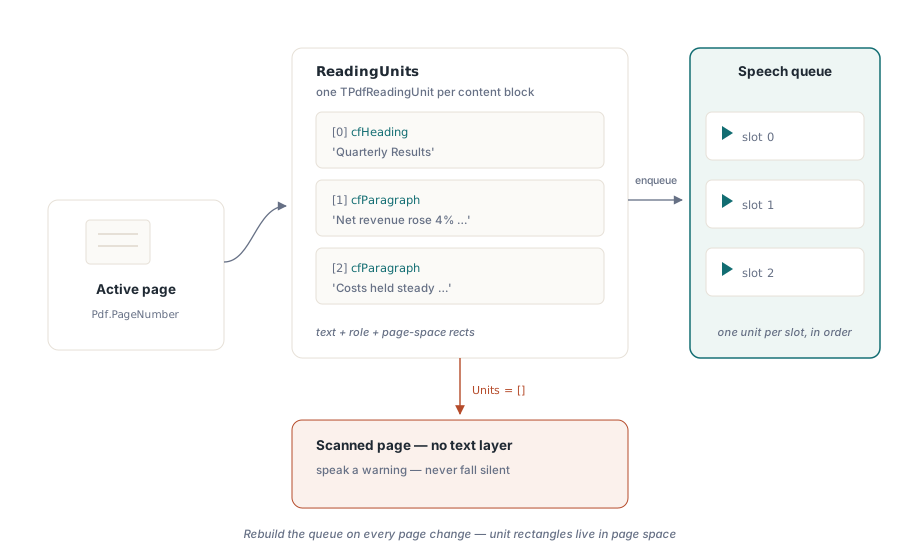
テキスト読み上げでは、ReadingUnits が重い処理を一手に引き受ける。アクティブなページに対して TPdfReadingUnit レコードの配列を返し、それぞれが読み上げるテキスト、その意味的な役割、そしてページ上での位置を示す矩形を保持している。ページをまたいで連続的に読み上げたい場合には、文書全体を対象とする対になる呼び出し DocumentReadingUnits がある。1 つのユニットはそのまま音声キューの 1 スロットに収まる
procedure TReaderForm.QueuePageSpeech(PageNumber: Integer);
var
  Units: TPdfReadingUnits;
  i: Integer;
begin
  Pdf.PageNumber := PageNumber;   // ReadingUnits はアクティブなページで動作する
  Units := Pdf.ReadingUnits;
  FSpeechQueue.Clear;
  for i := Low(Units) to High(Units) do
    FSpeechQueue.Add(Units[i]);  // テキスト + セマンティクス + ハイライト矩形
  FCurrentPage := PageNumber;
  SpeakNextUnit;
end;
このループの中には、間違えやすい点が 2 つある。キューはページごとに分け、ユーザーがページを移動するたびに作り直すこと。読み上げユニットはページ空間の矩形を保持しているため、3 ページ目の名残のキューを 4 ページ目にそのまま使うと、そのハイライトは 4 ページ目に描かれてしまう。そして、明らかにコンテンツがあるページで Units 配列が空になったら、それを画像のみのページの検出手段として扱うこと。スキャンされたページはテキストレイヤーを持たないピクセルの塊であり、正しい対応は警告を読み上げること(「このページには抽出可能なテキストがありません」)であって、聞き手にはフリーズなのか無音なのか区別のつかない沈黙で済ませることではない
音声を追いかける単語カーソル
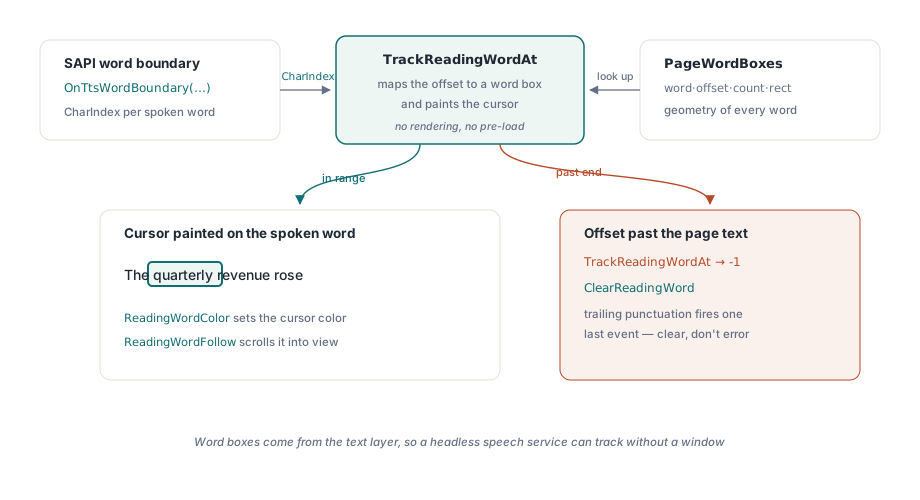
読み上げられている単語を目で追っているロービジョンのユーザーにとって、段落単位でハイライトするのはもたついて感じられる。単語単位のハイライト、いわゆるカラオケ効果には、2 つの要素が必要になる。各単語のジオメトリと、TTS エンジンの進行状況の通知をそのジオメトリに対応付ける手段である。PageWordBoxes は、単語のテキスト、その文字オフセット、文字数、そしてページ空間の矩形をそれぞれ持つ TPdfWordBox レコードとしてジオメトリを提供する。対応付けを行うのは TrackReadingWordAt である。SAPI の単語境界イベントがすでに報告している文字位置をそのまま渡せば、そのオフセットを単語ボックス配列内のインデックスへ解決し、該当する単語にカーソルを描画するところまでを 1 回の呼び出しでこなす
procedure TReaderForm.PrepareKaraoke(PageNumber: Integer);
begin
  // ビューのワードボックスは、ビューが表示するページから取得される。
  // Pdf.PageNumber を設定するだけではビューは移動しない
  PdfView.PageNumber := PageNumber;
  FWordBoxes := PdfView.PageWordBoxes;
end;

procedure TReaderForm.OnTtsWordBoundary(Sender: TObject; CharIndex: Integer);
var
  WordIdx: Integer;
begin
  // TrackReadingWordAt はオフセットを対応付けると同時にワードカーソルを描画する
  WordIdx := PdfView.TrackReadingWordAt(FCurrentPage, CharIndex);
  if WordIdx < 0 then
    PdfView.ClearReadingWord;  // 境界がページテキストを越えた
end;この契約は、ある点では寛容だが、別の点では容赦がない。寛容な点は、TrackReadingWordAt が追跡対象のページの単語ボックスキャッシュを自前で保持しているため、事前に読み込んでおくものは何もなく、単語ボックスはテキストレイヤーから来るためレンダリングも一切発生しないことである。表示ウィンドウを持たないヘッドレスの音声サービスでも、位置の追跡はできる。容赦のない点は、文字インデックスがコンポーネント自身が抽出したテキストを指していなければならず、自分で組み立てた整形済みの文字列を指していてはならないことである。CharIndex がページテキストの末尾を超えた場合、関数は例外を送出せず -1 を返す。これは、TTS エンジンが末尾の句読点に対して最後の境界イベントをもう 1 回発火させるような場面で、常に起きることである。-1 は「カーソルをクリアせよ」という意味として読み取り、エラーとして扱ってはならない
表示側では、ReadingWordColor がカーソルの色を設定する。既定のアンバー色はほとんどのページ背景で通用するが、ビューアが提供するすべての表示フィルタの下でテストしておくこと。アンバーのカーソルは色反転のもとで完全に見えなくなることがあり、しかも音声と並行して色反転を使うことこそ、まさにロービジョンのユーザーが日常的に行っている使い方である。つまり、最も正しく動かさなければならない組み合わせが、簡単なデモでは決して試されない組み合わせということになる。ReadingWordFollow を True に設定すれば、ビューアは話されている単語を自動的に画面内へスクロールしてくれる。これがなければ、画面をまたいで広がるズームされたページでは実現できない。1 つのスコープに関するルールに注意すること。SetReadingWord はアクティブな TPdfView のページにしか描画しない。手動でのスクロールが音声を一時停止させるのか、それとも追従動作がそれを上書きするのか、あらかじめ決めておくこと。どちらも決めていないと、カーソルが画面外のどこかに取り残されたまま、音声だけが読み進んでしまう
リーダーを壊す文書たち
ごく一握りの入力パターンは、素朴な実装を確実に打ち負かすため、その場限りで直して忘れるバグとしてではなく、回帰スイートに恒久的なサンプルとして組み込んでおく価値がある
- タグ付けされていないが、テキストは豊富なファイル。 ヒューリスティックな順序は、線形なレポートに対しては正しくなりがちだが、サイドバーやプルクォートが登場した瞬間に狂う。UI と診断ログの両方で、その順序を推定にすぎないものとしてフラグを立てておけば、後になっても失敗の原因が読み取れる
- 画像のみのスキャン。 テキストレイヤーがまったく存在しない。空の読み上げユニットで検知し、リーダーに空白のページをそのまま読ませるのではなく、上流の OCR ステップへユーザーを誘導すること
- 結合文字と混在スクリプト。 Unicode の結合文字は、必ずしも 1 対 1 で視覚的な単語にまとまるわけではないため、単語ボックスの個数は自前のトークナイザーが想定するものとずれることがある。テキストを自分で分割して計算したオフセットで単語ボックス配列にインデックスを付けてはならない。使ってよいのは
TrackReadingWordAtが返すインデックスだけである
デモではなく監査員のようにテストする
「サンプルを読み上げさせてみたら音が出た」というのは何の証明にもならない。胸を張れるテストは、完成したビルドに NVDA を接続して 3 つのファイルを流し込むものになる。見出しが見出しとして読み上げられ、表が行の順で読まれることが分かっているタグ付き済みファイル、推定順序の表示が見えているタグなしファイル、そしてテキストなしの警告が実際に読み上げられるスキャンファイルの 3 つである。それぞれが、うまくいくケースでは素通りしてしまう経路を実際に踏む
そこから先は、音声速度を 2 倍にしたときと半分にしたときの両方で単語カーソルが確実に追従し続けること、そして ReadingWordFollow によるスクロールがユーザー自身のスクロール操作と競合しないことを確認する。次に、すべての色フィルタを切り替えながら音声を走らせ、カーソルが決して消えないことを見届ける。ロービジョン向けカラーフィルタの記事がそのレンダリング経路を詳しく扱っており、単語音声カーソルの詳解記事が TTS のタイミングを分解している
ここまでに使った読み上げユニットと単語ボックスの API は、Delphi・C++Builder(VCL)向けおよび Lazarus/FPC(LCL)向けのPDFium Componentに同梱されている。製品ページには、これらの例の背後にある読み上げユニットと単語ボックスのレコードレイアウトを含む、完全な API リファレンスがリンクされている