ロービジョンの読者は、既定のコントラストでは白いページ上の黒い文字を読み取れないため、ダークモードを求めます。素朴な答えは、レンダリングされたページのすべてのピクセルを反転することです。それは 1 週間で出荷され、翌日には壊れます。スキャンされた写真はフィルムのネガのような見た目で戻ってきて、読者自身の黄色い蛍光ペンの跡は読み取れない青い染みに変わり、誰かが「なぜ印刷物が真っ黒に出てきたのか」と尋ねます。この機能は構築する価値が間違いなくあり、かつ半分だけ正しく作るのが間違いなく簡単で、その 2 つの結末を分けるのは 1 つの考え方です。色に関する各決定はレンダーパイプラインの特定の地点に属しており、反転は間違った段階に適用された間違ったツールだということです。ここでのコードは、Delphi、C++Builder、Lazarus 向けの PDFium ベースのビューアである PDFium Component を使っており、そのレンダリング API はこれらの段階を分けて公開しています
フィルターはプレゼンテーション状態であり、決して文書状態ではない
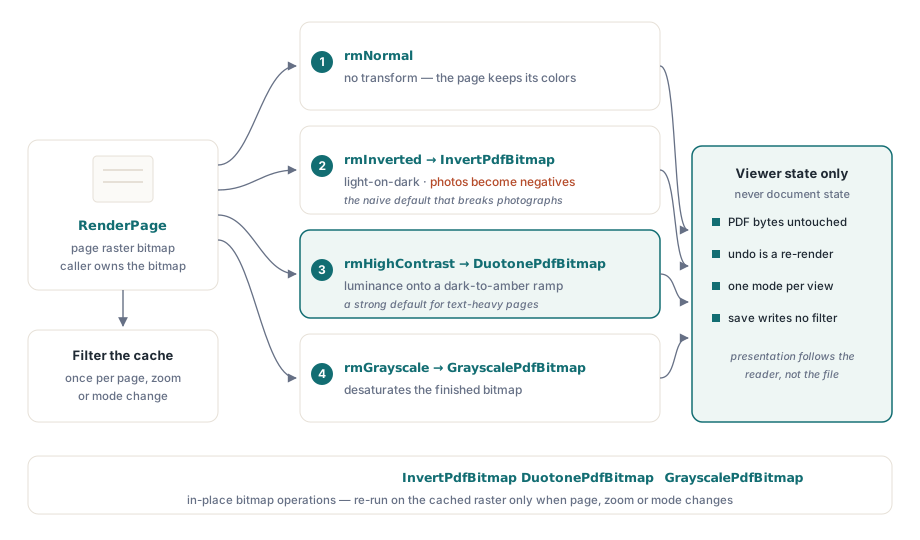
1 つのルールが、ここでの最悪のカテゴリのバグを防ぎます。リーディングモードは、ビットマップがどう生成され後処理されるかだけを変え、それ以外は何も変えない、というものです。PDF のバイトは手つかずのままであり、すべてのモードは再レンダリングで元に戻せ、「保存」がフィルター適用済みの外観をファイルへ書き戻すことは決してありません。これは、法務のレビューアーが有効なフィルターの下で契約書を印刷し、反転した版を証拠として保管してしまうまでは、当たり前に聞こえます。その時点で「印刷は文書自身の外観を使うのか、それとも画面の外観を使うのか」という問いは、コードパスの偶然ではなく、仕様書で明示的に答えられるべきものだと分かります。フィルター設定はビューア状態に保持し、レンダリング時に適用し、すべてのエクスポート経路がどちらの外観を使うのかを宣言するようにしてください
このルールは 2 回、元を取ります。可逆性は無料で手に入ります。モードを切り替えると、変更されていないソースから再レンダリングされるためです。維持すべきアンドゥスタックはなく、モード変更の連続でページが劣化する可能性もありません。マルチウィンドウのシナリオが一貫性を保てるのも同じ理由です。各ビューが自分のプレゼンテーション状態を持ち、文書オブジェクトは共有されたままであるため、1 つの文書の 2 つのビューで異なるモードを動かせます
まずレンダリングし、次に変換する
サポートされるパターンは、レンダリング後のビットマップ処理です。RenderPage がページのラスターを生成し、その後に変換パスがそれを調整します。コンポーネントは、その場でビットマップを加工する操作として InvertPdfBitmap、DuotonePdfBitmap、GrayscalePdfBitmap の 3 つの変換を搭載しており、これによりモード切り替えはすっきりした 2 段階の関数になります:
function TViewerForm.RenderWithMode(W, H: Integer): TBitmap;
begin
  Result := Pdf.RenderPage(0, 0, W, H, ro0, [reAnnotations]);
  case FReadingMode of
    rmInverted:     InvertPdfBitmap(Result);
    rmHighContrast: DuotonePdfBitmap(Result, clBlack, $0000C8FF);  // 暗い背景にアンバーの文字
    rmGrayscale:    GrayscalePdfBitmap(Result);
  end;
  // rmNormal はここを通過する:文書自身の色がそのまま使われる
end;
この設計から 2 つの帰結が導かれます。第一に、変換のコストはビットマップサイズに比例するため、この仕事はレンダリング結果をキャッシュする場所に属します。キャッシュされたビットマップを 1 回だけフィルターし、描画のたびに適用してはいけません。第二に、変換は完成したラスターの上で実行されるため、テキスト、ベクターアート、画像、注釈の外観に同じように作用します。その均一性こそ、写真に対して単純な反転が失敗する点です。デュオトーン変換がテキスト中心の文書でより良いデフォルトになる理由もここにあります。デュオトーンは色相を反転させる代わりに、輝度を選択した暗色から明色へのカラーランプへ写像するからです。反転は、それを望む読者のために明示的な選択肢として残ります。より鋭いグリフの輪郭は、別のレバーです。reNoSmoothText レンダーオプションは、レンダリング時にテキストのアンチエイリアスをオフにし、高倍率ズームでのハイコントラストモードと好相性です
食い違う 2 つのグレースケール
レンダーオプションには reGrayscale があり、後処理ステップを飛ばす近道に見えます。しかし同じ操作ではありません:

// エンジンレベル:ラスタライズ中にグレースケールを適用
GrayA := Pdf.RenderPage(0, 0, W, H, ro0, [reGrayscale]);

// ポストプロセス:カラーでレンダリングし、完成したビットマップを変換
GrayB := Pdf.RenderPage(0, 0, W, H);
GrayscalePdfBitmap(GrayB);
エンジンレベルのオプションは画像コンテンツのラスター出力に適用されますが、ベクターの塗りやテキストの色には届かないため、色付きの見出しを持つページは、グレーの写真と、頑なに青いままの見出しで戻ってくることがあります。完成したビットマップに対する GrayscalePdfBitmap は、すべてを無条件に変換します。画像は脱色しつつテキストの色をシグナルとして残したい場合、これは一部のロービジョン読者が特に好む組み合わせですが、そのときレンダーオプションには今も存在価値があります。しかし要件が「グレースケールのページ」と読めるなら、それを満たすのは後処理のほうです。どちらの経路を選ぶにしても、RenderPage の 2 つのオーバーロード形式を頭に置いてください。関数形式は呼び出し側が所有し解放しなければならないビットマップを返し、フィルターによって稼働中のレンダリング済みビットマップの数が増えた途端、そのことが効いてきます
背景、選択マーク、そして PageColor の罠
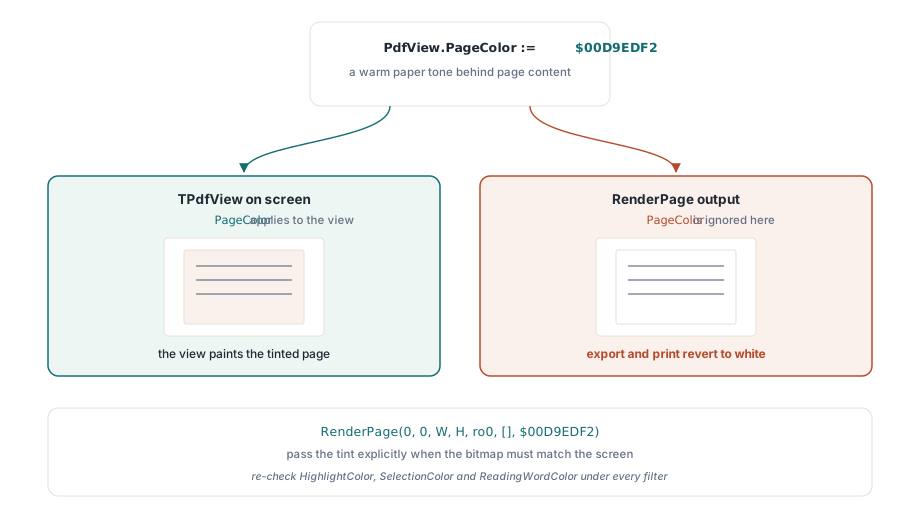
快適さのための調整すべてが変換というわけではありません。白いページ背景を暖色系のトーンに置き換えるだけで、まぶしさに敏感な読者には十分なことが多く、それには専用のプロパティがあります。そのプロパティには、人を捕まえるスコープのルールが付いています:
// 画面上の表示にのみ影響する
PdfView.PageColor := $00D9EDF2;  // ページコンテンツの背後の温かみのある紙色

// RenderPage の出力は PageColor を無視する。色は明示的に渡す
Bmp := Pdf.RenderPage(0, 0, W, H, ro0, [], $00D9EDF2);
PageColor は TPdfView が表示する内容を変えますが、RenderPage 経由で生成されたビットマップは、Color パラメーターが別の色を指定しない限り、既定の白を保持します。症状は確実に現れます。画面には色づいたページが表示され、ユーザーがエクスポートや印刷をすると、出力は白に戻ります。これは最初の節で述べたエクスポート方針の決定と同じ棚に分類してください
残りの色プロパティはオーバーレイのマークを定義します。検索ヒット用の HighlightColor、ユーザーのテキスト選択用の SelectionColor、読み上げカーソル用の ReadingWordColor です。そのどれもが、あなたが提供するすべてのフィルターの下で再チェックされなければなりません。白の上では機能するアンバーの読み上げカーソルは、反転後には消えます。淡い青の選択色は、ハイコントラストの背景に溶け込んで消えます。1 つのグローバルなセットではなく、モードごとのオーバーレイパレットを維持し、組み合わせを意図的にテストしてください。フィルターとテキスト読み上げの併用は、この機能が対象とする読者にとって通常の構成であり、エッジケースではありません。オーバーレイの機構そのものは、アクセシブルリーダーの記事で扱っています
数値、検証、そして印刷の問い
WCAG 2.1 は、この機能を測定できるものに変えます。達成基準 1.4.3 は本文テキストに 4.5:1 のコントラスト比を要求し、1.4.6 は拡張コントラストでそれを 7:1 に引き上げます。実際にレンダリングされた出力に対してコントラストアナライザーを実行し、ハイコントラストモードをこれらの比率でスポットチェックしてください。画像の上のテキストとフォームフィールド内のテキストは、本文テキストが合格しても、比率が静かに失敗する場所です
印刷には独自の決定に値し、擁護できるデフォルトは文書自身の外観で、「表示どおりに印刷」を明示的なユーザー選択として提供することです。印刷されたページは、ビューア作者が想定しがちな範囲よりも多くのワークフローで証拠であり、契約書の反転した印刷物は、法務の香りつきのサポートインシデントです。パフォーマンスのために重要な組み合わせがもう 1 つあります。フィルター付きレンダリングはモードを切り替えるたびにビットマップの仕事を倍にするため、各ペイントメッセージで変換を適用してはいけません。フィルター済みビットマップをキャッシュし、ページ、ズーム、モードが実際に変わったときだけ変換を再実行してください。これを安価にするキャッシング戦略は、レンダーキャッシュとズーム性能の記事で解説されています
コードではなく UI で決めるべきことが 1 つあります。どのモードを正しいデフォルトにするかです。単一の答えは存在しないため、セットを提供して読者に選ばせてください。ハイコントラストはテキスト中心の読書の大半に合い、反転は明るい文字と暗い背景を特に望む読者に合い、グレースケールは色のノイズを削り、背景の色づけはまぶしさへの敏感さに対応します。選択をユーザーごとに永続化し、起動時に復元し、通常モードへ 1 キーで戻る経路を保ってください。読めないモードに迷い込んだ読者には、速い脱出経路が必要です
ここで使ったレンダーオプション、ビットマップ変換、ビューの色プロパティは、Delphi、C++Builder、Lazarus/FPC 向けの PDFium Component に同梱されており、完全なソース付きのため、変換の実装を監査したり拡張したりできます