素朴な作りのPDFビューアーでズームボタンを押し続け、CPUのグラフを眺めてみてください。自動連射のズーム操作を1回押しただけで毎秒十数回のズーム段階が発火し、その一段ごとに表示中ページの完全品質の再描画が始まるなら、描画は完了するより速く積み上がっていきます。ページ単体のラスタライズは問題なく、A4のスキャンなら180ミリ秒ほどでしょう。しかし今あなたは、ユーザーがとうに通り過ぎた仕事に対して180ミリ秒の描画を十数本走らせているのです。ビューアーは固まり、1つのコアが100%に張りつき、画面が追いついた頃にはユーザーは4回分前の描画に当たるズーム倍率で止まっています。処方箋は速いラスタライザではありません。完成したページを即座に返すキャッシュと、古びた瞬間に仕事を投げ出す覚悟のある描画ループです
PDFium Componentはその両方の部品を渡し、方針には口を出しません。呼び出し側が所有するビットマップ、キャンセル用トークンを受け取るプログレッシブ描画器、リサイズ時にズームを計算し直すフィットモード、そしてまるごとラスタライズするには大きすぎるページのためのタイル描画呼び出しが手に入ります。あえて提供しないのはキャッシュそのものです。正しい追い出し方針は、あなたのビューポート、プラットフォームのメモリ上限、そしてユーザーがどうスクロールするかに左右されるからです。その判断を正しく下すのはあなたの仕事であり、誤ったときの結末がまさに、固まることと漏れることなのです
ミリ秒とメガバイトの行き先
何かを設計する前に、その代償に数字を与えましょう。96 DPIのA4ページはおよそ794×1123ピクセル、32ビットのビットマップとして約3.5 MBです。200%へズームすればそれが4倍になります。高DPIディスプレイの400%では、1ページ分のビットマップに50から60 MBを確保して埋めることになり、連続スクロールのビューアーは同時に複数ページを生かしておきます。ラスタライズの代償は出力ピクセル数に比例するので、ズームが倍になるたび、描画時間とメモリの両方がおおよそ4倍になります
この算術から2つの帰結がまっすぐ出てきます。ズーム倍率を無視したキーを持つキャッシュは無価値です。速くしたい当のしぐさであるズームが、毎回新しいビットマップを生むからです。そして上限のないキャッシュは、人が最も強くズームする文書、すなわち密な権利証のスキャン、設計図面、大判の地図でこそ、32ビットプロセスのアドレス空間を使い果たします。キャッシュはキーを正しく作り、上限をきっちり定めなければなりません。どちらも省略できません
キャッシュキーに入れるべきもの
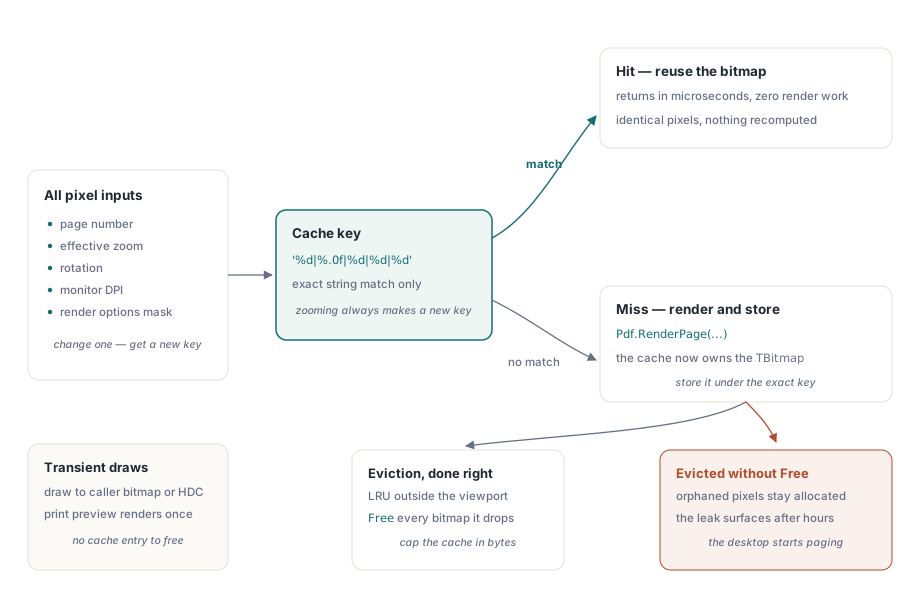
キャッシュしたビットマップを再利用してよいのは、そのピクセルを形づくった入力がすべて今も一致しているときだけです。つまりページ番号、実効ズーム(あるいは等価な出力ピクセル寸法)、回転、モニターのDPI、そして生成時に効いていた描画オプションです。reAnnotations付きで描いたページは、それ抜きの同じページとは別の画像であり、reGrayscaleを通したグレースケールもまた別物です。このうち1つでもキーから落とせば、起きるバグは予測できます。校閲者がコメントを消したあとも残り続ける注釈の重ね描き、あるいはユーザーがウィンドウをノートPCの画面から外付けの4Kモニターへ引きずり、古びたビットマップの下でDPIが変わった瞬間にぼやけるページです
function TPageCache.Acquire(Pdf: TPdf; PageNo: Integer; ZoomPct: Single;
  Rotation: TRotation; Opts: TRenderOptions): TBitmap;
var
  Key: string;
begin
  Key := Format('%d|%.0f|%d|%d|%d',
    [PageNo, ZoomPct, Ord(Rotation), Screen.PixelsPerInch, OptionsMask(Opts)]);
  if FBitmaps.TryGetValue(Key, Result) then
    Exit;

  Pdf.PageNumber := PageNo;
  Result := Pdf.RenderPage(0, 0, OutputWidth(PageNo, ZoomPct),
    OutputHeight(PageNo, ZoomPct), Rotation, Opts);
  FBitmaps.Add(Key, Result);   // これ以降このビットマップはキャッシュの持ち物
end;
命中したときはマイクロ秒で返ります。それこそが眼目です。難しいのは、キャッシュからこぼれ落ちたビットマップがどうなるかという問いで、結局それは誰がそれを所有しているのかという問いになります
ビットマップを解放するのは誰か
関数形のRenderPageは、呼び出し側が所有するTBitmapを返します。1回きりの書き出しなら、その所有権は明らかで守るのも簡単です。キャッシュの中では、これがDelphi製PDFビューアーで最も多い漏れになります。辞書が各ビットマップへの唯一の参照を握るようになり、素のTDictionaryがキーと値を解放してくれるのは管理された型の場合だけだからです。TBitmapはそうではありません。Freeを呼ばずに項目を追い出せば、ピクセルは誰にも指されないまま確保され続けます
これがすり抜けてしまう理由はタイミングです。10分の動作確認では、気づくほど多くの異なるページをズームすることはありません。誰かが長い文書を数時間スクロールしズームして初めて漏れは姿を現し、その頃にはプロセスが数百枚の親を失ったページビットマップを抱え、マシンはページングを始めています。だからこそ追い出しは、あとの版ではなくキャッシュの最初の版に属するのです。幅×高さ×4で見積もったバイト数でキャッシュに上限を設け、ビューポートと先読み窓の外にある最長未使用のページを追い出し、取り除くそばからビットマップをすべて解放してください。本当に一過性の描画には、呼び出し側が用意したTBitmapやHDCへ直接描く多重定義があり、所有権の踊りをまるごと省けます。印刷プレビューが分かりやすい例で、各面を一度描くだけならキャッシュしても得るものは何もありません
プログレッシブ描画と、正直なキャンセル
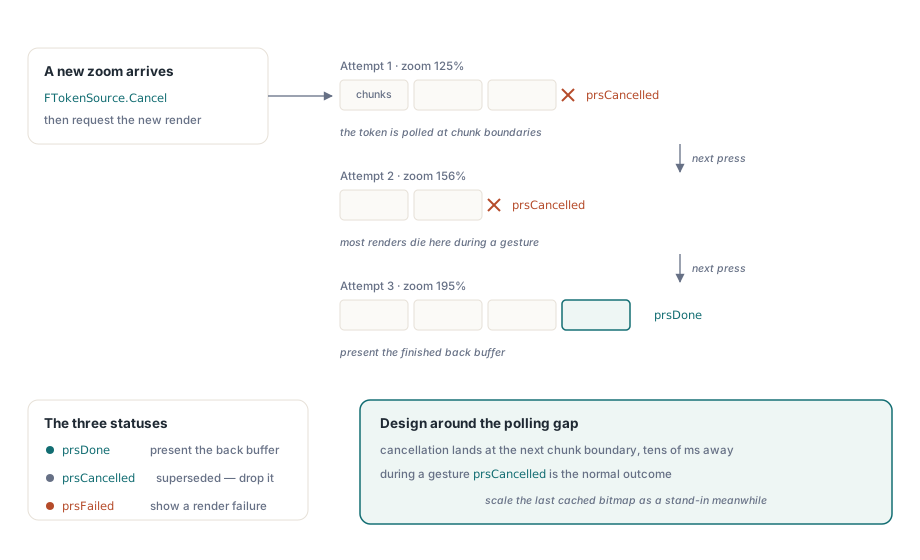
素のRenderPageの多重定義はページが仕上がるまでブロックします。ユーザーがまだズーム操作を動かしている最中には、まさに望まない振る舞いです。そのために手を伸ばすのがRenderPageProgressiveです。これはIPdfCancellationTokenを受け取り、prsDone、prsCancelled、prsFailedのいずれかを返します。人がつまずく振る舞いの細部は、キャンセルが即座ではないことです。トークンは描画の内部でチャンクの区切りごとに調べられるので、チャンクの途中で合図したトークンは、そのチャンクが終わってはじめて効きます。複雑なページでは、頼んでから止まるまでの遅れが数十ミリ秒に達します。その隙間は無いことにせず、それを前提に設計してください。新しいズーム値が届いた瞬間に前のトークンをキャンセルする、しかし頼んだ瞬間に古い描画が止まるとは思わないことです
procedure TViewerForm.RequestRender(TargetZoom: Single);
var
  Status: TPdfProgressiveStatus;
begin
  if FTokenSource <> nil then
    FTokenSource.Cancel;           // 実行中の前の描画を投げ出す
  FTokenSource := TPdfCancellationTokenSource.New;  // FPdfAsyncユニット

  Status := Pdf.RenderPageProgressive(FBackBuffer, 0, 0,
    FBackBuffer.Width, FBackBuffer.Height, FTokenSource.Token,
    ro0, [reAnnotations]);

  case Status of
    prsDone:      PresentBackBuffer;
    prsCancelled: ;                // 新しい要求に取って代わられた: 黙って捨てる
    prsFailed:    ShowRenderFailure;
  end;
end;操作の最中は、prsCancelledは例外ではなく普通の結末です。ズームのしぐさが始めた描画のほとんどは終わる前に取って代わられるので、キャンセルは日常茶飯事として扱い、結果は黙って捨ててください。キャンセルのたびに警告として記録する描画キューは、本当に大事なただ1つの失敗を数千行の雑音の下に埋めてしまいます。本物の描画が走っている間に画面が死んで見えないようにするには、プログレッシブの経路に安上がりな代役を組み合わせます。前にキャッシュしたビットマップを新しいズームへ拡大し、それをすぐ提示するのです。100ミリ秒か200ミリ秒はぼやけて見えますが、体感は即時であり、完全品質の描画には、仕上がるか次のしぐさにキャンセルされるかまでの時間を稼いでやれます
ズームが黙って解除するフィットモード
ビューアーのFitModeプロパティをpfmFitPageやpfmFitWidthに設定すると、リサイズのたびにズームを計算し直し、ウィンドウが変わってもページが収まり続けます。落とし穴は、Zoomを直接代入するとFitModeがpfmNoneへ戻ることです。既定の振る舞いとしてはこれで正しく、自分の意思で150%と打ち込んだユーザーは、次のリサイズでそれを捨てられたくありません。しかし、ズームインのボタンをZoom := Zoom * 1.25として配線した人は驚き、最初の1回でなぜ幅に合わせるモードが反応しなくなったのか分からなくなります。ツールバーが明示的なズームとフィットモードの両方を備えるなら、ユーザーが最後に選んだフィットを自分で覚えておき、フィットのボタンが再び押されたときに設定し直さなければなりません。ズームの代入が消したモードをコンポーネントが復元することはありませんし、そうすべきでもありません
擁護できるメモリ予算
書き出せる予算は、コードレビューで論拠を示せる予算です。ですから具体的な場面から始めましょう。連続スクロールが、表示中のページに加えて上下に先読みしたページを1枚ずつ、そしてサムネイルの帯を保つとします。96 DPIのディスプレイの100%なら、そのフルサイズのビットマップ3枚は1枚あたり約3.5 MBで、取るに足りません。4Kディスプレイの300%では同じ3枚が1枚およそ30 MBになり、しかもキャッシュがまだ過去のページを1枚も留めていない段階での話です。膨らむのは文書ではなく、しぐさのほうなのです
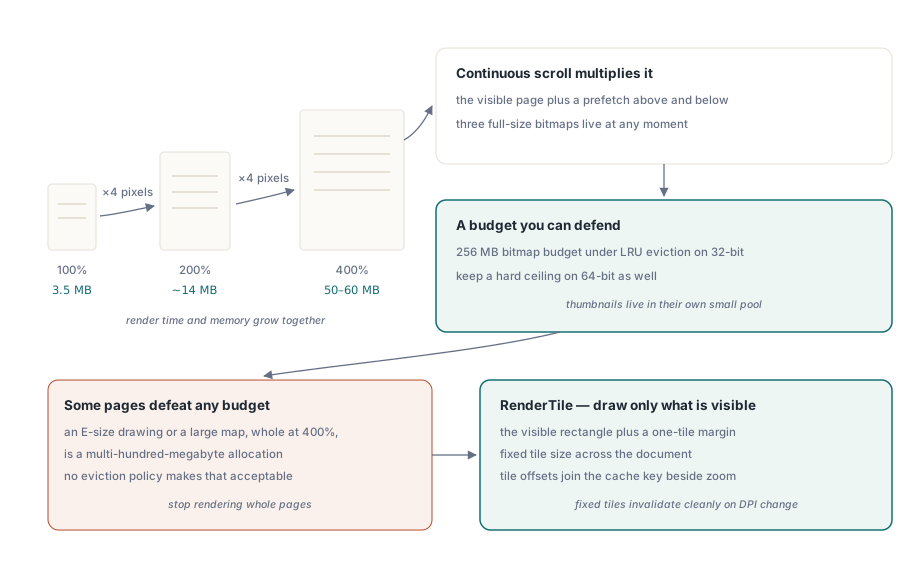
32ビットのDelphiプロセスなら、LRUで追い出す256 MBのビットマップ予算が手堅い既定値です。64ビットでは物理RAMに合わせて増やせますが、いずれにせよ固い上限は保ってください。守るべき相手は自分のプロセスの異常終了ではないからです。本当の危険は、ビューアーが建前上は動き続けたまま、マシン全体がページファイルを叩き回り、ユーザーが他のすべてが遅くなった理由を訝しむことです。固い上限は予測どおりに失敗し、上限のないキャッシュはデスクトップを道連れにして失敗します。サムネイルは別扱いに値します。1枚ずつ小さな目標サイズで一度だけ描き、LRUの論理が決して触らない別の置き場に保つのです。60 MBのフルページビットマップを縮小して120ピクセルのサムネイルを作り直すのは、切手大の絵を得る方法として考えうる限り最も無駄です
どんな予算も打ち負かす単独ページがあります。E判の設計図面や大きな地図を400%でまるごと描けば数百メガバイトの確保になり、どんな追い出し方針もそれを許容できるものにはしません。そこでの答えは、ページ全体を描くのをやめることです。RenderTileは、名目上PageWidth×PageHeightへ拡大したページの中で、ピクセル位置(Left, Top)にある領域だけをラスタライズします。ですから見えている矩形と、滑らかなパンのためにその周囲へ1タイル分の余白を足した分だけを描き、タイルの位置をズームと並べてキャッシュキーに畳み込みます。タイルの寸法は文書全体で固定してください。固定タイルならDPIの変化がグリッド全体をきれいに無効化しますが、可変タイルでは、わずかに違う倍率で描かれた領域どうしの継ぎ目が見えるのを追いかけ続けることになります
隣り合う2つの機能が、これらすべてに静かに上乗せします。グレースケールや反転といった色フィルターの処理は描画のあとに走り、そのたびにフルサイズのビットマップをもう1枚生むので、それを使うビューのページあたりの占有量は倍になります。その代償はDelphi製PDFビューアーのロービジョン向け色フィルターで扱っています。そして読み上げ中に単語を強調するビューアーは、話される単語ごとに描画済みのビューを無効化するので、強調の再描画と読み上げ速度の相互作用は見た目以上に効いてきます。これは単語単位のTTS強調で扱っています
ここで示した描画の多重定義、プログレッシブの状態コード、そしてビューアーコンポーネント自体は、PDFium Componentの製品ページで解説しています