自分のコードで組み立てたPDFフォームでTabを押すと、カーソルは本来の位置から2つ離れたフィールドに着地したり、2列目をまるごと飛ばしたり、3つ目のフィールドのあとで4つ目ではなく先頭へ戻ったりします。あなたのビューアーで請求書に記入する人は、これまで使ってきたどのWebフォームとも同じようにキーボードがフォームを歩いてくれることを期待しています。そうならないと、その人はマウスに手を伸ばし、次の入力欄を探し、そして静かに「この道具は未完成だ」と判断します。予測できるフィールド移動こそ、我慢して使われるデータ入力ビューアーと信頼されるビューアーの分かれ目であり、そしてそれはほとんどの場合、クリックの偽装でキーボード入力をまねるのではなく、正しいフォーカスAPIを使うかどうかの問題にすぎません
以下の例では、Delphi、C++Builder、Lazarus向けのPDFiumベースのVCL / LCLコンポーネントであるPDFium Componentを使います。移動はフォームビューアーが正しくやるべき3つのことのうちの1つで、残りの2つ、すなわちフォームを正しく開くことと、入力した値が実際に表示されるように保存することにこそ意外な落とし穴が潜んでいます。ですから、3つとも以下で扱います
フォームを開く:FormFill、FormType、そしてXFAという問い
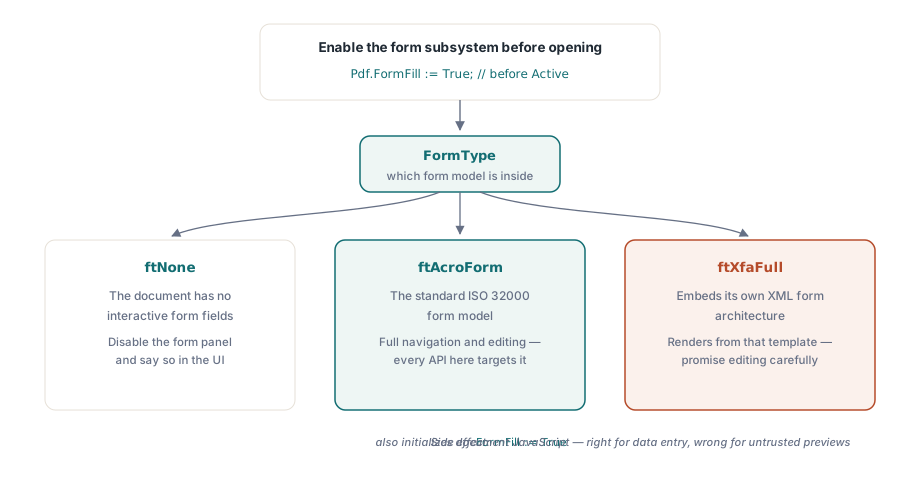
フィールドへアクセスするには、FormFillプロパティが制御するフォーム入力サブシステムを、文書を開く前に有効にしておく必要があります。有効になったら、FormTypeがどの種類のフォームに向き合っているかを教えてくれます。その答え次第で、約束できる機能の範囲が変わります:
Pdf.FileName := FormPath;
Pdf.FormFill := True;   // Activeの前に有効化する。フィールドアクセスには必須
Pdf.Active := True;

case Pdf.FormType of
  ftNone:
    DisableFormPanel('This document has no interactive form');
  ftAcroForm:
    BuildFieldList;     // フィールドの移動と編集がすべて使える
  ftXfaFull:
    ShowXfaNotice;      // XFAは自前のXMLテンプレートから描画される。
                        // フィールド編集は限定的だと考えること
end;
この分岐からは実務上の注意が2つ導かれます。AcroFormは標準のISO 32000フォームモデルで、ここに出てくるAPIはすべてこれを対象にしています。XFA文書は独自のXMLフォームアーキテクチャを埋め込んでいるので、AcroFormの手早いデモのあとで顧客にXFAの完全な編集を約束するのは、あとで後悔する類の確約です。2つ目は副作用の話です。FormFillをTrueにすると、文書のJavaScriptも初期化されます。データ入力ビューアーではそれこそが正解で、入力に合わせて合計を最新に保つのは計算スクリプトだからです。出所の分からないファイルのプレビュー窓ではまさに不正解です。安全なPDFプレビューの記事が、その取引のFormFill := False側を扱っています
ユーザーの予想どおりに着地するTabキー移動
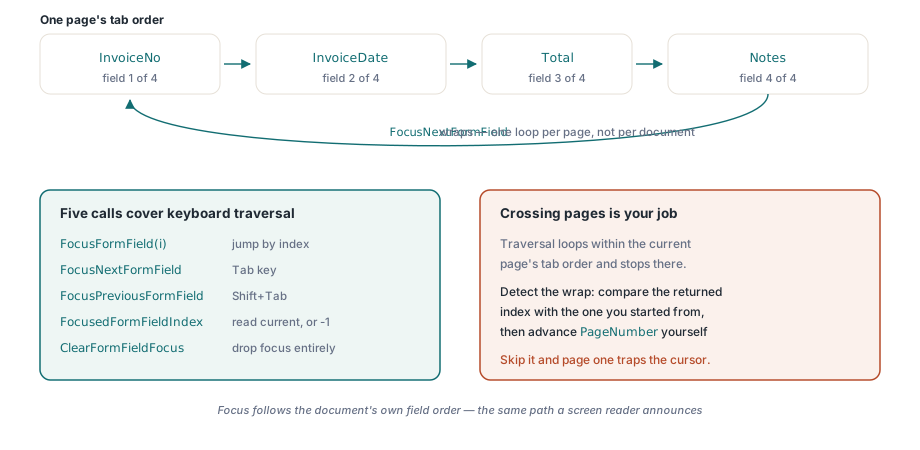
冒頭のキーボードの問題に戻りましょう。誘惑されるのは、次のウィジェットの矩形上でマウスクリックを合成してTabを偽装する方法ですが、フィールドが画面外へスクロールした瞬間や、2つのウィジェットが重なった瞬間に破綻します。フォーカスAPIは幾何の当てずっぽうなしに、フォーム自身のフォーカスを直接動かします。5つの呼び出しで足ります。添字で指定するFocusFormField、1つずつ進めるFocusNextFormFieldとFocusPreviousFormField、現在地を読むFocusedFormFieldIndex、そしてフォーカスを完全に外すClearFormFieldFocusです
procedure TFormViewer.HandleTabKey(Shift: TShiftState);
begin
  if ssShift in Shift then
    PdfView.FocusPreviousFormField
  else
    PdfView.FocusNextFormField;
  UpdateFieldStatus;  // 例: "Field 4 of 17: InvoiceDate"
end;人がつまずく振る舞いが1つだけあります。巡回です。移動は現在のページのタブ順に沿って進み、その中で輪になります。最後のフィールドを越えれば先頭へ戻るのです。どちらの移動関数も新しいフィールドの添字を返し、ページにフィールドが1つも無いときは-1を返します。この輪はページ単位であって文書単位ではありません。つまり次のページへ渡るのはライブラリではなくあなたの仕事です。返ってきた添字を出発点の添字と比べ、巡回したことに気づいたら、フォームを1つの連続した並びとして読ませたい場合は自分でPageNumberを進めてください。この確認を怠ると、2ページのフォームは黙ってカーソルを1ページ目に閉じ込めます。これもまた「Tabが壊れている」という苦情の一種です
移動は、UIの残りがそれに反応してはじめて役に立ちます。OnFormFieldEnterイベントはフォーカスが到着したときに発火し、ビューアー側ではOnFormFieldFocusChangeが新しいフィールドの添字を報告するので、脇のパネルはキーボードが今選んだものと歩調を合わせていられます。逆向きの対応づけ、つまり画面上の位置からフィールドを求めたいときは、添字付きプロパティのFormFieldAtが当たり判定を引き受け、ツールチップのプレビューやクリックして編集するパネルを支えます。この全体には、静かなアクセシビリティ上の見返りもあります。フォーカスが文書自身のフィールド順に従うので、Tabキーのために配線した経路は、スクリーンリーダーが読み上げる経路と同じものになり、追加の作業はいりません
素の添字番号ではなくフィールド名を表示するには、もう1つプロパティが必要です。FormFieldInfo[]は添字ごとにTPdfFormFieldInfoレコードを返し、フィールド名、型、フォントサイズ、チェック状態、エクスポート値、所属グループを運びます。移動リストが表示すべきはまさにこれです(「4」ではなく「Field 4 of 17: InvoiceDate」)。専用のテスト用ファイルを用意する価値があるのはラジオグループです。複数のウィジェットが1つのフィールド名を共有できるので、ウィジェットから素朴に組み立てたリストは同じグループを何度も見せ、それを読む人をみな混乱させます
入力した値が空白になる理由と、それを直す呼び出し
サポート窓口を埋めるもう1つの苦情は、行儀の悪いTabキーよりも不穏です。プログラムでフォームを入力し、顧客がそれをAcrobatで開くと、どのフィールドも空に見える、というものです。フィールドをクリックすると値がぱっと現れます。データは初めからずっとファイルの中にあります。欠けているのはデータの絵のほうで、その理由は一度理解しておく価値があります。ひとかたまりのバグを説明してくれるからです
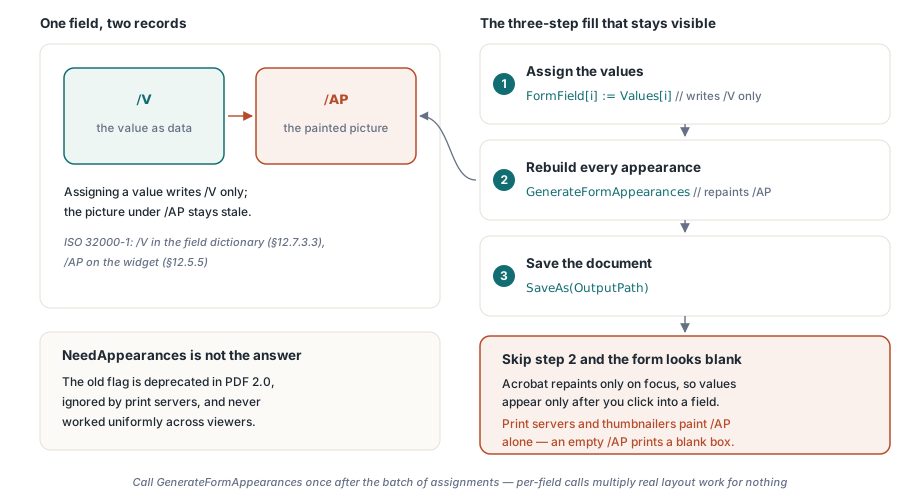
AcroFormのテキストフィールドは、その値をフィールド辞書の/Vエントリに格納します(ISO 32000-1 §12.7.3.3)。ビューアーが実際に描くのは別物で、/APの下にあるウィジェットの外観ストリーム(§12.5.5)、つまりあらかじめ描かれた小さな内容の断片です。/Vを書いて/APを放っておけば、両者は離れていきます。値はある、しかしその描かれた姿は古いか存在しないのです。Acrobatはたまたまフィールドがフォーカスを得たときにその外観を作り直すので、クリックしたときにだけ値が現れる現象はそれで全部説明がつきます。ビューアーに外観の再生成を頼む古いNeedAppearancesフラグは、一様に働いたためしがなくPDF 2.0では非推奨で、印刷サーバーやサムネイル生成器は完全に無視します。それらは/APだけを描くので、/APが空なら空の枠を印刷します
FormField[i]を通して値を代入しても、書かれるのは/Vだけです。だからフォームの入力は3段階の手順になり、開発チームが落とすのは真ん中の段です:
procedure TFormViewer.FillAndSave(const Values: array of WString;
  const OutputPath: string);
var
  i: Integer;
begin
  for i := 0 to Pdf.FormFieldCount - 1 do
    Pdf.FormField[i] := Values[i];   // 書かれるのは/Vだけ

  // /APの外観ストリームを作り直す。これが無いとフォームは
  // 各フィールドをクリックするまでAcrobatで空白に見える
  Pdf.GenerateFormAppearances;

  Pdf.SaveAs(OutputPath);
end;GenerateFormAppearancesがこの問題の解決そのものです。現在の値、フォント、寄せ方からすべてのウィジェットの外観ストリームを作り直すので、フォーカスイベントを一度も走らせない相手、たとえば印刷サーバーやサムネイル生成器でも、入力済みの状態が描かれます。呼ぶのは代入の一括処理が終わったあとに1回で、フィールドごとに1回ではありません。外観の生成は本物のレイアウト作業をするので、大きなフォームでフィールドごとに呼べば、その手間が意味もなく何倍にもなります
外観の再生成は、フォントと配置が自己主張してくる瞬間でもあり、そこから二次的な驚きが生まれます。新しいストリームは、フィールドのフォント、サイズ、寄せ方を使って各値をウィジェットの矩形の中にレイアウトします。あなたのテスト用フォームでは余裕に収まっていた値が、同じフィールドがもっと狭い顧客の手元の一部では切れたり縮んだりします。自動サイズのフィールド(フォントサイズ0)は文字を縮めて収め、固定サイズのフィールドはただ切り落とします。どちらも規格上は正しく、あるフォームがどちらをするのかを知る正直な方法は、自分が書いた文字列ではなく再生成された出力を見ることだけです。枠の端で文字が切れているという報告が来たら、原因はほぼ必ずこれです
検証は、後回しの雑務ではなく仕事の仕上げの一部として扱ってください。保存したファイルをAcrobatで開き、どのフィールドにも触れないうちに値が見えていることを確かめます。次に、フォームの論理を完全に無視する別のビューアーからPDFまたは画像へ印刷し、その経路でも値が生き残ることを確かめます。この2つの確認があれば、/Vと/APのずれのあらゆる変種を捕まえられます
デモは通るのに現場で落ちるフィールドの構成
きれいなデモ用フォームは、顧客のファイルには潜んでいる一連の端の場合を隠します。そのうちの4つが「私の環境では動いた」という報告の大半を占めます
- チェックボックスのエクスポート値。「オン」の状態は必ずしも
Yesではありません。フォームは自前のエクスポート値を定義してよいので、違う文字列を書くと、コードは設定したつもりでいるのに枠は見た目には未チェックのままになります。決めつけずに、エクスポート値はFormFieldInfo[]から読み取ってください - 名前を共有するラジオグループ。1つのフィールドに複数のウィジェットです。どのウィジェットが選択済みに見えるかは代入した値が決めるので、1つの名前が1つの矩形に対応すると思い込んだUIコードは、間違ったボタンにフォーカスの輪を描く羽目になります
- 計算フィールド。文書のJavaScriptが維持する合計は、フィールドのイベントに応じて更新されます。そうしたイベントを迂回するプログラム的な入力は、再計算を起こすか、計算フィールドを直接上書きするかのどちらかをしなければなりません。明細と合計が食い違うフォームは、どちらの手当てよりも悪い結果です
- 隠れている必須フィールド。条件付きのフォームは、必須の印が付いたままのフィールドを隠します。検証が可視性に従うのか、それとも素の必須フラグに従うのかを先に決め、その決定をサポートが見つけられる場所に書き残しておいてください
痛い目を見る前に片付けておく価値のある区別が1つあります。外観の生成は平坦化ではありません。GenerateFormAppearancesはフィールドを編集可能なまま残しつつ、値をどこでも見えるようにします。平坦化は外観を静的なページ内容へ焼き付け、対話性を永久に取り去ります。これは保存用の控えには正しく、次の人がまだ記入するフォームには誤りです。FormTypeがftAcroFormではなくftXfaFullを報告するなら、文書は自前のXMLテンプレートから描画されるので、いずれにせよここで扱った編集面はきれいには当てはまりません。その場合を検出してユーザーに伝え、限界を自力で見つけさせないようにしましょう
ここで示したフォーム入力サブシステム、フォーカス移動、外観の生成は、Delphi、C++Builder、Lazarus / FPC向けのPDFium Componentの一部です。あなたのビューアーがフォームのデータと並んで校閲者の書き込みも扱うなら、注釈レビューの記事が隣接するそのモデルを扱っています