信頼できないPDFを自分のアプリケーションの中でプレビューすることは、実行に関する判断です。そして肝心なのはビューアーの外枠ではなく、その枠が自分から何を拒むかです。ファイルをディスクへ書かないこと。そのリンクにシェルを呼ばせないこと。その添付にパスを渡さないこと。敵対的な文書がもたらす損害の大半は、エンジンの脆弱性ではなく、ビューアーが攻撃者の与えた入力に対してごく当たり前のことをしてしまうところから生まれます。NTLM資格情報を漏らすUNC共有へのfile://リンクを開く、一時ディレクトリに置いた控えを残す、埋め込まれたペイロードをファイル名の文字列が指すどこかへ複写する、といった具合です。PDFium ComponentはDelphi、C++Builder、Lazarus向けのソースコード付きPDFビューアーで、関係するスイッチを手の届くところに置いています。スクリプトを殺す読み込み時のフラグ、拒否できるリンククリックのイベント、自前のコードを通る添付へのアクセス、そして読み取れる権限ビットです。以下の順序は、文書が届いた瞬間からユーザーがその中の何かをクリックする瞬間までを追います
プレビュー枠の脅威モデル
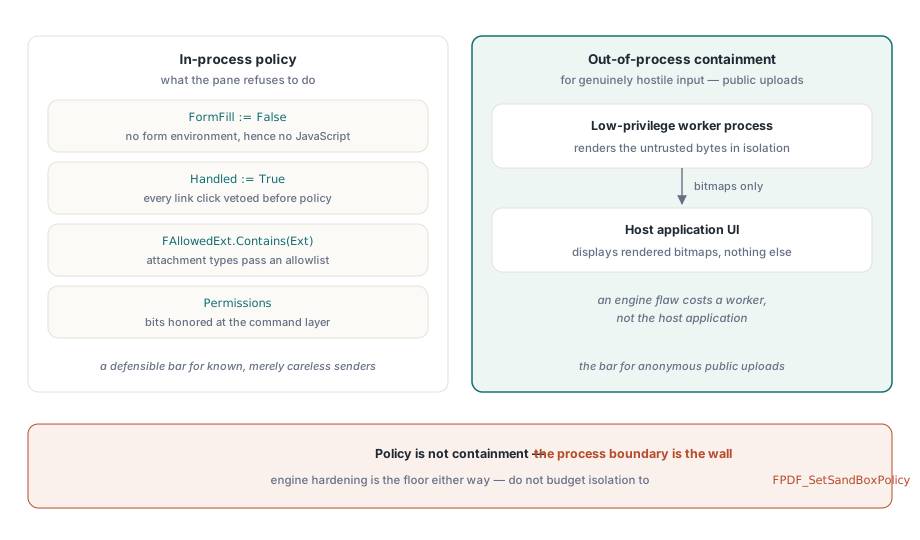
「安全なプレビュー」が何を買ってくれるのかについては正直でいましょう。何をしようとレンダラーは信頼できないバイト列を解析しますし、エンジン自身の堅牢化はあなたが立っている床です。その床より上はすべてアプリケーションの方針です。スクリプトを初期化するか、リンククリックが何をするか、埋め込みファイルがディスクへ届けるか、クリップボードとプリンターが扉なのか壁なのか。早めに見切りをつけるべきものが1つあります。エンジンのFPDF_SetSandBoxPolicyスイッチです。エンジンの制限はたいていコンパイル時に組み込まれており、このスイッチが実際に変えることはわずかで、隔離の物語の一部をこれに任せたところで、何かをやった気になるだけです。入力が本当に敵対的なとき、たとえば公開アップロード窓口なら、本物の隔離は権限の低い別プロセスで描画し、UIへはビットマップだけを渡すことだけです。プロセス内のフラグは方針であって、封じ込めではありません
クリックが一度も触れないからこそ忘れやすい面が2つあります。1つ目は一時ファイルです。あなたの処理系がプレビューの前に受信文書をディスクへ置くなら、その控えは何かが確実に消さない限りセッションより長く生き残ります。そして「一時ディレクトリから復元できる」ファイルは、枠そのものが課したあらゆる制御を静かに打ち破っています。代わりにTPdfStreamAdapterを通してメモリから読み込み、敵対的なバイト列に自分のパスを与えないでください。2つ目はクリップボードです。選択して複写できるプレビューは、1画面ずつではあれ、すでに文書を持ち出せるようにしてしまっており、リンクの横取りではそれを捕まえられません
JavaScriptはUIではなく読み込み時に殺す
PDFium Componentの文書JavaScriptは、フォーム入力環境と一緒にしか初期化されません。ですからFormFill := Falseで読み込めば、症状を抑えるのではなく根元でスクリプトを無効にできます:
procedure TPreviewPane.LoadUntrusted(const FilePath: string);
begin
  Pdf.FileName := FilePath;
  Pdf.FormFill := False;     // フォーム環境なし、ゆえにJavaScriptエンジンもなし
  Pdf.Active := True;

  FPermissions := Pdf.Permissions;   // 素のフラグ語。全ビットが立つ = 制限なし
end;この取引は本物で、仕様書に書くべきものです。フォーム入力を無効にすると、真っ当なAcroFormの操作と検証スクリプトも消えます。フィールドは最後に保存された外観で描かれますが、編集はできません。プレビュー枠ではたいていそれが正しい判断です。プレビューとは見ることであって、記入することではないからです。しかし同じウィンドウが信頼できる社内文書の記入面も兼ねるなら、答えは、敵対的な場合には緩すぎ信頼できる場合には厳しすぎる妥協設定を持つ1本の経路ではなく、明示的な信頼判断を挟んだ2本の読み込み経路です。その分岐の記入側にも固有の罠があり、フォームフィールドの移動と外観の再生成で扱っています
リンク:既定のハンドラーはシェルを呼ぶ
放っておけば、リンクのクリックはまっすぐオペレーティングシステムへ渡ります。ビューアーの既定のLinkOptionsにはloAutoOpenURIが含まれており、これこそがfile://からUNC共有への漏洩が起きるのを待っている状態です。関門になるイベントは2つ、ページ本文中で検出されたURL向けのOnWebLinkClickと、URIや起動アクションを運ぶリンク注釈向けのOnAnnotationLinkClickです。何かを判断する前に、どちらでも無条件にHandled := Trueを設定し、そのうえで方針が許すものだけを改めて通してください。2枚目の層として、敵対的な入力に対してはLinkOptionsからloAutoOpenURIを外し、既定では無効のloAutoLaunchが複写された設定から忍び込まないようにします:

procedure TPreviewPane.PdfViewWebLinkClick(Sender: TObject;
  const Url: WString; var Handled: Boolean);
begin
  Handled := True;   // 既定のシェル動作へ落ちることは決してない

  if (AnsiStartsText('https://', Url) or AnsiStartsText('http://', Url))
    and HostIsAllowed(Url) then
    OpenInBrowser(Url)
  else
    FAudit.LogBlockedLink(FDocumentId, Url);
end;これが本当に持ちこたえるかを決める細部が2つあります。第一に、スキームの検査は解析より前に素の文字列への前方一致で行わなければなりません。file://、UNCパス、風変わりなスキームこそ、素朴なURL解析器を落とし、あるいは正規化に熱心すぎる解析器をすり抜ける値だからです。第二に、遮断はすべて文書の識別子を添えて記録してください。遮断されたfile://リンクが数件なら背景の雑音ですが、短い期間に多数の受信文書へまたがって噴き出したなら、それはあなたのセキュリティ担当が他所からではなくあなたから聞きたい事案です
添付:拡張子の方針と、あなたが選んでいないファイル名
PDFは容れ物であり、AttachmentCountとAttachmentName[]プロパティが、何かがディスクに触れる前に何を運んでいるかを教えてくれます。ここで効く制御は2つあり、そのうち明白なのは1つだけです。明白なほうは種類の方針、すなわち書き出してよい拡張子の許可リストです。見えにくいほうは、添付の名前が攻撃者の制御下にあるデータだという、それだけの事実です。..\..\Startup\update.exeのような埋め込み名は、不注意な保存を、Windowsがログイン時に実行するフォルダーへ実行ファイルを落とすパストラバーサルに変えます。コンポーネントはAttachment[]を通してペイロードをバイト列として渡し、パスの選択はあなたのコードに委ねます。ですからそのパスは、無害化した基底名から組み立て、埋め込まれた素の文字列からは決して作らないでください:
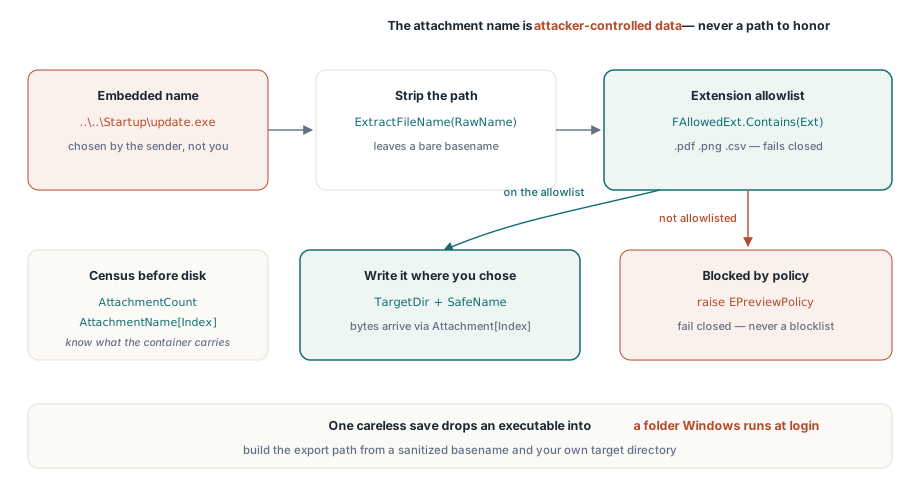
procedure TPreviewPane.ExportAttachment(Index: Integer; const TargetDir: string);
var
  RawName, SafeName, Ext: string;
  Data: TBytes;
begin
  RawName := string(Pdf.AttachmentName[Index]);
  SafeName := ExtractFileName(RawName);    // パス成分をすべて取り除く
  Ext := LowerCase(ExtractFileExt(SafeName));

  if not FAllowedExt.Contains(Ext) then    // 拒否リストではなく許可リスト
    raise EPreviewPolicy.CreateFmt('Attachment type %s blocked by policy', [Ext]);

  Data := Pdf.Attachment[Index];           // 埋め込みペイロードを素のバイト列で
  TFile.WriteAllBytes(
    IncludeTrailingPathDelimiter(TargetDir) + SafeName, Data);
end;許可リストの向きを選んでください。「危険な」拡張子の拒否リストは、誰かが聞いたこともない拡張子を武器に変えた日に負ける競走です。.pdf、.png、.csvの許可リストは閉じる側に倒れます
暗号化の権限が実際に約束していること
ISO 32000-1の標準セキュリティハンドラーは、印刷、内容の複写、変更に関する権限フラグを符号化しており、PermissionsとUserPermissionsプロパティが、文書を開いたあとそれらを素のビットマスクとして見せます。ISO 32000-1の表22がビットを定義しており、暗号化されていないファイルは全ビットが立った状態を報告します。それらを読み、コマンド層で尊重してください。ただし、それが何であるかははっきりさせておくこと。オーナーパスワードと空のユーザーパスワードで暗号化された文書では、内容は開いた時点で完全に復号され、フラグは強制の仕組みではなく準拠したビューアーへの依頼にすぎません。ここから2つの帰結が、互いに逆向きに導かれます。受け取った文書のセキュリティ上の性質として権限フラグをユーザーに示してはいけません。そういうものではないからです。同時に、一般的な複写(ビット5)が拒否されている場合でも、アクセシビリティのための抽出ビット(ビット10)は尊重してください。権限モデルではスクリーンリーダーのアクセスが意図的に別立てで切り出されており、「複写は禁止だから」と取り上げるのは、何のセキュリティ上の得もないまま支援技術を壊す行いです
拒否された操作は、ツールバーのボタンを隠すのではなくコマンドの水準で強制してください。Ctrl+C、コンテキストメニュー、ドラッグ選択はどれもツールバーを迂回しますが、複写コマンドの内側に置いた1つの権限検査は何にも迂回されません
ユーザーパスワードを本当に必要とする文書では、Active := Trueの前にPasswordを代入し、その値を秘密として扱ってください。セッションごとに資格情報の保管庫から取り出し、ログやクラッシュ報告から遠ざけ、文書の隣に決して残さないことです。「便利だから」とパスワードをキャッシュするプレビュー枠は、その名にふさわしい保護を何一つ備えないまま、静かにパスワードデータベースになっています
印刷は、複写の規則が着地した先を受け継ぐのではなく、それ自体として決めるに値します。紙の印刷物は定義からして監査できませんが、印刷を全面的に禁じるとユーザーはスクリーンショットへ向かいがちで、そちらはあらゆる軸でもっと悪いものです。よくある中間解は、印刷を許したうえで各ページにユーザーの識別情報と時刻を刻み、それを印刷コマンドの内側で強制することです。ただし期待は正しく持ってください。透かしは抑止と帰属であって、防止ではありません
受け入れ工程がすでに教えてくれているはずのこと
プレビュー枠は、ファイルが調書付きで現れるとより良い判断ができます。暗号化の有無、JavaScriptの有無、添付の点検結果、フォームの種類です。その検査の工程はビューアーの上流に属し、PDF受け入れ審査ワークベンチの構築で示した型は、プレビュー方針が消費したいフラグをまさに生み出します。受け入れ工程が危険と印を付けたファイルは自動的に堅い経路で開き、通常の文書は便利さを保ちます。2つの段階は2枚の設定画面ではなく1つの共有された方針オブジェクトで結んでください。設定画面を2枚に分ければ、最初にどれほど注意深く書いても2度目のリリースまでには食い違います
プロセス内とプロセス外の境目がどこに落ちるかは、誰があなたにファイルを送ってくるかで決まります。通常の業務上の受け入れなら、文書を送ってくる人は既知で、せいぜい不注意なだけですから、スクリプトを切りリンクを横取りしたプロセス内プレビューは擁護できる水準です。匿名の公開アップロードではそうではなく、プロセス内でフラグをいくら立てても水準には届きません。そちらは権限の低い別ワーカーで描画してUIへビットマップを渡し、エンジンの欠陥がホストアプリケーションではなくワーカー1つの損失で済むようにしてください。この分岐は意識して決め、どの取り込み経路がどちらの側に入るかを書き残しておくこと。読み違えたときの代償は左右で釣り合っていないからです
ライセンス、セキュリティに関わるAPI面、そして堅牢化したビューアーのデモは製品ページにあります:PDFium Component