PDF の注釈は、ページに描かれたマークではなく、ページに紐づけられた辞書です。ISO 32000-1 §12.5 はおよそ 24 のサブタイプを定義しており、それぞれが /Subtype、ページ座標系の矩形、フラグの集合、そして通常はビューアが実際に描画する内容を決定する外観ストリームを持っています。これらのサブタイプは、文書をレビューする人にとってすべてが同じ意味を持つわけではありません。ハイライトとインクストロークはコメントです。リンクはナビゲーションです。ポップアップは、付箋をクリックしたときに開く小さなウィンドウであり、それ自体独立したオブジェクトとして保存され、親から指し示されます。返信は、in-reply-to エントリを通じて自分が応答しているコメントを参照する、完全な Text 注釈です。したがって、ページレベルの注釈配列は、レビューアのコメントリストではありません。それはコメントと、それらをつなぐ配管、そしてレビューアなら誰もコメントとは呼ばないいくつかのものを含んだ、ただの平坦な袋です。その配列をコメントリストとして扱うパネルは、顧客が使う他のあらゆるビューアと食い違うことになります
Delphi、C++Builder、Lazarus 向けの PDFium ベースの VCL/LCL コンポーネントである PDFium Component の上に注釈レビューワークフローを構築するということは、生の配列と人間の視点との間のこのギャップが問題を引き起こす箇所、すなわちカウント、インデックス付け、エンジンがすでに凍結したマークの再着色、幽霊を残さない削除、そして自分自身のマークの追加に集中することを意味します
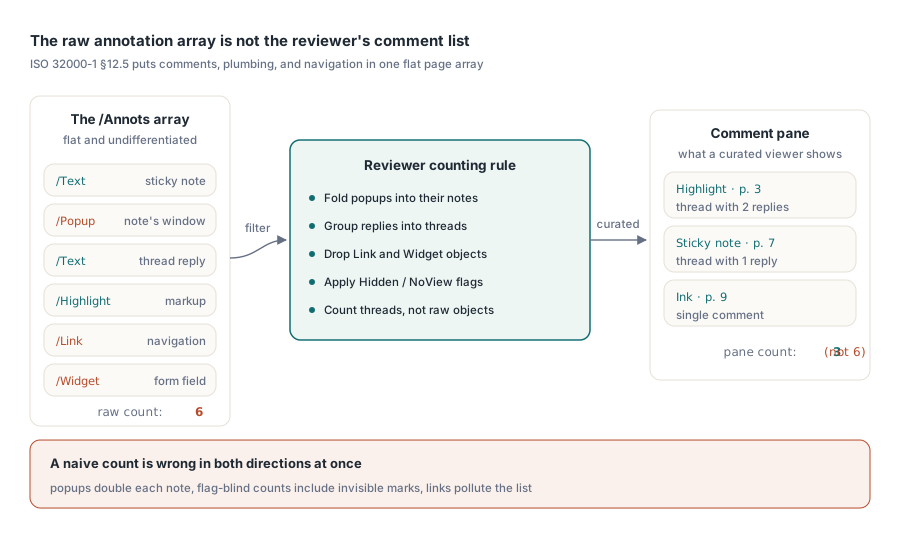
なぜあなたのカウントが Acrobat のコメントペインと決して一致しないのか
マークアップされた契約書を、あなたのビューアと Acrobat で並べて開いても、合計はめったに一致しません。Acrobat は精選されたビューを示します。マークアップは返信スレッドにグループ化され、ポップアップはそれが属するノートに折りたたまれ、リンクとフォームウィジェットは除外されます。生の配列はそれらすべてを未分化のまま保持しているため、素朴なカウントは、ある面では過大に、別の面では過小に、同時になってしまいます
ポップアップは合計を膨らませます。各付箋は独立した Popup オブジェクトを伴っており、両方をカウントするとそのノートを二重に数えることになるからです。返信は、可視のマークだけをフィルタする場合には合計を減らします。返信は、誰かがスレッドを展開するまで何も描画されない Text 注釈であるため、それを落とすと議論そのものが失われます。Hidden フラグと NoView フラグは、注釈を配列から取り除くことなく画面から外すため、フラグを見ないカウントは、ユーザーが見ることのできないマークまで含んでしまいます。Link 注釈はコメントと同じ配列に座っていますが、カウントにもリストにも属しません。ループを書く前にカウントのルールを決め、その決定を書き残しておいてください。「なぜあなたのパネルは Acrobat と違う数を表示するのか」は、レビュー機能が最初に受け取るチケットだからです
すべてを一度だけインデックス化し、二度とページを再パースしない
以下のすべてを導く 1 つの設計ルールがあります。作成者、タイプ、ページによるフィルタリングは、決してページオブジェクトを再パースしてはならない、というものです。マークアップの多い 300 ページの文書では、ドロップダウンが変わるたびに再パースすると、パネルは数秒単位で処理落ちするものになってしまいます。このコンポーネントは、現在読み込まれているページに範囲を絞った AnnotationCount とインデックス付きの Annotation[] プロパティを公開しており、それらが返す TPdfAnnotation レコードは、リストビューに必要なもの、Subtype、Flags、Color、Rectangle、ContentsText、AuthorText を持っています。正しいやり方は、開いたときに一度だけすべてのページを掃引し、自分自身のフラットなインデックスを保持することです
procedure TReviewPanel.BuildIndex;
var
  PageNo, i: Integer;
  A: TPdfAnnotation;
begin
  FItems.Clear;
  for PageNo := 1 to Pdf.PageCount do
  begin
    Pdf.PageNumber := PageNo;
    for i := 0 to Pdf.AnnotationCount - 1 do
    begin
      A := Pdf.Annotation[i];
      // レビューアに関係のあるサブタイプだけを残す。ページと
      // インデックスの組を記録する。以降のすべての編集はこれで参照されるため
      if A.Subtype in [anText, anHighlight, anInk] then
        FItems.Add(TReviewItem.Create(PageNo, i,
          A.AuthorText, A.ContentsText, A.Rectangle, A.Color));
    end;
  end;
end;
強調しておく価値のある組は (PageNo, i) です。以降のあらゆる変更は、再着色であれ削除であれ、ページ番号とアノテーションインデックスの組によって参照され、そのインデックスは脆いものです。ある注釈を削除すると、そのページ上でそれ以降のすべての番号が振り直されます。したがって、インデックス番号をその場でパッチするのではなく、削除のたびに影響を受けたページのエントリを再構築するように計画してください。再構築のコストは 1 ミリ秒です。それに対して、古びたインデックスは間違ったレビューアのコメントを削除してしまい、これは機能全体への信頼を蝕む類のバグです
あなたの最初のリリースが返信を表示せずカウントするだけであっても、スレッド化はインデックス内に居場所を与えるに値します。ページを開いている間に、アイテムを親参照でグループ化しておけば、パネルは後で Acrobat のようにスレッドを折りたためます。そのグルーピングをスクロール中に遅延して再構築すると、すでにコストを払って一度パースしたページを再び開くことになり、一度だけインデックス化するという発想全体が台無しになります。ジオメトリも同じ規律を求めます。各レコードの Rectangle はページ空間であり、それをビュー座標へ変換する処理は、コードのあちこちに散らばらせるのではなく、1 つの共有ヘルパーに置くべきです。選択、ヒットテスト、描画がそれぞれ独自のズームと回転の計算を発明すると、パネルには座標のバグが育ちます。この 3 つすべてを 1 つの変換に通せば、ハイライトと、リスト上のその行と、そのクリックターゲットは同じインクにピン留めされたままになります
マークアップの再着色と外観ストリームによる拒否権
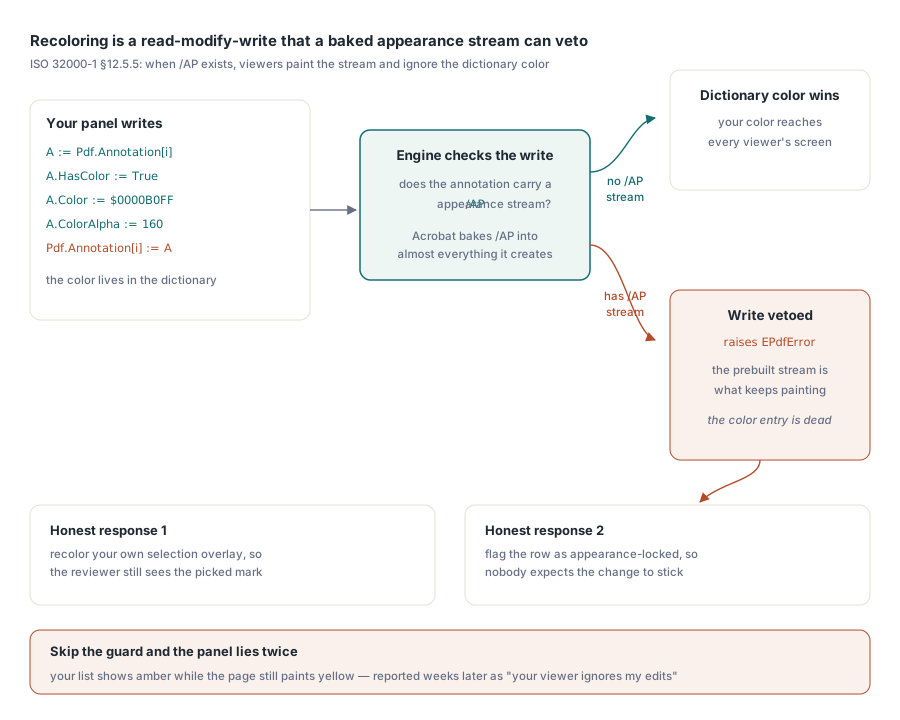
ハイライトを黄色からアンバーに変えるのは、1 行で済む話に聞こえますし、実際そうであることもあります。落とし穴は ISO 32000-1 §12.5.5 です。注釈が /AP 外観ストリームを伴っている場合、規格に準拠したビューアはその事前構築済みのストリームを描画し、辞書内の色エントリを死んだメタデータとして扱います。Acrobat は自分が作成するほぼすべてのものに対して外観ストリームを書き込むため、顧客から届くほとんどの注釈はすでにこの状態にあり、あなたが自信を持って設定した色は決して画面には届きません。再着色は Annotation[] プロパティを通じた読み取り・変更・書き込みであり、このコンポーネントはその衝突について正直です。エンジンが、焼き込まれた外観を辞書の色で上書きすることを拒否すると、その書き込みは EPdfError を送出します
A := Pdf.Annotation[Item.Index];
A.HasColor := True;
A.Color := $0000B0FF;       // アンバー
A.ColorAlpha := 160;
try
  Pdf.Annotation[Item.Index] := A;
except
  on EPdfError do
  begin
    // この注釈はレンダー済みの /AP ストリームを持っている。辞書側の
    // 色だけではビューアの描画内容を変えられない
    Item.AppearanceLocked := True;
    StatusBar.SimpleText := 'Color is fixed by the annotation appearance';
  end;
end;
この例外は毎回捕捉し、失敗ではなく情報として扱ってください。このガードを省くと、あなたのパネルは自分のリストの中では涼しい顔でアンバーを表示する一方、ページは黄色を描き続けます。ユーザーは数週間後にそれを「あなたのビューアは私の編集を無視する」として報告してきて、あなたはたまたま外観ストリームを持たないファイル上でそれを再現できず、午後を丸々費やすことになります。外観がロックされていると分かったら、正直な対応は 2 つあります。注釈そのものではなく自分自身の選択オーバーレイを再着色し、少なくともレビューアが選んだハイライトを見えるようにするか、行を外観ロック済みとしてマークし、誰もその変更が定着するとは期待しないようにするかです
幽霊を残さずに注釈を削除する
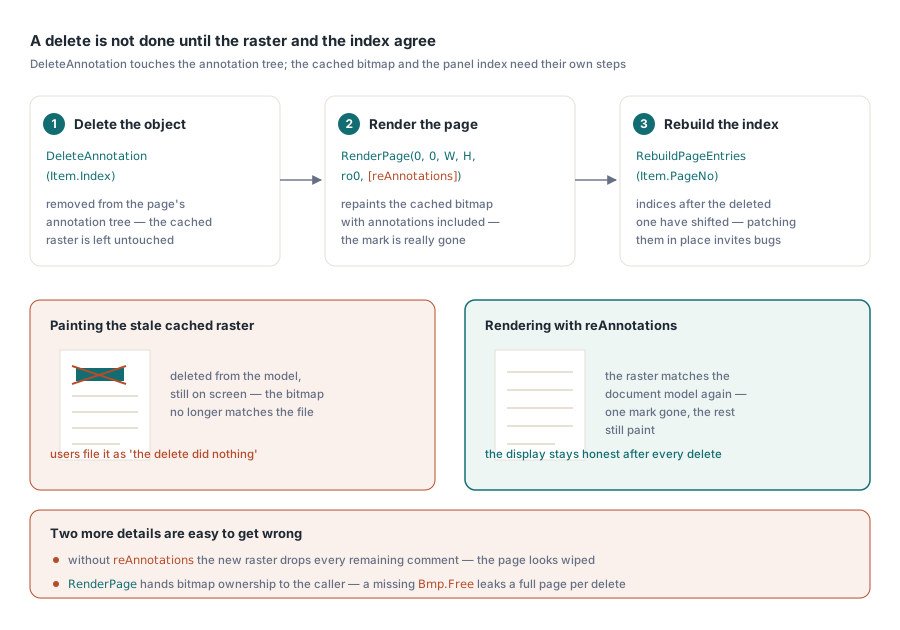
DeleteAnnotation は現在のページの注釈ツリーからそのオブジェクトを取り除きますが、キャッシュされたページのラスターにはそのまま触れません。呼び出しの直後に描画すると、削除したはずのハイライトはまだ画面に残っており、その背後にある文書モデルとはもう一致しないビットマップの中に座り続けます。修正方法は、再レンダリングを、呼び出し側が忘れるかもしれないステップとしてではなく、削除の一部として扱うことです
Pdf.PageNumber := Item.PageNo;
Pdf.DeleteAnnotation(Item.Index);   // 失敗時に EPdfError を送出する
Bmp := Pdf.RenderPage(0, 0, ViewWidth, ViewHeight, ro0, [reAnnotations]);
try
  PaintPageBitmap(Bmp);
finally
  Bmp.Free;  // RenderPage はビットマップの所有権を呼び出し側に渡す
end;
RebuildPageEntries(Item.PageNo);  // Item.Index より後のインデックスはずれている
このブロックには、間違えやすい細部が 2 つあります。reAnnotations オプションは必ず指定しなければなりません。さもないと、新しいラスターは残りのすべての注釈を落としてしまい、ページは 1 つのマークではなくコメント集合全体を消し去ったように見えます。そして Bmp.Free は省略できません。関数形式の RenderPage オーバーロードはビットマップの所有権を呼び出し側に渡すため、Free を忘れると削除のたびにページ全体のラスターがリークし、長い文書を扱うレビューアは数分のうちにそれを実際のメモリ圧力に変えてしまいます
自分自身の UI からレビューアのマークを追加する
注釈の作成は CreateAnnotation を通じて行われ、これは埋められた TPdfAnnotation レコード(サブタイプ、矩形、色、内容、作成者)を受け取り、現在のページに付加します。付箋、サブタイプ anText は簡単なケースです。位置、内容、作成者を設定すればそれで完了です。人がつまずくのはインク注釈です。レコードの矩形は描画の境界を示すだけで、ストローク自体は点の配列であり、エンジンのインクストローク呼び出しである FPDFAnnot_AddInkStroke に FS_POINTF データを与えて、マウスやペンからの入力を 1 ストロークずつ捉えて別途アタッチしなければなりません。矩形だけからインク注釈を構築すると、空白として描画される空の落書きができあがり、これはエンジンのバグのように見えますが、実際には半分しか完成していない注釈です
作成者ポリシーも同じ流れで決めておいてください。あなたの UI が作成するすべてのマークは、一貫した AuthorText を持つべきです。来月あなたが作るレビューアフィルタは、今日コメントに刻む名前の質に完全に左右されるからです。空白または一貫性のない作成者文字列は、すべてのファイルを開き直さない限り、後から修復することはできません
レビューをビューアの外へ持ち出す
レビューデータは、プロジェクトリーダーがファイルを開かずに読めるサマリーや、トラッキングシートに供給する CSV として、ビューアから持ち出せるようになって初めてその存在価値を発揮します。すでに構築したインデックスからエクスポートし、新たなパースからは決して行わず、各マークを参照し直すための安定した方法を選んでください。ページ番号と注釈の矩形を組み合わせたものは、配列インデックスでは生き延びられない往復を生き延びます。次の削除がインデックスを静かに振り直し、あなたの CSV が間違ったコメントを指し始めてしまうからです
保持する価値のある行には、ページ、サブタイプ、作成者、ファイルが記録している場合は作成タイムスタンプ、内容のテキスト、そして PDF が提供するものではなく自分で管理するステータス列が含まれます。同じインデックス化のパスは、文書がチームの外から届いたときの取り込み時にも、誰かがレビューする前にその中身を知りたいときに、より早い段階で役立ちます。PDF 取り込みワークベンチの記事はそのトリアージを扱っており、フォームフィールドナビゲーションは鏡写しの問題、すなわちコメントではなくデータを収集するために作られた文書のレビューを扱っています
配列があなたに見せてくれない 1 つのケース
見た目にはあなたのコードの欠陥のように見えて実はそうではない、フラグを立てておく価値のある失敗モードが 1 つあります。顧客がページ全体に目に見えるハイライトがあると報告してくるのに、あなたのパネルには何もリストされず、AnnotationCount は 0 を返します。よくある説明は、そのマークがどこか上流でフラット化されたというものです。フラット化は注釈の外観を通常のページコンテンツに焼き込むため、ハイライトはページグラフィックスの一部になり、注釈オブジェクトとしては完全に存在しなくなります。注釈 API が列挙、再着色、削除できるものは何も残っていません。描画されたマークアップが見えるのにカウントがゼロであるときは、列挙ループの中にバグを探すのをやめて、そのファイルがどう生成されたのかを問うてください
ここで扱った注釈の表面、列挙と作成から再着色、削除、そして表示の正しさを保つレンダーオプションまで、すべては Delphi、C++Builder、Lazarus/FPC 向けの PDFium Component に同梱されています