PDF 取り込みレビューワークベンチとは、1 つだけ仕事を持つ小さなプログラムです。下流の何かが触れることを許される前に、すべてのファイルを調べることです。その仕事を果たすには、いくつかの機能を 1 パスに組み合わせる必要があります。ファイルを開き(信頼はせずに)、ファイルが自分自身について主張する内容を読み取り、素朴な抽出器を惑わせたり攻撃を運んだりするコンテンツを探し、そもそも抽出可能なテキストがあるかどうかを判断し、そして見つけた内容に基づいて文書をキューへルーティングします。検査を省くと、失敗は静かに起こります。XFA フォームを包んだ所有者パスワードで暗号化された PDF は、テキスト抽出器を空文字列のまま通過し、白紙の文書としてインデックスされ、下流の誰かが読まれることのなかったコンテンツを探しに行くまで、誰も気づきません。PDFium Component は、Delphi、C++Builder、Lazarus 向けのソースコード付き VCL/LCL ビューア兼検査ライブラリであり、このワークベンチが必要とする内観の呼び出しを公開しています。以下の節では、どの呼び出しがどの問いに答えるか、そして自明な呼び出しが自信たっぷりの誤答を返す 2 つの場所を歩きます
ファイルをルーティングする前に答えるべき 5 つの問い
グリッドとサムネイル列を取り除くと、取り込みトリアージは 5 つの問いに帰着します:
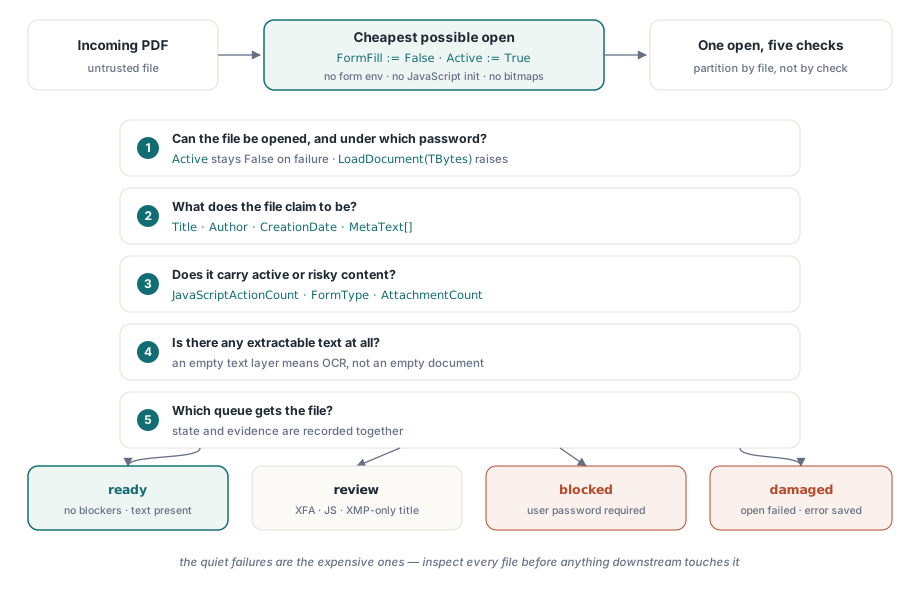
- ファイルはそもそも開けるのか、そしてどのパスワードの下でか
- それは何だと自称しているのか:タイトル、作成者、作成日
- JavaScript、XFA フォーム、埋め込みファイルのような、能動的あるいは危険なコンテンツを運んでいるか
- 抽出可能なテキストはあるか、それとも OCR 行きのスキャンか
- それらすべてを踏まえて、どのキューに入れるのか:ストレート処理、手動レビュー、それとも隔離か
各問いは、PDFium Component の 1 つか 2 つの呼び出しに対応します。それらの対応のうち 2 つには鋭い角があり、私が本番でデバッグを迫られた誤ルーティングファイルの大半はそこに起因します。文書のメタデータは食い違える可能性のある 2 つの場所に存在し、暗号化は必ずしも文書が開かれるのを止めません
安く開く:フォームフィルなし、レンダリング 0 ページ
トリアージは、可能な限り安価なオープンであるべきです。Active := True の前に FormFill := False を設定すると、フォームフィル環境全体をスキップするようコンポーネントに指示します。これでロード時間が縮み、さらに(出所不明のファイルにとって同じくらい重要な点として)ドキュメントレベルの JavaScript が初期化されるのを防ぎます。以下で使う検査プロパティのどれもページのレンダリングを必要としないため、トリアージパスは 1 枚のビットマップも生成せずに済みます
procedure InspectIncoming(const IncomingPath: string; var Rec: TIntakeRecord);
var
  Pdf: TPdf;
begin
  Pdf := TPdf.Create(nil);
  try
    Pdf.FileName := IncomingPath;
    Pdf.FormFill := False;     // フォーム環境なし、JavaScript も初期化しない
    Pdf.Active := True;        // 失敗は無音:Active は単に False のまま

    if not Pdf.Active then
    begin
      Rec.OpenFailed := True;  // 破損ファイルかユーザーパスワードによるロック
      Exit;                    // finally ブロックは引き続き実行される
    end;

    Rec.PageCount := Pdf.PageCount;
    CollectIdentity(Pdf, IncomingPath, Rec);
    CollectRiskSignals(Pdf, Rec);
  finally
    Pdf.Active := False;
    Pdf.Free;                  // 不正な形式のファイルでもインスタンスを漏らさない
  end;
end;
代入の後のチェックは省略可能ではなく、しかも理由があって例外ハンドラーではなくチェックになっています。エンジンがファイルをロードできないとき、コンポーネントは内部の EPdfError を飲み込み、それを伝播する代わりに Active を False のままにします。例外を待つコードは、開かれたことのない文書から PageCount を平然と読み取ることになります。拒否ワークフローがエンジンの実際のエラーテキストを必要とするなら、ファイルをバイト配列へ読み込んで、TBytes を受け取る LoadDocument のオーバーロードを呼び出してください。その経路はパスワードの場合を含め、メッセージ付きの EPdfError を送出します。try..finally にも今なお存在価値があります。取り込みサービスは数週間無人で動き続け、後のどんな例外も、TPdf インスタンスを漏らしたり、再試行パスがつまずくロックを握ったままにしたりしてはなりません
スループットがボトルネックになることはまれです。フォームフィルを無効にしてレンダリングしなければ、トリアージのオープンは I/O 支配になり、単一のワーカーがローカルディスクから毎秒数ファイルを余裕を持って検査します。取り込み量が本当に 1 ワーカーを上回るようになったら、チェック単位ではなくファイル単位で仕事を分割してください。5 つの問いは 1 回のオープンを共有しており、プロセス間で分割すると、最も高価なステップを償却するどころか倍加させることになります
メタデータは 2 つの場所に存在し、それらは食い違う
ISO 32000-1 は文書メタデータの 2 つの居場所を定義しています。文書情報辞書(条項 14.3.3)と、カタログに添付された XMP パケット(条項 14.3.2)です。Title、Author、Subject、CreationDate の各プロパティは Info 辞書を読み、他のキーには MetaText[]、D:YYYYMMDD... の日付文字列のパースには DecodeDate を使います。落とし穴は、最近のプロデューサーがますます XMP だけを書くようになっていることです。この方向は、ISO 32000-2 が PDF 2.0 で Info 辞書の大半のキーを非推奨にしたことで公式になりました。取り込みツールでの症状は具体的です。Adobe Acrobat がタイトルを表示しているのに、ワークベンチの表示は空になります。Acrobat が XMP パケット内の dc:title へフォールバックしたのに対し、Info 辞書のプロパティはそこに決して触れないためです
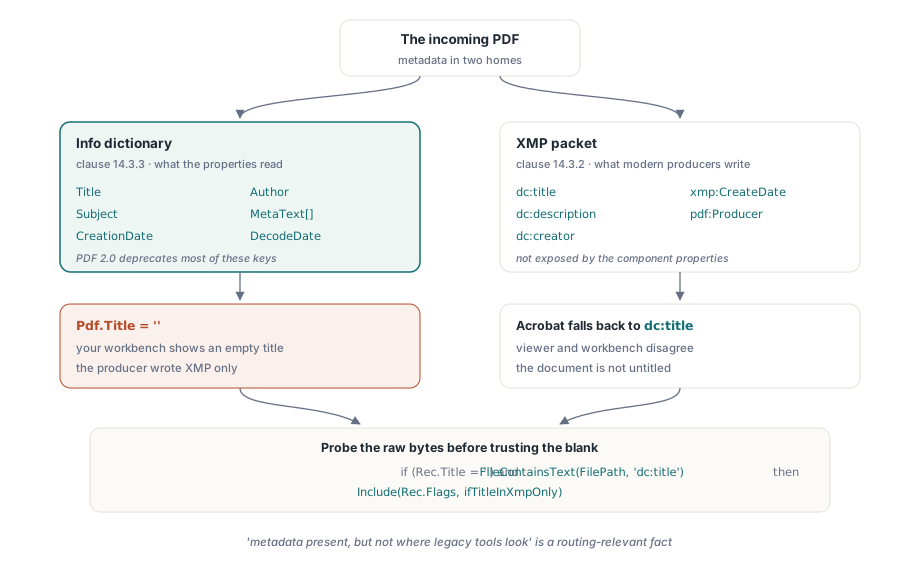
procedure CollectIdentity(Pdf: TPdf; const FilePath: string;
  var Rec: TIntakeRecord);
begin
  Rec.Title := Pdf.Title;             // Info 辞書の値
  Rec.Author := Pdf.Author;
  Rec.CreatedAt := Pdf.CreationDate;  // 生の PDF 日付文字列("D:2026...")

  // Info のタイトルが空でも、文書が無題だという意味にはならない。
  // コンポーネントは XMP パケットを公開しないため、空欄を信じる前に
  // 生のファイルバイトから dc:title 要素を探す。
  if (Rec.Title = '') and FileContainsText(FilePath, 'dc:title') then
    Include(Rec.Flags, ifTitleInXmpOnly);
end;
上のような荒っぽい部分文字列の探査であっても、十分に元を取ります。「メタデータは存在するが、レガシーツールが見る場所にはない」は、タイトルや作成者でインデックスを作るアーカイブパイプラインにとって、ルーティングに関わる事実だからです。下流のインデックスが Info 辞書だけを読むなら、このフラグが付いたファイルは静かに検索不能になります
それでも開いてしまう暗号化ファイル
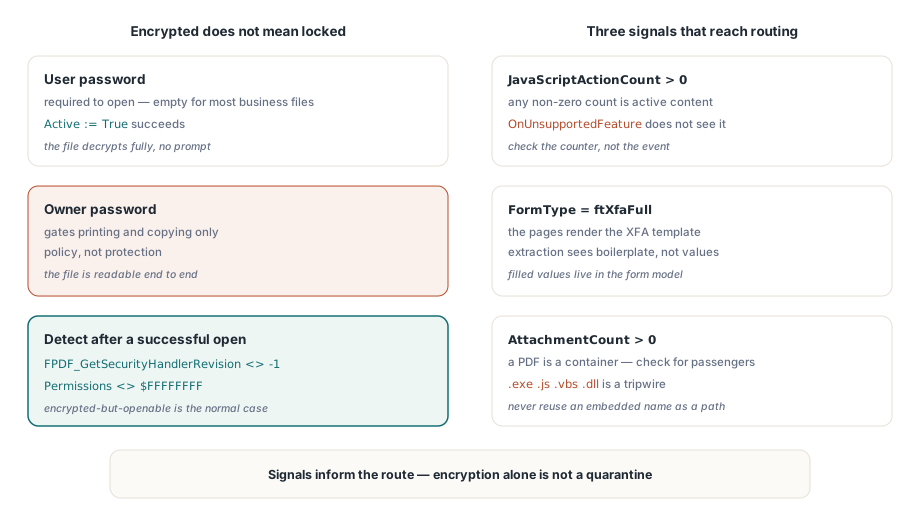
暗号化された文書は、必ずしも開けないわけではありません。標準セキュリティハンドラー(ISO 32000-1 条項 7.6.3)は、文書を開くために必要なユーザーパスワードと、印刷やコピーなどの権限を制御するだけの所有者パスワードを区別します。「保護された」ビジネス文書のかなりの割合は、所有者パスワードと空のユーザーパスワードで暗号化されています。それらはプロンプトなしで開け、完全に復号され、ビューアが権限フラグの遵守を自主的に引き受けることに依存しています。あれは保護ではなく方針であり、取り込みの状態はその違いを反映すべきです
開いた後の暗号化検出は、エンジンの呼び出し 1 つにフォールバックを加えるだけで済みます。FPDF_GetSecurityHandlerRevision(Pdf.Document) は保護されていないファイルに対して -1 を返し、それ以外ではハンドラーのリビジョンを返します。そして Pdf.Permissions が全ビット立ての $FFFFFFFF マスク以外を返すことが、裏付けのシグナルです。本当にユーザーパスワードでロックされたファイルに対しては、Active := True を設定する前に Password を代入してください。それでも開けない場合は、盲目的に再試行するのではなく、安全な経路を通じて送信者に資格情報を要求するブロック状態へファイルをルーティングします。そして「暗号化されている」を自動的な隔離扱いにしたくなる誘惑には抵抗してください。文書を多用するほとんどの業界では、暗号化されているが開けるファイルは普通のケースであり、不審なケースではありません
能動的コンテンツ:JavaScript、XFA、埋め込みファイル
3 つの発見は、常にルーティングの決定まで届くべきです。第一に JavaScript です。OnUnsupportedFeature イベントは、XFA や 3D コンテンツのような構造的機能をエンジンが遭遇した時点で報告しますが、JavaScript は検出しません。代わりに JavaScriptActionCount を確認し、0 以外の結果を能動的コンテンツとして扱ってください。第二に XFA です。FormType が ftXfaFull を返すとき、可視ページはしばしば XFA テンプレートのレンダリング以上の何者でもなく、従来型のテキスト抽出は記入済みの値ではなくテンプレートの定型文を見ることになります。第三に添付ファイルです。PDF はコンテナ形式であり、AttachmentCount はこの 1 つが乗客を乗せているかどうかを教えてくれます
procedure CollectRiskSignals(Pdf: TPdf; var Rec: TIntakeRecord);
var
  i, PageNo: Integer;
  Ext: string;
begin
  Rec.IsEncrypted := Assigned(FPDF_GetSecurityHandlerRevision) and
    (FPDF_GetSecurityHandlerRevision(Pdf.Document) <> -1);
  Rec.HasForms := Pdf.FormType <> ftNone;
  Rec.IsXfa := Pdf.FormType = ftXfaFull;
  Rec.HasJavaScript := Pdf.JavaScriptActionCount > 0;

  // AnnotationCount はページごとのプロパティ。合計するにはページを
  // 走査する。ページオブジェクトのロードは何も描画しないため、この処理は軽い
  Rec.Annotations := 0;
  for PageNo := 1 to Pdf.PageCount do
  begin
    Pdf.PageNumber := PageNo;
    Inc(Rec.Annotations, Pdf.AnnotationCount);
  end;

  Rec.Attachments := Pdf.AttachmentCount;

  for i := 0 to Rec.Attachments - 1 do
  begin
    Ext := LowerCase(ExtractFileExt(string(Pdf.AttachmentName[i])));
    if (Ext = '.exe') or (Ext = '.js') or (Ext = '.vbs') or (Ext = '.dll') then
      Include(Rec.Flags, ifDangerousAttachment);
  end;
end;
このループには、注意に値する細部が 2 つあります。添付ファイル名は文書の内部から来るため、サニタイズなしに出力パスとして再利用してはいけません。..\..\start.exe のような埋め込み名は、不用意な保存呼び出しを待っているパストラバーサルです。また、拡張子のブロックリストは保証ではなく張り線です。その仕事は、ファイルを無害と保証することではなく、人間の決定を強制することです
シグナルをルーティング状態へ変換する
実用になる状態モデルに必要な状態数は、多くのチームが予想するより少なくて済みます。ready(阻害要因なし、テキストあり)、review(オープンには成功したが目が必要なものがある。XFA フォーム、JavaScript、空のテキスト層、XMP にしかないタイトルなど)、blocked(ユーザーパスワードが必要)、damaged(オープン失敗)です。状態と並べて証拠も記録してください。ファイルハッシュ、ページ数、正確なフラグ、そして破損ファイルに対するエンジンのエラーメッセージは、どれも重要です。ルーティングの決定に疑問を呈する人は、それから数週間後、その間に置き換えや改変されたかもしれないファイルを相手にするからです
オペレーターが隔離ファイルを実際に見る必要があるときは、既定のシェルビューアに渡してはいけません。スクリプトとリンクの処理を無効にした強化されたペインの中でレンダリングしてください。Delphi でセキュアな PDF プレビュー面を構築するで解説しているアプローチです。また、取り込みが準拠要件を持つアーカイブへ供給するなら、トリアージパスはより深いチェックの予約場所として自然です。PDF/A および PDF/UA プロファイルに対するバッチプリフライト検証は、この検査が止まった地点からちょうど先を引き受けます
コンポーネントの製品ページでは、ライセンス、検査 API の全体、そして同梱のデモを扱っており、取り込みスタイルの文書インスペクターも含まれます:PDFium Component