2 つのフォームが同じフィールドを持っていても、まったく異なる振る舞いをすることがあります。AcroForm はフィールドを、実際のページコンテンツの上に乗った通常の PDF オブジェクトとして保持するため、規格に準拠したリーダーであれば誰でもそれを描画します。動的な XFA フォームは、PDF としてほとんど何も保持しません。フィールド、レイアウト、ページのジオメトリさえも XML パッケージの中に存在し、目に見えるページは、Adobe だけが広く提供してきたレイアウトエンジンによって開いたときに生成されます。そのファイルを Web ビューア、アーカイブレンダラー、テキスト抽出ツールに与えても、フォームは得られません。得られるのは「しばらくお待ちください... このメッセージが最終的に文書の適切な内容に置き換えられない場合、お使いの PDF ビューアはこの種類の文書を表示できない可能性があります」と読める、1 枚のグレーのページだけです。政府や保険関係の書類を取り込んだことがある人なら誰でも、そのページを見た瞬間にそれとわかります
このプレースホルダーは破損ではありません。XFA プロセッサが存在しないときにフォーマットの仕様どおりに起きることそのものであり、2026年時点では、それはデスクトップ版 Acrobat 以外のほぼすべてのビューアに当てはまります。したがって、実務的な対処は、動的フォームが下流の何かに到達する前に、通常の AcroForm に変換することです。losLab の Delphi/C++Builder 向け PDF ライブラリである HotPDF は、その変換をコードの中で行い、XML フォームをネイティブのページ上のネイティブフィールドとして再構築します
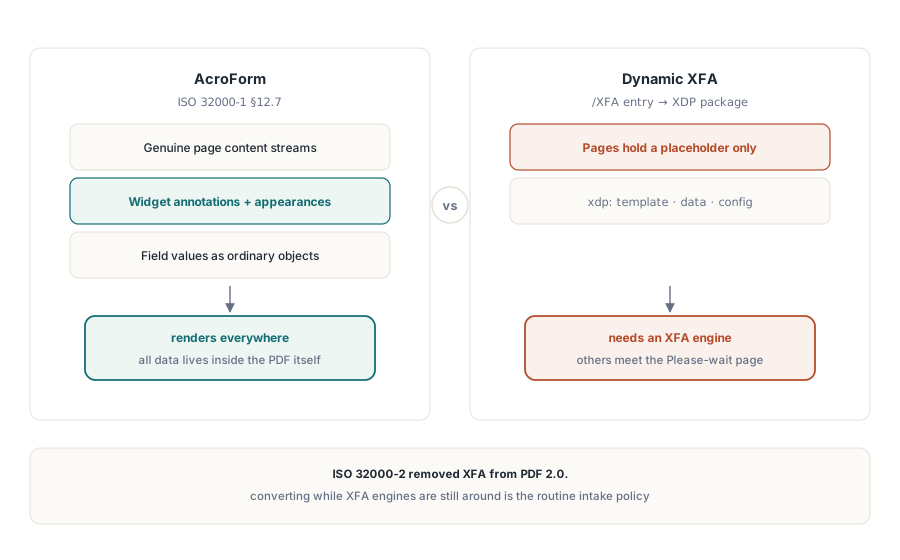
この 2 つのモデルが共存できない理由
AcroForm は ISO 32000-1 §12.7 で定義されています。各フィールドはウィジェット注釈と外観ストリームを持つ PDF オブジェクトであり、ページは正真正銘の PDF コンテンツであり、データはその上に乗ります。XFA はそれを逆転させます。フォームは XML 文書であり、AcroForm 辞書の /XFA エントリに保存された XDP パッケージであり、動的フォームの PDF ページは「しばらくお待ちください」のプレースホルダーだけを保持し、それ以外は何もありません。実際のコンテンツが PDF としてシリアライズされたことが一度もないからです。リーダーはファイルをどちらか一方のモデルとして処理します。/XFA エントリを無視すれば空の殻が見え、XFA エンジンなしでそれを尊重すれば警告が見えます。ISO 32000-2 は PDF 2.0 から XFA を落とすことでこの論争に終止符を打ちました。これが、「今のうちに変換しておく」がエッジケースから日常的な取り込みポリシーへと変わった主な理由です
何かを変換する前に、まずそれを分類してください。すべての XFA ファイルがプレースホルダーを表示するわけではないからです。静的な XFA フォームは、XML の隣に事前レンダリングされた PDF ページを同梱しているため、どこでも表示され、記入されたときにだけ不具合を起こします。動的フォームはプレースホルダーだけを同梱しており、変換するまでは使い物になりません。信頼すべきなのは文書そのものであり、拡張子や送信者では決してありません。Adobe 以外のビューアで実際のコンテンツを描画するのに /XFA エントリをまだ持っているファイルは、静的またはハイブリッドです。警告ページを表示するファイルは動的です。取り込んだ各ファイルがどちらのバケットに入ったかを記録してください。この 2 種類は後で異なる壊れ方をし、アーカイブされたフォームが空だというチケットも、取り込みログにすでに「dynamic XFA, converted, 47 fields mapped, 2 warnings」と書かれていれば数秒で解決します
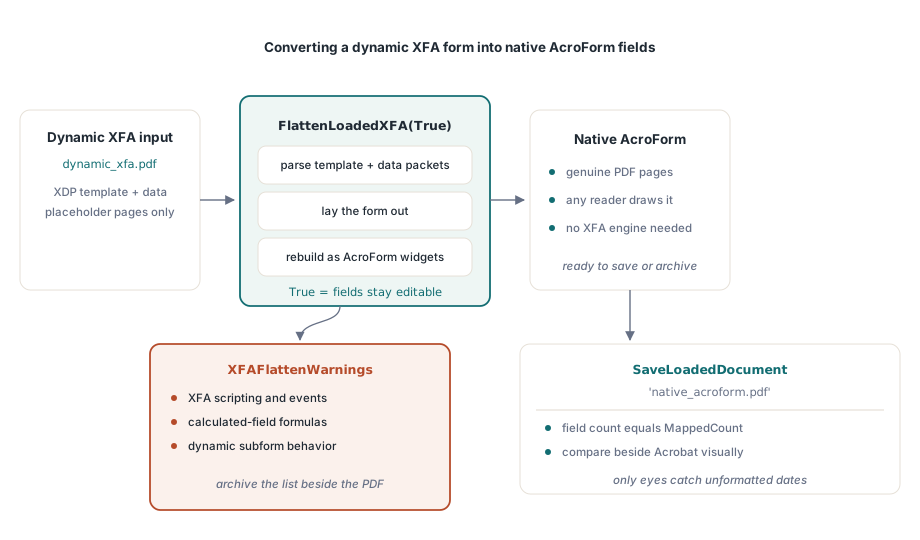
読み込んだ XFA 文書をネイティブフィールドに変換する
この変換は、すでにメモリ上にある文書に対して実行されます。FlattenLoadedXFA は XFA のテンプレートとそのデータパケットを解析し、フォームをレイアウトし、実際の PDF ページ上の AcroForm フィールドとして再構築します
var
  Pdf: THotPDF;
  MappedCount, I: Integer;
  Warnings: TStrings;
begin
  Pdf := THotPDF.Create(nil);
  try
    Pdf.LoadFromFile('dynamic_xfa.pdf');
    MappedCount := Pdf.FlattenLoadedXFA(True);   // True = フィールドは編集可能なまま
    Warnings := Pdf.XFAFlattenWarnings;
    for I := 0 to Warnings.Count - 1 do
      Log('XFA flatten warning: ' + Warnings[I]); // マッピングされなかった要素
    Pdf.SaveLoadedDocument('native_acroform.pdf');
    Log(Format('Mapped %d fields', [MappedCount]));
  finally
    Pdf.Free;
  end;
end;
戻り値と警告リストはデバッグ用のノイズではなく出力です。両方とも保持してください。変換はその性質上、情報を失います。XFA のスクリプト、計算フィールド、動的なサブフォームの挙動には AcroForm 側の対応物が存在せず、XFAFlattenWarnings はマッピングされなかったすべてのテンプレート要素を名指しします。警告リストなしで変換済みファイルをアーカイブしてしまうと、いつかアーカイブされたコピーの中の空の合計欄をただ見つめることになり、なぜそうなったのかの記録は何も残っていません。Editable フラグは、新しいフィールドが記入可能なままかどうかを制御します。フォームを人がその後も使い続ける場合は True を渡し、目的が凍結された記録であるときは値をロックしてください
変換のチェックには視覚的な部分と構造的な部分があり、両方が必要です。構造面は簡単です。フィールド数が MappedCount と一致することを確認してください。真の損傷を捉えるのは視覚面です。今なお XFA エンジンを動かす唯一のビューアであるデスクトップ版 Acrobat でソースフォームを開き、通常のリーダーで開いた変換後のファイルと並べ、テンプレートごとに少なくとも 1 つの記入済みサンプルで値とレイアウトを比較してください。XFA エンジンが 2026-06-11 として表示していた日付が、AcroForm 側のコピーでは生の書式なしの値として現れることがあり、それに気づけるのはあなたの目だけです
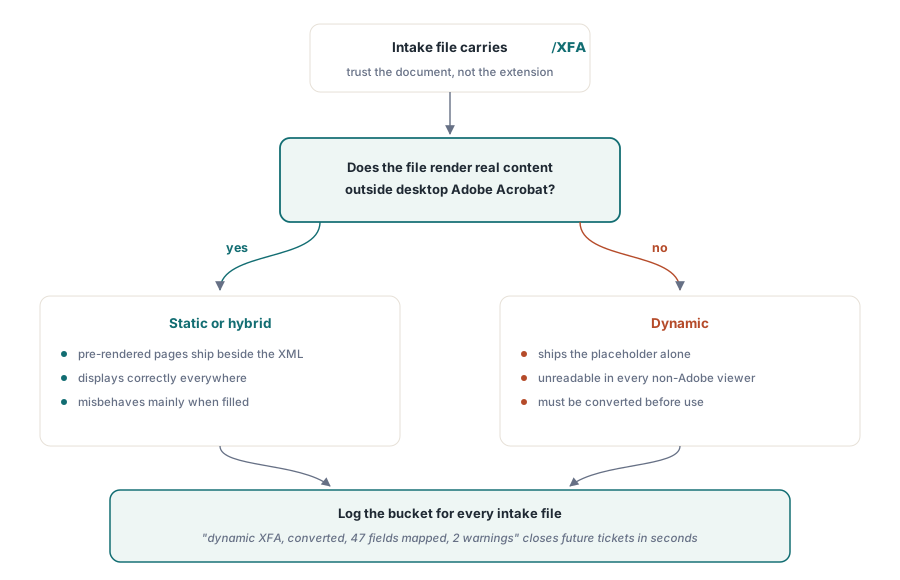
入力が XDP パッケージである場合
すべてのジョブが記入済みの PDF から始まるわけではありません。フォームデザインツールからエクスポートされたり、パートナーシステムから渡されたりして、XDP パッケージ単体を受け取ることもあります。ApplyXFAAsAcroForm は読み込みのステップを省略し、パッケージを現在の文書に直接適用します
XDPBytes := TFile.ReadAllBytes('benefit-claim.xdp');
MappedCount := Pdf.ApplyXFAAsAcroForm(XDPBytes, True);
同じ一連の呼び出しは逆方向にも動作し、XFA を消費するのではなく発行しなければならない、より稀なケースに対応します。AddXFAPacket は 'xdp' や 'config' のような個別の名前付きパケットを付加します。SetXFADocument は完全な単一ストリームのペイロードを 1 回の呼び出しでインストールします。ClearXFAPackets は登録内容を消去して最初からやり直せるようにし、AddXFASignaturePacket は XML フォームデータに直接署名するワークフロー向けに XAdES 素材を埋め込みます。2026年に XFA を生成することはニッチな需要であり、それ以外を一切受け付けないレガシーな消費者 1 社に強いられるケースがほとんどですが、契約でそれが指定されている場合、これらの呼び出しは別のツールを用意する代わりに単なる設定上の選択に留めてくれます
「フラット化」のもう1つの意味
「フラット化」という言葉は多くの会話を混乱させます。まったく別の操作、つまりインタラクティブなオブジェクトが 1 つも残らなくなるまで AcroForm のフィールド外観をページコンテンツストリームに焼き込む操作も指すからです。HotPDF には今日時点でそのための API はなく、プロジェクトの途中ではなく今それを知っておくべきです。代わりにライブラリが提供するのは、フィールドの作成時点でのフィールドレベルのロックであり、文書の権限によって裏打ちされています
// フィールド作成時に値をロックする: 読み取り専用のテキストフィールド
Pdf.CurrentPage.AddTextField('CaseNumber', 'BC-2026-0117',
  Rect(50, 700, 220, 720), 0, [ffReadOnly]);

// 念のための二重の備え: 文書全体でフォーム記入を制限する
Pdf.ActivateProtection := True;
Pdf.CryptKeyLength := aes256;
Pdf.OwnerPassword := 'records-owner';
Pdf.ProtectOptions := [prPrint, prInformationCopy, prExtractContent];
// 記入権限は与えない: prFillAnnotations は集合に含めない
それが何を買い、何を買わないのかをはっきりさせておいてください。読み取り専用のフィールドは、依然としてフォームオブジェクトです。ビューアのフィールドパネルに表示され、その値はフォーム API を通じて読み取ることができ、ファイルを書き換えるツールは読み取り専用フラグを再び解除できます。権限フラグはハードルを上げますが、ビューアがそれを尊重するかどうかに依存しており、これは ISO 32000-1 がはっきりと述べている制約です。規制当局がアーカイブされた記録にフォームオブジェクトを一切含めないよう求めている場合、HotPDF における今日時点での正直な答えは、文書を再構築することです。読み取り専用フラグをフラット化のように装うのではなく、値を読み出し、それを新しいページ上に通常の TextOut コンテンツとして描画してください。権限による経路で 1 つ覚えておくべきなのは、CryptKeyLength は BeginDoc の前に設定しなければならないということです。残りは当社の AES-256 暗号化と権限に関する記事にあります
XFA がアーカイブコンプライアンスにとって意味すること
PDF/A と PDF/X はどちらも XFA をきっぱりと拒否します。したがって、ISO 19005 アーカイブに供給するパイプラインは最初に変換しなければならず、その順序は交渉の余地がありません。読み込み、FlattenLoadedXFA、保存、その後で AcroForm の結果に対してアーカイブ生成または検証を実行します。変換をコンプライアンスの証明として扱わないでください。それはフォームモデルを修正するだけで、フォント、色、メタデータはそのままにするため、信頼する前に veraPDF で出力を検証してください。フォームが AcroForm 側に移った後は、その挙動は独自の一連の制御対象になります。JavaScript のトリガー、送信アクション、検証スクリプトについては、HotPDF の AcroForm フィールドとアクションに関する記事で扱っています
ここで示した XFA の登録、変換、フォーム API は、Delphi と C++Builder 向けの HotPDF Delphi Component に同梱されており、そのドキュメントは、最近のリリースを通じて拡張されてきた XFA 機能セットを追跡しています