AcroForm アクションは、ウィジェットに何らかの操作が行われたときにビューアが何をすべきかを伝える、そのウィジェットに紐づく辞書です。ボタンをクリックすると、ビューアはそのアクション辞書を読み取ります。URI アクションは Web アドレスを開き、JavaScript アクションはスクリプトを実行し、SubmitForm アクションは収集したフィールド値をエンドポイントに送信し、ResetForm アクションはそれらを既定値にリセットします。アクションはファイルに焼き込まれた振る舞いではなく、データです。ISO 32000-1 §12.6 は辞書の形を定義し、ビューアはそれを解釈するエンジンを提供します。この分離が重要なのは、アクションが PDF に完璧に書き込まれていても、読み手側のビューアにそれを解釈するエンジンがなければ何も起きないからであり、AcroForm にまつわる多くの悩みは、不正なフィールドよりもむしろこのギャップに起因します
HotPDF はこれらの辞書を、ぶら下がっているウィジェットフィールドと合わせて、Delphi と C++Builder から直接書き込みます。あらゆるインタラクティブなフォームでは、2 つの構造が働いています。ユーザーがページ上で目にするウィジェットと、その下でデータと配線を担うフィールドおよびアクションの仕組みです。両者は独立して編集され、一方が誤っていても他方は正常に見えることがあります。以下のセクションでは、フィールドの命名、ボタンアクション自体、フィールドレベルの JavaScript、そして視覚的なチェックをすり抜けてしまう不具合の分類を順に扱います。これはひとえに 2 つ目の構造の中だけに存在する問題です
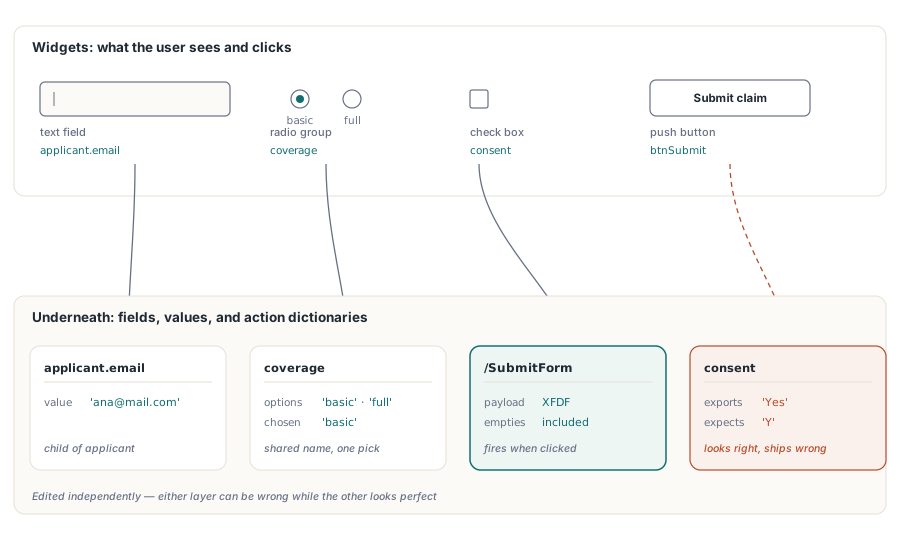
フィールド名はキャプションではなくルーティングキーである
すべての AcroForm フィールドは完全修飾名を持ちます。ISO 32000-1 §12.7.3 は、フォームがエクスポートまたは送信されるときにフィールドの値が運ばれるキーを、目に見えるキャプションではなくこの名前だと定めています。VCL 設計から来た開発者は、コントロールの名前をプライベートなコード識別子として扱いがちですが、ここではそうではありません。これはワイヤーフォーマットそのものです
そこから最初に導かれるのは、同じ完全修飾名を持つ 2 つのフィールドは 2 つのフィールドではないということです。PDF はそれらを 1 つのフィールドに属する 2 つのウィジェット注釈として扱い、1 つの値を共有するため、片方に入力すればもう片方もその場で更新されます。契約書の各ページに顧客名を繰り返し表示したい場合、これはまさに望んだ動作です。一方、生成ループが誤って 3 ページにわたって 'Field1' を使い回してしまえば、それはバグになります。この後者のケースは、いかなる目視検査でも見つかりません。各ページはそれぞれ自分のボックスを描画し続けるため、リンクは誰かが実際に入力を始めて初めて表面化します
applicant.email のようなドット区切りの名前は階層を構築します。親ノード applicant はその子をグループ化し、これによってリセットや送信をフォームの一部だけに対象を絞ることができます。最初からこの方法でフィールドに命名しておくコストはゼロであり、受信側システムが applicant ブロックだけを求めてきた瞬間にその価値が発揮されます
ラジオボタンには独自のルールがあります。連動して切り替わるべきボタンは、同じグループ名を共有しなければなりません。HotPDF では、同じグループ名を渡す AddRadioButton 呼び出しはそれぞれのウィジェットを 1 つの親フィールドに紐づけ、各ボタンのエクスポート値('basic' や 'full')が選択されたオプションを識別します。すべてのボタンに異なる名前を付けてしまうと、1 つの排他的なグループの代わりに、独立したオン/オフスイッチの列ができてしまいますが、見た目はまったく同じで、動作だけが誤っています
フィールドセットをページごとに作成する
HotPDF は THPDFPage のメソッドを通じてフィールドを配置するため、すべてのフィールドはそれを作成したページオブジェクトに属します。注意すべき順序の落とし穴は AddPage です。これは戻った瞬間に CurrentPage を新しいページに向け直すため、論理的には直前のページに属するはずのフィールド呼び出しであっても、その後に呼び出せば新しいページに配置されてしまいます。AddPage を呼び出す前に、描画内容とフィールドの両方を含め、各ページを完成させてください
procedure BuildClaimForm(Pdf: THotPDF);
begin
  // ページ1: 申請者ブロック
  Pdf.CurrentPage.AddTextField('applicant.name', '', Rect(50, 700, 300, 722));
  Pdf.CurrentPage.AddTextField('applicant.email', '', Rect(50, 660, 300, 682));
  Pdf.CurrentPage.AddCheckBox('consent', 'Y', Rect(50, 620, 70, 640), False);
  Pdf.CurrentPage.AddRadioButton('coverage', 'basic', Rect(50, 580, 70, 600), True);
  Pdf.CurrentPage.AddRadioButton('coverage', 'full', Rect(90, 580, 110, 600), False);
  Pdf.CurrentPage.AddComboBox('plan', 'Standard',
    ['Basic', 'Standard', 'Premium'], Rect(50, 540, 200, 565));

  Pdf.AddPage;  // CurrentPage はページ2を指すようになる
  Pdf.CurrentPage.AddListBox('riders', 'None',
    ['None', 'Flood', 'Earthquake'], Rect(50, 500, 200, 600));
end;
座標は PDF の慣例に従い、原点はページの左下隅にあります。これは TextOut が描画テキストに使うのと同じ原点であるため、Rect(50, 100, 200, 120) は Letter サイズのページの下部近くに位置し、上部ではありません。VCL では Y はページ上部を基準に下方向へ増加するため、レイアウトテーブルをそのまま移植すると垂直方向に反転し、すべてのフィールドがページの誤った端に配置されてしまいます。呼び出し箇所ごとに変換するのではなく、共有ヘルパーで一度だけ変換を行えば、1 か所の修正でフォーム全体が直ります
ボタンを URI、JavaScript、送信アクションに配線する
プッシュボタンはアクションが紐づけられるまで何も動作しません。HotPDF は ISO 32000-1 §12.6.4 のアクションタイプを THPDFButtonAction 列挙型(baURI、baJavaScript、baSubmitURL、baResetForm、baHide、baShow、baNamed)として公開し、ボタンを作成してそのアクションを 1 回の呼び出しで結び付ける 2 つのメソッドを提供します
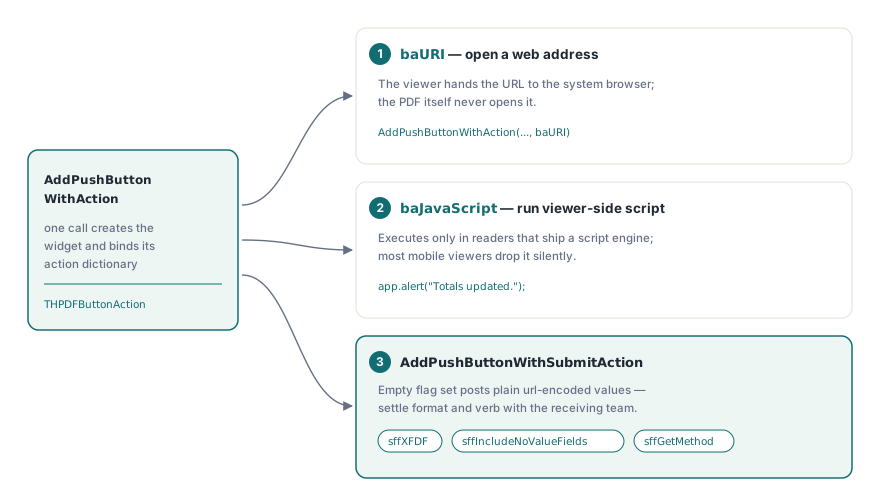
// システムのブラウザでヘルプページを開く
Pdf.CurrentPage.AddPushButtonWithAction('btnHelp', 'Help',
  'https://www.example.com/claims-help', Rect(320, 700, 420, 730), baURI);

// ビューア側で JavaScript を実行する
Pdf.CurrentPage.AddPushButtonWithAction('btnRecalc', 'Recalculate',
  'app.alert("Totals updated.");', Rect(320, 660, 420, 690), baJavaScript);

// XFDF として送信し、空のフィールドもペイロードに残す
Pdf.CurrentPage.AddPushButtonWithSubmitAction('btnSubmit', 'Submit claim',
  'https://api.example.com/claims', Rect(320, 620, 420, 650),
[sffXFDF, sffIncludeNoValueFields]);送信フラグは、普段向けられる以上の注意に値します。AddPushButtonWithSubmitAction は THPDFSubmitFormFlags の集合を受け取り、空の集合は単純な url-encoded の POST を生成します。これは多くのサンプルエンドポイントが受け付ける形式である一方、多くの本番エンドポイントでは拒否されます。sffXFDF を追加するとペイロードは XFDF に切り替わります。sffGetMethod は HTTP のメソッドを変更します。sffIncludeNoValueFields は空のフィールドを黙って落とすのではなくペイロードに残します。これは受信側が「値が存在しない」ことと「空である」ことを区別する場合に重要になります。フラグの組み合わせは、受信エンドポイントを解析するチームとのインターフェース契約の一部であるため、最初のリジェクトされたバッチの後ではなく、事前に固めておくべきです
フィールドレベルの JavaScript: keystroke、format、validate
アクションが存在するのはボタンクリックだけではありません。HotPDF は、スクリプトに対応したビューアがユーザーのデータ入力中に発火するフィールド単位のイベントにも JavaScript を紐づけます。トリガーは 3 種類あり、それぞれ入力ライフサイクルの異なる時点で発火します。keystroke アクションは各文字が入力されるたびに、そしてコミット時にも実行されます。format アクションは変更がコミットされた後、純粋に表示のために表示値を書き換えます。validate アクションは最後の判断を担い、コミットされた値がそのフィールドの値になる前にそれを受け入れるか拒否するかを決めます
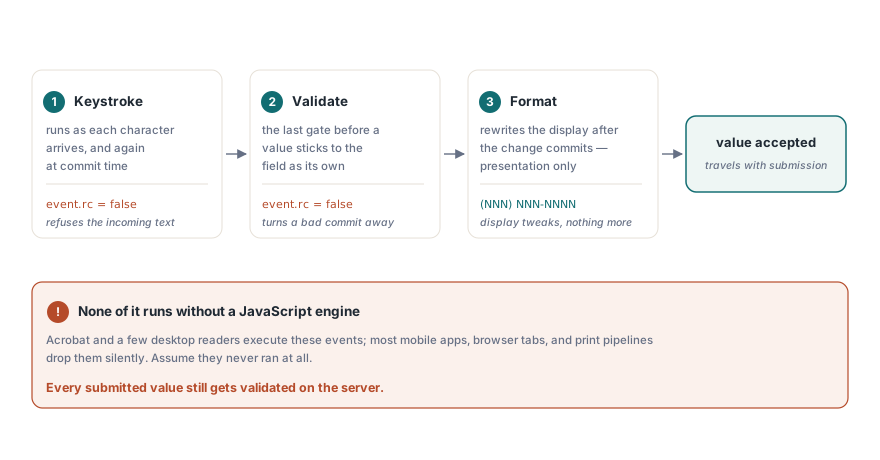
// メールアドレスとしてもっともらしくないコミット値を拒否する
Pdf.AttachFieldKeyStrokeAction('applicant.email',
  'if (event.willCommit && !/^[\w.-]+@[\w.-]+\.\w+$/.test(event.value)) event.rc = false;');

// 米国の電話番号を (NNN) NNN-NNNN の形式で表示する
Pdf.AttachFieldFormatAction('applicant.phone',
  'event.value = event.value.replace(/(\d{3})(\d{3})(\d{4})/, "($1) $2-$3");');

// コミット時に18歳未満の申請者を拒否する
Pdf.AttachFieldValidateAction('applicant.age',
  'if (parseInt(event.value) < 18) event.rc = false;');
keystroke アクションや validate アクション内で event.rc = false を設定すると、ビューアに入力を拒否するよう伝えます。ここで注意すべきなのは、ビューアが JavaScript エンジンを搭載していない限り、これらは何も実行されないという点です。Acrobat と一部のデスクトップ製品はエンジンを持っています。ほとんどのモバイルリーダー、ブラウザ埋め込み型のレンダラー、印刷パイプラインは持っておらず、何も文句を言わずにスクリプトを無視します。したがって、フィールドスクリプトはそれを実行するリーダーを使っている一部のユーザーに対してのみデータ品質を改善するものであり、それ以上の役割はありません。これはセキュリティ境界ではありません。送信されたすべての値は、届いた時点でサーバー側で必ず検証しなければなりません。クライアントが何かをチェックしたとは前提にできないからです
目視レビューをすり抜ける不具合
見つけるのが最も難しい AcroForm の不具合は、レンダリングではなくデータ構造の中に存在するものです。ファイルを開いて見ても何もわかりません。頻繁に登場する 4 つを名指しする価値があり、それぞれにリリース前に発見できる機械的なテストがあります
- エクスポート値のドリフト。
AddCheckBox('consent', 'Yes', ...)として作成されたチェックボックスはYesを送信します。Yと一致させている受信側は、ページが完璧に見えていてもすべての送信を拒否します。フォームに入力し、Acrobat から XFDF としてエクスポートし、その値を受信側が実際に期待するスキーマと突き合わせてください - 意図しない値のミラーリング。 同じ完全修飾名を共有する 2 つのフィールドは 1 つに統合されます。この症状はデータ入力時に現れ、生成時には現れません。そのため、テストはレンダリングして目で確認することではなく、フォームに実際に入力することです
- オプションリストの外にあるコンボ値。
AddComboBoxに渡された現在値がリストされたオプションのいずれでもない場合、それを表示するか、空にするか、フラグを立てるかについてビューアの挙動は分かれます。既定値をリストの中に収めておけば、この不一致は起こりません - ワークフロー終了後もまだ編集可能なフィールド。 HotPDF には AcroForm フィールド向けの外観フラット化呼び出しはありません。完成したフォームを凍結するサポートされた方法は、
ffReadOnlyフラグを付けてフィールドを作成することです。これにより、フィールド自身の外観ストリームを通じて値は表示され続けたまま、編集は拒否されます。フィールドは生きたフォームオブジェクトのままとなり、これは後工程の組み立てや署名ツールが期待する状態です
コードの変更では対処できないものの、ビューア側の挙動として回帰ノートに残す価値があるものが 1 つあります。エンタープライズ向けの Acrobat 展開では、ポリシーによって JavaScript を無効化したり送信先を制限したりできるため、あらゆる開発ビルドで動作していたアクションが、ロックダウンされた顧客のデスクトップ上では何もしないまま眠っていることがあります。ボタンが何もしない場合に備えて、目に見えるフォールバックを用意してください。それが単に代わりに何をすべきかをユーザーに伝える印刷済みの案内であっても構いません
フォーム作業がドキュメントの他の部分とどうつながるか
署名フィールドそれ自体が AcroForm のフィールドタイプです。後で認証または副署されるフォームは、後から差し込むよりも生成時にそのフィールドを確保しておくほうが望ましく、そのバイトレベルの理由はデジタル署名と PAdES 署名に関する関連記事にあります。ネイティブの AcroForm ではなく XFA パッケージとして届く入力は事情が異なります。XFA を AcroForm フィールドにフラット化することはそれ自体が独自の損失モデルを持つ独自のワークフローであり、2 つのフォーム技術が 1 つのファイル内で共存できないためです
ここで示したフィールド、アクション、トリガーの各メソッドは、Delphi と C++Builder 向けの標準 HotPDF Delphi Component API の一部です。製品ページには、フィールドフラグのオーバーロードや送信フラグの完全な列挙を含む完全なリファレンスへのリンクがあります