PDF の署名は主にバイトの計算であり、バイトの計算がうまくいかない原因でもあります。暗号化は 20 年間監査されてきたコードで実行されるため、その部分が失敗することはほぼありません。本番環境で失敗するのはもっと地味なことです。実際の署名に対して予約されたプレースホルダーが小さすぎる、ファイルの誤った範囲に対してハッシュが取得された、または署名によってすでに凍結されたバイトを静かに書き換えてしまう署名後の「保存」などです。バイトを正しく配置すれば、緑色のチェックマークは自ずと解決します
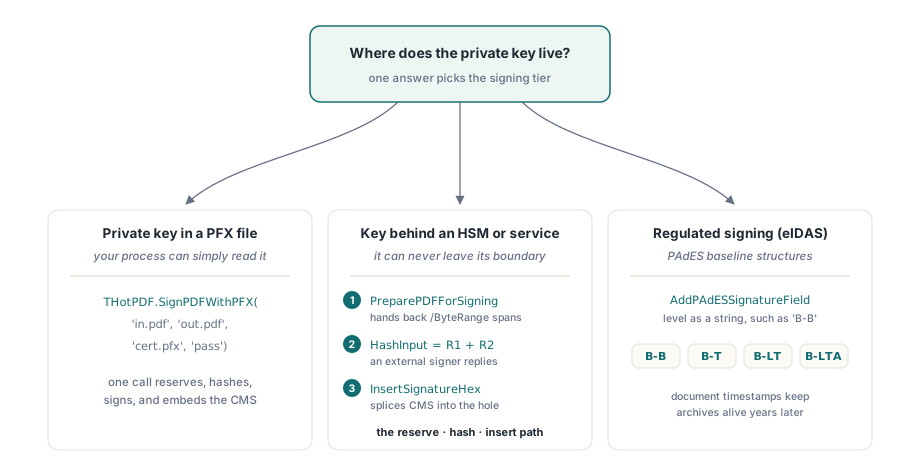
HotPDF は、Delphi および C++Builder 向けの署名を 3 つのレベルでカバーしており、秘密鍵はどこに存在するのかという 1 つの質問に答えることで、それらを選択します。ディスク上の PFX ファイルには、単一の関数呼び出しが必要です。HSM やリモート署名サービスにロックされたキーには、予約 - ハッシュ - 挿入のシーケンスが必要です。ライブラリがトークンにアクセスしてキーを引き出すことはできないからです。欧州の規制を満たす必要がある署名には、その上に PAdES ベースライン構造が必要です。以下のセクションでは、その進行に従います
/ByteRange が署名されたバイトをどのように固定するか
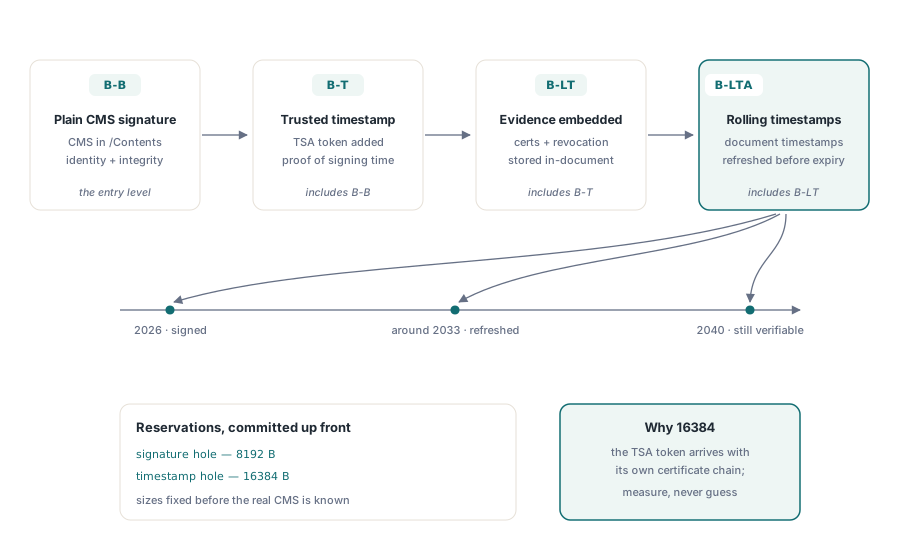
署名は署名するファイル内に存在しなければならず、それ自体に署名することはできません。PDF は、穴を残すことでこのパラドックスを回避します。署名する前に、書き込み側はゼロで埋められた固定サイズの /Contents エントリを予約し、その両側にある 2 つのスパン(穴の前のすべて、穴の後のすべて)に対して /ByteRange 配列を記録します。署名者はこれら 2 つのスパンをハッシュし、結果の CMS ブロブを 16 進数として穴に書き込みます。罠は「固定」という言葉にあります。完成した署名がどれくらいの大きさになるかを知る前に、その穴のサイズをコミットするため、予約は自信を持った過大評価である必要があります。短い証明書チェーンを持つ分離された CMS 署名なら、8 キロバイトで十分収まります
HotPDF はこの 2 つのケースを 2 つの呼び出しに分割しており、それらを混同することはよくある初期の間違いです。AddSignatureField は、人間が後でビューアで署名できるように、空の可視フィールドをドロップします。AddSignedSignatureField はフィールドを作成し、/Contents の穴を予約します。人間ではなくコードが署名を完了する場合は、こちらが必要になります。外部の署名者に空のフィールドを渡しても、埋めるものは何もありません
ワンコールパス: PFX からの署名
証明書とその秘密鍵がプロセスで読み取れる PFX/PKCS#12 ファイル内にある場合、パイプライン全体は 1 つのクラス関数に縮小されます
if THotPDF.SignPDFWithPFX('invoice-unsigned.pdf', 'invoice-signed.pdf',
    'company-cert.pfx', 'pfx-password') then
  Writeln('Signed: invoice-signed.pdf')
else
  raise Exception.Create('PFX signing failed');
これが失敗した場合、PDF が問題になることはほとんどありません。PFX が問題です。HotPDF は、PBES2 で保護されたコンテナを読み取ります。つまり、AES-256-CBC 上の PBKDF2 鍵導出です。古い Windows 証明書ウィザード、または 3.0 より前の OpenSSL によってエクスポートされた PFX は、通常、代わりにレガシーの RC2 または 3DES でラップされており、単にパースされません。修正方法は、最新の保護を使用してコンテナを再度エクスポートすることです。現在の OpenSSL はこれをデフォルトで行い、これはコードの変更ではありません。そのため、「他のどこでも機能する」証明書で署名が即座に強制終了された場合は、独自のコードを疑う前に、PFX がどのように作成されたかを確認してください
HSM およびトークン用の予約 - ハッシュ - 挿入パス
ワンコールパスは、プロセスがキーをファイルとして読み取れることを前提としています。しかし、そうでないケースが増えています。キーは HSM 内、USB トークン上、または署名サービスの API の背後にあり、ライブラリが直接到達する方法はありません。HotPDF は、署名をバイトレベルのステップに分割することでこれを処理します。プレースホルダー ドキュメントを記述し、ライブラリにハッシュの範囲を要求し、ハッシュ入力をキーを保持しているものに渡し、返された CMS を穴につなぎ合わせます

var
  Doc: THotPDF;
  Fs: TFileStream;
  PdfBytes, HashInput, SigHex: AnsiString;
  R1Start, R1Len, R2Start, R2Len, CStart, CLen: Integer;
begin
  // 1. 予約された /Contents の穴を持つドキュメントを書き込みます
  Doc := THotPDF.Create(nil);
  try
    Doc.FileName := 'placeholder.pdf';
    Doc.BeginDoc;
    Doc.CurrentPage.AddSignedSignatureField('Sig1',
      Rect(50, 100, 350, 150), 8192, 'adbe.pkcs7.detached',
      'Contract approval', 'Boston, MA', 'legal@example.com');
    Doc.EndDoc;
  finally
    Doc.Free;
  end;

  // 2. 保存されたバイトをロードします。返されるオフセットは 0 ベースです
  Fs := TFileStream.Create('placeholder.pdf', fmOpenRead);
  try
    SetLength(PdfBytes, Fs.Size);
    Fs.ReadBuffer(PdfBytes[1], Fs.Size);
  finally
    Fs.Free;
  end;
  THotPDF.PreparePDFForSigning(PdfBytes, R1Start, R1Len, R2Start, R2Len,
    CStart, CLen);

  // 3. 両方のスパンをハッシュし、外部で(HSM、トークン、サービス)署名します
  HashInput := Copy(PdfBytes, R1Start + 1, R1Len) +
               Copy(PdfBytes, R2Start + 1, R2Len);
  SigHex := SignWithHsm(HashInput);  // あなたの統合: CMS を 16 進数で返します

  // 4. 署名を予約された穴につなぎ合わせます
  THotPDF.InsertSignatureHex(PdfBytes, SigHex);
  Fs := TFileStream.Create('signed.pdf', fmCreate);
  try
    Fs.WriteBuffer(PdfBytes[1], Length(PdfBytes));
  finally
    Fs.Free;
  end;
end;
このシーケンスの 2 つの詳細が、断続的な障害のほとんどを引き起こします。1 つ目は、PreparePDFForSigning が完成したファイルのバイトに対して機能することです。オフセットが意味を持つようになるには、プレースホルダーが完全に書き込まれて保存されている必要があります。組み立て中のストリームに対してこれらを計算しても、最終的にハッシュするバイトと一致しません。2 つ目は、やはり予約サイズです。要求した 8192 バイトには最終的な CMS を保持する必要があり、中間証明書を伴う署名、またはサービスが署名付き属性で装飾する署名は、それを超える可能性があります。InsertSignatureHex は穴を大きくしてスペースを作ることはしません。兆候は、ある証明書では正常に署名されるが、次の証明書では失敗するパイプラインです。治療法は、推測ではなく、実際の署名者によって生成された実際の署名から測定された予約を使用してプレースホルダーを再生成することです
PAdES ベースライン、および署名を存続させるタイムスタンプ
欧州の規則に基づいて署名する場合、適用される規格は ETSI EN 319 142-1 であり、4 つの PAdES ベースラインレベルが積み重なっています。B-B はプレーンな署名です。B-T は、いつ作成されたかを証明する信頼できるタイムスタンプを追加します。B-LT は、検証資料(証明書と失効データ)をドキュメント内に埋め込み、数年後でも確認できるようにします。B-LTA は、定期的なドキュメントのタイムスタンプを一番上に重ねて、構築の基になったアルゴリズムよりも長く証拠が存続するようにします。HotPDF は、各レベルのドキュメント側の構造を出力します
// PAdES ベースライン署名フィールド (ETSI EN 319 142-1)
Pdf.CurrentPage.AddPAdESSignatureField(
  'ApprovalSig', Rect(50, 100, 350, 150), 'B-B',
  'Contract approval', 'Boston, MA', 'legal@example.com');

// ドキュメント タイムスタンプ: TSA トークンとチェーンのためにより大きな予約
Pdf.CurrentPage.AddDocumentTimestampSignature('ArchiveTS', 16384);
タイムスタンプの 16384 バイトの予約は意図的なものです。タイムスタンプ局は自身の証明書チェーンを引きずるトークンを返すため、プレーンな署名が満足する 8 KB よりも日常的に多くのスペースを必要とします。これらのドキュメントのタイムスタンプは、B-LTA の背後にあるメカニズムでもあります。アーカイブされた署名に、現在でも通用するアルゴリズムを使用して数年ごとにタイムスタンプを付け直すことで、2026 年に署名したドキュメントが 2040 年でも検証可能な状態を保ちます
両方のフィールド呼び出しが受け入れる理由、場所、および連絡先の文字列について一言。これらは便宜上のメタデータであり、それ以上のものではありません。HotPDF はそれらをプレーンな辞書エントリとして保存し、可視の署名の外観にペイントしますが、検証機能はそれらを何とも照合しません。監査員はそれらを読むため、ワークフローデータから一貫してそれらを入力し、それらを証拠と間違えないでください。実際の暗号化による主張は完全に CMS とその証明書チェーンに存在し、検証者は目に見えるテキストを完全に無視します
署名後、ファイルは大きくなるのみ
署名が存在した瞬間に、その範囲内のバイトは凍結されます。その後にファイルを変更する唯一の正当な方法は、ISO 32000-1 §7.5.6 の増分更新(Incremental update)です。これは、元のバイトの後に新規および変更されたオブジェクトを追加し、新しい相互参照セクションをそれらにチェーンバックします。そのように行えば、署名はそのリビジョンに対して有効なままになり、ビューアは正直な状態を報告します。つまり、署名されたリビジョンは無傷であり、ドキュメントはその後拡張された、ということです。代わりにファイル全体を再シリアル化すると、署名されたスパンが書き換えられ、目に見える変更がなくても署名が破棄されます。同じリビジョンのメカニズムは、1 つのドキュメントが複数の署名を保持する方法でもあります。新しい署名はそれぞれ独自の増分更新に配置され、その範囲は以前の署名を含むそれ以前のすべてをカバーします。追記専用(append-only)のメカニズム、およびそれを圧縮するのがいつ安全であるかについては、オブジェクトストリームと増分更新に関する記事で説明されています
設計中に心に留めておく価値のある 2 つの境界があります。HotPDF の PDF/A 出力モードは署名フィールドを完全に拒否するため、アーカイブの適合性と埋め込み署名は別のファイルとして出荷する必要があります。また、署名は秘密保持については何も語っていません。ドキュメントを誰が作成したか、およびそれ以降変更されていないことを証明しますが、依然として誰でも読むことができます。コンテンツを隠すことは別の仕事であり、AES-256 暗号化と権限ポリシーによって処理されます
何を構築するにせよ、ファイルを書き込んだコード以外の何かでそれをテストしてください。Acrobat の署名パネルで出力を開き、3 つのことを確認します。署名が有効であること、ID が予想したルートにチェーンしていること、およびパネルが署名以降に変更がないと報告していること。次に、使い捨てのコピーの署名された範囲内で 1 バイトを反転させ、パネルがドキュメントが変更されたと判断することを確認します。改ざんされたファイルを拒否するのを見たことがない署名パイプラインは、検証が実際にテストされていないパイプラインです
3 つの署名層(tier)はすべて、Delphi および C++Builder 向けの HotPDF Delphi Component に同梱されています。製品ページには、完全な署名 API リファレンスがリンクされています