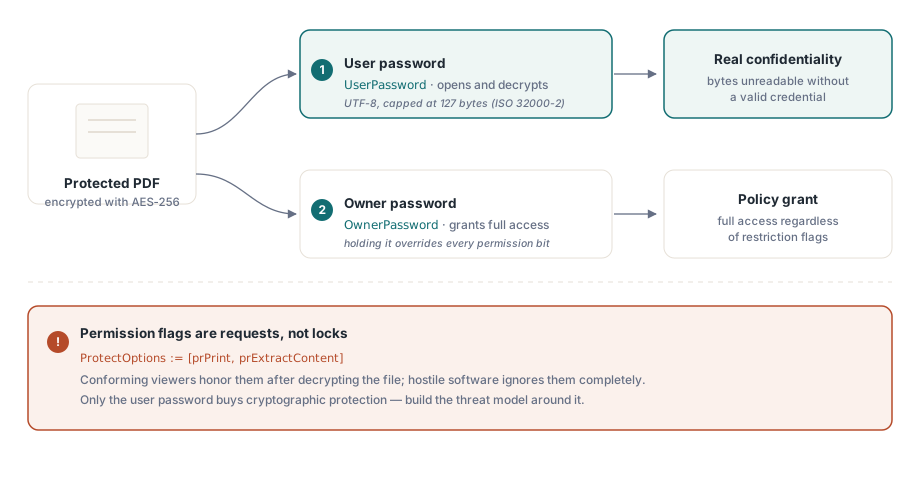
PDF の権限フラグは鍵ではない。ファイルを開くソフトウェアに対する要求にすぎず、ビューアはそれを無視する自由を持つ。この 1 つの事実が、このページにあるほかのあらゆる選択をどう考えるべきかを決める。真の機密性はただ 1 箇所からしか得られない。読み手が持たないパスワードで鍵付けされた AES-256 暗号化である。それ以外のもの、「印刷不可」や「コピー不可」のチェックボックスはすべて、準拠ソフトウェアが尊重に同意し、悪意あるソフトウェアはそうしないポリシーにすぎない。この 2 つの層を混同すると、デモでは安全に感じられても実運用では漏洩するものを出荷してしまう
HotPDF は Delphi と C++Builder 向けのネイティブ VCL PDF コンポーネントであり、ISO 32000 の保護モデルを少数のプロパティ群として公開している。プロパティの設定自体は簡単だ。難しいのは、どれが暗号学的な保護をもたらし、どれが丁寧な提案にすぎないのかを見極めること、そして代入の順序を正しく守り、要求したはずの暗号化が実際に得られる暗号化になるようにすることである
2 つのパスワードが実際に約束すること
PDF 暗号化は役割の異なる 2 つの資格情報を定義しており、両者を混同することは保護済み出力を扱うコードで最もよく見られる設計上の誤りである。ユーザーパスワードは復号のゲートを担う。それ、あるいはオーナーパスワードのいずれかを持たなければ、準拠リーダーはファイルキーを再構成できず、内容は暗号学的に読めないままとなる。オーナーパスワードは代わりに権限設定のゲートを担う。オーナーパスワードを受け取ったリーダーは、制限フラグの内容にかかわらず完全なアクセスを許可される
権限ビットの立場はそれより弱い。印刷、コンテンツ抽出、フォーム入力のいずれも、ビューアが読み取り、尊重するかどうかを選ぶフラグにすぎない(ISO 32000-2 §7.6.4)。暗号化はバイトを保護する。権限フラグは準拠ソフトウェアに対して指示を出すだけであり、しかもその指示は事後的なものである。ユーザーパスワードで文書を開いた者は、その時点ですでに復号済みの内容をメモリ上に保持しているため、「コピー不可」や「印刷不可」は行儀のよいビューアには意味を持つが、そのつもりがないビューアには何の意味も持たない。脅威モデルはこの境界線を軸に組み立てること。機密性はユーザーパスワードに宿る。権限は主要なビューアが何を提供するかを形作るものであり、それこそが権限のすべてである
設定の順序: すべては BeginDoc より前に
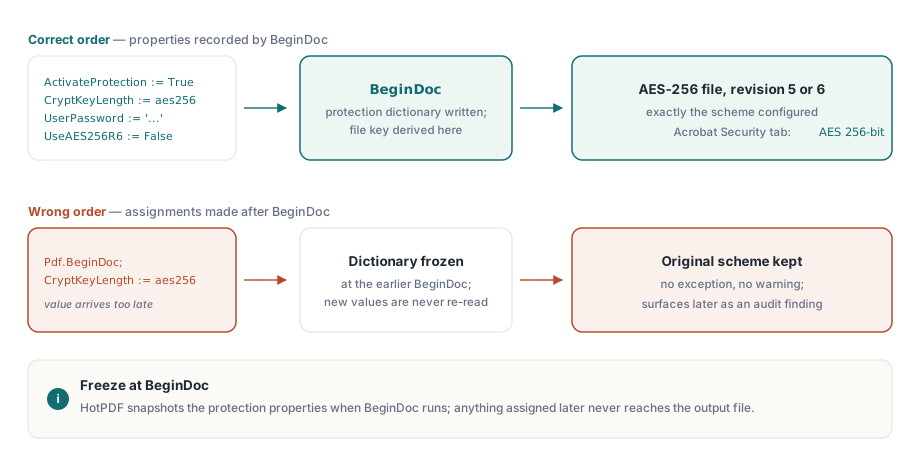
HotPDF は BeginDoc が実行される瞬間に暗号化辞書を構築し、ファイルキーを導出する。その瞬間に保護プロパティが保持している値がそのまま文書に反映され、その後で変更しても何も変わらない。ここで最も重要なプロパティは CryptKeyLength であり、THPDFKeyType の値である k40、k128、aes128、aes256 のいずれかから方式を選ぶ。これを BeginDoc の後に代入しても例外は発生せず、警告も出ない。ただ静かに、最初に持っていた値のままのファイルができるだけである。この種の静かな乖離は最悪の部類に入る。ローカルのテストはすべて通過してしまい、数か月後になって顧客の机の上でコンプライアンス上の指摘として現れる
var
  Pdf: THotPDF;
begin
  Pdf := THotPDF.Create(nil);
  try
    Pdf.FileName := 'statement.pdf';
    Pdf.ActivateProtection := True;
    Pdf.CryptKeyLength := aes256;        // BeginDoc前に設定必須
    Pdf.UserPassword := 'open-secret';
    Pdf.OwnerPassword := 'admin-secret';
    Pdf.UseAES256R6 := False;            // R=5:viewer対応範囲が最も広い
    Pdf.BeginDoc;
    Pdf.CurrentPage.SetFont('Arial', [], 11);
    Pdf.CurrentPage.TextOut(50, 720, 0, 'Account statement, June 2026');
    Pdf.EndDoc;
  finally
    Pdf.Free;
  end;
end;
パスワードは UTF-8 であり、127 バイトが上限となる。これは AES-256 方式に対する ISO 32000-2 の制限である。パスワードポリシーがそれより長い秘密を渡してくる場合は、切り捨てをどこで行うか自分で完全に制御できる自分側のコードで実施すること。成り行き任せにすると、ライブラリと将来のどこかのビューアとで切り捨て位置の解釈が食い違いかねず、自分の環境では開けるのに別の場所では同じパスワードを拒否されるファイルができてしまう
リビジョン 5 かリビジョン 6 か: 1 つの真偽値、2 つのエコシステム
UseAES256R6 は 2 つの AES-256 ハンドシェイクのいずれかを選ぶプロパティであり、その選択が持つ意味は真偽値という型から想像するよりはるかに大きい。False のままにしておくと、HotPDF は PDF 1.7 の拡張として登場した AES-256 方式であるリビジョン 5 を書き込み、これはおよそ 15 年分のビューアで開ける。True にすると、PDF 2.0 向けに ISO 32000-2 で標準化された、より堅牢な鍵導出であるリビジョン 6 になり、これはリビジョン 5 のパスワード検証方法に存在した既知の弱点を塞いでいる
したがって暗号学的に見ればリビジョン 6 のほうが優れている。だが、それは同時に物事を壊す側でもある。リビジョン 6 のファイルには PDF 1.7 拡張レベル 3 または PDF 2.0 向けに作られたビューアが必要であり、実際に配備されているソフトウェアの少なからぬ部分はそのどちらでもない。記録管理用のアーカイブ、他製品に組み込まれたレンダラー、何年も誰も手を触れていない業務ツールなどである。それらはそのファイルを問答無用で拒否し、しかもそれが起きるのは顧客のマシン上であって、自分の手元では決して起きない。したがって実務上の既定値はリビジョン 5 である。リビジョン 6 に手を伸ばすのは、セキュリティポリシーが ISO 32000-2 をリビジョン指定で名指ししており、かつすべての利用者が実際にそれを読めることを確認できた場合に限る。いずれを選んだにせよ、どちらを選び、なぜそうしたのかを書き残しておくこと。次にこのコードに触れる人が必ず疑問に思うからである
古い鍵タイプについても、避けるべき理由がわかる程度には触れておく。THPDFKeyType には今も k40、k128、aes128 が残っているが、これらは既存の古いアーカイブを再現するために存在しているのであって、新しいアーカイブを保護するためではない。40 ビットの RC4 は市販のハードウェアで容易に破られ、128 ビット方式はどんな現行のセキュリティレビューでも要求される AES-256 のリビジョン群より前の世代である。2026 年にこれから作成する文書にとって、実質的な選択肢はリビジョン 5 かリビジョン 6 かだけであり、新規設計でレガシーな鍵タイプに手を伸ばしている自分に気づいたら、どこか上流で何かが間違っている
開封パスワードなしの権限フラグ
要件が秘匿性とは正反対であることもよくある。誰でも文書を読めるようにしつつ、印刷や抽出だけは制限したいという場合である。それは空のユーザーパスワードと空でないオーナーパスワードで表現する。PDF ではこれをオープンパスワードモードと呼び、許可したい操作は ProtectOptions に列挙する
Pdf.ActivateProtection := True;
Pdf.CryptKeyLength := aes256;
Pdf.UserPassword := '';                      // 誰でもfileをopenできる
Pdf.OwnerPassword := 'rotate-me-quarterly';  // permission setを保護
Pdf.ProtectOptions := [prPrint, prPrint12bit, prExtractContent];
Pdf.BeginDoc;
// ... page content ...
Pdf.EndDoc;
THPDFProtectOptions のセットは ISO の権限ビットに対応している。prPrint と prPrint12bit は高解像度印刷、prInformationCopy は一般的なコピーと抽出、prExtractContent は支援技術向けの抽出、そのほかに prModifyStructure、prEditAnnotations、prFillAnnotations、prAssemble がある。このうち 2 つには注意が必要である。prExtractContent は、構築するほぼすべてのプロファイルで有効のままにしておくこと。これはスクリーンリーダーがテキストに到達するために必要なビットであり、これをうっかり解除すると、権利に関する判断が静かにアクセシビリティ上の欠陥に変わり、それは障害を持つ誰かがぶつかるものであって、あなたの目に触れることは決してない。もう 1 つの落とし穴は、prPrint12bit を伴わずに prPrint だけを立てることである。複数のビューアはこれに対して印刷品質を落とすという反応を示し、ユーザーはそれを権限設定の結果ではなく描画のバグとして報告してくる
検証には 5 分もかからず、リリースチェックリストに組み込んでおくべき項目である。各プロファイルのサンプルを Acrobat で開き、文書のプロパティを開いてセキュリティタブを確認する。ここにはアルゴリズム(「AES 256 ビット」)が明記され、許可された操作が 1 つずつ列挙されている。次に、同じファイルを、手元にある最新のビューアではなく、実際に顧客が使っている最も古いビューアで開くこと。この 2 回目の確認こそが、リビジョン 6 のファイルが開発中は問題なく通過し、一度もアップグレードしていない顧客のもとで初めて動かなくなる事態への安価な保険になる
既存ファイルから保護を取り除く
復号は同じプロパティモデルを逆向きにたどるだけである。有効な資格情報で文書を読み込み、保護を無効にして、それを外した状態で結果を保存する
var
  Pdf: THotPDF;
  PageCount: Integer;
begin
  Pdf := THotPDF.Create(nil);
  try
    PageCount := Pdf.LoadFromFile('encrypted.pdf', 'open-secret');
    if PageCount > 0 then
    begin
      Pdf.ActivateProtection := False;   // save時にencryptionを外す
      Pdf.SaveLoadedDocument('plain.pdf');
    end;
  finally
    Pdf.Free;
  end;
end;この経路は文書全体をメモリに解析するため、普通サイズのファイルには問題ないが、巨大なファイルには無駄が多い。入力が数百メガバイトに及ぶ場合は、DecryptFile のほうが軽い選択肢になる。ファイルレベルのコピーの最中に復号を行い、入力が許す限り完全なオブジェクトツリーの構築を省く直接的な AES-256 書き換え経路を取る。これは Delphi から大きな PDF を処理する関連記事で扱っている Direct File API の一部である
暗号化と絡み合う制約
暗号化まわりを設計する前に知っておく価値のある制限が 2 つある。1 つ目はアーカイブ適合性である。ISO 19005 は PDF/A における暗号化を禁じているため、文書を暗号化しながら同時にPDF/A 適合性も主張するワークフローは構造的に矛盾している。HotPDF はその両方を 1 つのファイルの中で同時に持たせることを許さない。両方が本当に必要な場合、答えは 2 つの成果物を用意することである。配布用の暗号化済みコピーと、アーカイブ用の別の非暗号化コピーである
2 つ目の制限はもっと厳しい。PDF 暗号化にはエスクロー機構も復旧手段もない。R5 または R6 のファイルでユーザーパスワードを失えば、選択肢はブルートフォースか諦めるかのどちらかしかない。したがって、オーナーとユーザーの秘密はどんな本番用の資格情報とも同じように扱うこと。生成し、保管庫に保存し、定期的にローテーションする。決してやってはならないのは、ユニット内の定数としてハードコードすることである。そうすればそれはそのままバージョン管理に乗り、すべての開発者の作業コピーの中に永遠に居座ることになる
もう 1 つ身につけておく価値のある習慣がある。自分が作成していないファイルの保護を変更する処理は、独立した機能ではなく復号と同じ仕組みである。LoadFromFile でそのパスワードを使って読み込み、ProtectOptions かパスワードをその場で編集し、SaveLoadedDocument で書き戻す。ファイルを復号できるなら再度権限を設定し直すこともでき、そのコードは上の例とほとんど同じ見た目になる
ここで示した保護用プロパティは、Delphi と C++Builder 向けの標準HotPDF Delphi Componentの一部であり、製品ページには完全な権限の列挙を含む暗号化リファレンス全体が掲載されている