HotPDF v2.743.0は、/AP appearance streamを持たないPDF annotationを黙ってskipせずflattenします。FlattenLoadedAnnotationsはappearanceのないwidgetをEnsureLoadedFieldAppearanceStreamへ送り、appearanceのないmarkupについてはannotation自身のpropertyからForm XObjectを構築します。そのため、/NeedAppearances formへ入力されたvalueがflatten時に消えず、page contentに残ります。この変更を迫ったfailureはno-opに見えます。customerがbrowserからPDFにprintした入力済みapplication formを送ってきます。HotPDFでloadし、FlattenLoadedAnnotationsを呼び、0を受け取り、applicantが入力したnameとamountのboxが空のdocumentをsaveして出荷します。exceptionもlogもありません。valueはずっとfile内にあり、各fieldの/V entryに入っていました。しかしどのwidgetもappearance streamを持たなかったため、flatten passはそのまま通り過ぎました
browserからprintしたformで入力valueが失われる理由
/NeedAppearances formはvalueを保存しても、そのvalueのpictureは保存しないためです。ISO 32000-1 12.7.2では、interactive formがAcroForm dictionaryに/NeedAppearances trueを設定できます。これはviewerに対し、/V、/DA、/Qからopen時に各fieldのvisual surfaceを構築するよう指示します。browser print path、server-side filler、scan front endの一部など、安価にformを生成するproducerはこの仕組みを利用し、/APをまったく書きません。ISO 32000-1 12.5.5のappearance algorithmで定義されるflatteningはtranscription jobです。annotationのnormal appearance streamを取り、/BBoxを/Rectへmapし、Do operatorでpage content streamからinvokeしてからannotationを削除します。source streamがなければtranscribeするものがありません。v2.386.0のoriginal HotPDF implementationはこれを「skip」と扱っていました。単独なら説明できても、全体では破滅的です。flatteningが最も必要なdocumentほどappearanceを持たないからです。同じ穴にmarkupも落ちました。review toolのHighlight、redline passのSquare、Ink signatureが、producerがviewerに描画を任せた場合に消えていました
FlattenLoadedAnnotationsへsynthesisをhookする場所
hook pointは意図的に遅く、appearance lookupが失敗した後です。FlattenLoadedAnnotationsはまずGetLoadedAnnotationAppearanceStreamにnormal appearanceを尋ね、すでに持っているannotationはv2.386.0とまったく同じようにbakeします。nil resultになり、かつannotationがnon-degenerateな/Rectを持ち、hidden flagもない場合だけsynthesis pathへ入ります。この順序が重要です。/APを書く手間をかけたdocument authorには、HotPDFのreconstructionではなく、自身のbyteが返るからです
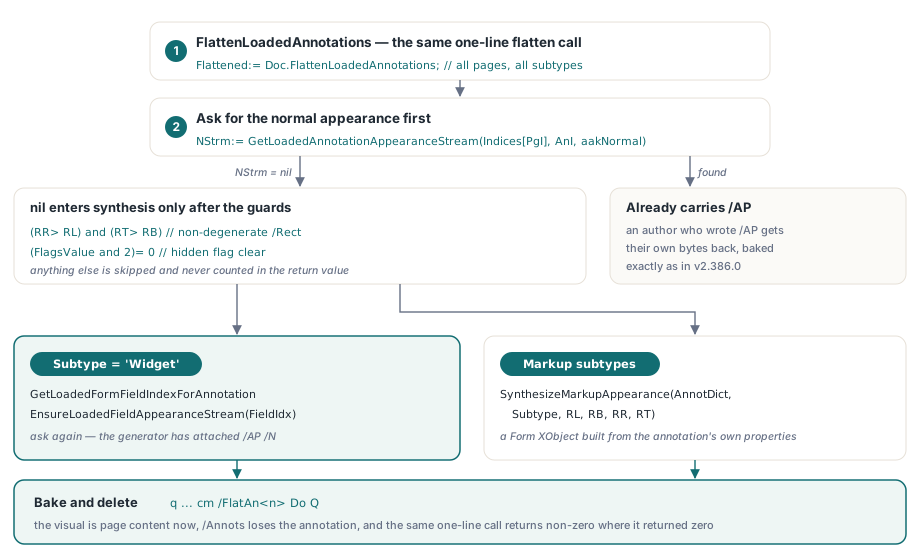
NStrm:= GetLoadedAnnotationAppearanceStream(Indices[PgI], AnI, aakNormal);
if (NStrm= nil) and (RR> RL) and (RT> RB) and ((FlagsValue and 2)= 0) then
begin
  if Subtype= 'Widget' then
  begin
    FieldIdx:= GetLoadedFormFieldIndexForAnnotation(Indices[PgI], AnI, WidgetIdx);
    if FieldIdx>= 0 then
      EnsureLoadedFieldAppearanceStream(FieldIdx);
    // もう一度queryすると、generatorがwidgetへ/AP /Nを付けている
    NStrm:= GetLoadedAnnotationAppearanceStream(Indices[PgI], AnI, aakNormal);
  end
  else
    NStrm:= SynthesizeMarkupAppearance(AnnotDict, Subtype, RL, RB, RR, RT);
end;
ここからannotation familyは2つに分かれます。widgetはGetLoadedFormFieldIndexForAnnotationでowning fieldへ戻し、v2.328.0以降このDelphi PDF libraryにあるfield appearance generator、EnsureLoadedFieldAppearanceStreamへ渡します。二つ目のfield rendererを書くのではなく再利用することが要点です。すでにType0 font、line wrapping、quadding、checkboxとradioの/AS state、/MK rotationまで扱っており、loaded PDFへAcroForm fieldを追加する処理と同じ機構だからです。それ以外はmarkup synthesizerへ送ります。callerから見れば何も変わりません。以前は0を返していたdocumentでも、同じ1行のflatten callが今はnon-zero countを返します
Doc:= THotPDF.Create(nil);
try
  Doc.LoadFromFile('needappearances-form.pdf');
  // v2.743.0:APのないwidgetとmarkupを合成してからbakeする
  Flattened:= Doc.FlattenLoadedAnnotations;          // 全page、全subtype
  // Flattened:= Doc.FlattenLoadedAnnotations('1-3', 'Highlight');
  if Flattened= 0 then
    raise Exception.Create('nothing was flattened');
  Doc.SaveLoadedDocument('flattened.pdf');
finally
  Doc.Free;
end;
QuadPointsとInkListが誤った位置に落ちる理由
これらのcoordinateはpage user spaceにありますが、synthesized appearance streamは自身の/BBox spaceに描画し、2つのoriginは同じ点ではないためです。ISO 32000-1 Table 176はtext markup annotationの/QuadPointsをdefault user spaceで定義し、Table 174はline annotationの/L endpointにも同じことをします。/InkListも同じconventionです。HotPDFはsynthesized formに[0 0 W H]の/BBoxを与え、そのoriginを/Rectのlower-left cornerに置きます。そのため/QuadPoints、/L、/InkListから取り出したpointは、content streamへ書く前に/Rect lower-leftのnegated valueでtranslateする必要があります。これを誤ると、pageの700 point上にあるlineのhighlightは自身のboxよりさらに700 point上に描かれ、実際にはどこにも出ません。修正はcoordinateごとに1回のsubtractionです。後でbakeが出すcmともcomposeします。このmatrixが/BBoxを/Rectへ戻すため、2つのstepは相殺されて正しいabsolute geometryになります
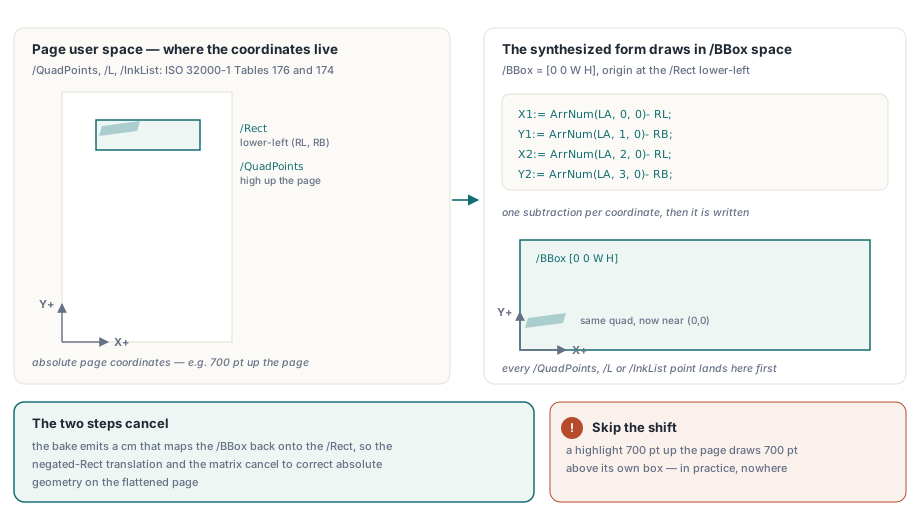
// /L endpointはpage user space(ISO 32000-1 Table 174)にあり、formの
// BBox originは/Rectのlower-leftにあるため、-(RL, RB)だけshiftする
X1:= ArrNum(LA, 0, 0)- RL;
Y1:= ArrNum(LA, 1, 0)- RB;
X2:= ArrNum(LA, 2, 0)- RL;
Y2:= ArrNum(LA, 3, 0)- RB;
StrokeOp:= ColorOp(DArr('C'), true);
if StrokeOp= '' then
  StrokeOp:= '0 G';
Result:= _FloatToStrR(BW)+ ' w '#10+ StrokeOp+ #10+
  _FloatToStrR(X1)+ ' '+ _FloatToStrR(Y1)+ ' m '+
  _FloatToStrR(X2)+ ' '+ _FloatToStrR(Y2)+ ' l S'#10;
synthesized markup appearanceが実際に描くもの
markup synthesizerはannotation dictionaryだけを読み、それ以外は読みません。これによってoutputは予測可能になり、知り得ないものを知っているふりもしません。FreeTextとStampは/DAからparseしたfontとcolorで/Contentsを描き、/Qでalignし、paddingは2 ptです。SquareとCircleはreまたは4つのarc Bezier outlineを/Cでstrokeし、/ICがあればfillし、widthは/BS /Wから取ります。LineとInkはvertexをstrokeします。Highlightは各quadをfillし、Underline、StrikeOut、Squigglyはquadのbottom、quadのmidpoint、または1 pointのzigzagにruleをstrokeします。1未満の/CAはca entryを持つExtGStateになり、stream先頭で/GSA gsとして参照されます
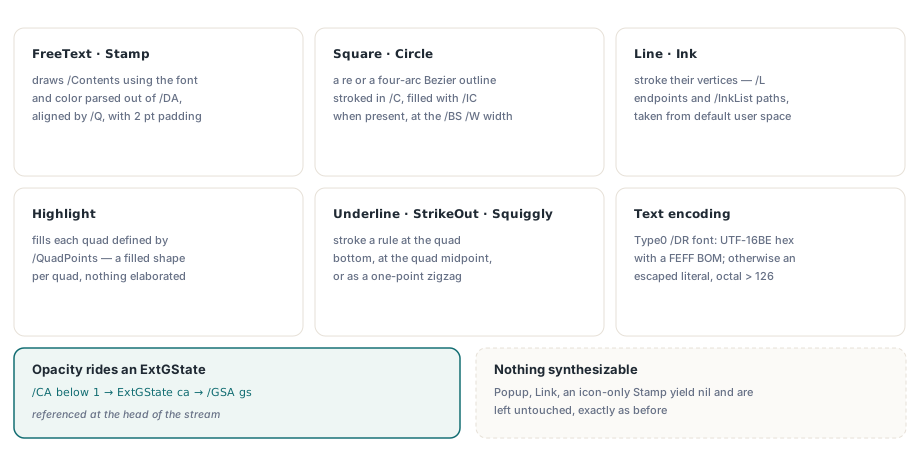
text encodingは、/DAが示すAcroForm /DR /Font entryから決まります。そのfontの/SubtypeがType0なら、HotPDFはFEFF byte order mark付きのUTF-16BE hex literalとしてstringを書きます。それ以外ではescaped literal stringを書き、parenthesisとbackslashをescapeし、126を超えるbyteをoctalで書きます。/DAのTf operatorはBTの前に出力します。text stateはtext object boundaryを越えてpersistするため合法で、/DA stringを分解する手間も省けます。2つの制限を明確にしておきます。wrappingとquaddingのline widthはreal font metricではなくhalf-em / full-em heuristicで推定するため、proportional fontでのalignmentは近似で正確ではありません。またsynthesizeできるものがないsubtype、Popup、Link、contentがicon nameだけのStampはnilを返し、以前と同じように未変更のまま残ります
helpful cleanupが問題にするtemporary /Annots swap
FlattenOneWidgetはFlattenLoadedFormFieldsが使うper-widget pathで、shared flatten loop内の変更が尊重すべきaliasing trapです。pageの/Annots valueを一時的に1-element arrayへ置き換え、generic flatten passが単一widgetを処理できるようにし、その後finally blockでoriginalのPHPDFDictionaryItem pointerを戻します。restoreはcall前にcaptureしたdictionary slotへ書き戻します
DictItem:= PHPDFDictionaryItem(PageObj.Items.Items[AnnotsIndex]);
Item:= DictItem^.Value;
TemporaryAnnots:= THPDFArrayObject.Create(nil);
TemporaryAnnots.AddObject(Target);
DictItem^.Value:= TemporaryAnnots;
try
  Result:= FlattenLoadedAnnotations(IntToStr(PageIndex+ 1), 'Widget')= 1;
finally
  DictItem^.Value:= Item;   // inner loopがこのitemをfreeするとdanglingになる
  TemporaryAnnots.Free;
end;
shared inner loopの中へ、もっともらしいcleanupを追加します。arrayが空になったらDeleteValue('Annots')を呼び、保存したpageに役目を終えたempty arrayを残さないようにします。しかしそのcallはDictItemが指すdictionary item自身をfreeします。続くfinallyはdangling pointerを通じてwriteし、processは「Invalid pointer operation」で停止します。2つの既存testがすぐにこれを捕捉しました。だからfootnoteで済んでおり、support ticketにならずに済みました。教訓は一般化できます。shared loopへcleanupを追加する前に、callerのaliasまたはswap contractを確認してください。empty /Annots arrayが残るのは見た目の問題であり、pointer lifetime guaranteeと交換する価値はありません
bakeされないものとflatteningのコスト
hidden annotationは意図的に除外されます。/F integerのbit position 2がsetされたannotationはISO 32000-1 12.5.3によりhiddenです。しかも/APがないと、他と同じようにsynthesizeしてbakeしたくなります。それはsecurity consequenceのあるbugになります。invisible noteをpage contentへbakeすると、fileを開くすべての人に見えてしまうためです。HotPDFはそのannotationを完全にそのまま残し、return valueにもcountしません。bakeされるannotationについてはコストも同様に明確に伝えてください。flatteningはirreversibleです。annotationはpageの/Annots arrayから削除され、visualはpage contentになります。以後field valueをeditすることも、comment threadを使うことも、/AS stateをtoggleすることもできず、structured dataをoriginal fileなしに戻す方法もありません。copyをflattenし、originalを保管し、documentがformからrecordへ変わる場所でだけ使ってください。appearance-lessではなくXFA-backedが問題なら、HotPDFのXFAからAcroFormへのflattening pathから始めるべきです。まだformを構築中なら、AcroForm field actionとvalidationの配線にwrite sideの説明があります
verificationについて1つ注意があります。後で午後を失わないためです。ExtractLoadedPageGlyphsはForm XObjectへdescendせず、baked appearanceはその中にあります。page content streamにあるのはq ... cm /FlatAn<n> Do Q sequenceだけです。そのためflattened pageでglyph extractionを行っても何も報告されません。これはbakeが失われたのではなく正しい動作です。byte levelで/FlatAn resource name、Do invocation、/Subtype /Formをcheckするか、XObjectをexpandするrendering pipelineで確認してください
annotation flatteningは、実際に人々が生成するdocumentに出会うまでは3行のtranscriptionに見えます。DelphiまたはC++Builderでfilled form、review markup、archival outputを扱うなら、appearance generatorを自分で上に構築する前に、HotPDF Delphi PDF componentがloaded-document側のAcroFormとannotationをどう扱うかを読む価値があります