レポートの生成とは、結局のところ 3 つのものをページに配置し、それらの位置を一致させる作業に帰着する。既知の座標にあるテキスト、サーバー上でもデスクトップ上でも同じように描画されるフォント、そして収まるサイズに合わせた画像である。レポートライブラリが行うそれ以外のことは、すべてこの 3 つを中心に組み立てられている。losLab の Delphi・C++Builder 向け PDF 生成ライブラリである HotPDF は、これらのそれぞれをページオブジェクトへの直接的な呼び出しとして提供しており、本当につまずくのはその下にある座標系だけである。それは、見慣れた VCL キャンバスとは逆向きに進む。まずこの向きの問題を片付けてしまえば、残りのレイアウト作業はもうこちらに逆らわなくなる
テキストの配置と左下隅の原点
ほとんど誰の最初のレポートも上下逆さまに出てくる。タイトルが下端近くに現れ、その下の各行はむしろ上へ向かって並んでいく。何も壊れているわけではない。ISO 32000-1 §8.3 で定義される PDF のユーザー空間は、原点を左下隅に置き、Y は上方向へ増えていく。これは、左上隅から Y が下方向へ増えていく GDI キャンバスとちょうど鏡合わせの関係にある。ここで折り合いをつけるのに費やす 5 分は、数値の辻褄が合わなくなってからレイアウトを書き直す羽目になるのを防いでくれる
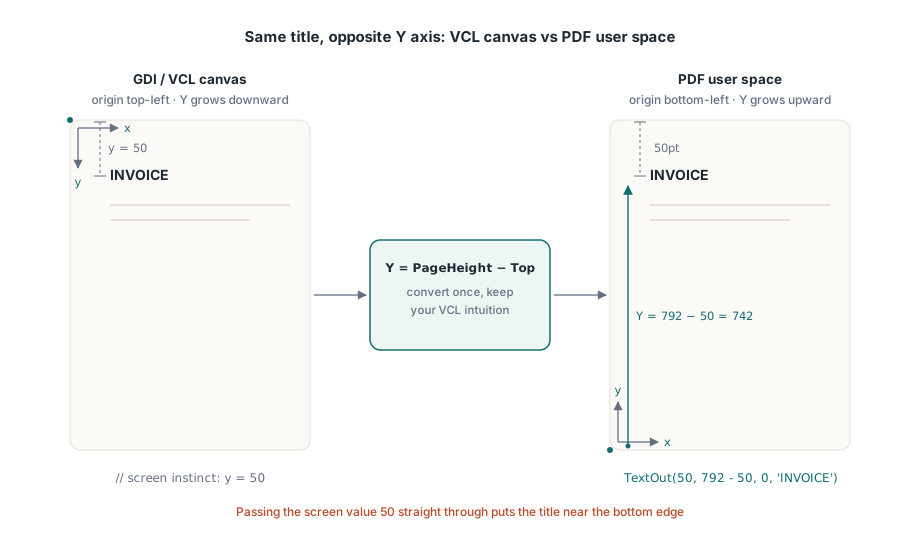
ページオブジェクトの中心的な呼び出しは TextOut(X, Y, Angle, Text) である。X と Y は左下隅からのポイント単位でテキストの位置を指定し、Angle は度単位で回転させる。斜めの DRAFT や COPY のスタンプが、特別な仕組みなしに描けるのはこのおかげである。VCL で培った直感をそのまま使い続けるコツは、Y をページの高さから、上端からの距離を引いた値として表すことである
var
  Pdf: THotPDF;
begin
  Pdf := THotPDF.Create(nil);
  try
    Pdf.FileName := 'invoice-0001.pdf';
    Pdf.BeginDoc;
    Pdf.CurrentPage.SetFont('Arial', [fsBold], 16);
    Pdf.CurrentPage.TextOut(50, 792 - 50, 0, 'INVOICE');       // Letter上端から50pt
    Pdf.CurrentPage.SetFont('Arial', [], 10);
    Pdf.CurrentPage.TextOut(50, 792 - 70, 0, 'Date: 2026-06-11');
    Pdf.CurrentPage.TextOut(300, 400, 45, 'COPY');              // 回転したスタンプ
    Pdf.AddPage;                                                // CurrentPageはここを参照するようになる
    Pdf.CurrentPage.SetFont('Arial', [], 10);                   // フォント状態は引き継がれない
    Pdf.CurrentPage.TextOut(50, 742, 0, 'Page 2 detail rows');
    Pdf.EndDoc;
  finally
    Pdf.Free;
  end;
end;
このリストにある 2 つの状態依存の挙動が、2 ページ目になって初めて表面化するバグの大半の原因になっている。AddPage は、いま作成したばかりのページを指すように CurrentPage を付け替える。そのため、以前にキャッシュしておいたページへの参照は、もう期待通りの場所には描画されない。フォントの選択も、文書単位ではなくページ単位である。AddPage の後に SetFont を省略すると、新しいページ上の最初の TextOut は、3 ページ前に設定した太字の見出しフォントではなく、そのページが開始時点で持っていた既定のフォントにフォールバックしてしまう。安全な習慣は、「新しいページを開始する」ことと「テキストの状態を設定し直す」ことを、レポートのループの中で切り離せない 1 つの手順として扱うことである
デスクトップだけでなくサーバー上にも存在するフォント
フォントに関する問題のほとんどは、実のところデプロイの問題が別の顔をしているにすぎない。開発機には社内標準のフォントがインストールされているため、レポートは画面上では正しく見え、そのまま出荷される。本番ホストはそのフォントを一度もインストールしたことのないサービスアカウントの下でジョブを実行し、レンダラーは見つかる何かへ静かに代替フォントを差し替え、誰かがそれに気づくのは顧客から「レターヘッドがなぜ変わったのか」と問い合わせが来たときである。この状況を抜け出す方法は、OS のフォントディレクトリを信頼するのをやめ、インストーラーがディスク上に配置したファイルからフォントを読み込むことである。HotPDF の Unicode 登録用の呼び出しはパスを受け取り、まさにそれを行う
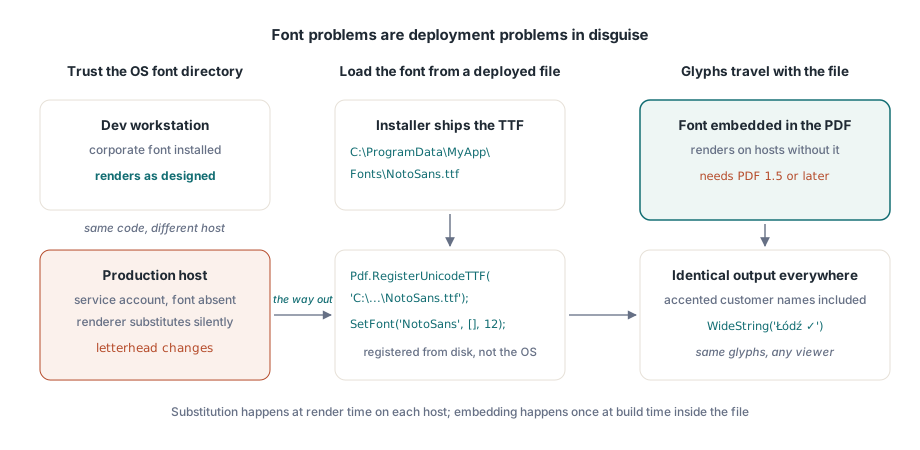
Pdf.RegisterUnicodeTTF('C:\ProgramData\MyApp\Fonts\NotoSans.ttf');
Pdf.CurrentPage.SetFont('NotoSans', [], 12);
Pdf.CurrentPage.TextOut(50, 700, 0, WideString('Łódź - Ünïcode test ✓'));
TextOut は WideString を直接受け取り、これは見た目以上に重要な事実である。アクセント付きの顧客名、ドイツ語の通り名、ポーランドの都市名。これらは特殊なケースではなく、顧客テーブルのごく普通の中身であり、登録したフォントが実際にそのグリフを含んでいる限り、ハードコードした ASCII のラベルと同じ呼び出しをそのまま通っていく。埋め込みフォントには 1 つバージョン上の制約が付いてくる。文書は PDF 1.5 以降でなければならない。だから、無関係な要件のせいでもっと古いバージョンに縛られている場合、それこそが静かに壊れる部分になる。アラビア語やヘブライ語のような右から左へ書くスクリプトは、単純なグリフ検索ではなく本物のシェーピングを必要とし、そのためだけの専用パイプラインがある。HotPDF による複雑なスクリプトのテキストシェーピングに関する記事を参照してほしい
インストール済みのどのフォントでも表現できないもの、たとえば小切手上の MICR 文字や独自のシンボルセットを思い浮かべてほしいが、そういった場合は Type 3 フォントがその隙間を埋める。RegisterType3Font と AddType3Glyph を通じて、各グリフを小さなコンテンツストリームとして定義する。API の中でも特殊な一角であり、手を伸ばすことはめったにないが、何百もの小さなシンボルビットマップをページ中にばらまくよりはるかにすっきりしている
画像: 中間の引数は対角の座標ではなく幅と高さである
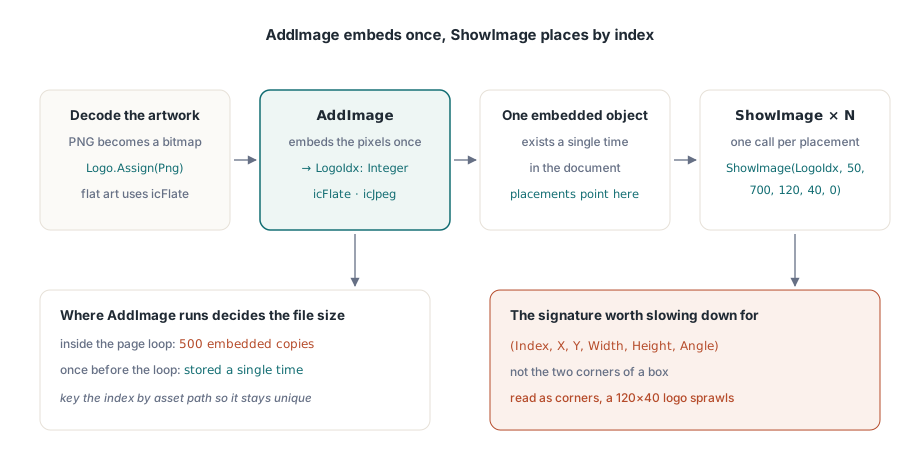
画像の扱いは 2 つの手順に分かれており、それらを分けたままにしておくことこそが肝心である。AddImage は TBitmap または TJPEGImage を受け取り、それを 1 回だけ埋め込んで、インデックスを返す。PNG のアートワークは、そこにたどり着く前にビットマップへデコードしておく必要がある。そのインデックスを、好きな場所へ好きな回数だけ描画するのが ShowImage の役目である。ShowImage の引数の順序は、じっくり読む価値がある唯一の箇所である
var
  Png: TPngImage;
  Logo: TBitmap;
  LogoIdx: Integer;
begin
  Png := TPngImage.Create;
  Logo := TBitmap.Create;
  try
    Png.LoadFromFile('brand-logo.png');
    Logo.Assign(Png);                       // PNGをビットマップにデコードする
    LogoIdx := Pdf.AddImage(Logo, icFlate); // 単色アートには可逆圧縮
  finally
    Logo.Free;
    Png.Free;
  end;
  // (Index, X, Y, Width, Height, Angle): (X1, Y1, X2, Y2)ではない
  Pdf.CurrentPage.ShowImage(LogoIdx, 50, 700, 120, 40, 0);
end;
位置の後に続く 2 つの数値は幅と高さである。対角にある角の座標ではなく、末尾の引数は度単位の回転角である。これを X1/Y1/X2/Y2 の矩形として読んでしまうと、(50, 700) に置いたはずの 120×40 のロゴが、代わりにそこから (120, 40) まで引き伸ばされ、ページの大部分に広がってしまう。出力を見れば間違いは一目瞭然なのに、ソースコードのほうはまったく妥当に見える。これがまさに午後をまるごと無駄にする原因である。KeepImageAspectRatio は既定で True になっているため、比率の合わないボックスに対しては画像を歪めるのではなくレターボックス状に収める。False に切り替えるのは、本当に引き伸ばすつもりがあるときだけにすること
登録と配置を分けておくことは、長時間の実行で報われる。AddImage はピクセルを 1 回だけ埋め込み、そのインデックスを使うすべての ShowImage は同じ埋め込みオブジェクトを指し戻すため、AddImage をどこで呼ぶかがファイルサイズを左右する。500 ページの明細書のページループの中でそれを呼べば、同じロゴが 500 回埋め込まれてしまう。ループの前に 1 回だけ呼び、そのインデックスを保持しておけば、ロゴは 1 回だけ格納される。アセットのパスをキーにした小さな辞書があれば、それぞれ異なる画像がちょうど 1 回だけ登録されることを保証するのに十分である
コーデックの選択も、もう 1 つのサイズを左右するレバーになる。スキャンした添付書類のような写真的なコンテンツは JPEG に向いている。AddImage に icJpeg を渡し、JpegQuality はおよそ 85 まで下げること。このプロパティは 100 から始まるが、85 との差は印刷したページの上ではまず見分けがつかない。ロゴ、チャート、線画のような単色主体のアートワークは icFlate に向いており、可逆圧縮の時点ですでにコンパクトであり、JPEG を使うとくっきりした輪郭の周りに目に見えるリンギングがにじんでしまう。すべてのページにフル品質の写真を 1 枚ずつ載せる明細書のバッチは、ギガバイト単位に膨れ上がりかねないが、同じ内容を JPEG 品質 85 で処理すればおおよそ 10 分の 1 のサイズに収まり、それでいてどの読者にも違いはわからない
パスのプリミティブによる罫線、ボックス、網掛け
表のヘッダーの下にある横罫線や、合計欄の背後にあるグレーのボックスは、画像である必要はない。それらをベクターとして描けば、どんなズーム倍率でもくっきりしたまま保たれ、印刷しても鮮明で、ファイルサイズにもほとんど影響しない。HotPDF は、生の PDF コンテンツストリームと同じモデルに従う。パスを組み立て、それを塗る演算子を呼び出す
// 表ヘッダーの下の横罫線
Pdf.CurrentPage.SetLineWidth(0.75);
Pdf.CurrentPage.MoveTo(50, 660);
Pdf.CurrentPage.LineTo(545, 660);
Pdf.CurrentPage.Stroke;

// Shaded totals box:X、Y、width、height
Pdf.CurrentPage.SetRGBFillColor(RGB(235, 235, 235));
Pdf.CurrentPage.Rectangle(395, 120, 150, 40);
Pdf.CurrentPage.Fill;
この順序は選択の余地があるものではない。まず描画状態を設定し、パスを構築し、それから Stroke または Fill を呼ぶ。組み立てただけで一度も塗らなかったパスはページに何も残さない。罫線が「表示されない」という相談の答えはほぼ常にこれである。SetRGBFillColor は単一の TColor を受け取るため、clNavy や clBlack といったおなじみの VCL 定数をそのまま渡せる。Rectangle も、対角の 2 点ではなく画像配置と同じ幅・高さの引数を使う。細い線については 1 つ注意が必要である。おおよそ 0.5 ポイントを下回るような線は、モニター上では洗練されて見えても、600 dpi のオフィスプリンターで印刷すると消えてしまうことがあるため、印刷に耐える必要がある罫線には 0.75pt を妥当な下限として考えておくこと
サンプルデータではなく実データに対するページ割り
レイアウトが固まる前に押さえておくべき細部が 1 つある。数値の列は右端で揃えるべきであり、そのための方法は、文字列の先頭に空白を詰めることではなく、各値のレンダリング後の幅を測定し、列の境界からその分だけ後ろに配置することである。空白による詰め物は等幅フォントでしか揃わないし、財務レポートを等幅フォントで組む人などいない。まず FormatFloat のような Delphi のロケール対応ルーチンに値を通しておけば、幅を測定する桁区切り記号が、実際に顧客のロケールで表示されるものと一致する
ページ割りにまつわる危険は、デモ用データセットに対して書いてしまいがちなことである。そこでは短い行が 10 個ほどページに収まり、ループが改ページを迎えることすら一度もない。本番環境が渡してくるのは、社名が 140 文字に及ぶ顧客や、4,000 行の明細を持つ明細書であり、そうなるとループは毎回正しく改ページしなければならない。ここで通用するパターンは、各行の高さを差し引くたびに下方向へ移動する単一の Y カーソルと、そのカーソルが下端の余白を越えそうになった瞬間に新しいページを開始するチェックである。ここでの「下方向」とは Y が減っていくことを意味し、これこそが左下原点が直感に反したままになる唯一の箇所である。これらすべてを、SetFont を再設定し、新しいページで繰り返しヘッダーを再描画する処理も含めて 1 つのルーチンにまとめておけば、1 ページずれのバグは付け入る隙を失う。同じレポート群がアーカイブやアクセシビリティの規格も満たさなければならない場合、ここでまさに下す判断、どのフォントを埋め込むか、出力をタグ付けするか、どの色空間を使うかは、それらの規格が取り締まる対象そのものである。テンプレートを固める前にHotPDF の PDF/A、PDF/X、PDF/UA ガイドを読んでおく価値がある
ここで示したすべての呼び出し、テキストの配置、フォントの登録、画像の埋め込み、パスの描画は、Delphi と C++Builder 向けのHotPDF Delphi Componentに同梱されている。そのリファレンスには、フォーム、暗号化、署名の各機能と並んで、この出力 API 全体が文書化されている