PDF/A、PDF/X、PDF/UA は、長期保存、印刷用データ交換、アクセシビリティという 3 つの異なる問題を解決する、まったく別の 3 つの規格である。1 枚のコンプライアンス申告書に並んだ 3 つのチェック項目ではなく、それらを同一のもののように扱ってしまうのが最もよくある間違いだ。完璧な PDF/A であっても印刷会社にとってはまったく役に立たないファイルになりうるし、完璧な印刷用マスターがスクリーンリーダーには読めないこともある。さらに厄介なのは、この 3 つがいずれもファイルの見た目ではなく内部構造に対する制約だという点である。手元のあらゆるビューアで問題なく開ける文書でも、最初の検証で失敗することは十分にあり得るし、実際たいてい失敗する
losLab のネイティブ VCL PDF ライブラリである HotPDF は、適合性を最初のページが存在する前に宣言しておくものとして扱う。コンプライアンスプロパティを設定し、規格が求める構造を組み込んでおけば、その規格に矛盾する設定は保存時にライブラリ側が拒否する。これは、ファイルを生成してから後処理でなんとか適合させられることを期待するよりもはるかによいモデルである。これらの規格が求めるものの大半は、後から付け足すことができないからだ
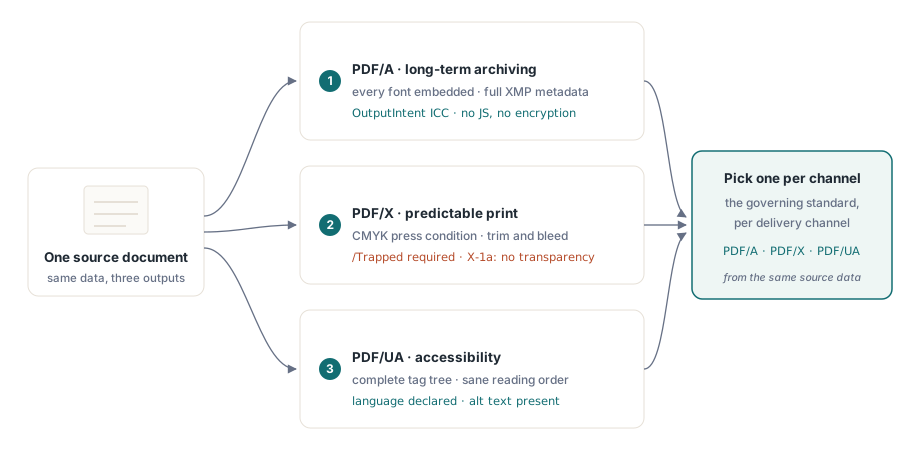
3 つの ISO 規格、3 つの異なる約束
PDF/A(ISO 19005)は時間に関する規格である。数十年後も同じように表示され続けることを約束するため、完全な自己完結性を要求する。すべてのフォントを埋め込み、OutputIntent を通じてすべての色にデバイスに依存しない意味を与え、完全な XMP メタデータを備え、実行環境に依存する挙動を持つものを一切禁じる。暗号化と JavaScript は対象外である。2050 年にも復号器やスクリプトエンジンが存在し続けると誰も保証できないからだ
PDF/X(ISO 15930)は紙の上の色に関する規格である。デザイナーが、互いに協議しなくても済む形で印刷会社にファイルを渡せるようにするために存在し、そのために特性化された印刷条件、必須の /Trapped キー、明確に定義されたトリムとブリードのジオメトリ、そして X-1a 系では RIP に推測させるようなライブなトランスペアレンシーの排除を求める。PDF/UA(ISO 14289)は成果物を誰が読めるかに関する規格である。支援技術には、完全なタグツリー、まともな読み上げ順序、宣言された文書の言語、そしてテキストでないものすべてに対する代替テキストが必要になる
この 3 つはそれぞれ違う方向を向いているため、すべてを満たす 1 つのファイルを追い求めるのではなく、出力チャネルごとに支配的な規格を選ぶこと。CMYK のみの印刷用マスターは、色をまったく目にすることのないスクリーンリーダー利用者に渡すファイルとしてはまさに不適切であり、アーカイブ用プロファイルが動的な挙動を封じ込める性質は、インタラクティブな要素と正面から衝突する。同じソースデータからチャネルごとに生成すれば、この対立全体を回避できる
PDF/A: OutputIntent は誰もが忘れがちな部分
PDF/A ファイルの検証が失敗したら、まず確認すべきは OutputIntent である。これは、見た目に何の影響も与えないという、まさにその理由によって、生成側が最も見落としやすい構造である。ISO 19005 はこれを必須とする。文書のデバイスカラーが実際に何を意味するかを固定する、埋め込み ICC プロファイルである。HotPDF はこのプロファイルを、後付けの要素ではなく明示的な入力として扱う
var
  Pdf: THotPDF;
  ICC: TFileStream;
begin
  Pdf := THotPDF.Create(nil);
  try
    Pdf.FileName := 'invoice-archival.pdf';
    Pdf.PDFACompliance := 'B';            // level B: visual fidelity
    Pdf.Lang := 'en-US';
    Pdf.StandardFontEmulation := False;   // 実際のfontをembedし、Base-14 emulationは使わない
    ICC := TFileStream.Create('sRGB.icc', fmOpenRead);
    try
      Pdf.AddPDFAOutputIntent('sRGB IEC61966-2.1', '', ICC, 3, 'DeviceRGB');
    finally
      ICC.Free;
    end;
    Pdf.BeginDoc;
    Pdf.CurrentPage.SetFont('Arial', [], 11);
    Pdf.CurrentPage.TextOut(50, 760, 0, 'Archival invoice body');
    Pdf.EndDoc;
  finally
    Pdf.Free;
  end;
end;ここでは、いくつかの細部が合否を分ける。StandardFontEmulation はオフにしなければならない。エミュレートされた Base-14 フォントは埋め込まれず、ISO 19005 のもとでは埋め込みが交渉の余地なく必須だからである。暗号化は無効のままにしておく必要があり、PDFACompliance と ActivateProtection を組み合わせてはならない。暗号化されたアーカイブ用ファイルはそれ自体が矛盾であり、バリデータは即座にそれを検出する。AddPDFAOutputIntent のコンポーネント数はプロファイルと一致していなければならず、sRGB IEC61966-2.1 のような RGB プロファイルでは 3、CMYK では 4 になる。HotPDF は書き込みの最中、宣言された intent に対して DeviceRGB と DeviceCMYK の使用状況を追跡するため、RGB intent の文書に紛れ込んだ CMYK の塗りつぶしは、静かに見逃されるのではなく報告される問題になる
ICC プロファイルについて言っておくべきことが 1 つある。それは誰かがかつてビルドサーバーに置いただけのファイルではなく、バージョン管理された成果物として扱うこと。そのバイト列は生成するすべての文書に埋め込まれるため、切り詰められた、あるいは破損したプロファイルはバッチ全体を静かに汚染し、それに気づくのは検証の段階になってからということになる。インストーラーに同梱し、実行ログにチェックサムを記録し、上の例のように TFileStream のパターンで読み込むこと。そうすれば、ファイルの欠落は生成時に大きな声で失敗し、アーカイブの門番のところで静かに失敗することはなくなる
印刷向けの PDF/X: Trapped、CMYK、印刷用プロファイル
印刷用マスターでは色の話が逆転する。印刷所は特性化された CMYK を求め、この規格は、たとえ正直な答えが「わからない」であっても、トラッピングが適用されているかどうかを申告することを求める。/Trapped キーはどのような場合でも必須である
Pdf.PDFXCompliance := 'X-1a';
Pdf.Trapped := 'Unknown';        // ISO 15930で必須のkey
ICC := TFileStream.Create('FOGRA39.icc', fmOpenRead);
try
  Pdf.AddPDFXOutputIntent('FOGRA39 (ISO 12647-2:2004)', '', ICC, 4, 'DeviceCMYK');
finally
  ICC.Free;
end;
Pdf.BeginDoc;
// CMYK-safe colorで描画し、transparencyとencryptionは使わない
Pdf.EndDoc;
ここではコンポーネント数は CMYK の印刷用プロファイルに合わせて 4 になる。X-1a はライブなトランスペアレンシーも禁じているため、半透明の要素を重ねる描画コードがないか監査すること。ビューアが画面上で合成して見せるものと、RIP が解釈を拒否するものはまったく同じである。印刷所から別の特性化プロファイルを渡された場合は、プロファイルのバイト列と識別子文字列だけを差し替え、周囲の構造には手を加えないこと
PDF/UA: 構造は生成時に作るものであり、後付けはできない
アクセシビリティは、チームが最後になって取って付けようとしがちな規格であり、そのやり方をほかの 2 つよりも厳しく罰する。タグツリーはコンテンツが論理的に作成された順序を映し出さなければならないが、それはファイルが書き出されてしまえばもう手元にない情報である。PDFUACompliance を設定するとタグ付き出力が有効になり、構造 API は描画の呼び出しごとにその意味的な役割を紐付けていく
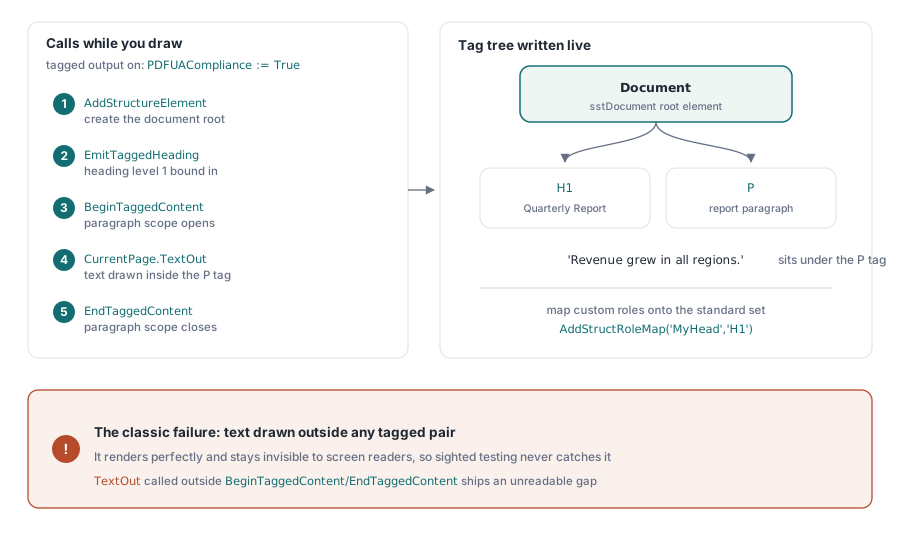
Pdf.PDFUACompliance := True;     // tagged PDFを自動有効化
Pdf.Lang := 'en-US';             // 明示的に設定し、空なら'en'へfallback
Pdf.BeginDoc;

Root := Pdf.AddStructureElement(sstDocument, nil);
H1 := Pdf.EmitTaggedHeading(1, Root, 50, 700, 'Quarterly Report');
Para := Pdf.BeginTaggedContent('P', Root);
Pdf.CurrentPage.TextOut(50, 650, 0, 'Revenue grew in all regions.');
Pdf.EndTaggedContent;

Pdf.EndDoc;注意すべき失敗は、BeginTaggedContent と EndTaggedContent のペアの外側で描画されたテキストである。見た目は完璧にレンダリングされ、スクリーンリーダーからは見えなくなるため、目の見えるテスターがそれに気づくことは決してない。そのバグはそのまま出荷され、実際に支援技術を使う利用者がその隙間にぶつかったときにようやく表面化する。テンプレートが独自の構造ロール名を持っている場合は、AddStructRoleMap('MyHead', 'H1') で標準のセットへマッピングしておくこと。そうすれば準拠リーダーがその意味を理解できる。ISO 14289 は宣言された言語も要求する。HotPDF は Lang が空の場合に 'en' へフォールバックするが、これは安全網であって、実際の文書の言語を未設定のまま放置してよい理由にはならない
検証: ビューアではなくバリデータを信頼する
ファイルを開けるビューアがあっても、適合性については何も証明しない。したがって検証は、描画ではなく構造をチェックするツールを使い、リリース経路の一部として組み込むべきである。PDF/A と PDF/UA については、veraPDF がリファレンスグレードのオープンなバリデータであり、失敗を ISO の条項単位で報告してくれるため、それは上の設定へそのまま結び付く。PDF/X については、Adobe Acrobat の Preflight プロファイルが依然として実用的なチェック手段になる。印刷適合性は構文と同じくらい色の意図に左右されるからである
生成側にもこの一端を担わせることはできる。保存時に HotPDF は機能フラグを設定済みの PDF バージョンと突き合わせ、そのバージョンで表現できないものは静かに格下げする。たとえば PDF 1.7 未満では AES-256 が AES-128 に落とされる。EndDoc 内のコンプライアンスゲートはさらに踏み込み、PDFACompliance を暗号化と同時に要求するような、はっきりした矛盾に対してはその場で例外を発生させる。どちらも外部バリデータの代わりにはならない。ただ、あり得ない設定がバリデータにまで届くのを未然に防いでいるだけである
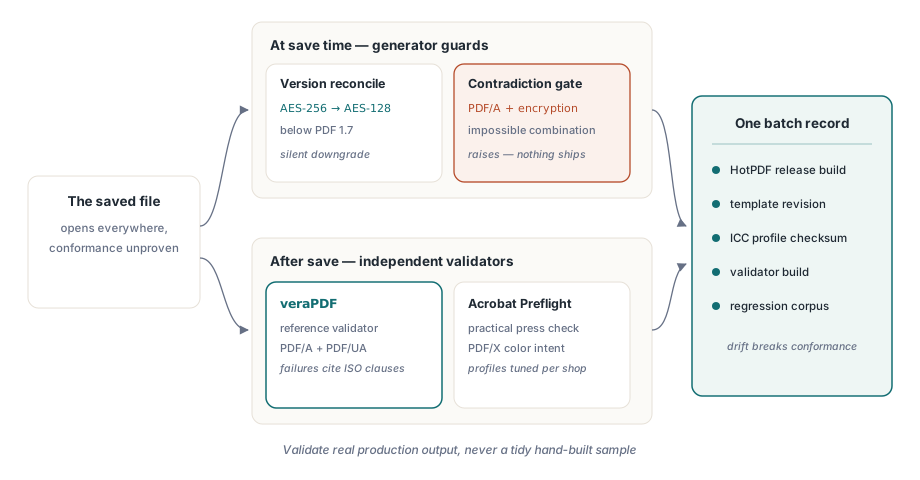
繰り返し報われる習慣が 1 つある。コンプライアンスの設定一式を、まとめて 1 つの単位としてバージョン管理することだ。HotPDF のリリース、テンプレートのリビジョン、ICC プロファイルのチェックサム、承認したバリデータのビルド。これらのどれか 1 つがほかに対して変化した瞬間、適合性は狂い始める。そして最も厄介な監査は、5 年前のアーカイブファイルがどの組み合わせから生まれたのか、誰も再現できないというものである。バッチごとに 1 つの設定レコードを残しておけば、それは永久に解決する
最後に、バリデータは必ず実際の本番出力に対して実行し、きれいに手作りしたサンプルに対しては実行しないこと。実際に噛みついてくる失敗は、誰も予期していなかったデータから生まれる。intent は RGB なのに CMYK として届いた顧客ロゴ、埋め込まれていないフォントをこっそり紛れ込ませるテンプレートの微調整、タグツリーの外にテキストを描く新しいコード経路。過去の不具合それぞれから既知の不良ファイルを 1 つずつ保管して回帰用の入力にしておけば、コンプライアンスゲートは時間が経っても誠実であり続ける。こうしたパイプラインのレンダリング側についてはHotPDF によるレポート出力、フォント、画像に関する記事を、バリデータをビルドに組み込む方法についてはPDF プリフライトチェックの自動化に関する関連記事を参照してほしい
これらの例で使ったコンプライアンスプロパティ、OutputIntent、タグ付け API は、Delphi と C++Builder 向けのHotPDF Delphi Componentに同梱されている。製品ページには、ここで示したすべての呼び出しに関する完全なリファレンスがリンクされている