ファイルは自分のマシンでは問題なく開けます。Acrobat は表示し、印刷プレビューは正しく見え、すべてのページがそこにあります。ところがそれが印刷所へ送られるか、月次バッチを取り込むアーカイブシステムに入れられると、拒否されて戻ってきます。CMYK のジョブなのに RGB の画像がある、/Trapped キーがない、出力インテントがプレスと一致しない。誰の目にも見える範囲では、文書の何も悪くなかったのです。悪かったのはプロファイルに対してであり、そのプロファイルはあなたのいない場所で検査されました。プリフライトはその検査の印刷前工程での呼び名であり、PDF がデザイナーのデスクトップからではなく自分の Delphi コードから生まれてくるとき、本当の問いはその検査がどこにあるべきかです
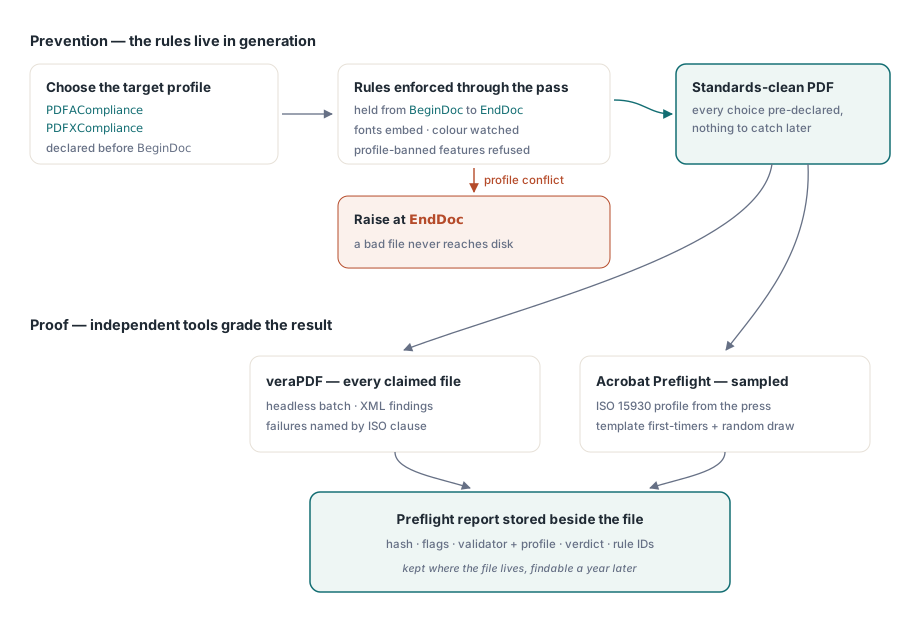
HotPDF は、呼び出すためのプリフライト関数を提供しません。コンポーネントの GUI デモにはプリフライトレポートウィンドウが搭載されていますが、その背後にサービスやビルドスクリプトが呼び出せる API はなく、そうでないふりをすると、存在しないメソッドを探し回ることになります。自分で生成するファイルの場合、自分の出力に対してバリデーターを呼ぶのは、そもそも間違った形だという点に気づくまでは、それは欠落に聞こえます。バリデーターが検査するすべてのプロパティを、あなたはすでに制御しています。有用な分割は、ジェネレーターに不良ファイルを出力できないようにしておき、それを自分が書いていないツールで証明することです
なぜ自分の出力は別の方法で検査するのか
従来のプリフライトは、よそ者のファイルを前提にしています。どこのデザイナーが、どのアプリケーションで、どれだけ不明な編集の連鎖を経て作ったのか分からないからこそ、中身を知らないために検査するわけです。自分のコードが生成した文書はよそ者ではありません。フォントの埋め込み、色空間、出力インテント、メタデータブロック。それらすべてを、ファイルがディスクに届く数ミリ秒前にあなたのプログラムが決定しました。その直後に検査して、自分がちょうど下した選択を「発見」するのは無駄仕事です。より安上がりな手は、その選択肢を制約して、準拠しないファイルが捕捉対象としてそもそも存在しないようにすることです
検証を外部に保つことには、信頼性上の理由もあります。自分の出力にお墨付きを与えるライブラリは、自分の試験を採点しているようなものです。顧客のアーカイブシステムや印刷所の RIP がファイルを拒否したとき、「うちのコンポーネントは問題ないと言っている」には何の重みもありません。相手側が同じツールを実行しているからこそ、veraPDF や Acrobat の判定には重みがあります
準拠はチェックリストではなく設定にする
予防の階層は、ただの設定です。BeginDoc の前に PDFACompliance か PDFXCompliance を設定すると、HotPDF は生成パス全体で対応するルールを保持します。フォントを埋め込み、宣言した出力インテントに対して DeviceRGB と DeviceCMYK の使用を監視し、プロファイルが禁止する機能を拒否します。矛盾が表面化するのは EndDoc で、コンプライアンスゲートは、下流で失敗するものを黙って出荷するのではなく例外を送出します。ファイルが保存された後は、同じプロパティが実際に強制された内容を読み戻せます。これはパイプラインのログが最も必要とする事実です:
// EndDoc 後:適用されたプロファイルを実行メタデータと一緒に記録する
if Pdf.PDFACompliance <> '' then
  Log('Generated as PDF/A level ' + Pdf.PDFACompliance);
if Pdf.PDFXCompliance <> '' then
  Log('Generated as PDF/X profile ' + Pdf.PDFXCompliance);
これらのフラグは、入力データのハッシュと HotPDF のバージョンと同じログ行に載せてください。バリデーターとジェネレーターがファイルについて食い違う日が来ても、その行が、どのテンプレートがそれを生成し、どのビルドのライブラリがロードされていたかを教えてくれ、午後を丸呑みするはずだった議論が 1 回の grep になります。これらのフラグの背後にある出力インテント、ICC プロファイル、タグ付けについては、HotPDF での PDF/A、PDF/X、PDF/UA 出力のガイドで詳しく解説されています
自分が生成していないファイルのための安価な最初のゲート
すべてのパイプラインが純粋に生成的であるわけではありません。顧客が PDF をアップロードし、スキャナーがフォルダーにドロップし、パートナーがメールに添付してきます。それらのすべてをフルの構造バリデーターに通すと、開くことすらできないファイルのためにキュー時間を浪費します。HotPDF の Direct File API は、オブジェクトツリー全体をロードせずにファイルの構造の必要な部分を読み、「これはそもそも使える PDF か」に答えられるため、素早く失敗させる場所として適しています:
function TriagePdf(Pdf: THotPDF; const FileName: string): Boolean;
var
  Handle, Pages: Integer;
begin
  Result := False;
  Handle := Pdf.DAOpenFileReadOnly(FileName, '');
  if Handle <= 0 then
    Exit;  // 構造として読み取れない:隔離し、検証しない
  try
    Pages := Pdf.DAGetPageCount(Handle);
    Result := Pages > 0;
  finally
    Pdf.DACloseFile(Handle);
  end;
end;
この API をどうラップするかを決める事実が 2 つあります。フラットメモリのショートカットは暗号化されていない入力に対してのみ成り立ちます。DAOpenFileReadOnly にパスワードを渡すと、静かにフルパースへフォールバックするため、暗号化されていると分かっているファイルは、トリアージの前に DecryptFile を通して平文の作業コピーにすべきです。また、きれいに開けなかったハンドルでは DAGetPageCount は何の意味も持たないため、ハンドルチェックは厳格に保ち、結果が 0 以下ならリトライではなく拒否として扱います。これらのパターンの多くは、大規模 PDF ワークフローのための Direct File API の記事で解説されています
veraPDF をビルドの一部として実行する
PDF/A や PDF/UA として主張するものすべてに対して、組み込むべきバリデーターは veraPDF です。ヘッドレスで動作し、バッチを受け付け、XML か JSON を出力し、各失敗を ISO 条項で名指しします。そのため ISO 19005-1 の条項 6.2.2 に対するルール違反は、推測に委ねるのではなく、ジェネレーターの設定をまっすぐ指し戻します。Delphi から動かすのは、ごく普通のプロセス制御です:
function RunVeraPdf(const PdfFile, ReportFile: string): Cardinal;
var
  Cmd: string;
  SI: TStartupInfo;
  PI: TProcessInformation;
begin
  Cmd := Format('cmd /c verapdf.bat --format xml "%s" > "%s"',
    [PdfFile, ReportFile]);
  FillChar(SI, SizeOf(SI), 0);
  SI.cb := SizeOf(SI);
  if not CreateProcess(nil, PChar(Cmd), nil, nil, False,
      CREATE_NO_WINDOW, nil, nil, SI, PI) then
    RaiseLastOSError;
  try
    WaitForSingleObject(PI.hProcess, 120000);  // ファイルごとに待機時間を制限する
    GetExitCodeProcess(PI.hProcess, Result);
  finally
    CloseHandle(PI.hThread);
    CloseHandle(PI.hProcess);
  end;
end;
このタイムアウトは十分に元を取ります。不正な形式のファイルは、どんなパーサーでも二度と出てこない袋小路へ追い込むことがあり、キューワーカー内の際限のない待機は、キューの残り全体を道連れに引きずり下ろします。待機を制限し、タイムアウトには独自の失敗コードを与え、そのファイルは人間のために脇へ置いてください。結果を読むときは、人間が読めるテキストではなく、ルール識別子のために XML をパースします。ルール ID はバリデーターのアップグレードを生き延びますが、メッセージの文言はそうなりません。安定したコードは、サポートエンジニアが古いチケットを検索できる対象になります
バッチをどう運用するかは、各ファイルが合格するかどうかと同じくらい重要です。バッチごとに 1 つではなく、ファイルごとに 1 プロセスにします。そうすれば有害な入力のコストは、そのファイルのタイムアウトだけで済みます。バリデータープロセス数はコア数で頭打ちにしてください。XML レポートの構築は CPU バウンドであり、過剰な投入はただスラッシングするだけです。さらに、取り込み時点でサイズの上限を設けてください。2 ギガバイトのスキャンブックは、パーサーがどれだけ忍耐強くてもキューを独占します。これらは厳密な意味でのプリフライトではありません。月末の量を生き延びるゲートと、深夜 2 時にパイプラインを止めた最初の夜にオフにされるゲートとの違いです

PDF/X は、この仕組みが届かない部分です。veraPDF は PDF/X を検証しないため、実務のチェックは、印刷会社が指定した ISO 15930 プロファイルを使った Acrobat のプリフライトのままです。Acrobat は人間を必要とするため、これは全数カバーではなくサンプリングを意味します。新しいテンプレートからの最初の 1 ファイルに加えて各バッチからの小さな無作為抽出を人間が確認し、自動ゲートは人間なしで処理できるすべてを扱います。実際に動くサンプリング検査の方が、永遠に半端なままの完全自動化に勝ります
1 年後にも欲しくなるレポート
プリフライトゲートは 2 回報われます。1 回目は不良ファイルを入り口で止めたとき、もう 1 回目はずっと後で、なぜこの特定のファイルを通したのかと誰かに聞かれたときです。この 2 番目の瞬間こそがフォーマットを決めるべきです。薄いレポートがあなたを立ち往生させるのは、その瞬間だからです。検査したすべてのファイルについて、入力ハッシュ、上のログ行にあるジェネレーターのコンプライアンスフラグとライブラリバージョン、バリデーターの名前とバージョン、検査に使ったプロファイル、合格か不合格か、そしてバリデーターが通知してくれる場合はページ番号付きの失敗ルール ID を保管してください。そのレポートは、それが記述するファイルのそばに置きます。別システムに置けば、そのシステムは、記録対象のアーカイブよりも先に運用終了になります
例外も書き留めておく必要があります。顧客がゲートに嫌われるファイルの出荷に固執するときの答えは、全員のルールを緩めることではありません。誰が、どんな根拠で、いつまでこのファイルを承認したのかを記録し、その特例承認をレポートに添付します。名前と有効期限のある特例承認は、誰かが所有する決定です。「一時的に」とコメントアウトされたチェックは、自分の日付を待っているインシデントです
もう 1 つ、それ自体で元を取れる習慣があります。ファイルが失敗したら、誰かが触る前に、名前付きの回帰フォルダーへコピーするのです。デバッグする価値のあるプリフライト問題のほぼすべては 1 つの特定の入力に遡り、そうした入力を手放さず持っているチームは、本番で再浮上するのを待つのではなく、再発を 1 時間で直します。ここで示したコンプライアンスプロパティと Direct File API は、Delphi と C++Builder 向けの HotPDF Delphi Component の一部であり、そのドキュメントに各呼び出しの完全な説明があります