1.4 GB のスキャンされたアーカイブ内のページを数えるのは安価であるはずです。そのファイルで LoadFromFile を呼び出すと、それは安価ではなくなります。HotPDF は相互参照データを解析し、ドキュメントの数十万のインダイレクトオブジェクトのそれぞれに対してメモリ内オブジェクトを構築します。そして、32 ビットワーカーはその解析の途中で 2 GB のアドレス空間の制限に達します。あなたが望んでいた操作、ページ数カウントには、それらのオブジェクトは 1 つも必要ありませんでした。必要なのはページツリーだけであり、他には何もありませんでした。ジョブが要求するものとフルロードが提供するものとの間のこのギャップが、Direct File API が存在する理由のすべてです
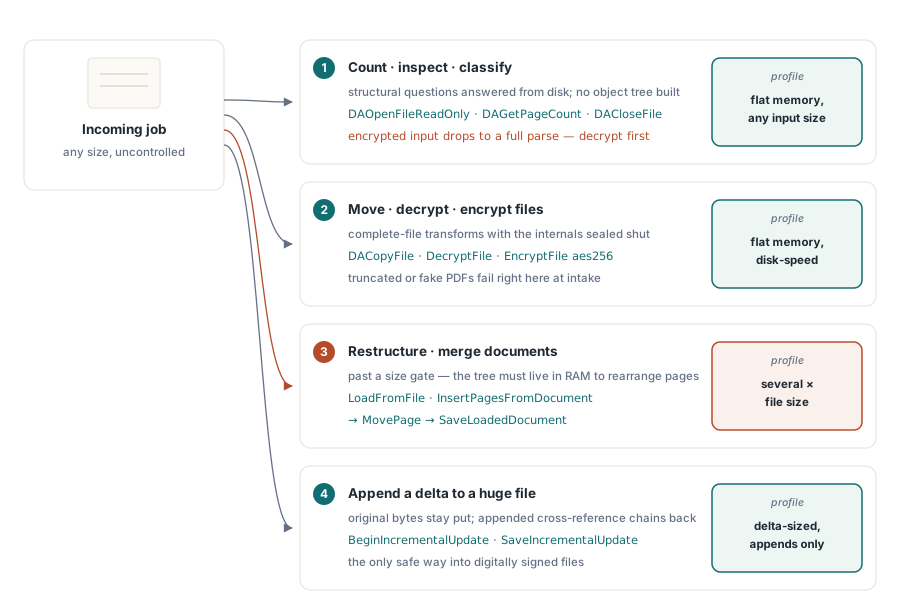
Direct File API は、Delphi および C++Builder に PDF へのファイルレベルのアクセスを提供します。ページカウント、コピー、復号化、増分追加など、ドキュメントモデル全体を RAM に再構築するのではなく、実際に必要なものだけをディスクから読み取ります。スキルとは、各ジョブをそれに答えることができる最も軽い層(tier)に一致させることです。この一致を正しく行えば、サービスは入力サイズに関係なくフラットなメモリを維持します。これを間違えると、最初の特大ファイルでワーカーがダウンします
フルロードによるコスト
LoadFromFile は敵ではありません。それにはメモリを消費するだけの価値があります。ツリーが RAM に入ると、すべてのページとすべてのオブジェクトにランダムアクセスできるようになります。これはまさに InsertPagesFromDocument、MovePage、および SaveLoadedDocument を介した再シリアル化が必要とするものです。真の再構築に近道はありません。それを再配置するにはドキュメントを保持する必要があります
問題は、入力サイズが自分で制御できない場合に始まります。顧客のアップロード、スキャナーの出力、および 10 年前のアーカイブは、テストコーパスが想定していたものを無視します。すべての入力を無条件にロードすると、メモリの制限は、誰かが送信する最大の 1 つのファイルによって設定されます。解析時間はオブジェクト数に追従し、常駐メモリはオブジェクト構造とデコードされたストリームがカウントされた後、ファイルサイズの数倍に落ち着くため、ディスク上の 1 ギガバイトは数ギガバイトの常駐を意味する可能性があります
64 ビット用に再コンパイルすると、アドレス空間の制限は解除されますが、請求はそのまま残ります。ファイルの独自の構造が数ミリ秒で答えられたはずの質問に答えるために、ワーカーは依然として CPU の数秒とファイルサイズの数倍の RAM を消費します。並行処理下では、計算は敵対的になります。一度に実行される 4 つの大きなロードが 1 つのメモリ予算を共有し、キューが最も深く、余裕がないときにスループットが正確にクレーター(激減)します
ハンドルを介したファイルの読み取り
読み取り専用の層(tier)は、ファイルをハンドルとして開き、それに関する構造的な質問に答え、そしてそれを閉じます。オブジェクトツリーも、ページレンダリングも、入力とともに増大するメモリもありません
var
  Pdf: THotPDF;
  Handle, PageCount: Integer;
begin
  Pdf := THotPDF.Create(nil);
  try
    Handle := Pdf.DAOpenFileReadOnly('archive-2026-06.pdf', '');
    if Handle > 0 then
    try
      PageCount := Pdf.DAGetPageCount(Handle);
      RouteByPageCount('archive-2026-06.pdf', PageCount);
    finally
      Pdf.DACloseFile(Handle);
    end;
  finally
    Pdf.Free;
  end;
end;
3 つの習慣により、この層が正直に保たれます。まず、戻り値を確認します。正でないハンドルはオープンが失敗したことを意味し、死んだハンドルで DAGetPageCount を起動することは、顧客が不正な形式のファイルを送信する日まで隠れたままになる種類のバグです。次に、すべての成功したオープンを finally ブロック内の DACloseFile とペアにします。ハンドルをリークするサービスはクラッシュしませんが、腐敗し、それはさらに悪いです。第 3 に、パスワードパラメータが実際に何をするかを尊重します。DAOpenFileReadOnly は 1 つを受け入れますが、暗号化された入力の場合、ページ数を読み取るために静かにフルパースに移行するため、フラットメモリの保証は消滅します。保護されたファイルを最初に DecryptFile を介してルーティングすると、パイプラインの残りの部分は安価なままになります
同じプローブは、トリアージゲートとしても機能します。ファイルは、ラベルが間違っていたり、半分アップロードされていたり、他の形式から名前が変更されたりして表示されます。DAOpenFileReadOnly チェックは、問題のあるファイルにエラーを固定して、数ミリ秒で正面玄関でそれらすべてを拒否します。代替案は、ジャンクファイルをキューワーカーの奥深くまで乗せてそこで爆発させることであり、どの入力が原因であるかを解きほぐすのに午後の時間を費やす可能性があります
ファイルのコピー、復号化、暗号化
2 番目の層は、内部を露出することなくファイル全体を移動および変換します。これらは、インテークパイプラインが最も依存する呼び出しです
// 構造的コピー: オブジェクトツリーを解析せずに検証して移動します
Status := Pdf.DACopyFile('incoming\statement.pdf', 'verified\statement.pdf');
LogDirectFileStatus('copy', Status);

// コピー中の復号化: 保護された入力への Direct File ルート
Status := Pdf.DecryptFile('incoming\protected.pdf',
  'verified\plain.pdf', 'batch-password');
LogDirectFileStatus('decrypt-copy', Status);

// コピー中の暗号化: フルロードなしで出力を保護します
Status := Pdf.EncryptFile('verified\statement.pdf',
  'outbound\statement.pdf', 'owner-secret', '', aes256, [prPrint]);
LogDirectFileStatus('encrypt-copy', Status);各呼び出しにはその役割があります。DACopyFile は、隔離ディレクトリから管理されたストレージへの検証済みのコピーです。進行するにつれて PDF 構造を開いてインデックスを作成するため、切り捨てられた入力や PDF でない入力は、3 つのステージの下流ではなく、ここで失敗します。DecryptFile は、入力が許す限りオブジェクトツリーをスキップする直接 AES-256 書き換えパスに沿って復号化されたコピーを書き込みます。これは、AES-256 暗号化の記事でカバーされている、ロードして再保存する復号化フローの大きなファイル向けの対応物です。EncryptFile は同じ動作を逆方向に実行し、メモリ内パスがすでに使用しているキータイプおよび権限パラメータを使用して、ファイルレベルのコピー中にパスワード保護を適用します
書き換える代わりに変更を追加する
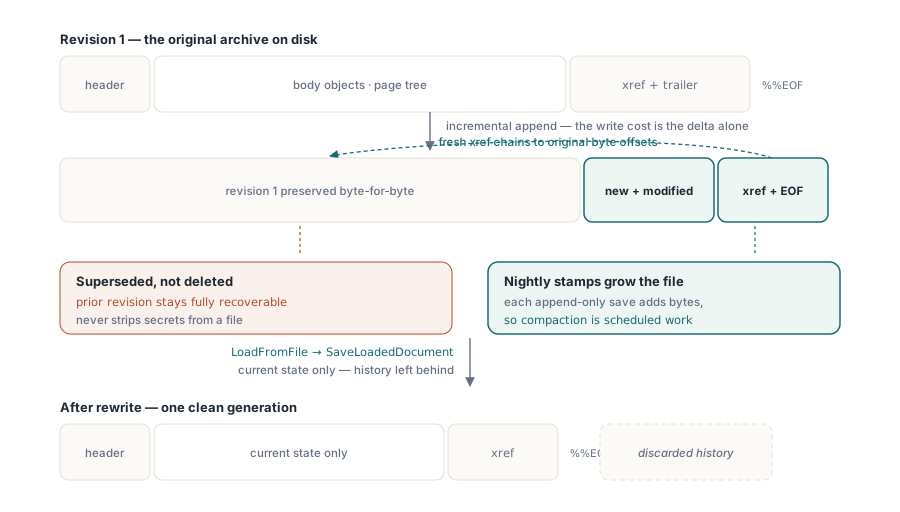
増分更新(Incremental update、ISO 32000-1 §7.5.6 で定義)は、3 番目の層です。元のバイトはディスク上の元の場所に留まり、新規または変更されたオブジェクトはそのあとに追加され、それに続いて元のセクションにチェーンバックする新しい相互参照セクションが追加されます。1 ページを追加する必要がある 900 MB のアーカイブの場合、書き込みコストはファイル全体ではなくデルタ(差分)です
// 書き換えることなく、大きなアーカイブに監査ページを追加します
Pdf.BeginIncrementalUpdate('archive-2026-06.pdf');
Pdf.AddPage;
Pdf.CurrentPage.SetFont('Arial', [], 10);
Pdf.CurrentPage.TextOut(50, 760, 0, 'Processed by intake service 2026-06-11');
Pdf.SaveIncrementalUpdate('archive-2026-06-stamped.pdf');  // 元のバイト + デルタ
ここで重要なのは 2 つの規律のポイントです。追加された相互参照データはその内部のバイトオフセットにチェーンバックするため、BeginIncrementalUpdate は元のファイルを指している必要があります。そして、モデルは設計上追記専用(append-only)です。増分保存が行われるたびにファイルは大きくなり、小さくなることはありません。毎晩スタンプが押されるドキュメントは、定期的な再シリアル化によって圧縮される(ドキュメントをロードし、SaveLoadedDocument を介して書き戻す)まで、制限なく膨張します。同じ追記専用の性質こそが、増分更新をデジタル署名されたドキュメントに触れる唯一の安全な方法にしているものであり、この制約はデジタル署名と PAdES の記事で調べられています。基になる相互参照のメカニズムについては、オブジェクトストリームと増分更新の記事で独自に扱われています
追記専用の保存には、ほとんどのレビューをすり抜ける罠があります。元のバイトはファイルに残り、見ようとする人なら誰でも読むことができます。ページを「置換」する増分更新は、古いページを削除しません。現在のリビジョンで古いページに置き換わりますが、以前のリビジョンはそこにあり、完全に回復可能です。したがって、増分更新は、機密コンテンツを取り除くための間違ったツールです。受信者に見られるべきではない履歴を本当に削除するには、完全な再シリアル化が必要です。つまり、LoadFromFile に続いて SaveLoadedDocument を実行します。これにより、現在の状態のみが書き出され、埋もれたリビジョンは背後に残されます
層(Tier)を操作に一致させる
選択ロジックは頭に留めておくのに十分なほど短く、各ジョブに独自のパスを即興で作らせるのではなく、パイプラインの先頭で明示的なルーティングの決定としてそれをエンコードすることは価値があります。必要な操作が層を決定します
- カウント、検査、または分類はハンドルを開きます:
DAOpenFileReadOnly、DAGetPageCount、DACloseFile - ファイル全体の移動、復号化、または暗号化は、ファイルレベルにとどまります:
DACopyFile、DecryptFile、またはEncryptFile - ページの再構築またはドキュメントの結合には完全なロードが必要です:
LoadFromFile、次にInsertPagesFromDocumentまたはMovePage、次にSaveLoadedDocument - 巨大なファイルまたは署名されたファイルへの小さなデルタの追加は、
BeginIncrementalUpdateを呼び出して保存します
混在したパイプラインは、フルロードパスの前にサイズしきい値を設定することに長けています。数百メガバイトを超えるものはすべて Direct File 層を通して送信し、実際のメモリ予算を持つ 64 ビットワーカーでの真の再構築のためにフルロードを予約します。このしきい値は、メモリ不足によるクラッシュを、表示および調整できるルーティングの決定に変換します
どの層がジョブを処理するかにかかわらず、その出力を一時的な名前に書き込み、結果が検証された場合にのみ所定の場所に名前を変更します。最終的な名前の下にある半分書き込まれたファイルは、パイプラインの次の段階にとって良いファイルとまったく同じように見え、Direct File 呼び出しはチェックを安価にします。出力の確認は 1 行のハンドルプローブです
Direct File API は、Delphi および C++Builder 向けの HotPDF Delphi Component の一部として同梱されています。製品ページには、ここに示す増分更新の呼び出しを含む、完全な関数リファレンスがリンクされています