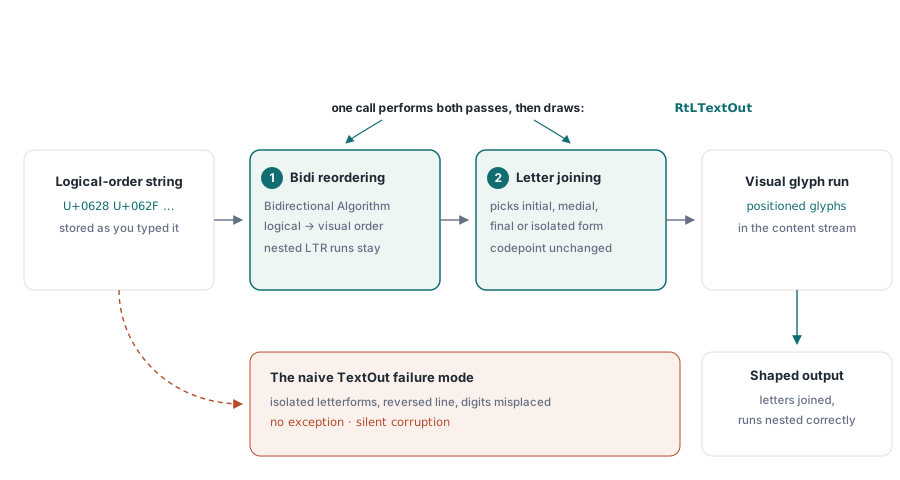
アラビア語のフレーズيوضح ملف PDFをTextOutに渡し、結果を開いてみてください。文字の向きが逆になり、それぞれの文字が孤立した形で、次の文字との間に目に見える隙間ができます。まるで誰かが英語を逆向きにタイプし、すべての文字の間にスペースを入れたかのようです。例外は発生しませんでした。警告も出力されません。出力は単純に間違っており、アラビア語が依存する2つの別々の変換が行われなかったために間違っています。これらの2つの変換が何であるか、そしてどの呼び出しがそれらを実行するかを知ることが、複雑なスクリプトのPDF出力の大部分を占めています
HotPDFは、DelphiおよびC++Builder用のネイティブVCL PDFコンポーネントであり、個別の呼び出しを通じて右から左への処理を実行します。また、ロケールをコミットする前に知っておきたい特定の場所では、少し不十分な場合もあります。そのため、この記事では概念と正直な境界をマッピングしています。呼び出し自体の実践的な設定は、RtLTextOutリファレンス記事に記載されています
正しい文字列が依然として間違って印刷される理由
Unicodeはテキストを論理的な順序、つまりタイプし、声に出して読む順序で保持します。レンダラーはグリフを視覚的な順序で配置する必要があります。左から右へのスクリプトの場合、これらの順序は一致しており、誰もそれについて考えません。アラビア語やヘブライ語の場合、それらは一致しません。そして、ラテン語のトークン「PDF」を含むアラビア語の文や、数字で書かれた価格など、1行に方向が混在している場合、Unicode双方向アルゴリズム(UAX #9)は、右から左への行の中に左から右へのフラグメントがどのようにネストされるかを正確に決定します。これが最初の変換である並べ替えであり、これをスキップすると行が反転します
2つ目は文脈上のシェーピングです。アラビア文字は、単語内の位置(語頭、語中、語尾、または独立)に応じて異なるように描画されます。コードポイントは全体を通して同じままですが、グリフのみが変化します。各コードポイントをデフォルトのグリフに直接渡すパイプラインは、まさに最初の段落にあるような切断された、孤立した形式の出力を生成します。ヘブライ語は文字が結合しないためこのステップをスキップしますが、それでも並べ替えは必要です。アラビア語は両方を必要とするため、テストする文字列はヘブライ語ではなくアラビア語になります
デスクトップ上では、これはあなたの問題ではありません。VCLフォームがアラビア語をTEditにペイントすると、オペレーティングシステムのテキストスタックが静かにそれを並べ替えてシェーピングします。これがまさに、画面上で完璧に見える文字列がナイーブなPDFで壊れて出力される理由です。コンテンツストリームは編集可能なテキストを保存しません。それは配置されたグリフを保存するため、ストリームを出力する人は誰でも、OSが処理していたシェーピング作業を継承することになります。RtLTextOutはその作業を取り戻す呼び出しです
RtLTextOutがあなたのためにシェーピングするもの
HotPDFは、ラテン語のパスと複雑なスクリプトのパスを2つの異なるメソッドとして保持しています。TextOutは、与えられたものを与えられた順序で印刷します。RtLTextOutは、まず両方の変換を実行します。つまり、行全体にわたる双方向の並べ替えと、結合するスクリプトの文脈分析です。その後、印刷します。どのスクリプトのルールが適用されるかは、呼び出し自体からではなく、フォントの文字セットを介して伝わるため、方向は文字から推測されるのではなく、すべての呼び出しサイトで明示的な選択になります。パラメータごとの設定、文字セットの値、フォントの登録手順、およびコンパイル可能な完全な例はすべて、RtLTextOutリファレンス記事にあります。この記事は、変換が何を意味するか、それらがどこで止まるか、そしてそれらが機能したことをどのように証明するかについて説明します
このレベルでも1つの使用規則が重要です:入力は論理的な順序である必要があります。なぜなら、RtLTextOut自体が反転を実行し、手動ですでに反転させた文字列は二重に反転して出力されるからです。リファレンス記事では、その罠とそのクリーンアップについて説明しています。ここでその罠について言及する価値があるのは、なぜそれがテストを生き延びるのかということです。二重に反転した純粋なアラビア語の文字列は完全に正しく見える可能性があり、ラテン語の単語または数字が含まれている場合にのみ崩れます。なぜなら、それらの埋め込まれた実行はもはやUAX #9が指示するようにネストされないからです。バグはレンダリングにあるのではありません。それは、すでに半分処理されたテキストをアルゴリズムに供給することにあります
その同じ方向混在の動作は、コードをつまずかせる以上にレビュー担当者をつまずかせます。右から左への行の内側では、数字と埋め込まれたラテン語の単語は依然として左から右に読みます。双方向レイアウトを扱ったことがない人は、レンダリングされた請求書を見て、アカウント番号が周囲のアラビア語に対して「間違った」方向に読まれているのを見て、それをバグとして書き留めるでしょう。これは仕様的に正しい結果です。ネイティブスピーカーによる最初の確認の前に書かれた、受け入れ基準の短いメモがあれば、その往復を節約できます
並べ替えと結合で十分な場合とそうでない場合
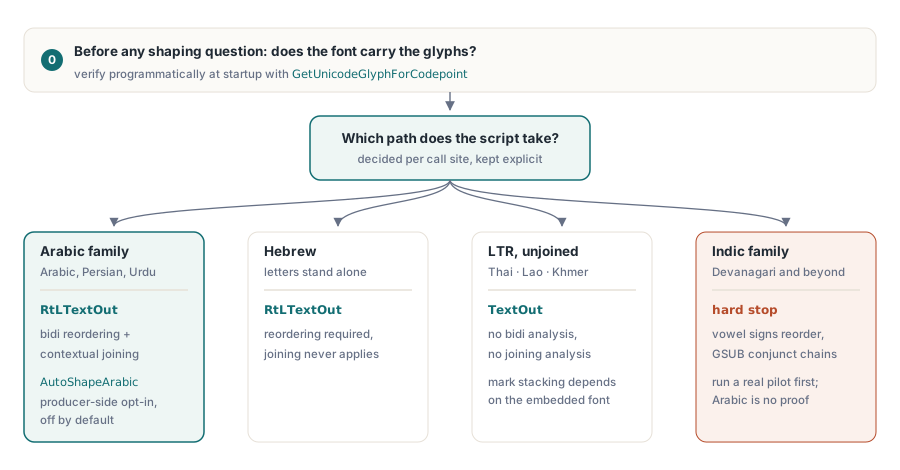
アラビア語とヘブライ語の連続したテキスト(レポート、請求書、契約書、手紙)の場合、並べ替えと文脈上の結合がすべての作業であり、RtLTextOutが単独でそれを担います。タイポグラフィが結合以上のものを求める場合、境界が現れます。アラビア語側でのHotPDFの答えは、オプトインのプロデューサー側シェーパーです:AutoShapeArabic := Trueを設定すると、コンポーネントは双方向パスの前に論理的な順序の実行をUnicode Presentation Formsに書き換えるため、結合フォームは論理的な隣接文字に対して計算され、合字の折り畳みは、ビューアが解決するために残されるのではなく、PDFが実際に運ぶコードポイントに焼き付けられます。このスイッチはデフォルトでオフになっており、オフのままであれば出力はバイトレベルで安定しているため、これをオンにするのはドキュメントパイプラインごとの意図的な決定であり、グローバルなアップグレードではありません。同じオプトインモデルは、HotPDFがシェーピングする他の結合型右から左スクリプトにも拡張されます:シリア文字、ンコ文字、アドラム文字、ハニーフィー・ロヒンギャ文字にはそれぞれ、アラビア語のものを反映した独自の自動シェイプフラグがあります
オプションのOpenType機能は、また別のメカニズムです。任意の合字や同様の単一置換機能はGetSingleSubstituteGlyph(GID, 'liga')を通過します。これは一度に1つの置換(最初に入力グリフID、次に機能タグ)を解決し、機能が適用されない場合は入力グリフを変更せずに返します。これは、自分で維持する既知の有限の合字リストを駆動するのに十分です。それは完全なGSUBエンジンではありません。そしてその違いこそが、野心的なロケール計画がうまくいかないまさにその部分です:アラビア語を完璧に処理するシェーピングパイプラインは、並べ替えと結合を示しただけであり、それ以上のものは何もありません
スクリプト間のカバレッジ
アラビア語は両方の変換を実行するため、それがテストする文字列であり、アラビア語の合格がパイプラインが機能していることの最も強力な単一の証拠となります。ヘブライ語は並べ替えを必要としますが、文字が独立しているため結合は必要としません。ヘブライ語が正しくレンダリングされても、アラビア語が切断されて出力される場合、双方向の半分は機能していますが、文脈上の半分は実行されていません。ペルシャ語とウルドゥー語はアラビア文字に乗り、その動作を継承しますが、ウルドゥー語のナスタアリーク体への好みは、ネイティブリーダーが判断すべき読みやすさの結果を伴うフォントの決定です
タイ語は完全に境界の反対側に位置しています。それは左から右に走るため、双方向の作業は必要なく、文字も結合しないため、文脈上の分析は必要ありません。タイ語の文字列は、ラテン語のように通常のTextOutパスを通ります。タイ語にあるのは積み重ねられたマーク(基本子音の上下にある母音と声調記号)であり、それらが正しく配置されるかどうかは、シェーピングエンジンの助けなしに積み重ねるように結合マークを構築するフォントに依存しています。ほとんどの専用のタイ語フォントはそうなっています。そっくりなフォントではなく、実際に埋め込む正確なフォントでテストしてください
デーヴァナーガリー文字およびその他のインド系文字のファミリーは、正直なハードストップです。それらの母音記号は子音クラスターの周りで並べ替えられ、それらの結合文字は文脈依存の置換のチェーンを通じて形成されます。これは完全なGSUBの領域であり、並べ替えと結合の範囲を超えています。インドのロケールがロードマップにある場合は、それを約束する前に、実際の顧客の文字列で真のパイロットを実行してください。アラビア語が機能することは、デーヴァナーガリー文字が機能することの証拠にはなりません。CJKの文字列、積み重ねられた発音区別符号を持つベトナム語、および混在するヨーロッパのテキストはすべて、双方向分析なしで通常のパスを通ります。そして、レポートコードで2つのパスを物理的に分離しておくことは報われます。RTL実行用とその他すべて用の1つのルーチンを作成することで、ロケールのロジックが誰かが設定を忘れるフラグの背後に隠されるのではなく、呼び出しサイトで表示されるようになります
グリフのカバレッジは、シェーピングが実行される前に決定されます
シェーピングはフォントからグリフを選び出します。フォントにそれらが含まれていない場合、選ぶものは何もありません。これが、古典的なデプロイメントの失敗(開発者のマシンでは完璧だが、静かなフォント置換後に顧客のサーバーでは空白のボックスになる)がシェーピングの問題ではなく、カバレッジの問題である理由です。実用的な治療法、つまりマシンがインストールしているものを信頼するのではなく、出荷するフォントを登録する方法は、リファレンス記事で段階的に説明されています。概念的なポイントは、シェーピングの質問が意味を持つ前にカバレッジを確立する必要があること、そしてそれが出力を目視することなくプログラムで確立できることです
// RegisterUnicodeTTF の後、データが実際に使用する
// コードポイントに対するカバレッジを監査します
GID := Pdf.GetUnicodeGlyphForCodepoint($0628);  // U+0628 ARABIC LETTER BEH
LogGlyphAudit($0628, GID);
登録自体には2つの制約(埋め込みUnicode処理のためのPDF 1.5の下限と、フォントの埋め込み許可ビット)があり、どちらもRtLTextOutリファレンス記事のセットアップ手順の横で説明されています。ここに属するのは監査の習慣です:GetUnicodeGlyphForCodepointはあなたの早期警戒システムです。サービスが開始されたときにデータが実際に使用するコードポイントの範囲を歩き、どのようなグリフIDが戻ってくるかをログに記録します。カバレッジのギャップは、すでに顧客に到達した請求書の欠落文字としてではなく、ロールアウト中のスタートアップログの1行として表示されます
読む順序はグリフではなくドキュメントに属します
すべてのグリフを正しくしても、1つのことが未完了のままです。ISO 32000-1 §12.2は、ドキュメント全体の読み取り順序を示す/Directionと呼ばれるビューアの設定を定義しています。それはグリフには触れません。それがすることは、見開きをどのように配置するか、見開きページのレイアウトをどちら側から開始すべきか、そして読み取りUIをどの方向に傾けるべきかをビューアに伝えることです。そのどれも単一のページには表示されません。それが忘れられるまさにその理由です
// ドキュメントレベルで右から左への読み取り順序を宣言します
Pdf.Direction := RightToLeft; // ViewerPreferences に vpDirection を追加しますDirectionを設定することがすべての作業です:プロパティセッターはドキュメントのViewerPreferencesにvpDirectionを追加するため、1行でその設定がファイルに伝わります。テキストがRtLTextOutを通って出力される場合、これは無料で得られます。なぜなら、この呼び出しは副作用としてドキュメントの方向を反転させるからです。リファレンス記事では、混在するドキュメントでそれを元に戻す必要がある場合について説明しています。自分で設定する必要があるケースは、他の方法、たとえば上流で事前にシェーピングし、通常のパスを通じて描画された入力から生成された右から左へのドキュメントです。それを省いても、あなたが見つめている単一ページのプルーフはどちらの方法でも同じに見えます。その後、誰かが両面小冊子を印刷すると、見開きが鏡像として出力されます。その原因は、数週間前に1行のコードが欠落していたことです
シェーピングされた出力の検証
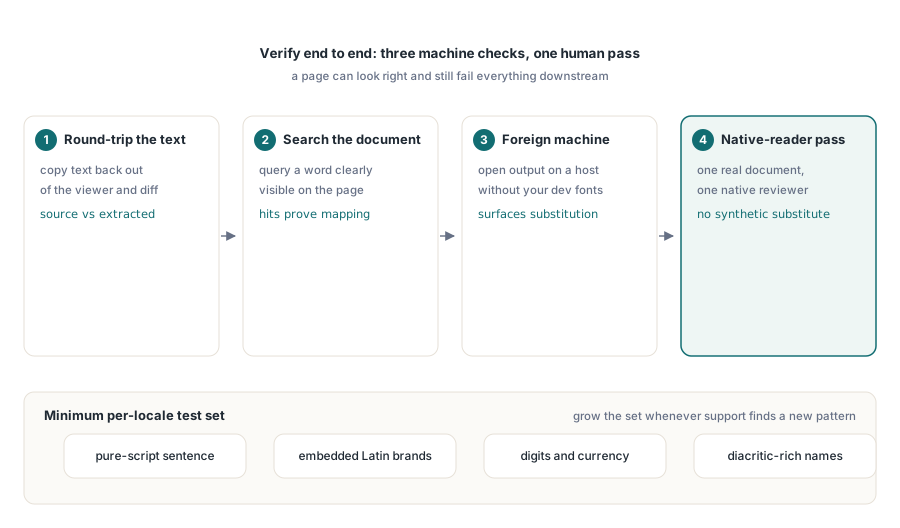
ページが正しく見えても、下流のすべてにとって役に立たない可能性があるため、エンドツーエンドで検証してください。3つのチェックでほとんどの問題が見つかります。Acrobatからテキストをコピーして取り出し、コードポイントをソース文字列と比較します。ページに表示されている単語について、ビューアのドキュメント内検索を実行します。そして、開発用フォントがインストールされていないマシン、つまり置換が最も起こりやすいマシンで出力を開きます。これらのどれも、合成コーパスでは見逃されるようなことを捉える、実際のドキュメントを見ているネイティブリーダーの代わりにはなりません。フォーマットが出荷される前に、そのレビューの予定をカレンダーに入れてください
翻訳者が昨年送ってきたものをリサイクルするのではなく、意図的にテスト文字列を選択してください。ロケールごとの実行可能な最小値:純粋なスクリプトの文、ラテン語のブランド名が埋め込まれた文、数字と通貨を含む行、および発音区別符号または結合マークが付いた名前。実際の顧客名は、フィラーテキストでは触れられない前提を壊すため、サポートケースで見たことのないパターンが現れるたびに、回帰セットが1つの文字列ずつ増えるようにしてください
フォントの登録、サブセット化、および日常的なテキスト描画APIは、HotPDFを使用したレポート出力、フォント、および画像に関する記事で説明されています。同じドキュメントがアクセシビリティプロファイルも満たす必要がある場合、PDF/AおよびPDF/UA検証記事の言語タグ付けと構造規則がここのシェーピング作業の上に配置されます
上記で説明した右から左およびUnicodeフォントAPIは、DelphiおよびC++Builder用のHotPDF Delphi Componentに付属しています。製品ページには、完全なテキスト出力リファレンスへのリンクがあります