PDF ページを印刷プレビュー用に Windows のデバイスコンテキストへレンダリングすると、同じ 1 行のコード上に 3 つの座標系が同居することになり、それらはめったに一致しない。PDF ページはポイント単位で測られ、原点は左下にある。画面 DC はピクセル単位で測られ、原点は左上にあり、任意に選べるズーム係数を持つ。プレビューが予測しようとしているプリンタ DC は、デバイス解像度でピクセルを測るものの、その原点は用紙の角ではなく印刷可能領域の角に置かれる。このうちどれか 1 つでも取り違えれば、プレビューは正しく見えるのに、印刷したページはずれたり、拡大縮小されたり、端がクリップされたりする。よくある症状は、プレビューでは中央に配置されて見える罫線付きフォームが、印刷すると上と左の罫線が切れて出てくるというものだ。レーザープリンタは外周の数ミリにインクを乗せられないのに、そのことがプレビューに伝わっていないからである。losLab PDF Library(PDF Library for Delphi)は、デバイスコンテキストへのレンダリング呼び出し、仮想プリンタの設定レイヤー、そしてプリンタ自身のメトリクスから生成されるプレビュービットマップまで、この経路全体をカバーしており、この最後の部分こそが、あの余白についてプレビューを正直にしてくれる
用紙のジオメトリは印刷可能なジオメトリではない
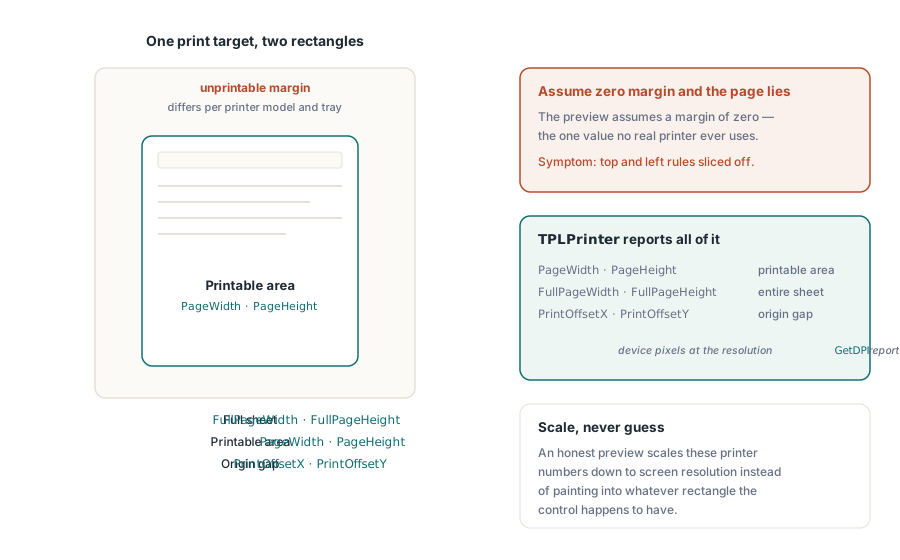
どの印刷対象も 2 つの矩形で表され、その両者のずれこそがプレビューの不具合のほとんどが潜む場所である。用紙矩形は物理的なシートそのものである。印刷可能矩形は、印刷エンジンが実際に到達できるより小さな領域であり、プリンタの機種ごと、時にはトレイごとに異なるハードウェアマージン分だけ内側に入り込んでいる。ライブラリの印刷レイヤーは両方を計測する。内部の TPLPrinter クラスは、印刷可能領域を表す PageWidth と PageHeight、シート全体を表す FullPageWidth と FullPageHeight、両者の原点の間隔を表す PrintOffsetX と PrintOffsetY を公開しており、これらはすべて GetDPI が返す解像度でのデバイスピクセル単位である。誠実なプレビューは、コントロールがたまたま持っている矩形にページを描き込むのではなく、これらと同じ数値を画面解像度に合わせて縮小する。この手順を省くと、プレビューは静かにマージンをゼロと仮定してしまうが、それは実在するどんなプリンタも使わない値である
RenderPageToDC による画面プレビュー
画面上のプレビューコントロール向けには、RenderPageToDC(DPI, Page, DC) が、読み込んだ文書のページを任意の GDI デバイスコンテキストへ直接描画する。それが TPaintBox のキャンバスであっても、オフスクリーンビットマップであっても、メタファイル DC であっても構わない。DPI 引数がズームを決める。96 は従来型ディスプレイでのおよそ 100% 表示に相当し、これを 2 倍にすればレンダリングされるサイズも 2 倍になる
procedure TPreviewForm.PreviewBoxPaint(Sender: TObject);
begin
  // この3つはcall単位でなくlibrary stateとしてsticky
  FPdf.SetRenderDCOffset(FOffsetX, FOffsetY);
  FPdf.SetRenderDCErasePage(1);
  FPdf.SetRenderCropType(0);
  FPdf.RenderPageToDC(FPreviewDpi, FCurrentPage, PreviewBox.Canvas.Handle);
end;
落とし穴は、この DC レンダリング経路が呼び出しごとのパラメータではなく、ライブラリに粘着する状態によって制御されている点にある。SetRenderDCOffset、SetRenderDCErasePage、SetRenderCropType はいずれも、何かが変更するまで値を保持し続ける。そのため、ユーザーがズーム表示を調整した後に走るサムネイルループは、それ以前のコード経路が残していったオフセットやクロップをそのまま引き継いでしまう。症状としては、特定のナビゲーション操作の並びでだけプレビューがずれるという、再現がこれ以上ないほど厄介なバグになる。上の例のように、ペイントハンドラの先頭で関連する状態をすべて設定し直しておけばコストはかからず、この種の不具合をまるごと排除できる。もう 1 つの倍率が近くに潜んでいる。実際の出力解像度はレンダースケールと DPI 引数の積であり、SetRenderScale の既定値は 1.0 だが、これも一度変更されると値を保持し続ける。そのため、エクスポート機能がこの値を引き上げると、誰かが元に戻すまで以降のすべてのプレビューが静かに再スケールされ続けることになる
スクロール式のビューアや部分的な再描画には専用のバリエーションがある。RenderPageToDCClip はデバイスコンテキストに加えてクリップ指定を受け取るため、ウィンドウの一部の帯領域だけを無効化すれば、ページ全体を再ラスタライズすることなくその帯だけを再描画できる。大判ページを高いズームで扱う場合、これがスクロールバーに追従するビューアと、その裏側で像がにじむビューアとの分かれ目になる
プレビューと一致する印刷ジョブ
印刷側は仮想プリンタを介して動作する。NewCustomPrinter はシステムのプリンタをライブラリ内部専用の設定へ複製し、SetupPrinter はマシン全体の DevMode には一切触れずにその複製を調整する。用紙は設定 1(DMPAPER_* 定数)として、向きは設定 11 として渡す。その見返りが分離性である。サービスはホストの既定プリンタが Letter のままでも A4 のラベルを印刷でき、後で何かを元に戻す必要もない

var
  Pdf: TPDFlib;
  Virt: WideString;
  Opt: Integer;
begin
  Pdf := TPDFlib.Create;
  try
    if Pdf.LoadFromFile('report.pdf', '') <> 1 then
      raise Exception.Create('load failed');
    Virt := Pdf.NewCustomPrinter(Pdf.GetDefaultPrinterName);
    Pdf.SetupPrinter(Virt, 1, 9);        // setting 1 = paper, DMPAPER_A4
    Pdf.SetupPrinter(Virt, 11, 1);       // setting 11 = orientation, 1 = portrait
    Opt := Pdf.PrintOptions(1, 1, 'Monthly Report');  // 用紙に合わせ、auto-rotateしてcenter
    Pdf.PrintDocument(Virt, 1, Pdf.PageCount, Opt);
  finally
    Pdf.Free;
  end;
end;
PrintOptions は注意深く読む価値がある。これはオプションハンドルを返し、それを PrintDocument や PrintPages に渡さなければならない。周囲の状態として自動的に効くものではない。オプションを作成しておきながらそのハンドルを渡し忘れても、失敗は表に出ない。ジョブは既定値のまま印刷され、用紙に合わせて縮小されるはずだったのに大きすぎるページがクリップされて出てくるまで、誰も気づかない。ページの拡大縮小に関する引数こそが、その方針が宿る場所である。拡大縮小なしは寸法の正確さを保つため、定規で測られるようなフォームには重要になる。用紙に合わせるはすべてをシートに合わせて再スケールする。大きなページのみ縮小は通常のページにはまったく手を触れず、ページが印刷可能領域を超えたときだけ介入するもので、混在する文書集合に対してはたいていこれが正しい既定値になる。自動回転と中央配置のフラグは、横向きページを別のコード経路なしで処理してくれる
すでに VCL のダイアログフローを通じて TPrinter を管理しているアプリケーションは、それをそのまま渡すこともできる。PrintDocumentToPrinterObject と PrintPagesToPrinterObject は設定済みの TPrinter インスタンスを受け取り、標準の印刷ダイアログをユーザー向けの設定画面として維持しつつ、ページのレンダリングはライブラリが担う。1 つのコード経路の中でこの 2 つの方式を混在させると、ここまでの作業が排除しようとしてきたジオメトリのずれを再び持ち込みがちになるため、どちらか一方に決めること。仮想プリンタ経路は無人稼働のサービスに向き、TPrinter 経路は対話的なアプリケーションに向く
部分出力も同じ枠組みで動く。PrintPages は範囲文字列を受け取るため、仮想プリンタ名、'2-5,12'、オプションハンドルを渡せば、ジオメトリの契約を保ったまま 2 から 5 ページと 12 ページ目が印刷され、同じ構文がファイル出力用のバリエーションも駆動する。これらのファイル出力バリアントは、物理デバイスを一切持たない無人環境にとって実用的な答えになる。ドライバのキューがまったく存在しないビルドサーバー上で印刷ジオメトリを回帰テストするような場面である。すべてのビルドで、同じ文書を同じオプションを通してファイル成果物へレンダリングしておけば、ジオメトリの回帰は 3 週間後の顧客報告ではなく差分として現れるようになる
プリンタ自身のメトリクスによるプレビュービットマップ
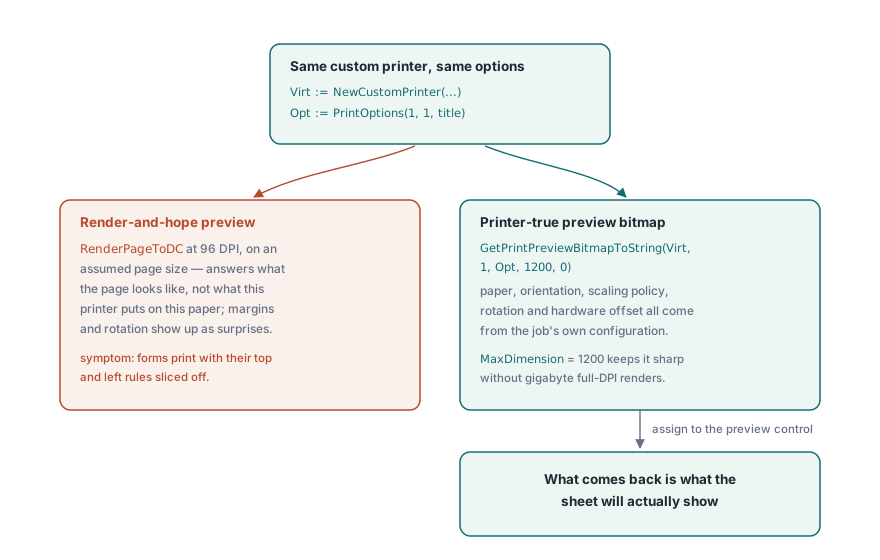
想定したページサイズに対して 96 DPI でレンダリングしたプレビューは、間違った問いに答えている。それが示すのはページがどう見えるかであって、このプリンタがこの用紙に何を印字するかではない。GetPrintPreviewBitmapToString は、最終的なジョブと同じカスタムプリンタと同じオプションハンドルからプレビューを構築することでその隔たりを埋める。用紙サイズ、向き、拡大縮小の方針、回転、そしてハードウェアのオフセットのすべてがビットマップに反映される。返ってくるのは、そのシートに実際に印字される内容そのものである
procedure ShowPrinterTruePreview(Pdf: TPDFlib; const Virt: WideString; Opt: Integer);
var
  Data: AnsiString;
  Strm: TMemoryStream;
  Bmp: TBitmap;
begin
  Data := Pdf.GetPrintPreviewBitmapToString(Virt, 1, Opt, 1200, 0);
  Strm := TMemoryStream.Create;
  try
    Strm.WriteBuffer(PAnsiChar(Data)^, Length(Data));
    Strm.Position := 0;
    Bmp := TBitmap.Create;
    try
      Bmp.LoadFromStream(Strm);
      PreviewImage.Picture.Assign(Bmp);
    finally
      Bmp.Free;
    end;
  finally
    Strm.Free;
  end;
end;
MaxDimension 引数はビットマップの長辺を制限する。1200 ピクセルであればプレビューダイアログとしては十分に鮮明でありながら、E サイズの工学図面のようなものでもメモリ消費を適度に抑えられる。プリンタの 600 DPI でフル解像度レンダリングすればギガバイト単位に膨れ上がる場面である
ユーザーのプリンタ選択を記憶する
セッションをまたいで設定を忘れる印刷ダイアログは、それだけでサポートチケットを生む。DevMode のペアである GetPrinterDevModeToString と SetPrinterDevModeFromString は、プリンタの完全なドライバ設定を不透明な文字列としてシリアライズし、ユーザー設定に保存して次のセッションで復元できるようにする。汎用 API がモデル化しようとしないドライバ固有のオプションも含まれる。プリンタは GetPrinterNames から得られる名前で永続化すること。決してリストのインデックスで保存してはならない。インデックスの順序はプリンタが追加または削除されるたびに変わるため、保存したインデックスは、次に一覧が入れ替わったときに静かに間違ったデバイスを指すようになる。記憶していたデバイスが完全に消えてしまった場合のフォールバックは GetDefaultPrinterName がカバーする
トレイの選択も、この永続化の話を締めくくる要素である。GetPrinterBins はドライバが公開する給紙元を報告するもので、レターヘッド用紙をトレイから、それ以降を普通紙から給紙するといったレターヘッドワークフローで重要になる。これはアプリケーションがほかのすべてと一緒に記憶しておくべきだとユーザーが期待するポリシーであり、間違った用紙に印字されたジョブは、PDF の中身が 1 バイトも間違っていなくてもバグとして受け取られる
プレビューと印刷で 1 つのエンジンに揃える
もう 1 つの決断が、忠実度全体を静かに左右する。レンダリングエンジンの選択は画面出力とプリンタ出力の両方に適用されるため、プレビューは高速なエンジンで行い、印刷は精密なエンジンで行うという誘惑にかられがちだが、それには抵抗すること。プレビューとジョブを別々のエンジンで駆動すれば、プリンタに忠実なプレビューがそもそも取り除こうとしていた忠実度のずれをそのまま持ち込むことになり、しかもそれは紙の上でしか現れない。組み込みエンジン、Cairo、PDFium の各エンジン間のトレードオフはDelphi におけるマルチエンジン PDF レンダリングで検討している。1 つを選び、両側で使うこと
印刷前に快適に読み込むには大きすぎる文書は、大きな PDF のマージ、分割、直接アクセスで説明しているダイレクトアクセス経路から開くことができ、これは文書ツリーを構築することなくファイルハンドルからデバイスコンテキストへページをレンダリングする。印刷 API の完全なリファレンスはlosLab PDF Library for Delphi製品ページに掲載している