同じ PDF を読んでも、3 つのラスタライザは何が書かれているかについて意見を違えることがある。PDF Library for Delphi に組み込まれているエンジンは、余分なファイルを一切必要とせず、あらゆるものをそつなくレンダリングするものであり、だからこそ既定枠を得ている。Cairo は異なる透過とアンチエイリアシングのパイプラインを持ち込んでおり、ソフトマスクやブレンドモードがほかのエンジンでおかしくなったときに人々が頼る存在になりがちである。PDFium は Chrome のレンダリングコードをそのまま抱えているため、ブラウザで正しく見えるページはたいてい PDFium の下でも正しく見えるが、その代償としてかなりのサイズの DLL と、頑なに一致を求めるビット数を伴う。この 3 つのうち、抽象論として正しいものは 1 つもない。正しさは文書ごとに決まるものであり、あるコーパスに対してどのエンジンが適しているかを知る唯一の誠実な方法は、そのコーパスをそれぞれのエンジンに実際に通してみることである
だからこそ、エンジンはビルド時ではなく実行時の選択として扱うべきである。losLab の Delphi・C++Builder 向け PDF ライブラリである PDF Library for Delphi は、この 3 つすべてを単一のレンダリング面の背後にまとめており、そのため決定にかかるコストはコードの分岐ではなく整数 1 つで済む。ここから先は、この 3 つの間を安全に切り替える方法、デプロイ済みのバイナリが実際にどのエンジンを備えているかを確認する方法、そしてレンダリング状態が静かに次のジョブを汚染しないようにする方法に尽きる
1 つの呼び出し面の背後にある 3 つのラスタライザ
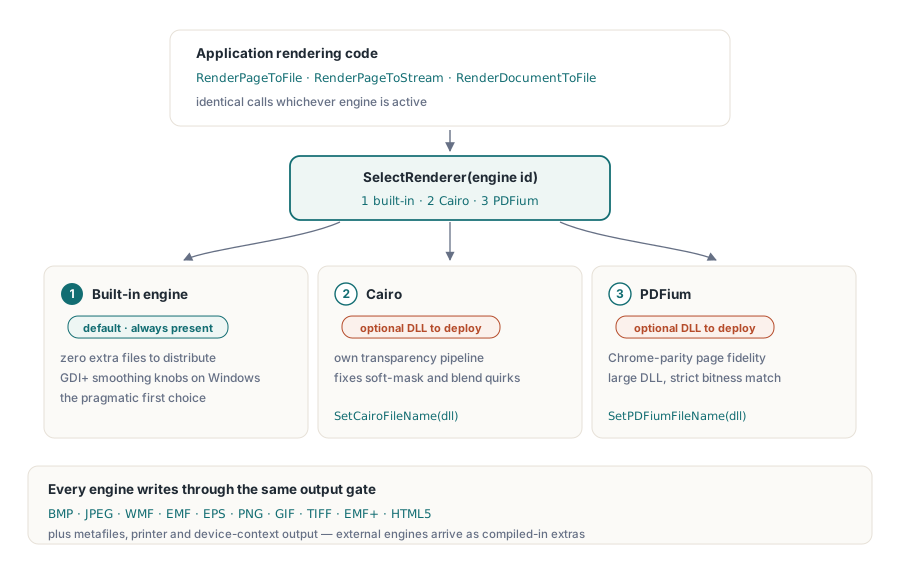
このライブラリはエンジンに番号を振っている。エンジン 1 は組み込みのレンダラーであり既定値で、Windows では GDI+ のスムージングオプションを備えている。エンジン 2 は Cairo、エンジン 3 は PDFium であり、どちらも実行時に SelectRenderer で選択する。この 2 つの外部エンジンは、選択する前に SetCairoFileName と SetPDFiumFileName で指定したパスの DLL から読み込まれる。どのエンジンが有効であっても、処理は同じ呼び出し群、RenderPageToFile、RenderPageToStream、RenderDocumentToFile を通る。エンジンの切り替えは数値 1 つを動かすだけであり、残りのレンダリングコードはそれにまったく気づかない
出力先のモデルはビットマップをはるかに超えて広がっている。このレンダラークラスは、メタファイル(WMF、EMF、EMF+)、EPS、デバイスコンテキスト直接、プリンター、HTML5 も対象とし、Cairo と PDFium はコンパイルに含まれている場合のみ追加の出力先として現れる。この 3 つのエンジンの違いが最も目に見える形で現れるのはラスター出力であるため、ここでの例もそれを使う
エンジンが存在すると決めてかからない: 起動時に確認する
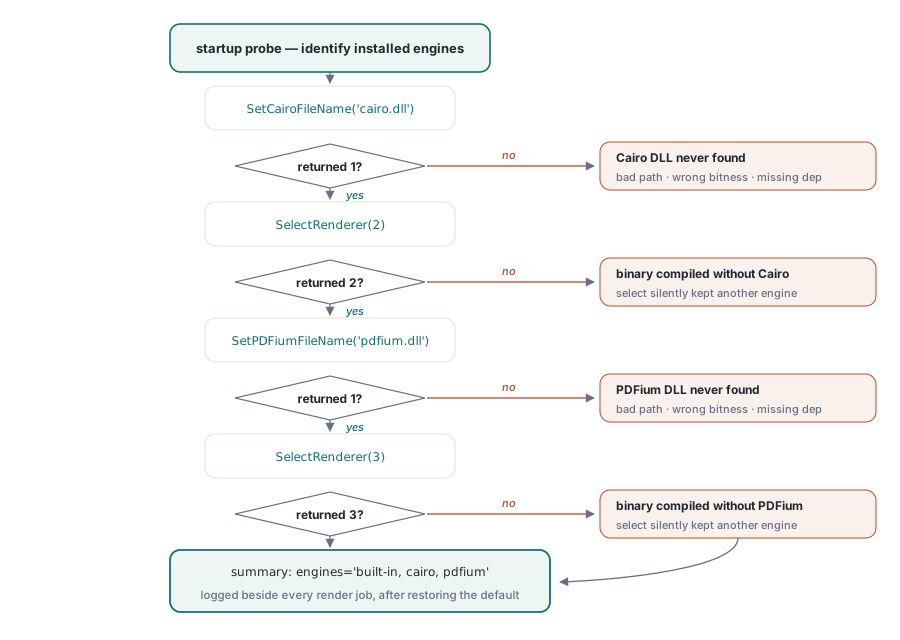
Cairo と PDFium は条件付きコンパイルの機能であり、これはつまり、それらを一切含まないバイナリをビルドできるということである。そうなっている場合、エンジン 2 や 3 を要求しても何も例外は発生しない。SelectRenderer は要求した ID とは異なる値を返すだけであり、戻り値を無視するコードは、それまで有効だったエンジンでレンダリングを続けてしまう。防御策は、起動時に各エンジンへ自己申告を求め、その答えを記録するプローブである
function ProbeEngines(PDF: TPDFlib): string;
begin
  Result := 'built-in';                        // エンジン 1 は常に存在する
  if (PDF.SetCairoFileName('cairo.dll') = 1) and (PDF.SelectRenderer(2) = 2) then
    Result := Result + ', cairo';
  if (PDF.SetPDFiumFileName('pdfium.dll') = 1) and (PDF.SelectRenderer(3) = 3) then
    Result := Result + ', pdfium';
  PDF.SelectRenderer(1);                       // 実際の作業の前に既定値へ戻す
end;
このプローブを起動時に一度実行し、その結果をすべてのレンダリングジョブと一緒にログへ書き込んでおくこと。顧客がレンダリングの違いを報告してきたときに最もよく聞かれる質問は、その環境が実際にどのエンジンを備えているかであり、ログの中に置かれた 1 行の答えがあれば、リモートデスクトップのセッションを開かなくてもそれが片付く。有用な副次効果もある。SetPDFiumFileName 自体が 0 を返した場合、それは PDFium 非対応でコンパイルされたバイナリの問題ではなく、DLL そのものの問題(パスの誤り、ビット数の不一致、依存関係の欠落)だとその時点でわかる。パスの呼び出し自体が、SelectRenderer が一度も走る前に何も解決できていないからである
1 つの Options 整数の背後にある 10 種類の出力形式
レンダリング呼び出しの Options パラメータは出力エンコーディングを選択する。0 が BMP、1 が JPEG、2 が WMF、3 が EMF、4 が EPS、5 が PNG、6 が GIF、7 が TIFF、8 が EMF+、9 が HTML5 である。プレビューやアーカイブ用のページ画像には PNG(5)が分別のある既定値になる。JPEG(1)は SetJPEGQuality と組み合わせれば、くっきりした輪郭よりファイルサイズを優先したい写真的なスキャンに向いている
1 つの形式には、出力先のストリームに関する要件が隠れている。BMP の経路はまず画像データを書き込み、その後オフセット 0x26 まで戻ってヘッダー内の解像度フィールドを書き換える。これを前方専用のストリーム、圧縮ラッパー、ネットワークソケットへ向けると、呼び出しはエンジンの不具合のように見える形で失敗するが、実際にはそうではない。シーク不可能な出力先がどうしても避けられない場合は、代わりに PNG をレンダリングするか、メモリストリームを経由して BMP を組み立て、完成してから前方へコピーすること
渡した DPI が、そのまま得られる DPI とは限らない
すべてのレンダリング呼び出しは DPI 引数を受け取るが、実際に得られる解像度は、その値にグローバルなレンダースケールを掛けたものになる。SetRenderScale は 1.0 から始まり、これを変更すると、新しい係数はそのインスタンス上のそれ以降のすべてのレンダリングに静かに適用される
PDF.SetRenderScale(2.0);                    // 以後のレンダリングはすべて2倍になる
PDF.RenderPageToFile(150, 1, 5, 'p1.png');  // 実質 300 DPI
PDF.SetRenderScale(1.0);                    // リセットしないとサムネイルが巨大になる
同じ粘着性は SetRenderCropType と JPEG の品質設定にも当てはまる。1 つの共有インスタンスからサムネイル、プレビュー、印刷解像度の画像を生成するサービスでは、この取り残された設定こそが、たまに来る「サムネイルが急に 40 MB になった」というチケットの本当の正体である。きれいな抜け道は 2 つある。各処理の先頭で関連する状態をリセットするか、出力プロファイルごとに専用のインスタンスを用意して、互いに漏れ出さないようにすることである
別のエンジンに手を伸ばす前に既定エンジンを調整する
「別のエンジンが必要だ」という要望の意外なほど多くの割合が、実は設定の問題が別の顔をしているだけだとわかる。組み込みのレンダラーは、SetGDIPlusOptions とより広範な SetRenderOptions ファミリーを通じてスムージングの挙動を公開しており、SetGDIPlusFileName を使えば、デプロイ環境が特殊な GDI+ ランタイムを備えている場合にそれを狙い撃ちできる。低 DPI でのギザギザした線画、サムネイル内のぼやけたテキスト、グラデーションの縞模様。これらはすべてこれらのつまみに反応し、それを回しても何もインストーラーのコストにはならない。それに対して Cairo や PDFium を追加することは、より多くの DLL を出荷し、2 つ目や 3 つ目のビット数のバリエーションを管理し、それらを更新し続ける義務を負うことを意味する
したがって、品質に関する苦情には自然な対処の順序がある。まず顧客が使っているのとまったく同じ DPI とスケールで再現すること。半分のケースでは、それらを一致させただけで違いが消えてしまう。次に組み込みエンジンのスムージングオプションを試すこと。それでも駄目な場合に初めて、ほかのすべての変数を固定したまま、ページを複数のエンジンで横並びにする。エンジン 1、2、3 で同一の DPI で PNG にレンダリングし、その 3 枚すべてを添付すること。たいていは 3 つのうち 2 つが一致し、その多数派が、外れている 1 つが文書の解釈のされ方の違いなのか、自分自身の基準となる期待のほうがずれているのかを教えてくれる。「レンダリングがおかしい」という論争は、形容詞を並べた段落よりも、具体的な 3 枚の画像のほうがはるかに早く決着する
自らを説明するフォールバックチェーン
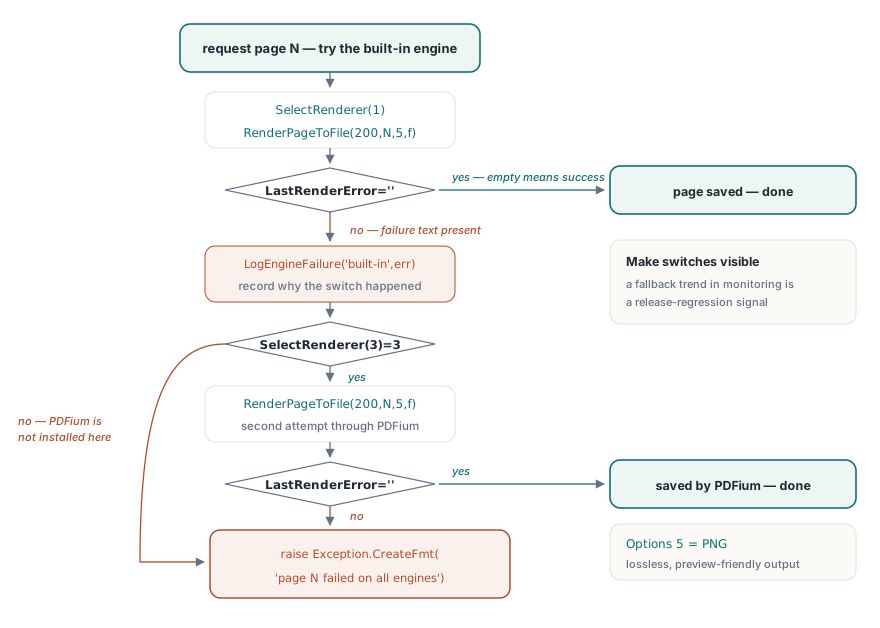
プローブと状態管理の規律が整えば、フォールバックチェーン自体は短くなる。失敗の検出は LastRenderError に頼る。これは直近のレンダリングに対するエンジン自身のメッセージテキストを保持し、レンダリングが成功した場合は空になる
procedure RenderPageWithFallback(PDF: TPDFlib; Page: Integer; const OutFile: string);
begin
  PDF.SelectRenderer(1);                            // 最初に組み込みエンジン
  PDF.RenderPageToFile(200, Page, 5, OutFile);      // 5 = PNG
  if PDF.LastRenderError = '' then Exit;
  LogEngineFailure('built-in', Page, PDF.LastRenderError);
  if PDF.SelectRenderer(3) = 3 then                 // PDFium を重量級フォールバックとして
  begin
    PDF.RenderPageToFile(200, Page, 5, OutFile);
    if PDF.LastRenderError = '' then Exit;
    LogEngineFailure('pdfium', Page, PDF.LastRenderError);
  end;
  raise Exception.CreateFmt('Page %d failed on all available engines', [Page]);
end;
ここには重要な設計上の判断が 2 つある。このチェーンは、なぜ各切り替えが起きたのかを記録する。「このページはリリース 3.7 以降 PDFium にフォールバックしている」というログの 1 行は、失われるべきものではなく、監視の中で傾向を追うべき回帰の兆候だからである。フォールバックの順序自体も、ワークロードごとに選ぶ価値のある方針である。組み込みエンジンは追加の DLL なしでデプロイできるため、ほとんどの環境で最初に試すべき正しい選択になる一方、透過グループや特殊なシェーディングを多用する文書こそが、そもそもチームが代替エンジンを組み込む主な理由になる。どのエンジンも一般的に最速というわけではなく、それこそが呼び出しごとに選ぶことの意義である。実際の文書のサンプルを実際の DPI で、それぞれのエンジンに対してベンチマークし、エンジンの DLL や文書の構成が変わるたびにその計測をやり直すこと。この議論には、常にコーパスが勝つ
1 ページ単位の呼び出しを超えて: TIFF のバッチとライブなデバイスコンテキスト
1 ページ単位の呼び出しに隣接する 2 つの機能が、このツールセットを締めくくる。RenderAsMultipageTIFFToFile はページ範囲式を、複数ページの TIFF へ直接レンダリングする。これは、PDF 以前から存在する文書管理システムへのアーカイブ用の引き渡しに自然な形である。RenderPageToDC はプレビューコントロール向けに、Windows のデバイスコンテキストへ直接描画し、独自の 3 つの粘着性のある設定(SetRenderDCOffset、SetRenderDCErasePage、加えてクロップタイプ)に支配される。これらは、レンダースケールの係数と同じリセットの規律を必要とする。画面プレビューと印刷経路のレンダリングは、それ自体に専用の記事を設けるだけの落とし穴を抱えている。下にリンクを示す
この先どこへ進むか
持ち越しておく価値のある習慣が 1 つある。SelectRenderer はそのインスタンス上のそれ以降のすべての呼び出しに効いてくるため、文書のほかの部分を既定のエンジンにとどめたまま、頑固な 1 ページだけを別のエンジンで再試行することができる。プレビューの描画、プリンターの選択、DevMode の扱いについては、印刷プレビューとデバイスコンテキストの記事を続けて参照してほしい。非常に大きなファイルに対する高負荷なパイプラインへレンダリングを供給する場合は、ダイレクトアクセスガイドにあるハンドルベースの手法が、DARenderPageToFile によるページ単位のレンダリングと自然に組み合わさる
エンジンのパッケージング、対応形式、体験版ビルドについてはPDF Library for Delphi 製品ページで詳しく説明している