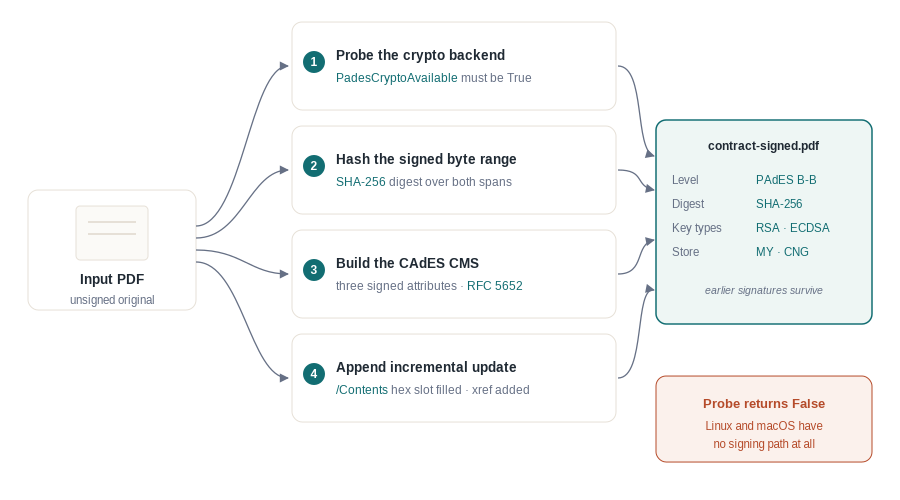
PDFium's fpdf_signature.h exports eight functions, and every one of them is a getter. FPDF_GetSignatureCount and FPDF_GetSignatureObject find the signatures; six FPDFSignatureObj_Get* calls return the /Contents bytes, the /ByteRange, the /SubFilter, the reason, the /M time and the DocMDP permission. Nothing in that header creates a signature dictionary, reserves a slot for the signature value or writes a byte range, and FPDF_SaveAsCopy with FPDF_INCREMENTAL appends an update without offering any point where a digest could be computed. So a signing tool built on PDFium has to produce every signature byte on its own: lay out a placeholder, hash the file around it, build the CMS, sign, and back-fill
PAdES B-B is the smallest thing worth producing that way. ETSI EN 319 142-1 defines it as a PDF signature dictionary with /SubFilter /ETSI.CAdES.detached, whose /Contents holds a detached CMS SignedData that carries three mandatory signed attributes: content-type, message-digest and the ESS signing-certificate-v2. ISO 32000-1 §12.8.1 supplies the PDF side, a /ByteRange that covers the whole file except the /Contents value itself. There is no trusted time and no revocation data at this level. Those arrive with B-T and the long-term levels, which all build on a correct B-B signature
Signing with a certificate thumbprint in Delphi
The PDFium Component signs the open document through TPdf.SignPades, and the shortest overload takes a destination file name and the SHA-1 thumbprint of the signer certificate. The signing types live in two units next to PDFium: FPdfPades declares TPadesSignOptions and the validation result, FPdfCrypto declares the backend probe and the EPadesCrypto exception
uses
  System.SysUtils, PDFium, FPdfPades, FPdfCrypto;

procedure SignContract(const AThumbprint: string);
var
  Pdf: TPdf;
begin
  if not PadesCryptoAvailable then
    raise Exception.Create('No PAdES signing backend is configured');

  Pdf := TPdf.Create(nil);
  try
    Pdf.FileName := 'contract.pdf';
    Pdf.Active := True;
    // AThumbprint: SHA-1 of a certificate in the Current User "MY" store,
    // hex digits in either case, separators allowed
    if not Pdf.SignPades('contract-signed.pdf', AThumbprint) then
      raise Exception.Create('contract.pdf is not open');
  finally
    Pdf.Free;
  end;
end;
PadesCryptoAvailable answers whether anything on this machine can produce a signature value right now. On Windows it is True once crypt32.dll and ncrypt.dll load; the backend binds them at run time rather than at link time, and both ship in System32 on every supported version. PadesCryptoBackendName returns 'Windows CNG' there, or the name of whatever backend you installed, and it is worth writing into your signing log next to the thumbprint. The Boolean that SignPades returns covers only the document side (False means the document is not open or could not be serialized). Every cryptographic failure raises EPadesCrypto instead, including a thumbprint that matches no certificate, and EPadesCryptoUnavailable when no backend exists at all
The thumbprint is the same value the Windows certificate manager shows on the Details tab. With it, the Windows backend finds the certificate in the Current User "MY" store, acquires its CNG private key handle, and asks Windows to build the chain so the signer certificate and its intermediates go into the SignedData certificates field; the root stays out. An empty thumbprint makes the backend take the first suitable certificate it finds. That is fine on a build agent with one test certificate. On a workstation where someone later imports a second certificate, it quietly changes who signs, so production code should always pass the thumbprint
The key type decides the algorithm. For an RSA key, TPadesSignOptions.Default selects RSASSA-PSS, the scheme ETSI TS 119 312 recommends; for an ECDSA key the backend switches to ecdsa-with-SHA256 on its own and rewraps the raw r‖s pair that NCryptSignHash returns into the DER SEQUENCE of two INTEGERs that CMS expects. Keep PSS unless a specific verifier you have to satisfy cannot handle it, and only then set PaddingScheme := psRsaPkcs1v15; how the PSS parameters themselves are encoded is covered in encoding RSASSA-PSS-params per RFC 4055
The new field is an invisible signature: a widget with /Rect [0 0 0 0] on the first page, named PDFiumPasSignature plus an object number unless you set FieldOptions.FieldName. Readers list it in their signature panel rather than on the page
How does the ByteRange stay valid once the signature is written?
The ByteRange stays valid because the slot for the signature has a fixed width before anything is hashed. SignPades appends an incremental update containing the signature dictionary with a /Contents hex string of zeros, serializes the cross-reference section and trailer, and only then knows the final offsets. The /ByteRange gets two spans: from offset 0 up to the < that opens the hex string, and from just after the closing > to the end of file. Each of the four numbers is written into a ten-digit field, so filling them in does not move a single byte either
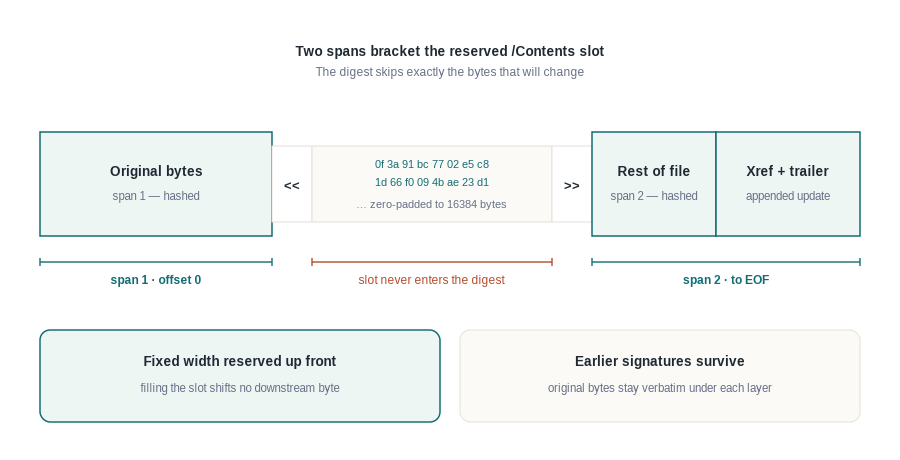
SHA-256 runs over those two spans and nothing else. The finished CMS is hex-encoded over the start of the zero run, and the rest of the run stays zero, which is legal padding for a hex string and sits outside the digest anyway. Because the original file is copied byte for byte ahead of the update, an earlier signature on the same document still verifies against its own ByteRange
ContentsSize counts bytes of signature, and the hex string in the file is twice that long: the default of 16384 reserves 32,768 hex digits. Values below 1024 are raised to 1024, and anything above 64 MiB is refused. When the CMS comes out larger than the reservation, SignPades raises EPadesCrypto with both sizes in the message. Suppose a signer certificate with two intermediates comes to roughly 5 KB of DER; a B-B signature then fits the default easily. A B-T signature does not get a second slot, because the RFC 3161 token is added inside the same CMS as an unsigned attribute, and a TSA that returns its own certificate chain can add several more kilobytes. If the files you sign today might be timestamped with the same code tomorrow, reserve 32768 from the start rather than tuning per document
Encrypted input is refused with the message "remove encryption before signing". An incremental update has to carry the /Encrypt reference in its trailer (ISO 32000-1 §7.5.6) and encrypt every string it adds, so plaintext objects appended to an encrypted file would leave a document that conforming readers cannot open correctly. Remove the encryption, then sign the plaintext copy
What goes into the CMS SignedData?
Every signature the PDFium Component builds carries four signed attributes: content-type, message-digest, signing-certificate-v2, and cms-algorithm-protection from RFC 6211, which binds the digest and signature algorithm identifiers into the signed data so they cannot be swapped afterwards. The first three are what EN 319 142-1 requires for B-B. Commitment-type-indication and signature-policy-identifier are added only when you fill the matching option fields, and the message-digest attribute holds the SHA-256 of the two ByteRange spans
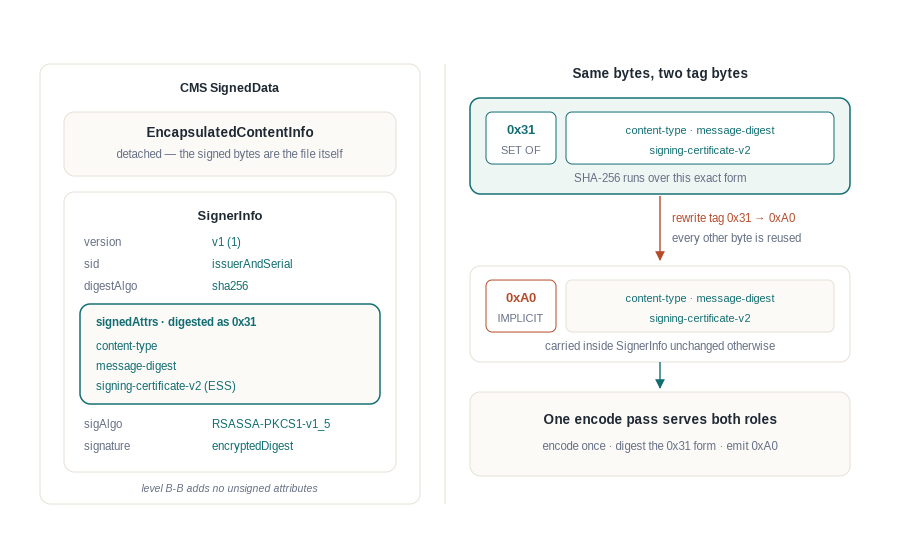
The private key never signs the PDF digest directly. It signs the SHA-256 of the DER-encoded signed attributes, and RFC 5652 §5.4 says that encoding uses the explicit SET OF tag 0x31, even though the same attributes are stored in SignerInfo under the IMPLICIT [0] tag 0xA0. Hand-written CMS code that hashes the 0xA0 form produces a signature that no verifier accepts, and the bytes look perfectly plausible in a hex dump. FPdfCms.BuildSignedData encodes the attribute set once, hashes it with 0x31 in front, and changes only that first byte for the emitted copy. The attributes are also sorted by their encodings as X.690 §11.6 requires for a DER SET OF, a detail with its own write-up in CMS signedAttrs DER SET OF sorting
Reason, location and commitment type
The options overload of SignPades, and SignPadesToStream, which takes the same record, write the optional ISO 32000-1 §12.8.1 entries /Name, /Reason, /Location and /ContactInfo into the signature dictionary. Signing into a stream has a practical advantage: SignPades with a file name opens the destination with fmCreate before signing starts, so an exception leaves an empty file at that path, while a memory stream lets you write the file only after the signature exists
var
  Pdf: TPdf;
  Opts: TPadesSignOptions;
  Signed: TMemoryStream;
begin
  Opts := TPadesSignOptions.Default;          // B-B, RSASSA-PSS, 16384-byte slot
  Opts.CertificateThumbprint := SignerThumbprint;
  Opts.Reason := 'Approved for release';
  Opts.Location := 'Berlin, DE';
  Opts.ContactInfo := '[email protected]';
  Opts.ContentsSize := 32768;                 // room for a B-T token later

  // Opts.CommitmentTypeOid := '1.2.840.113549.1.9.16.6.5';  // proofOfApproval
  // With a commitment type set, /Reason is left out of the dictionary

  Pdf := TPdf.Create(nil);
  Signed := TMemoryStream.Create;
  try
    Pdf.FileName := 'contract.pdf';
    Pdf.Active := True;
    try
      if Pdf.SignPadesToStream(Signed, Opts) then
        Signed.SaveToFile('contract-signed.pdf');
    except
      on E: EPadesCrypto do
        LogSigningFailure(E.Message);   // your own logging routine
    end;
  finally
    Signed.Free;
    Pdf.Free;
  end;
end;
The two commented lines change what a reader of the signed file sees. EN 319 142-1 §6.3 does not allow a signature to state its intent twice, once as a commitment-type-indication attribute and again as a /Reason entry, so when CommitmentTypeOid is non-empty PDFium Component omits /Reason even if you filled it in. Someone opening the signed file in a desktop viewer then sees an empty reason and assumes the option was ignored. Pick one per workflow. A commitment OID is what an automated validation service can act on, so it suits documents headed for EU trust services; /Reason is the text a person reads in the signature panel, which fits internal approval chains
Level defaults to plB_B. Setting plB_T requires TsaUrl as well, and leaving the URL empty raises EPadesCrypto instead of producing a B-B file under a B-T request. The timestamp and DSS options are covered in RFC 3161 timestamps and DSS for long-term validation
Signing on Linux and macOS
Outside Windows there is no system certificate store the component can assume, so the default backend is OpenSSL 3 with credentials you hand over explicitly. FPdfCryptoSsl.ConfigureSslSigningCredentials takes the private key as PEM bytes, the signer certificate and any intermediates as DER, and an optional password for an encrypted PEM, which is passed as bytes and never prompted for on stdin. After that call PadesCryptoAvailable reports True and PadesCryptoBackendName returns 'OpenSSL'
uses
  System.SysUtils, System.Classes, System.IOUtils,
  PDFium, FPdfPades, FPdfCrypto, FPdfCryptoSsl;

procedure SignOnServer(const KeyPassword: AnsiString);
var
  Chain: TPadesChainCertArray;
  Opts: TPadesSignOptions;
  Pdf: TPdf;
  Signed: TMemoryStream;
begin
  SetLength(Chain, 1);
  Chain[0] := TFile.ReadAllBytes('/etc/signing/issuing-ca.der');
  ConfigureSslSigningCredentials(
    TFile.ReadAllBytes('/etc/signing/signer-key.pem'),
    TFile.ReadAllBytes('/etc/signing/signer.der'),
    Chain, KeyPassword);
  if not PadesCryptoAvailable then
    raise Exception.Create('OpenSSL signing unavailable: ' + SslMissingSymbols);

  Opts := TPadesSignOptions.Default;
  // CertificateThumbprint stays empty: OpenSSL signs with the configured
  // certificate, and a thumbprint here raises EPadesCrypto

  Pdf := TPdf.Create(nil);
  Signed := TMemoryStream.Create;
  try
    Pdf.FileName := 'invoice.pdf';
    Pdf.Active := True;
    if Pdf.SignPadesToStream(Signed, Opts) then
      Signed.SaveToFile('invoice-signed.pdf');
  finally
    Signed.Free;
    Pdf.Free;
  end;
end;
Code that moves from Windows to Linux unchanged usually breaks on the thumbprint. On Windows it selects the certificate; under OpenSSL there is exactly one configured certificate, and a non-empty CertificateThumbprint raises EPadesCrypto with "thumbprint selection is unavailable" instead of being ignored. On macOS, FPdfCryptoMac.ConfigureKeychainSignerProvider installs a Keychain-backed signer in place of OpenSSL, as described in signing PAdES with a macOS Keychain identity. When the key cannot leave an HSM or a cloud signing service, the document is prepared and completed in two steps instead, which remote PAdES signing with HSM and cloud keys walks through
Reading the signed copy back
A signature that only the signing code has looked at is unchecked. Reopening the output with a fresh TPdf and calling ValidatePades parses the file as a validator would: it finds the signature dictionaries, recognizes the PAdES level and lists any structural issue it found
procedure CheckSignedCopy(const FileName: string);
var
  Pdf: TPdf;
  R: TPadesValidationResult;
begin
  Pdf := TPdf.Create(nil);
  try
    Pdf.FileName := FileName;
    Pdf.Active := True;
    R := Pdf.ValidatePades;
    if not R.IsCompliantAt(plB_B) then
      raise Exception.CreateFmt('%s: no clean B-B signature (%d found)',
        [FileName, R.SignatureCount]);
    // Needs a CMS verification backend; on Windows the CNG one is built in
    if not R.IsCryptographicallyValid then
      raise Exception.CreateFmt('%s: signature digest did not verify', [FileName]);
  finally
    Pdf.Free;
  end;
end;
IsCompliantAt(plB_B) is True when the detected level is B-B or higher and the issue set is empty. IsCryptographicallyValid goes one step further and requires the integrity check to come back valid, which means the ByteRange digest matched and the signature value verified against the embedded certificate. Neither says the certificate is trusted; that is a separate trust validation against anchors and revocation data, and inspecting a PDF signature and its PAdES level shows how to read every field of the result
B-B proves who signed and that the covered bytes have not changed since. It does not prove when: any time recorded in the file came from the signer's own clock. It also carries no revocation evidence, so a verifier years from now has to fetch chain status itself, and may find the CA gone. For anything that must stay verifiable past the certificate's expiry date, B-B is the first step only. Before you put a signature on a document from an outside source, auditing the PDF for security risks tells you what scripts, actions and hidden content you would be vouching for
Thumbprint signing, the OpenSSL and Keychain backends and the validation calls above are all part of the PDFium Component for Delphi and C++Builder, which pairs PDFium's rendering and read-only signature access with its own PAdES signing pipeline