You have received a signed PDF and you need to show, in your viewer, who signed it, when it was signed, whether the signature covers the whole file, and how far it goes toward long-term compliance. The PDFium Component for Delphi and Lazarus answers all four questions with read-only calls: FPDF_GetSignatureCount and the FPDFSignatureObj_* family expose the signature dictionary, and TPdf.ValidatePades classifies the PAdES baseline level. This is the first of three articles on PDF signatures with PDFium; the two that follow cover creating a B-B signature and adding long-term timestamps. One boundary belongs up front, though: everything here is inspection, and reading what a signature claims is a different job from verifying its cryptography or deciding whether you trust the signer
Why a PDF signature dictionary is not just a blob of bytes
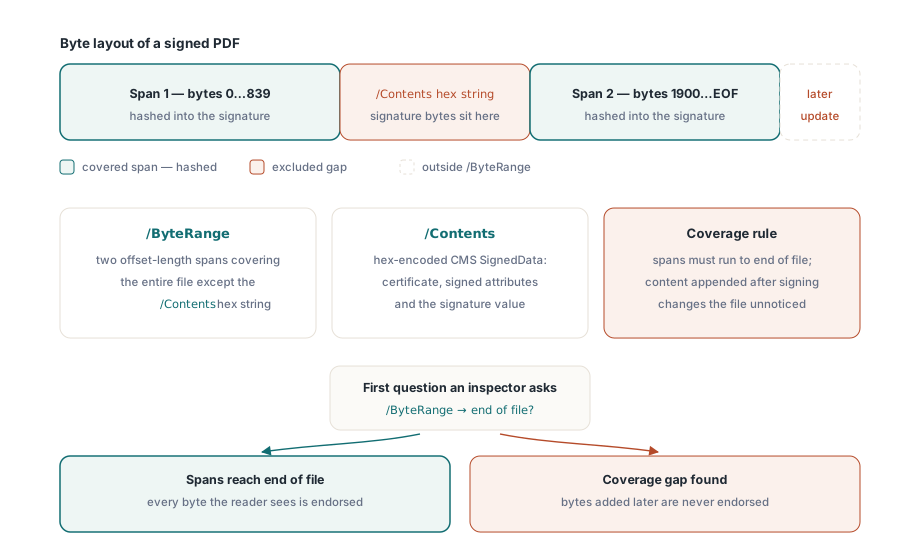
A PDF signature is a dictionary, not an opaque attachment, and its two most important entries tell you how much of the file is actually protected. ISO 32000-1 §12.8 defines the signature dictionary with a /ByteRange and a /Contents entry. /Contents holds a hex-encoded CMS SignedData structure (RFC 5652), the cryptographic envelope that carries the signer certificate, the signed attributes, and the signature value itself. /ByteRange is the part developers underestimate: it is an array of two offset-length spans that together cover the entire file except the /Contents hex string. That gap is exactly where the signature bytes sit, and the two spans on either side are precisely what the signature commits to
The ByteRange design is what makes an incremental save auditable. Because a signer cannot hash signature bytes that do not exist yet, the file is split around the /Contents placeholder and everything else is hashed into the signature. A signature whose ByteRange does not reach the end of the file is a warning sign: content appended after the covered range, through a later incremental update, would not break the signature even though it changes what the reader sees. So the first thing a serious inspector checks is not who signed, but whether the signature covers the bytes it appears to endorse
Reading the signature dictionary with PDFium's read-only API
The PDFium Component surfaces the signature dictionary through two read-only members: SignatureCount and the Signature[Index] record. Under the hood they call FPDF_GetSignatureCount, FPDF_GetSignatureObject, and the FPDFSignatureObj_* accessors for /SubFilter, /ByteRange, /Contents, /Reason and the signing time. Read-only is the operative phrase here: PDFium can enumerate and read signatures but has no API to create or write one, which is why the signing side of this series is implemented by the library itself rather than by PDFium
var
  Pdf: TPdf;
  i: Integer;
  Sig: TPdfSignature;
begin
  Pdf := TPdf.Create(nil);
  try
    Pdf.FileName := 'contract-signed.pdf';
    Pdf.Active := True;
    for i := 0 to Pdf.SignatureCount - 1 do
    begin
      Sig := Pdf.Signature[i];
      Writeln('SubFilter : ', Sig.Encoding);        // ETSI.CAdES.detached, adbe.pkcs7.detached, ...
      Writeln('Signed at : ', Sig.Time);            // signer date string, e.g. D:20260708120000+02'00'
      Writeln('Reason    : ', Sig.Reason);
      Writeln('CMS length: ', Length(Sig.Content)); // raw DER SignedData taken from /Contents
      Writeln('DocMDP    : ', Sig.Permission);      // 0 = no certification, 1..3 = MDP level
    end;
  finally
    Pdf.Free;
  end;
end;
Each TPdfSignature record maps directly onto the dictionary. Encoding is the /SubFilter, the single most diagnostic field, because it names the signature handler and immediately separates a modern ETSI.CAdES.detached signature from a legacy or forbidden one. Time is the author-declared signing time as a PDF date string, which is a claim by the signer and not trusted time. Content is the raw CMS SignedData, and Permission exposes the DocMDP certification level (0 for an ordinary approval signature, 1 to 3 for a certification signature that locks down later changes). The one field the record does not surface is the parsed ByteRange, and that omission is deliberate, because ValidatePades does the ByteRange coverage arithmetic for you rather than making you redo it by hand
What is the difference between PAdES B-B, B-T, B-LT and B-LTA?
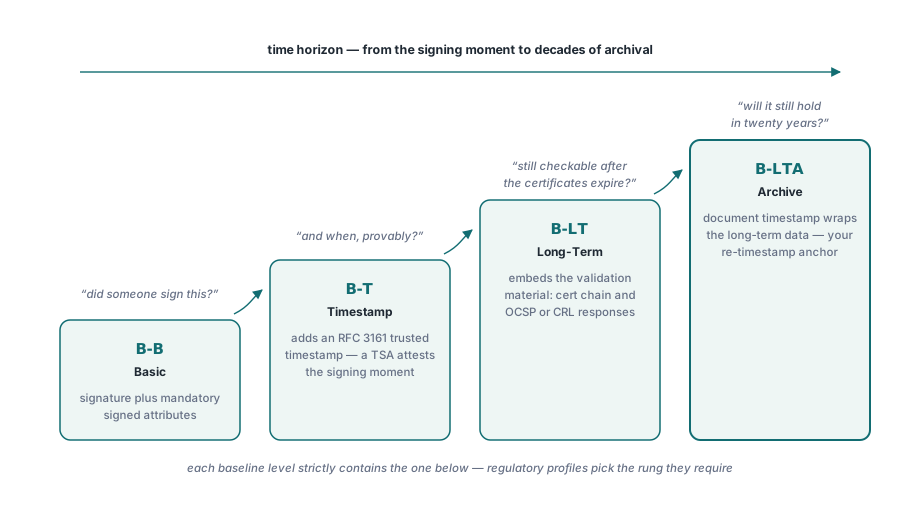
The four PAdES baseline levels form a ladder from a minimally valid signature to one built to survive decades of archival, and each level strictly contains the one below it. ETSI EN 319 142-1 defines them as B-B, B-T, B-LT and B-LTA. B-B (Basic) is the signature plus the mandatory signed attributes and nothing more. B-T (Timestamp) adds a trusted RFC 3161 timestamp over the signature, so the moment of signing is attested by a time-stamping authority instead of asserted by the signer clock. B-LT (Long-Term) embeds the validation material — the certificate chain, and optionally OCSP or CRL responses — inside the file, so the signature can still be validated years later when the issuing infrastructure is gone. B-LTA (Long-Term with Archive timestamp) wraps a document timestamp around that material, protecting the long-term data itself and giving you a point to re-timestamp before the underlying cryptography ages out
The practical reading is about time horizon. A B-B signature answers "did someone sign this". B-T answers "and when, provably". B-LT answers "and can I still check it after the certificates expire". B-LTA answers "and will that check still hold in twenty years". Regulatory profiles pick a rung: many e-invoicing and eIDAS contexts require at least B-T, and archival mandates reach for B-LT or B-LTA. Knowing which rung a document actually reaches, before you accept or reject it, is the whole point of the inspection step
Detecting the baseline level with TPdf.ValidatePades
The PDFium Component reduces the entire level question to one call. TPdf.ValidatePades returns a TPadesValidationResult record whose Level field is a TPadesLevel — plNone, plUnknown, plB_B, plB_T, plB_LT or plB_LTA — alongside a set of issues, a signature count and a document-timestamp count. The level is inferred monotonically: the validator establishes B-B first, then promotes to B-T if a signature timestamp or a document timestamp is present, to B-LT if the catalog carries a /DSS with certificates and the /Extensions /ESIC Level 1 marker, and to B-LTA if a document timestamp and the ESIC Level 2 marker are both present. Two helpers make the result actionable: IsCompliant is True only when the level reaches at least B-B and the issue set is empty, and IsCompliantAt lets you assert a policy floor such as plB_T
var
  Pdf: TPdf;
  R: TPadesValidationResult;
begin
  Pdf := TPdf.Create(nil);
  try
    Pdf.FileName := 'contract-signed.pdf';
    Pdf.Active := True;
    R := Pdf.ValidatePades;
    case R.Level of
      plNone:    Writeln('No PAdES signature present');
      plUnknown: Writeln('Signature present but level undeterminable');
      plB_B:     Writeln('PAdES B-B   (basic)');
      plB_T:     Writeln('PAdES B-T   (trusted timestamp)');
      plB_LT:    Writeln('PAdES B-LT  (long-term material embedded)');
      plB_LTA:   Writeln('PAdES B-LTA (archive timestamp)');
    end;
    Writeln('Signatures   : ', R.SignatureCount);
    Writeln('DocTimeStamps: ', R.DocTimeStampCount);
    if R.IsCompliantAt(plB_T) then
      Writeln('Meets the B-T policy floor')
    else
      Writeln('Below the required B-T level');
  finally
    Pdf.Free;
  end;
end;
Why is adbe.pkcs7.sha1 a forbidden SubFilter?
Because SHA-1 is broken and the adbe.pkcs7.sha1 handler bakes it in. That SubFilter pre-hashes the document with SHA-1 before wrapping it in PKCS#7, and SHA-1 has been collision-vulnerable for years, so EN 319 142-1 clause 6.3 forbids it outright for a baseline signature. ValidatePades raises ppeiForbiddenSubFilter when it sees adbe.pkcs7.sha1 or adbe.x509.rsa_sha1, and it raises ppeiBadDigestAlgorithm when the CMS itself uses MD5 or SHA-1 as the message digest (clause 6.2.1). Those are two distinct checks catching the same class of weakness at two different layers
The issue set has 26 members in total, and the ones you will meet most often cluster around structure and coverage. ppeiByteRangeNotCoveringFile is the coverage check described earlier. ppeiForbiddenCertKey fires when the signature dictionary carries a /Cert entry, which PAdES forbids because the chain must live inside the CMS SignedData.certificates instead. ppeiMissingSigningCertificate, ppeiMissingContentType and ppeiMissingMessageDigest flag mandatory signed attributes that are absent, and ppeiDetachedContentViolation catches a signature that wrongly embeds the signed content instead of detaching it. Enumerating the set turns a bare rejection into a diagnosis you can log
var
  R: TPadesValidationResult;
  Issue: TPadesValidationIssue;
begin
  R := Pdf.ValidatePades;
  if R.Issues <> [] then
    for Issue := Low(TPadesValidationIssue) to High(TPadesValidationIssue) do
      if Issue in R.Issues then
        Writeln('Issue: ',
          GetEnumName(TypeInfo(TPadesValidationIssue), Ord(Issue)));
end;
What ValidatePades does not check
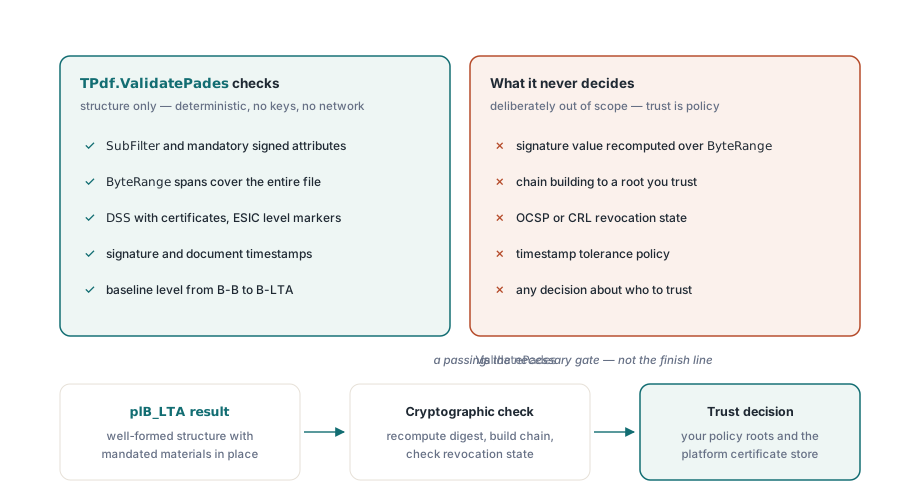
ValidatePades validates structure, not trust, and mistaking one for the other is the dangerous error. A result of plB_LTA means the document contains a well-formed B-LTA signature with all the mandated attributes, materials and timestamps in the right places — it does not mean the signature is cryptographically valid, that the certificate chains to a root you trust, or that no certificate in the chain has been revoked. The validator deliberately performs no cryptographic verification: it does not recompute the signature over the ByteRange, does not build or evaluate the trust chain, and does not check OCSP or CRL revocation state. That split is intentional and useful, because structural inspection is fast, fully deterministic, and needs no keys, no network and no platform crypto, so ValidatePades runs identically on Windows, Linux and macOS as pure Pascal over the file bytes. Trust-chain validation, by contrast, is inseparable from policy — which roots you trust, how you fetch revocation, how strict your timestamp tolerance is — and it belongs to a later stage that depends on the platform certificate store, so treat a passing ValidatePades as the necessary gate that a signature is shaped correctly, then hand a structurally sound signature to real cryptographic verification before you rely on it
That structural pass is the right place to start, and it pairs naturally with the wider read-only checks in auditing PDF security risks with the PDFium Component and with format-conformance work such as validating print-ready PDF/X documents. Once you can read and classify a signature, the next step is producing one: the second article in this series covers signing PDFs with PAdES B-B, and the third extends that to trusted timestamps and long-term B-LT and B-LTA signatures. The read-only signature inspection and the ValidatePades classifier shown here are part of the PDFium Component for Delphi, C++Builder and Lazarus