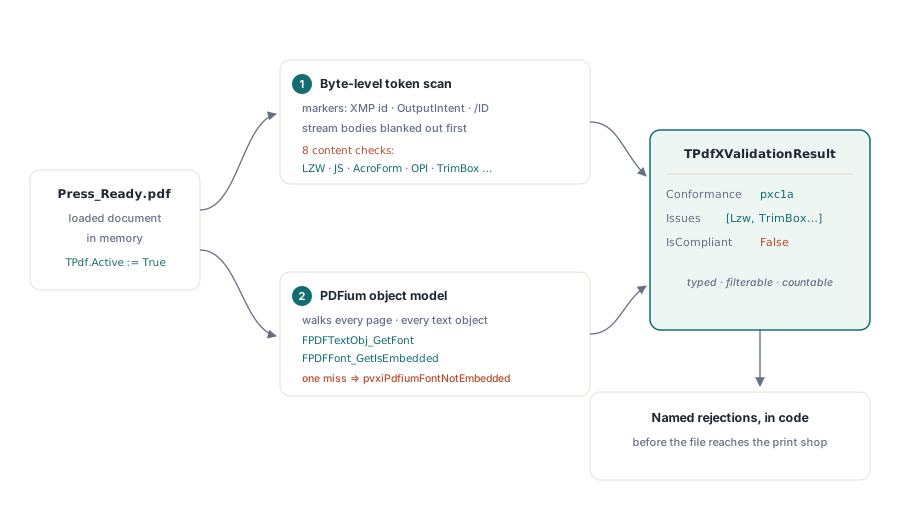
The PDFium Component for Delphi validates print-ready PDF/X documents through TPdf.ValidatePdfX, which implements ISO 15930 checking in two layers: eight byte-level content checks (forbidden LZW compression, JavaScript, form fields, OPI references, a missing TrimBox, an unset Trapped key, and more) plus a PDFium object-model pass that uses FPDFFont_GetIsEmbedded to verify font embedding on every text object of every page. The result is a TPdfXValidationResult record that names the detected conformance level and lists each violation as a typed enum, so your Delphi application can tell a customer exactly why a file will bounce at the print shop before anyone burns a plate
If you have ever couriered a job to a commercial printer and received it back with a one-line rejection — "no TrimBox", "fonts not embedded", "Trapped not set" — you know the cost of finding out late. PDF/X is the prepress counterpart to PDF/A: where archival PDF/A guarantees a document renders identically decades from now, PDF/X guarantees a document separates, images, and trims identically on someone else's RIP tomorrow morning. The two standards share machinery (XMP identification, OutputIntents, embedded ICC profiles) but answer different questions, which is why the component ships separate validators for each — the PDF/A side is covered in PDF/A preflight validation with the PDFium Component
What does ISO 15930 actually require from a print-ready PDF?
ISO 15930 exists to make blind exchange possible: a designer hands a file to a printer they have never spoken to, and the printer can produce correct output with no phone call, no missing-font email, and no linked image that stayed behind on the designer's laptop. Every rule in the standard serves that goal. Fonts must be embedded because the receiving RIP cannot be assumed to own them. External references are banned because the file must be complete in itself. Interactive features are banned because ink has no onclick handler
The PDFium Component recognizes three conformance families and reports them through the TPdfXConformance enum in the validation result: pxc1a for PDF/X-1a:2001 (ISO 15930-1, the strict CMYK-plus-spot baseline on PDF 1.3/1.4), pxc3 for PDF/X-3:2002 (ISO 15930-3, which admits RGB, Lab, and ICC-managed color), and pxc4 for PDF/X-4:2010 (ISO 15930-7, which finally allows live transparency and layers on a PDF 1.6 base). A file that carries no PDF/X identification at all comes back as pxcNone, which is itself a useful answer: the document never claimed to be print-ready, and everything else the validator reports explains what it would take to get there
The prohibitions make sense once you think like a RIP vendor. /LZWDecode is banned in every PDF/X variant so that a conforming consumer never depends on a filter with a compatibility and licensing history; Flate does the same job without the baggage. JavaScript, AcroForm fields, and /AA additional-action dictionaries are banned because a print file must be a fixed description of marks on paper — anything that can mutate appearance at open time breaks the guarantee that what was proofed is what prints. OPI (Open Prepress Interface) placeholders are banned because they are, by design, references to high-resolution images stored somewhere else, and "somewhere else" is exactly what blind exchange forbids
Why do print shops reject PDFs without a TrimBox?
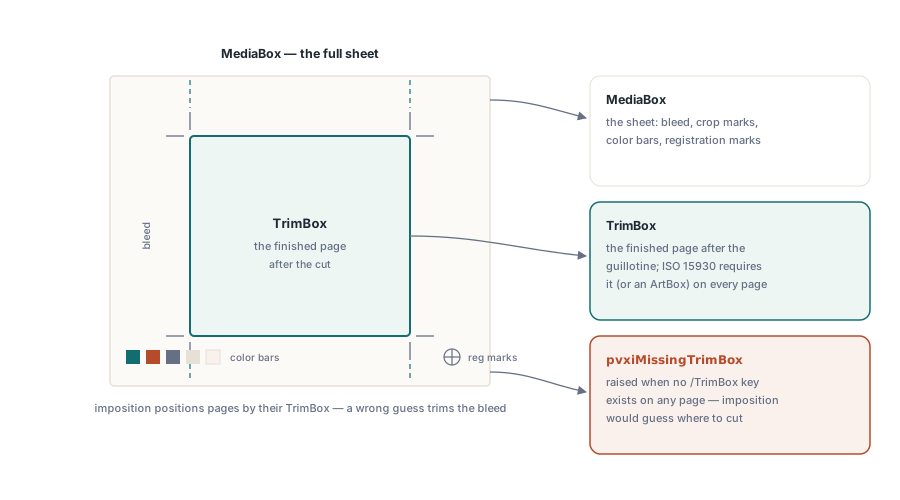
The TrimBox is the finished page — the rectangle that remains after the guillotine cuts. The MediaBox, which every PDF page has, is merely the sheet: it includes bleed, crop marks, registration targets, and color bars. Imposition software positions pages on a press sheet by their TrimBoxes; without one, the operator has to guess where your business card actually ends, and a wrong guess trims off your bleed or leaves a white sliver on one edge. That is why ISO 15930 requires a TrimBox (or an ArtBox) on every page, and why ValidatePdfX raises pvxiMissingTrimBox when no /TrimBox key is found on any page of the document
The /Trapped key answers a different production question. Trapping is the prepress technique of slightly overlapping adjacent colors so that tiny press misregistration does not open white gaps between them. The printer needs to know whether that work has already been done: trapping an already-trapped file doubles the overlaps, and skipping trapping on an untrapped file risks visible gaps. PDF/X therefore requires the Info dictionary to state /Trapped /True or /Trapped /False explicitly — a missing key or /Unknown forces a human to inspect the file, which is precisely the conversation blind exchange was meant to eliminate. The component flags this as pvxiTrappedNotSet
Running the two-layer validation with TPdf.ValidatePdfX
TPdf.ValidatePdfX takes no arguments and returns a TPdfXValidationResult record with three members: Conformance (the detected PDF/X flavor), Issues (a Pascal set of TPdfXValidationIssue values), and an IsCompliant helper. Internally it serializes the loaded document to a memory stream, runs the byte-level inspector over it, and then walks the PDFium object model for the per-font embedding check. A minimal preflight gate looks like this:
uses PDFium, FPdfPdfx;

procedure CheckPrintReadiness(const FileName: string);
var
  Pdf: TPdf;
  Res: TPdfXValidationResult;
begin
  Pdf := TPdf.Create(nil);
  try
    Pdf.FileName := FileName;
    Pdf.Active := True;

    Res := Pdf.ValidatePdfX;
    Writeln('Detected conformance: ',
      Ord(Res.Conformance)); // pxc1a, pxc3, pxc4, pxcNone...

    if Res.IsCompliant then
      Writeln('PDF/X checks passed')
    else
    begin
      if pvxiMissingTrimBox in Res.Issues then
        Writeln('REJECT: no /TrimBox on the pages');
      if pvxiTrappedNotSet in Res.Issues then
        Writeln('REJECT: /Trapped missing or /Unknown');
      if pvxiPdfiumFontNotEmbedded in Res.Issues then
        Writeln('REJECT: a page uses a non-embedded font');
      if pvxiLzwForbidden in Res.Issues then
        Writeln('REJECT: LZWDecode filter present');
    end;
  finally
    Pdf.Free;
  end;
end;
Because Issues is an ordinary Pascal set, you can partition it however your workflow needs — treat structural problems as hard rejects, treat pvxiMissingTitle (a SHOULD in the standard, not a MUST) as a warning, and log the rest. The same record type also feeds the component's report generator, so if you would rather emit a human-readable document than branch on enums, the pattern in building a batch preflight report CLI with the PDFium Component applies to PDF/X unchanged
What the byte-level layer catches — and what it misses
The byte-level layer is a token scan over the document's structural bytes with stream bodies blanked out, so a JPEG that happens to contain the byte pattern /JavaScript cannot trigger a false positive. On top of the marker checks (XMP pdfxid:GTS_PDFXVersion, OutputIntent with an embedded ICC profile, trailer /ID, the encryption prohibition), the content pass adds eight checks, each with its own enum value:
pvxiLzwForbidden— a/LZWDecodefilter appears anywhere in the file (forbidden in all PDF/X variants)pvxiJavaScriptForbidden— a/JavaScriptaction or name tree is presentpvxiFormFieldsForbidden— an/AcroFormdictionary or/XFAentry existspvxiAdditionalActions— an/AAadditional-actions dictionary is presentpvxiEmbeddedFilesForbidden—/EmbeddedFilesor a/FileAttachmentannotation is presentpvxiOpiForbidden— an/OPIor/Alternatesentry references replaceable image contentpvxiMissingTrimBox— no/TrimBoxfound on any pagepvxiTrappedNotSet—/Trappedis absent or set to/Unknown
Byte scanning is fast and needs no rendering engine, but it has an inherent blind spot with fonts: at that level the inspector can only apply a coarse heuristic — it flags a document when it finds no embedded font program at all. A file with nine fonts embedded and one system font slipped in looks fine to a byte scan. That single gap is why the second layer exists
Per-font embedding through the PDFium object model
PDFium Component's object-model layer answers the font question precisely. After the byte-level pass, TPdf.ValidatePdfX iterates every page, asks FPDFPage_CountObjects for the object list, and for each text object resolves the font handle via FPDFTextObj_GetFont and queries FPDFFont_GetIsEmbedded. One non-embedded font anywhere in the document adds pvxiPdfiumFontNotEmbedded to the issue set. The traversal short-circuits at two levels — it stops scanning objects on a page, and stops loading further pages, the moment the issue is confirmed — so on a violating 300-page catalog the verdict often arrives after page one
Two boundary notes worth knowing. First, this layer needs the PDFium library loaded and requires builds that export FPDFFont_GetIsEmbedded; when the export is absent the check is skipped rather than failed, so an older DLL never produces phantom rejections. Second, the check answers "embedded or not" and nothing more — it does not distinguish full embedding from subsetting, nor inspect glyph coverage. When a file fails and you need to know which font on which page, the enumeration techniques in analyzing PDF font properties with PDFium in Delphi pick up exactly where the validator's boolean leaves off
Validating streams without loading a document — or the DLL
The byte-level inspector is also exposed as a standalone function, ValidatePdfXCompliance(Source: TStream) in the FPdfPdfx unit, and it is pure Object Pascal with no dependency on the PDFium DLL. That makes it deployable in places a rendering engine is unwelcome: a lightweight upload gate on a web server, a CI job that vets generated artwork, or a Lazarus service on a platform where you would rather not ship native binaries. Feed it any seekable stream:
uses Classes, FPdfPdfx;

function QuickPdfXGate(const FileName: string): Boolean;
var
  Fs: TFileStream;
  Res: TPdfXValidationResult;
begin
  Fs := TFileStream.Create(FileName, fmOpenRead or fmShareDenyWrite);
  try
    Res := ValidatePdfXCompliance(Fs);
    Result := Res.IsCompliant and (Res.Conformance <> pxcNone);
  finally
    Fs.Free;
  end;
end;
The trade-off is explicit: the standalone path runs the marker checks and all eight content checks, but not the per-font PDFium layer, so its font verdict falls back to the coarse heuristic. A sensible architecture uses ValidatePdfXCompliance as the cheap first gate and reserves the full TPdf.ValidatePdfX for files that pass it
Where this validator ends and a full preflight begins
Honesty matters in preflight tooling, so here is the boundary. ValidatePdfX verifies identification markers, structural prohibitions, page geometry keys, the Trapped declaration, and font embedding down to individual text objects. It does not measure total ink coverage, validate that every color space is legal for the claimed variant (X-1a's CMYK-only rule, for instance), check image resolution against line screen, or evaluate overprint and transparency flattening behavior — those need a color-managed preflight engine, and the unit's own documentation says to pair it with one for final certification. What the two-layer check gives you is the 80% of rejections that are structural and detectable early, caught in milliseconds inside your own Delphi code instead of in tomorrow's email from the printer
Both validation layers, the PDF/X marker injection APIs for producing compliant output, and the PDF/A, PDF/UA, PDF/E, and PDF/VT validators that share the same architecture ship in the PDFium Component for Delphi and C++Builder — one component, from rendering to prepress gatekeeping