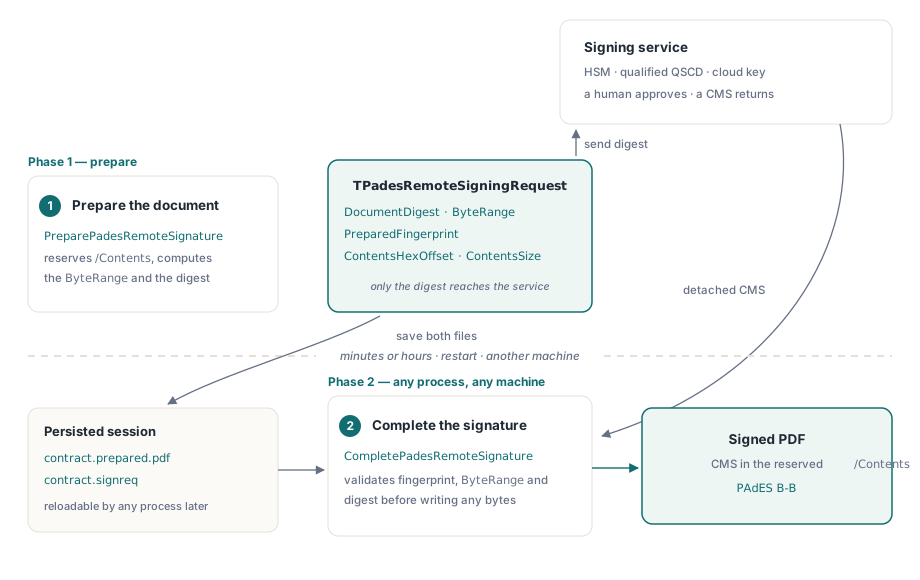
PDFiumPas splits PAdES signing into two calls so the private key never has to be in your process. PreparePadesRemoteSignature writes an incremental update with an empty fixed-width /Contents placeholder and hands back a request record carrying the SHA-256 document digest, the exact ByteRange and a fingerprint of the prepared file. CompletePadesRemoteSignature takes the detached CMS your signing service returns and drops it into that reserved slot
Between those two calls, minutes or hours can pass, the process can restart, and the work can move to another machine. That gap is the entire reason the API is shaped this way
Why can a remote key not use the ordinary signing call?
Because SignPadesBytes assumes the signing operation happens inside the call. It builds the incremental update, computes the digest over the ByteRange, signs it, and writes the result, all before returning. That is exactly right when the key lives in the Windows certificate store or in a PKCS#12 file you loaded
It is impossible when the key lives in a network HSM, a qualified signature-creation device operated by a trust service provider, or a cloud signing API that requires the user to confirm on a phone. In those cases the sequence is not a function call, it is a conversation: you send a digest, something else authenticates a human, and a CMS comes back later. A synchronous API cannot express "later" without blocking a thread on an operation that may need a second factor
The two-phase protocol
Phase one prepares the document. PDFiumPas appends the signature field and value dictionary, reserves ContentsSize bytes of hex-encoded space in /Contents, computes the ByteRange around that reservation, and produces a TPadesRemoteSigningRequest containing FormatVersion, PreparedFingerprint, DocumentDigest, the four-element ByteRange, ContentsHexOffset and ContentsSize
The only value your signing service needs is DocumentDigest: the SHA-256 the returned CAdES SignedData must carry as its message digest. Everything else in the record exists so phase two can prove that the file it is completing is the file that digest was computed from
uses
  FPdfPades;

var
  Options: TPadesRemoteSignOptions;
  Request: TPadesRemoteSigningRequest;
  Source, Prepared, Session: TFileStream;
begin
  Options := TPadesRemoteSignOptions.Default;
  Options.Reason := 'Approved by finance';
  Options.Location := 'Lisbon';
  Options.Name := 'A. Moreira';
  Options.SigningTimeUtc := NowUtc;
  Options.ContentsSize := 16384;   // hex bytes reserved for the CMS

  Source := TFileStream.Create('contract.pdf', fmOpenRead or fmShareDenyWrite);
  Prepared := TFileStream.Create('contract.prepared.pdf', fmCreate);
  try
    PreparePadesRemoteSignature(Source, Prepared, Options, Request);
  finally
    Prepared.Free;
    Source.Free;
  end;

  // Persist the session so a later run - or another machine - can finish it
  Session := TFileStream.Create('contract.signreq', fmCreate);
  try
    SavePadesRemoteSigningRequest(Session, Request);
  finally
    Session.Free;
  end;

  SendDigestToSigningService(Request.DocumentDigest);
end;
What does Complete refuse, and why does each check exist?
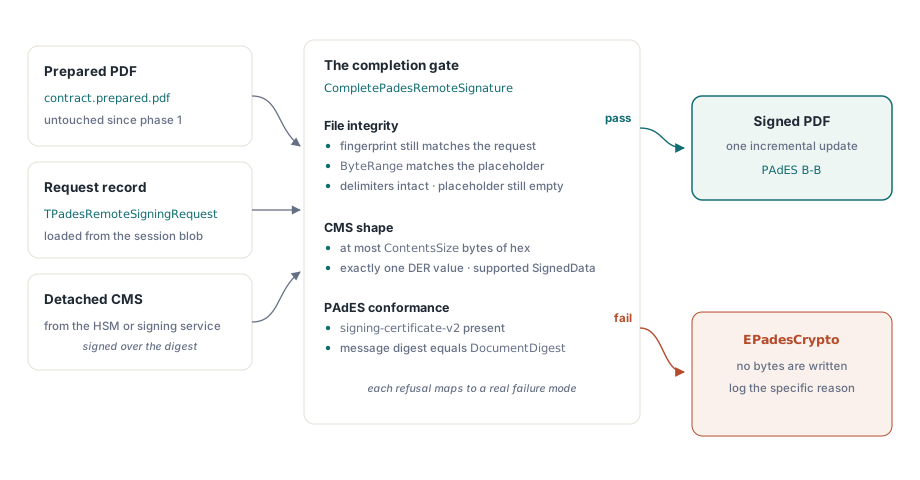
Completion is where a remote signing design usually goes wrong, so the validation is deliberately unforgiving. CompletePadesRemoteSignature rejects a prepared PDF whose fingerprint no longer matches the request, a ByteRange that does not match the recorded placeholder coordinates, modified /Contents delimiters, a placeholder that is no longer empty, a CMS larger than the reservation, a CMS that is not exactly one DER value, an unsupported SignedData shape, a missing signing-certificate-v2 attribute, and a CMS whose message digest does not equal the prepared document digest
Each of those maps to a real failure. The fingerprint and ByteRange checks catch the case where someone regenerated the prepared file between phases, which would produce a signature that validates against bytes nobody has. The empty-placeholder check catches double completion, where a second CMS is written over a signature that already exists. The message-digest check catches the most dangerous case of all: a correctly formed CMS signed over a different document, which is what you get when a queue mixes up two concurrent signing sessions. Without it you would produce a file that looks signed and fails validation everywhere, or worse, that carries someone else's approval
The signing-certificate-v2 requirement is a PAdES conformance matter rather than an integrity one. ETSI EN 319 142 requires the signing certificate to be bound into the signed attributes, and a CMS lacking that attribute is not a PAdES signature even if it verifies cryptographically. Rejecting it at completion means you find out here, not in a validator report from a customer, a topic explored further in why validators reject PAdES signatures
var
  Request: TPadesRemoteSigningRequest;
  Session, Prepared, Dest: TFileStream;
  CmsDer: TBytes;
begin
  Session := TFileStream.Create('contract.signreq', fmOpenRead);
  try
    Request := LoadPadesRemoteSigningRequest(Session);
  finally
    Session.Free;
  end;

  CmsDer := FetchDetachedCmsFromService;   // returned by the HSM or TSP

  Prepared := TFileStream.Create('contract.prepared.pdf', fmOpenRead);
  Dest := TFileStream.Create('contract.signed.pdf', fmCreate);
  try
    try
      CompletePadesRemoteSignature(Prepared, Dest, Request, CmsDer);
    except
      on E: EPadesCrypto do
        // Every rejection carries a specific reason; log it verbatim
        FailSession(E.Message);
    end;
  finally
    Dest.Free;
    Prepared.Free;
  end;
end;
Crossing process and machine boundaries
SavePadesRemoteSigningRequest and LoadPadesRemoteSigningRequest serialize the session through a stable versioned binary format, which is what makes the design practical rather than merely correct. A web application can prepare a document in one request, store the prepared PDF and the session blob, return a digest to the browser for a smart-card signature, and complete the file in a completely different request handler
The FormatVersion field is what keeps that safe across upgrades. A session written by an older build and loaded by a newer one is recognized or rejected explicitly, rather than being misread as a differently shaped record. If your queue can hold sessions for days, treat the format version as an operational fact worth logging, not an implementation detail
Sizing the placeholder
ContentsSize is the one parameter you must think about, because it is fixed before the CMS exists. It counts the hex-encoded reservation, so a 6 KB DER CMS needs at least 12 KB of space, and the implementation caps the reservation at 64 MiB
Reserve too little and completion fails with an oversized-CMS error after your signing service has already done its work, which on a metered qualified-signature service means a wasted operation. Reserve too much and every signed document carries the padding forever. The sensible approach is to measure: sign one document with your real certificate chain, look at the DER length, double it for hex, then add generous headroom for the timestamp token if you intend to upgrade to a T-level signature. Chains with several intermediates and a long OCSP response grow faster than people expect
What comes after the signature
A completed remote signature is PAdES B-B. Long-term validation needs a timestamp and the validation material, which is a separate incremental update that adds a DSS and its per-signature VRI dictionaries, described in long-term signatures with RFC 3161 timestamps and DSS. That step is local: it adds certificates, OCSP responses and CRLs, none of which need the private key
Before shipping, verify what you produced with the same code path a relying party would use, covered in inspecting digital signatures and PAdES levels. Signing and verification are different code, and a remote signing pipeline is exactly the place where the two can drift apart without anyone noticing until an external validator says so
PDFiumPas is a Delphi and Lazarus component around the PDFium engine with a native Pascal PAdES stack, so signing, timestamping and validation work without external command-line tools. Full API documentation and a trial build are on the PDFium Delphi component page