PDFium Component saves edited XFA form values exactly, through save and reopen, when it runs the Windows V8 runtime pdfium.v8.dll shipped in v3.125.2 or later. Older runtimes added line feeds to field values, cut emoji down to an unrelated BMP character, quietly skipped single-stream XFA saves and could swallow a failed final write. One reopen symptom is not a library defect at all: a dynamic form whose root subform lacks restoreState="auto" rebuilds its layout from the template
The bug reports for this all looked alike. A customer fills an XFA claim form in a Delphi viewer, saves, reopens, and something is slightly off. An empty comments box now holds a blank line, and after a second save it holds two. A name typed with an emoji comes back with a private-use glyph. Nobody gets an error, which is what makes these bugs expensive: the drift shows up weeks later in somebody else's export
What goes wrong when an XFA form is saved and reopened?
Four separate defects in the native XFA save path caused value drift, and each one hid behind a successful-looking save. Two came from serialization, one from the single-stream storage layout, and one from the PDF writer itself. The table maps each symptom to its cause and to the release where PDFium Component fixed it
| Symptom after reopen | Cause | Fixed in |
|---|---|---|
| Empty field holds a line feed; values grow a newline per save | Both XFA writers inserted layout newlines after start tags | v3.125.2, pdfium.v8.dll |
| U+1F642 comes back as U+F642, or the emoji disappears from the form packet | 16-bit wchar_t truncation in decoding; surrogate filtering in the form serializer | v3.125.2, pdfium.v8.dll |
| Edits in a single-stream XFA document are simply gone | Native save rejected the stream layout, but the return value was ignored | v3.125.2; comments and processing instructions kept since v3.126.0 |
| Truncated file although the save reported success | Final buffered write failed after the writer had already returned success | v3.125.2 V8 runtime; v3.125.3 ordinary pdfium.dll |
| Three-page dynamic form reopens as two pages | Root subform does not request restoreState="auto" | Form authoring, not a library defect |
Earlier write-ups concluded that XFA field edits could not be persisted with PDFium at all, which was accurate for the runtimes of the time. The newer V8 runtime saves XFA values natively, so an edit made in the live form reaches the saved datasets packet without packet surgery on your side
Which PDFium runtime saves XFA values?
XFA save fidelity depends on the native DLL, not on the Delphi wrapper, so the first check is which runtime your process actually loaded. PDFium Component ships two Windows builds per architecture: the ordinary pdfium.dll, built without V8 and XFA, and pdfium.v8.dll, which carries the JavaScript engine and the XFA form runtime. Only pdfium.v8.dll can run an XFA form, so every XFA fix described here lives there, starting with the rebuilt Win32 and Win64 V8 libraries in v3.125.2
The final-write fix is generic PDF writer code, so it matters for ordinary documents too. v3.125.3 rebuilt the ordinary pdfium.dll libraries to carry that same repair. Shared source is no proof of shared behavior: until the binary is rebuilt, the old DLL keeps the old bug
A second trap sat in the loader. Before v3.125.2, setting EnableV8Engine to True made the binding pick the default pdfium.v8.dll name and ignore a full path in LibraryName. An application that pointed at a freshly deployed runtime could keep loading an older copy from another folder. Since v3.125.2, a LibraryName that contains a directory selects exactly that file in either engine mode, and a missing path fails instead of falling back to another bundled library
uses
  System.SysUtils, PDFium;

procedure SelectXfaRuntime;
begin
  // A directory in LibraryName pins this exact file (v3.125.2 and later);
  // if the file is missing, loading raises instead of falling back
{$IFDEF WIN64}
  PDFium.LibraryName := ExtractFilePath(ParamStr(0)) + 'DLLs\Win64\pdfium.v8.dll';
{$ELSE}
  PDFium.LibraryName := ExtractFilePath(ParamStr(0)) + 'DLLs\Win32\pdfium.v8.dll';
{$ENDIF}
  PDFium.EnableV8Engine := True;
  PDFium.LoadLibrary;  // fail at startup, not at the first save
end;
After opening a document, TPdf.XFA tells you the file contains XFA and TPdf.XfaRuntimeAvailable tells you the loaded DLL can actually execute it. If you also need to tell static and dynamic forms apart, TPdf.FormType returns ftXfaFull or ftXfaForeground; the article on detecting XFA forms and extracting XFA packets in Delphi covers that probing in detail
Why do saved XFA fields gain extra line feeds?
Saved XFA fields gained line feeds because both native XFA writers, the generic XML element writer and the form packet serializer, pretty-printed their output with a newline after start tags. In most XML that whitespace is cosmetic. In XFA data it is not: when the datasets packet is parsed again, the text between <Comments> and </Comments> is the field value, newline included. An empty field therefore reopened holding a single LF, and each further save-and-reopen cycle could add another
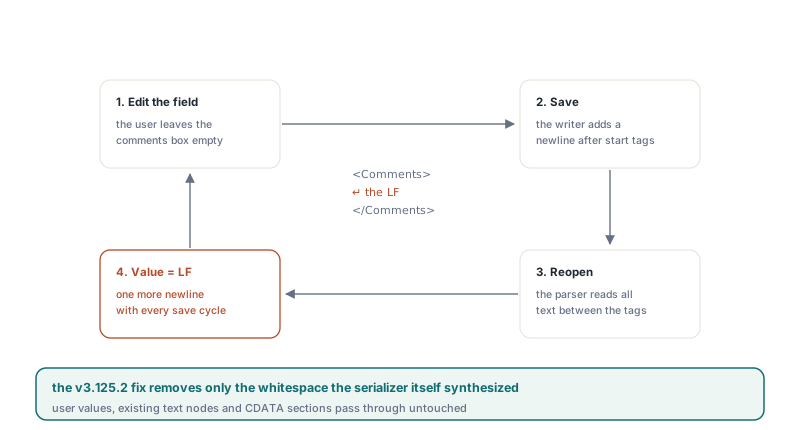
The obvious repair, trimming values on load, would be wrong. Users type leading spaces, trailing spaces and deliberate multi-line text into XFA fields, and an address block or a fixed-width code must survive byte for byte. The v3.125.2 fix therefore removes only the whitespace that the serializer itself synthesized around tags. User values, existing text nodes and CDATA sections pass through untouched, so " indented" stays indented and an intentionally empty field stays empty
Why does an emoji come back as a different character?
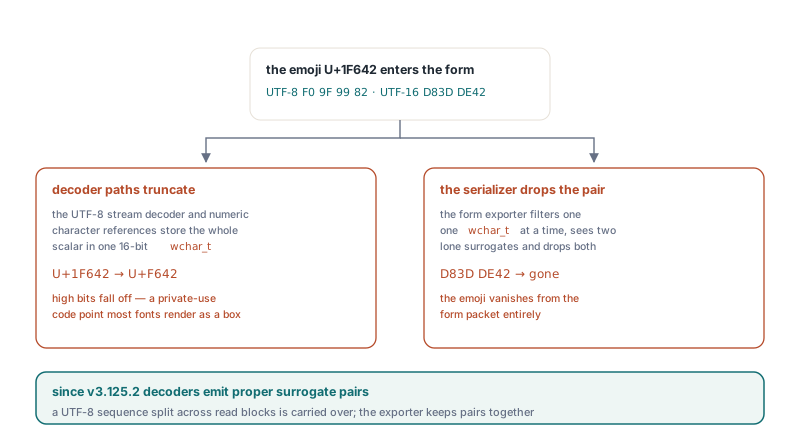
An emoji came back wrong because Windows wchar_t is 16 bits wide, and two decoding paths stored a full Unicode scalar value in a single wchar_t. The UTF-8 stream decoder and the parser for numeric character references such as 🙂 both did this. U+1F642, the slightly smiling face, does not fit in 16 bits, so the high bits fell off and U+F642 appeared instead: a code point in the Private Use Area that most fonts render as a box or nothing
The form serializer had the opposite problem. It filtered characters one wchar_t at a time, saw two surrogate code units that are invalid in isolation, and dropped both, so the emoji vanished from the form packet entirely. In v3.125.2 the decoder consumes each scalar value completely and emits a proper surrogate pair. When only one output slot is left, it keeps the low surrogate pending and does not report end-of-stream while that unit is still buffered. A UTF-8 sequence split across read blocks is carried over to the next read instead of being discarded. The form exporter now keeps valid surrogate pairs together, and numeric character references produce correct pairs as well
Latin-1 test data never shows any of this, so every XFA round-trip test needs at least one supplementary-plane character
Single-stream XFA and save failures nobody saw
A single-stream XFA document lost its edits because the native save helper rejected that storage layout and its caller ignored the failure. ISO 32000-1 §12.7.8 allows the /XFA entry of the interactive form dictionary to be either an array of packet names and streams or a single stream holding the whole XDP document. Packet arrays are the common case, but single streams are perfectly legal, and the PDF save completed as if nothing had happened while the form data stayed at its old values
Since v3.125.2, the V8 runtime handles the supported single-stream subset. It first exports both live packets, datasets and form, into a staging area and validates them, and only then replaces the matching packets in the original XDP. Other packets and the root namespace declarations are kept. If staging fails, the persistent XFA stream is never touched and the document keeps its modification mark
XML comments and processing instructions needed extra care because the internal XML DOM drops them. In v3.125.2 their presence made the save fail outright rather than lose content silently. v3.126.0 preserves them: before parsing, each comment or processing instruction is swapped for a marker built from a prefix that does not occur anywhere in the original text. After the live packets are replaced, every marker must appear exactly once before the original token is restored and the stream is written. Tokens outside the replaced packets therefore keep their text and order, including tokens in the prolog, the template and other packets
Some inputs are still refused on purpose, and each refusal is an explicit save failure:
- Comments or processing instructions inside the live
datasetsorformpackets, since their original positions cannot be mapped into freshly exported content - DTD declarations and XMLDSig signatures, since rewriting the XDP cannot keep an XML signature valid
- Invalid UTF-8 or UTF-16 encoding, incomplete tags, invalid character references, unknown entities and malformed processing instructions, which are rejected instead of silently repaired
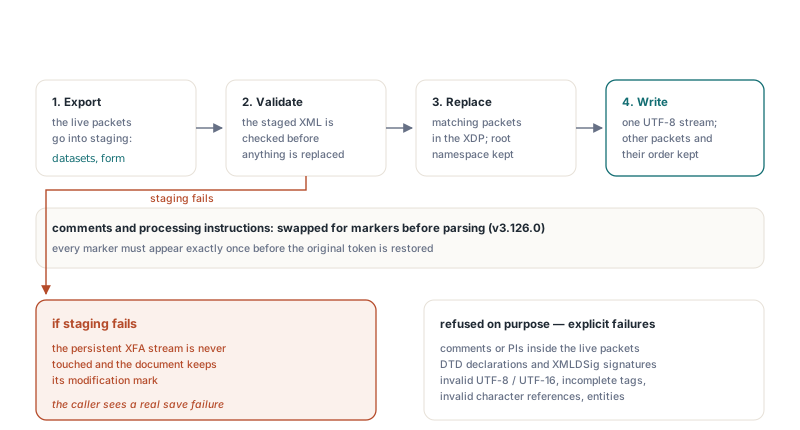
The single-stream output is UTF-8 and preserves the XML content model, not the original byte layout or encoding declaration
The last defect sat below XFA. The native file writer buffers output in 32 KB blocks and flushed the final partial block only in its destructor, after the document writer had already reported success. A disk-full or I/O error on that last block was invisible to the caller. Since v3.125.2 in the V8 runtime and v3.125.3 in the ordinary runtime, that final flush is part of the save result, and the XFA modification mark is cleared only after a real success. On the Delphi side, TPdf.SaveAs(const FileName: string; Option: TSaveOption = saNone; PdfVersion: TPdfVersion = pvUnknown): Boolean writes to a temporary file next to the target and moves it into place only when the save returns True, so a failed save leaves the previous file intact
Why does a dynamic XFA form reopen with fewer pages?
A dynamic XFA form reopens with fewer pages when its root subform does not declare restoreState="auto", and that is a form authoring decision rather than a PDFium Component defect. In XFA 3.3, restoreState on the root subform defaults to manual. Under manual, the XFA processor restores only limited state from the saved form packet and leaves the rest to the author's scripts. Saved field values and repeating-subform instance counts still come back, but geometric properties set at run time do not
The case that exposed this was a three-page form whose script grew a subform to h="450pt". The saved form packet held the new height, the values and the instance counts. On reopen, though, the layout was rebuilt from the template heights and the form reflowed onto two pages. The runtime was right: the template had never asked for automatic restoration. Declaring it on the root subform fixes the reopen:
<template xmlns="http://www.xfa.org/schema/xfa-template/3.3/">
  <subform name="form1" layout="tb" restoreState="auto">
    <pageSet>
      <pageArea name="Page1">
        <contentArea x="0.25in" y="0.25in" w="8in" h="10.5in"/>
        <medium stock="letter"/>
      </pageArea>
    </pageSet>
    <subform name="Details" layout="tb" w="7.5in">
      <!-- fields; scripts may change h or add instances at run time -->
    </subform>
  </subform>
</template>
If you do not own the template, do not patch around it in the viewer: a form that relies on manual mode expects its own scripts to rebuild state. Live repagination while the user types is a separate topic, covered in how PDFium Component tracks dynamic XFA page counts and moved fields
How do you verify an XFA save in Delphi?
The only reliable XFA save check is to reopen the saved file in a fresh TPdf instance and read the stored data back. TPdf.GetXfaDatasets returns the datasets packet as it is stored in the document, not the live XFA data model, so calling it before saving shows the old values. After reopening, it shows exactly what was written. A single-stream document has no separately named packets: PDFium reports the whole XDP as one packet with an empty name, so GetXfaPacketByName('datasets') and GetXfaDatasets return nothing, and the fallback reads the complete stream through GetXfaFormPackets
uses
  System.SysUtils, PDFium, FPdfXfa;

function ReadSavedXfaData(const FileName: string): string;
var
  Pdf: TPdf;
  Packets: TXfaPacketList;
  Bytes: TBytes;
begin
  Pdf := TPdf.Create(nil);
  try
    Pdf.FileName := FileName;
    Pdf.Active := True;
    Bytes := Pdf.GetXfaDatasets;          // packet-array layout
    if Length(Bytes) = 0 then
    begin
      Packets := Pdf.GetXfaFormPackets;   // single stream: one unnamed packet
      if Length(Packets) = 1 then
      begin
        SetLength(Bytes, Length(Packets[0].Content));
        if Length(Bytes) > 0 then
          Move(Packets[0].Content[0], Bytes[0], Length(Bytes));
      end;
    end;
    Result := TEncoding.UTF8.GetString(Bytes);  // saved XDP output is UTF-8
  finally
    Pdf.Free;
  end;
end;
The save routine then commits the pending edit, checks the SaveAs result and compares the reopened value. TPdf.ClearFormFieldFocus kills form focus, which is the moment PDFium commits the edit buffer of the focused field. TPdf.SetFocusedFormFieldText(const Value: WString): Boolean fills the focused field programmatically, but it relies on a focus the wrapper tracks through FocusFormField, which walks widget annotations. A dynamic XFA page normally has none, so there the text usually arrives through keyboard input in TPdfView, and the function returns False when no tracked field has focus
function XmlText(const S: string): string;
begin
Result := StringReplace(S, '&', '&', [rfReplaceAll]);
Result := StringReplace(Result, '<', '<', [rfReplaceAll]);
end;
procedure SaveXfaAndVerify(Pdf: TPdf; const FileName, FieldTag,
Expected: string);
var
Saved: string;
begin
// Optional scripted fill; False means no tracked field has focus
if (Pdf.FocusedFormFieldIndex >= 0) and
not Pdf.SetFocusedFormFieldText(Expected) then
raise EPdfError.Create('Could not write the focused field');
Pdf.ClearFormFieldFocus; // commit the edit buffer
if not Pdf.SaveAs(FileName) then // includes the final flush (v3.125.2+)
raise EPdfError.CreateFmt('Saving %s failed', [FileName]);
Saved := ReadSavedXfaData(FileName);
if Pos('<' + FieldTag + '>' + XmlText(Expected) + '</' + FieldTag + '>',
Saved) = 0 then
raise EPdfError.CreateFmt('%s did not survive the round trip', [FieldTag]);
end;Treat the substring test as a smoke test. An empty element may be serialized as <Tag/>, attributes can appear on data elements, and escaping beyond & and < is a serializer choice. For production checks, load the reopened XML with a real XML parser and compare the text node of the bound data element. Run the check twice in a row as well, because the newline defect only showed its full shape on the second generation
Quick reference: XFA save fidelity checklist
- Deploy
pdfium.v8.dllfrom v3.125.2 or later for XFA forms, and v3.125.3 or later for the ordinarypdfium.dll, so the final-write fix is in both - Point
LibraryNameat a full path and setEnableV8Engineto True; a missing path fails instead of loading another copy - Confirm
TPdf.XFAandTPdf.XfaRuntimeAvailableafter opening the document - Call
ClearFormFieldFocusbeforeSaveAsso the focused field is committed - Never ignore the Boolean result of
SaveAs; a False result leaves the previous file in place - Verify by reopening in a new
TPdfand readingGetXfaDatasets, falling back toGetXfaFormPacketsfor single-stream XFA - Test with empty values, leading spaces, multi-line text,
&and a supplementary-plane character, across two save generations - Expect explicit save failures for DTDs, XMLDSig and comments inside the live packets of single-stream XFA
- If a dynamic form loses run-time geometry on reopen, check the root subform for
restoreState="auto"before suspecting the library
For the callback structure the XFA runtime expects from a host application, see FPDF_FORMFILLINFO version 2 and the XFA ABI in Delphi. The V8 runtime, the Delphi and C++Builder wrapper and the viewer control are all part of PDFium Component for Delphi and C++Builder, which includes both Windows runtimes for Win32 and Win64