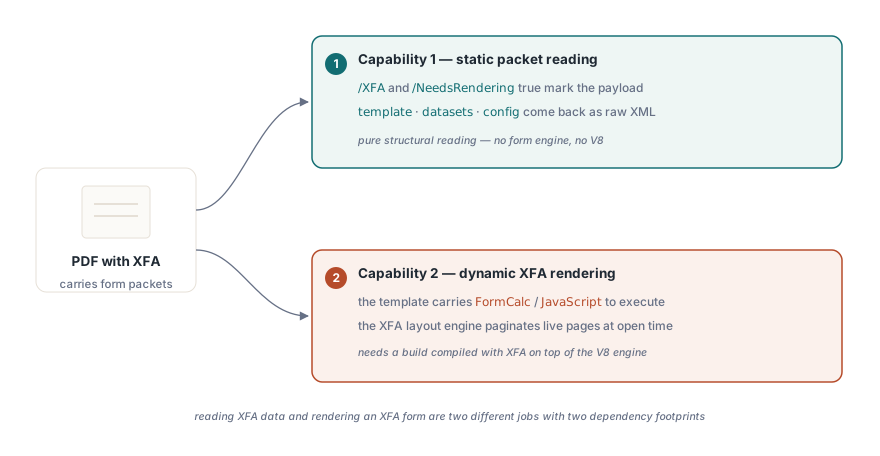
Yes — PDFium supports XFA forms, with one important split. PDFium Component can detect an XFA form and extract its template, datasets and config packets as raw XML using the standard DLL, with zero runtime dependency. Running a dynamic XFA form — laying its XML description out into live, interactive pages — is a separate problem that additionally needs the V8-enabled build. The community keeps asking whether PDFium "does XFA" as if it were one yes-or-no capability, and the honest answer is that reading XFA data and rendering an XFA form are two very different things with two very different dependency footprints
This article walks through both halves with PDFium Component, the native VCL wrapper around PDFium for Delphi and C++Builder. First the detection and static extraction path — FormType, the XFA property, and the GetXfaPacket* readers — then the dynamic runtime path with its V8 constraint, and finally the capability probes that let you fail gracefully when a deployed DLL cannot run the engine
Does PDFium support XFA forms?
Read it as two capabilities, not one. Static XFA extraction is always available: the low-level FPDF_GetXFAPacket* exports that back GetXfaPacketCount, GetXfaPacketName and GetXfaPacketContent are compiled into every reasonably modern pdfium.dll, even a build with XFA switched off. That is why pulling the raw template, datasets and config XML out of a form carries no runtime dependency at all — it is pure structural reading, no engine involved. Dynamic XFA is the other capability: actually running the form, evaluating its calculations, and letting the XFA layout engine paginate it. That path exists only in a PDFium build compiled with XFA support on top of the V8 JavaScript engine, and it is the part most "does PDFium support XFA" threads are really arguing about
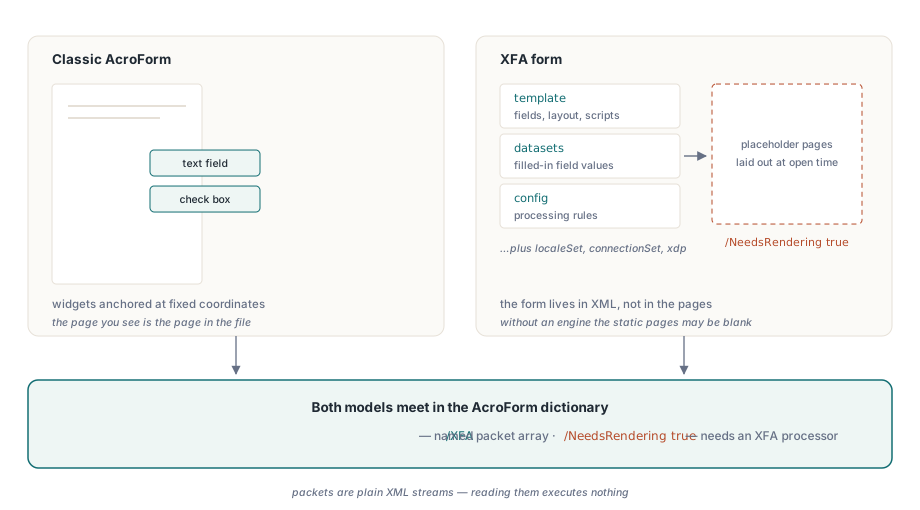
The standards frame the split cleanly. XFA is defined outside the core PDF grammar in Adobe XFA 3.3 (2012), and PDF 1.7 §8.6.7 describes how an XFA form is carried inside a PDF: the form packets live under the AcroForm dictionary /XFA entry, and a document that must be laid out by an XFA processor before it means anything sets /NeedsRendering true in the catalog. Those two markers are exactly what PDFium Component looks for, and exactly what you can rely on when you reason about a file you have never seen
How is XFA different from an AcroForm?
An AcroForm is the classic PDF form: widget annotations — text fields, check boxes, radio groups — anchored at fixed coordinates on ordinary PDF pages. The page you see is the page in the file, and the fields sit on top of it. XFA takes the opposite approach. The interactive form is described entirely in XML, and in a full (dynamic) XFA document the PDF pages are effectively a placeholder — the real content is generated at open time by an XFA engine that reads the XML template and lays it out, growing or shrinking to fit the data. That is what /NeedsRendering true announces: without an XFA processor, the static pages may be blank or carry only a "please open in a compatible viewer" notice
The XFA payload itself is a set of named packets, and three of them carry everything most integrations need. The template packet is the form definition — fields, layout, calculations and scripts. The datasets packet holds the actual instance data, the filled-in field values as an XML tree. The config packet carries processing instructions for the XFA engine. Others exist — localeSet, connectionSet, the xdp wrapper — but for auditing a form or migrating the data out of it, template plus datasets is usually the whole job. Because that data is just XML sitting in a stream, reading it never requires executing anything, which is the root reason static extraction is dependency-free
Detecting an XFA form in Delphi
Detection starts the way every PDFium Component task does: set FileName, flip Active := True, and check that it actually opened. Active := True never raises — a missing file, wrong password, or absent DLL just leaves Active at False — so the guard is mandatory. Once the document is open, FormType tells you which form model it uses. Two of the TPdfFormType values are XFA: ftXfaFull is a full, dynamic XFA form, the kind that needs rendering, while ftXfaForeground is XFAF, the foreground subset where XFA content is drawn over otherwise-normal AcroForm pages so the static pages remain meaningful. The XFA boolean is a shortcut for "this is an XFA document of either flavor". If you also work with the widget-level fields on an XFAF or AcroForm document, the mechanics are covered in the guide to PDFium form field navigation
var
  Pdf: TPdf;
begin
  Pdf := TPdf.Create(nil);
  try
    Pdf.FileName := 'application-form.pdf';
    Pdf.Active := True;
    if not Pdf.Active then
      Exit;                        // damaged, encrypted, or DLL missing
    case Pdf.FormType of
      ftXfaFull:
        Log('Full (dynamic) XFA form');
      ftXfaForeground:
        Log('XFAF: XFA layered over static AcroForm pages');
      ftAcroForm:
        Log('Classic AcroForm');
    else
      Log('No interactive form');
    end;
    if Pdf.XFA then
      Log('Document carries an XFA packet payload');
  finally
    Pdf.Active := False;
    Pdf.Free;
  end;
end;
Extracting XFA packets as raw XML
Extraction is the high-value, zero-dependency half. Guard with XfaStaticReadable — it confirms the packet reader exports resolved in the loaded DLL — then walk the packets by index. GetXfaPacketCount returns how many packets the form carries, GetXfaPacketName gives each one its name, and GetXfaPacketContent returns the raw bytes, which for the well-known packets are UTF-8 XML. When you already know which packet you want, the named helpers GetXfaTemplate, GetXfaDatasets and GetXfaConfig resolve the name for you and hand back TBytes directly. For a data-migration job the one that matters is GetXfaDatasets: it gives you the submitted field values as an XML document you can parse and map into your own schema, the same kind of downstream work you would do after extracting text from a PDF
procedure ExtractXfaData(Pdf: TPdf; const Dir: string);
var
  I, Count: Integer;
  PacketName: string;
  Content, Datasets: TBytes;
begin
  if not Pdf.XfaStaticReadable then
    Exit;                          // packet reader exports not present
  Count := Pdf.GetXfaPacketCount;
  for I := 0 to Count - 1 do
  begin
    PacketName := Pdf.GetXfaPacketName(I);
    Content := Pdf.GetXfaPacketContent(I);   // raw UTF-8 XML
    TFile.WriteAllBytes(
      TPath.Combine(Dir, PacketName + '.xml'), Content);
  end;

  // Or jump straight to the filled-in field values by name:
  Datasets := Pdf.GetXfaDatasets;
  if Length(Datasets) > 0 then
    ParseAndMap(Datasets);
end;
Why does dynamic XFA rendering need the V8 engine?
Conclusion first: because a dynamic XFA form is a small program, not a static drawing. The template packet carries FormCalc and JavaScript calculations, validations, and event scripts, and the XFA layout engine has to execute them to decide what the pages even look like. PDFium implements that engine only in a build compiled with XFA support on top of V8, Google's JavaScript engine — the same reason the V8-enabled DLL (pdfium32v8.dll or pdfium64v8.dll) is markedly larger than the standard build. Without V8 there is no one to run the scripts, so there are no rendered pages to show, only the raw XML you can already read statically
Selecting that build has a hard constraint you cannot design around: it is a per-process, one-time decision. A single process cannot load both the standard pdfium.dll and the V8-enabled build — they export the same symbols and V8 keeps global isolate state — so PDFium Component must choose the V8 build before the library is loaded for the very first time. To make that automatic, LoadDocument pre-scans the file for the /XFA and /NeedsRendering true markers (the same check exposed as the standalone PdfFileLooksXfa function) and sets EnableV8Engine := True before the load when it finds them. Once a plain pdfium.dll is already resident, the switch can no longer take effect, and that case is what the runtime-missing path reports
begin
  // Peek for XFA before PDFium is loaded for the first time, so the
  // V8-enabled build can still be selected. PdfFileLooksXfa scans for
  // /XFA and /NeedsRendering true without parsing the whole file.
  if PdfFileLooksXfa('dynamic-form.pdf') then
    EnableV8Engine := True;

  Pdf := TPdf.Create(nil);
  try
    Pdf.FileName := 'dynamic-form.pdf';
    Pdf.Active := True;
    if Pdf.Active and Pdf.XFA then
    begin
      if Pdf.XfaRuntimeAvailable then
        RenderXfaPages(Pdf)          // engine is live: dynamic layout
      else
        ExtractXfaData(Pdf, 'C:\out'); // fall back to static packets
    end;
  finally
    Pdf.Active := False;
    Pdf.Free;
  end;
end;
Handling a missing XFA runtime gracefully
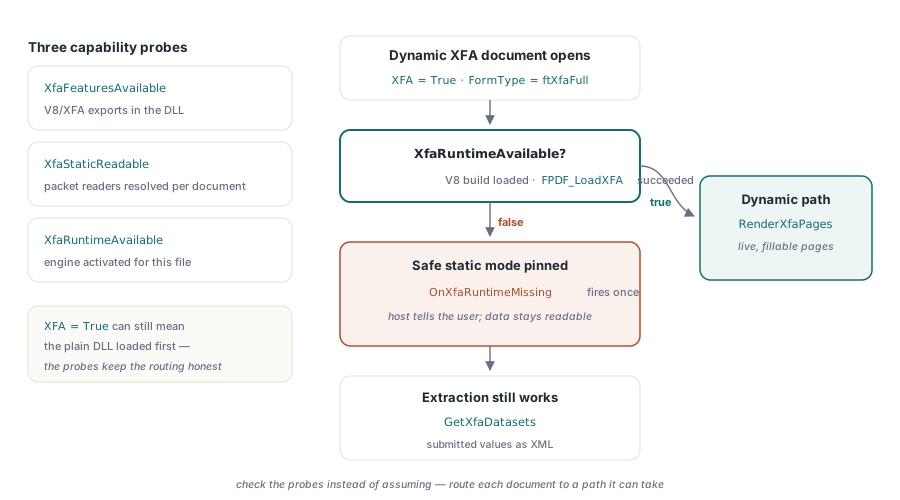
Three probes tell you exactly how much XFA capability you have, and honest code checks them instead of assuming. XfaFeaturesAvailable is a global check that the XFA/V8 helper exports are present in the loaded DLL. XfaStaticReadable confirms, per document, that the packet readers resolved — the guard for extraction. XfaRuntimeAvailable is the strong one: it is true only when this specific document actually activated the XFA engine, meaning it is XFA, the V8 build loaded, and FPDF_LoadXFA succeeded. A document can report XFA = True yet XfaRuntimeAvailable = False whenever the deployed DLL lacks XFA or the standard build was already loaded
When an XFA document opens but the engine cannot run, PDFium Component does not gamble. It pins the form to the safe static mode rather than requesting a dynamic runtime it cannot honor, and it raises OnXfaRuntimeMissing once so the host can react — typically by telling the user to restart with the V8-enabled build, while still offering the statically readable data in the meantime. Wiring that handler is the difference between a clean fallback and a form that silently shows nothing
procedure TForm1.PdfXfaRuntimeMissing(Sender: TObject);
begin
  // Fires once when an XFA document opens but the engine cannot run:
  // a plain pdfium.dll was already loaded, or the build lacks XFA/V8.
  ShowMessage('This is a dynamic XFA form. Restart with the ' +
    'V8-enabled build to render it; its packet data is still readable.');
end;
Be honest about the boundary in your own product, too. If you never ship the V8-enabled DLL, dynamic XFA forms will never render for your users — but you can still detect them, extract every packet, and pull the submitted data out, which is enough for the large class of jobs that are really about getting data out of legacy government and banking forms rather than presenting them interactively. Reserve the heavier V8 build for the cases that genuinely need a live, fillable form, and let the capability probes route each document to the path it can actually take. If your extraction pipeline also handles embedded files, the same read-only philosophy applies to PDF attachments in Delphi
The FormType, XFA, GetXfaPacketCount, GetXfaPacketName, GetXfaPacketContent, GetXfaTemplate, GetXfaDatasets, GetXfaConfig and capability-probe APIs shown here are part of the PDFium Component for Delphi and C++Builder