When a dynamic XFA form in a Delphi viewer adds or removes pages, PDFium Component reports the new total through TPdf.PageCount and TPdf.OnXfaPageCountChanged since v3.126.1, because the native page event carries an added/removed delta rather than a total. The Windows V8 libraries in v3.126.1 also move input hit areas with relocated fields, and v3.126.2 reloads stale page handles after the layout callback returns. The bug report that started this was an expense claim form: click Add Row twice, the form grows to two pages, and the page indicator proudly reads 1 of 1. Type into a field that moved to page 2 and the keystrokes land somewhere invisible. None of it showed up with the fixed-length sample forms everyone tests with first, and the reasons why are worth knowing if you embed a form viewer
What happens when a dynamic XFA form repaginates?
A dynamic XFA form has no fixed page list, so its page count is an output of layout and can change every time the user edits data. XFA 3.3 describes the form as a tree of subforms; a repeating subform is controlled by an instanceManager, and a script such as _Row.addInstance() clones one more row. The layout processor then flows the content into the page areas again, which may add a page, drop a page or push existing fields onto another page. ISO 32000-1 §12.7.8 only defines how the XFA packets ride inside the PDF; everything that happens after that belongs to the XFA engine, which in PDFium Component is PDFium's own XFA layout running in the host process. A Delphi viewer therefore deals with a document whose page count, page sizes and widget positions are all live state. Three things go wrong when the host assumes otherwise:
- The page count the host caches for navigation, scroll ranges and page spinners goes stale, or worse, gets updated with the wrong number
- Fields that relocate show their border in the new position while the editor and mouse hit area stay at the old coordinates
- The viewer keeps a page handle that the layout has replaced, so clicks and paints go to a page that no longer exists in that form
Persisting row edits across save and reopen is a separate problem with its own rules; this article stays with what happens at runtime inside the viewer
Which PDFium runtime does dynamic XFA need?
Dynamic XFA in PDFium Component requires the V8/XFA build of the native library, selected by the global EnableV8Engine variable in the PDFium unit before the first document loads. The process commits to one DLL the first time any TPdf loads the library, and a plain PDFium build cannot run the XFA engine at all. When a document opens, TPdf does peek at the file for XFA markers and switches to the V8 build automatically, but only if no plain library has been loaded yet in that process. When the commitment has already gone the wrong way, TPdf.OnXfaRuntimeMissing fires once so the host can tell the user to restart. Setting the flag explicitly at startup removes the guesswork. The FPDF_FORMFILLINFO callback structure that carries the XFA events must also match the DLL; the background is in FPDF_FORMFILLINFO version 2 and the XFA callback ABI, and detecting XFA forms and reading their packets covers telling the form types apart before you open a viewer
uses
  PDFium;

procedure TClaimForm.FormCreate(Sender: TObject);
begin
  // Decide before the first TPdf loads the native library:
  // the process cannot switch from pdfium.dll to pdfium.v8.dll later
  EnableV8Engine := True;

  FPdf := TPdf.Create(nil);
  FPdf.OnXfaRuntimeMissing := PdfXfaRuntimeMissing;
  FPdf.OnXfaPageCountChanged := PdfXfaPageCountChanged;
  FPdf.FileName := 'C:\Forms\expense-claim.pdf';
  FPdf.Active := True;

  PdfView1.Pdf := FPdf;
  PdfView1.OnPageChange := PdfViewPageChange;
  PdfView1.Active := True;

  UpdatePageRange(FPdf.PageCount);
end;

procedure TClaimForm.PdfXfaRuntimeMissing(Sender: TObject);
begin
  StatusBar1.SimpleText :=
    'This XFA form needs the V8 runtime; restart the application to enable it';
end;
Why did PageCount report 1 for a two-page form?
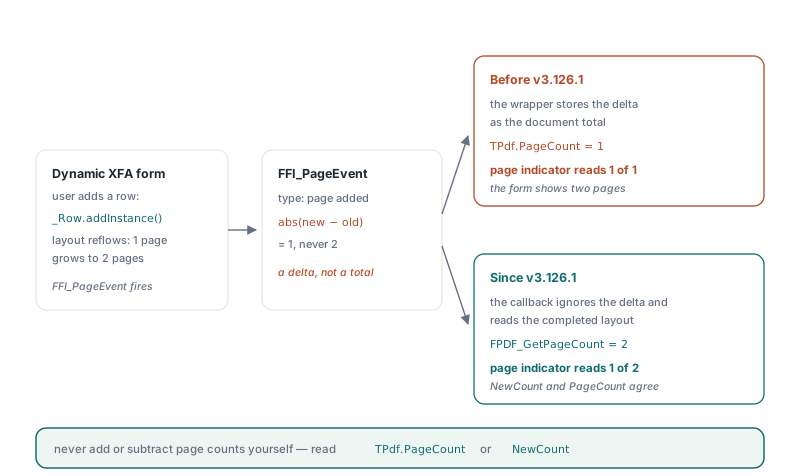
Before v3.126.1, PDFium Component stored the page_count argument of the native page event as the document total, and that argument is actually the absolute difference between the new and old page counts. PDFium raises FFI_PageEvent after a layout pass finishes with an event type of page added or page removed; internally it updates its stored page count first and then passes abs(new - old). On the initial layout the old count is zero, so the delta equals the total, and a three-page static sample reports three pages as expected. That is exactly why fixed-length test forms never exposed the bug. The first time a dynamic form grows from one page to two, the delta is 1, and the wrapper set both TPdf.PageCount and the NewCount parameter of OnXfaPageCountChanged to 1. Removing a row from a three-page form produced the same kind of nonsense in the other direction
Accumulating the delta onto the previous value is not a safe repair either. The order of initialization and layout callbacks means the wrapper cannot always trust its earlier count as a baseline, so a running sum can drift. Since v3.126.1, the callback ignores the argument as a count and calls FPDF_GetPageCount on the document, which reads the total from the layout that has just completed. It then clears the cached page scenes, stores that total as the XFA page-count override behind TPdf.PageCount, and only after that raises OnXfaPageCountChanged. By the time your handler runs, NewCount and FPdf.PageCount agree
procedure TClaimForm.PdfXfaPageCountChanged(Sender: TObject; NewCount: Integer);
begin
  // v3.126.1+: NewCount is the completed layout's total, never a delta.
  // This runs inside PDFium's layout callback: update host UI state only,
  // do not close the document or reload pages from here
  UpdatePageRange(NewCount);
end;

procedure TClaimForm.PdfViewPageChange(Sender: TObject);
begin
  // Fires after every page reload, including the deferred XFA refresh
  PageSpin.Value := PdfView1.PageNumber;
end;

procedure TClaimForm.UpdatePageRange(Count: Integer);
begin
  PageSpin.MinValue := 1;
  PageSpin.MaxValue := Count;
  PageLabel.Caption := Format('of %d', [Count]);
end;
The event only fires for Full XFA forms whose layout changes at runtime. Static XFA and AcroForm documents never raise it, so a viewer that handles both can leave the same handler assigned. Leaving it unassigned is safe as well; the override behind TPdf.PageCount is applied regardless, and the event exists so the host can refresh whatever it cached
Why does the input box stay on the old page when a field moves?
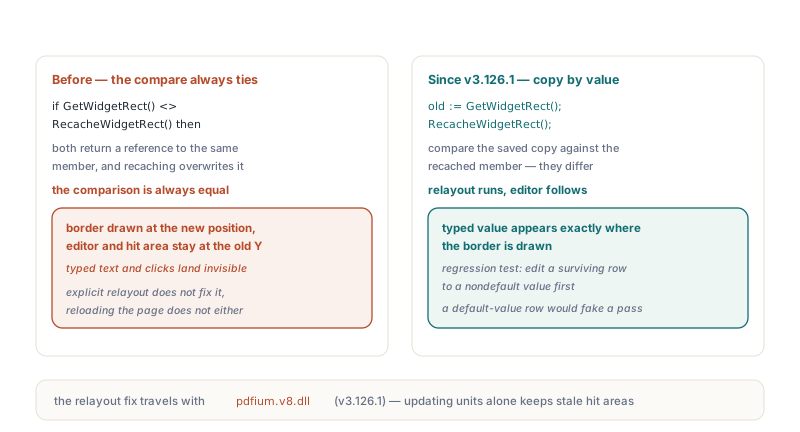
The border moved and the editor did not because the native XFA notifier compared a rectangle with itself. When layout changes the geometry of a widget that is already loaded, PDFium is supposed to notice the new rectangle and call PerformLayout on the widget, which repositions the text editor and its hit area. The check compared GetWidgetRect() against RecacheWidgetRect(). Both functions return a const reference to the same member, and the recache overwrites that member in place, so the comparison always saw two identical values and loaded widgets skipped their relayout
The symptom surfaced when a test changed a subform height so that existing fields crossed onto the next page. On both V8 architectures, the field border was drawn at its new position while the typed text and the mouse hit area stayed at the previous Y coordinate. An explicit relayout did not fix it, and neither did reloading the page, because the widget still believed its geometry was current. The Windows V8 libraries shipped with v3.126.1 copy the old rectangle by value before recaching and compare that copy, so moved widgets relayout and the edited value appears exactly where the border is. This is a native fix: it travels with the DLLs, so updating the Pascal units while keeping an older pdfium.v8.dll leaves the misplaced hit areas in place. The regression check that drove it edits a surviving row to a nondefault value first and then requires that value at the field's new location, because a row rebuilt with default values would otherwise look like a pass
How does TPdfView reload pages without pulling a handle from under PDFium?
Since v3.126.2, TPdfView defers the page reload that follows an XFA layout change until the native call stack has unwound. The page event usually fires while PDFium is still processing input: the user clicked an Add Row button, the click ran a script, the script changed the instance count, and layout finished inside that same native call. Closing and reopening the page handle at that moment would free an object the caller is still using. Before v3.126.2, the viewer only invalidated itself, so the displayed page handle could keep pointing at pre-layout state, and if the user had been on the last page when it disappeared, the selected page number was out of range
The deferred refresh works in a few small steps, and they explain the behavior you see from the host:
- The page-event callback marks the view as having a pending XFA layout refresh and posts a private window message; repeated events before the message arrives merge into one refresh
- A view without a window handle yet keeps the pending flag and posts the message from
CreateWnd, while changing documents, deactivating the view or destroying it clears the flag - When the message arrives, the view clears the text selection, search highlight and focused-field index, because all three referred to the old layout
- The selected page is clamped to the new
PageCount; a changed page number goes through the normal page switch, otherwise the current page is reloaded, and the fit mode is applied again - If the layout leaves no pages at all, the view unloads its old page handle instead of painting a page that no longer exists
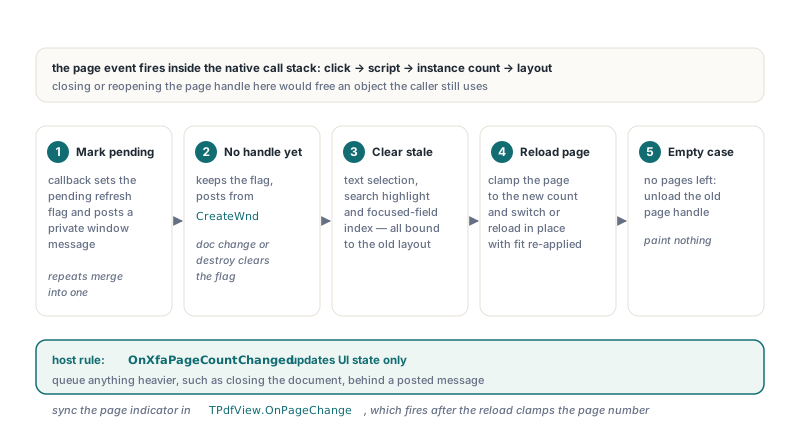
The same constraint applies to your own code. OnXfaPageCountChanged runs inside that native layout callback, so treat it like a notification: update labels, spinner ranges and toolbar state there, and queue anything heavier, such as closing the document or opening another one, with a posted message so it runs after the callback returns. TPdfView.OnPageChange then tells you when the view has actually reloaded the page, and reading PdfView1.PageNumber at that point gives you the clamped value. Tab-key traversal and the FormType checks a form viewer runs on open are covered in PDF form field navigation with PDFium Component
Why does clicking a Full XFA field raise "Cannot open text page"?
Full XFA pages have no PDF text page, and before v3.126.2 the viewer's default text selection and link detection tried to load one anyway. With TPdfView.AllowUserTextSelection at its default of True, hovering asked the text layer for a character under the mouse, and a mouse-up click ran an automatic URL probe over the page text. On a Full XFA page the text page cannot be opened, so an ordinary click into a field could end in a Cannot open text page exception. Since v3.126.2, both internal paths return no result when TPdf.FormType is ftXfaFull and the XFA runtime is available, so the default settings work and field input stays available
Turning off AllowUserTextSelection for Full XFA documents is still a reasonable UI choice, because there is no page text to select and drag gestures should not start a selection mode. It is not a substitute for upgrading, though: on earlier versions the URL probe on click did not depend on that property, so a viewer could hit the same exception with selection disabled
procedure TClaimForm.ConfigureViewerForForm;
begin
  // FormType reads the open document, so call this after FPdf.Active := True
  if FPdf.XFA and (FPdf.FormType = ftXfaFull) and FPdf.XfaRuntimeAvailable then
  begin
    // No PDF text layer exists on Full XFA pages; fields stay editable
    PdfView1.AllowUserTextSelection := False;
    StatusBar1.SimpleText := Format('Dynamic XFA form, %d page(s)',
      [FPdf.PageCount]);
  end
  else
    PdfView1.AllowUserTextSelection := True;
end;
Typing needed its own repair in v3.126.2. The native XFA text editor does not replace a selection when it receives a character: FORM_OnChar inserts at the caret, and Backspace deletes a single character, so selecting a value and typing over it produced old and new text side by side. PDFium Component now remembers that the click landed on an XFA text field and routes typed characters, Backspace and Delete through FORM_ReplaceSelection whenever a selection exists and the document grants fill-forms or modify permission. Whether a read-only XFA field may change is still decided by the native editor, so a field marked read-only in the form keeps its value even in a document that otherwise allows filling. Setting TPdfView.AllowFormEvents to False also stops this keyboard routing, which keeps a read-only viewer read-only
Quick reference: dynamic XFA in a Delphi viewer
| Symptom | Cause | Fixed in |
|---|---|---|
| Page count shows 1 after the form grows to two pages | Native page event passes an added/removed delta, not a total | v3.126.1 (wrapper) |
| Field border moves, typed text and hit area stay behind | Loaded widget skipped relayout after a self-comparison | v3.126.1 (Windows V8 libraries) |
| Viewer paints or routes input to pre-layout page state | Page handle not reloaded after repagination | v3.126.2 (deferred refresh) |
| Click into a field raises Cannot open text page | Text selection and URL probe on pages without a text layer | v3.126.2 |
| Typing over a selected value appends instead of replacing | Native XFA editor inserts at the caret | v3.126.2 |
- Set
EnableV8EnginetoTruebefore any document loads, and handleOnXfaRuntimeMissingfor the case where the plain library was loaded first - Read the total from
TPdf.PageCountor theNewCountparameter ofOnXfaPageCountChanged; never add or subtract page counts yourself - Keep the
OnXfaPageCountChangedhandler light, because it runs inside the native layout callback - Sync the current page indicator in
TPdfView.OnPageChange, which fires after the deferred reload clamps the page number - Deploy the v3.126.1 or later Windows V8 DLLs together with the units; the widget relayout fix lives in native code
- Test with a form that actually changes its page count and moves an edited field across a page break, because fixed-length samples hide every bug on this list
Dynamic XFA turns page count and field geometry into live values, and a viewer stays correct only when it takes them from the completed layout and reloads pages at a safe moment. PDFium Component handles both inside TPdf and TPdfView, so the host only has to listen. Details and downloads are on the PDFium Component for Delphi product page