PDFium Component converts static XFA forms into ordinary AcroForm fields from Delphi through FlattenPdfXfaToAcroForm in the FPdfDocumentXfaFlatten unit. The function reads the XFA template and datasets packets, maps every absolutely positioned field to an AcroForm terminal field with its own appearance stream, and appends the result as an incremental revision, so the converted PDF opens as a normal form in viewers that never supported XFA
The motivation is usually a support ticket rather than a roadmap item. A government or insurance form was authored in a designer that saved it as XFA, it works in one desktop reader, and everywhere else it opens as a blank page that says the document requires a newer viewer. XFA was deprecated in PDF 2.0 (ISO 32000-2), browsers and mobile viewers never implemented it, and PDFium itself only renders XFA with the V8-enabled build. Static XFA forms, the ones whose layout is fixed at design time, carry enough geometry in the template to be rebuilt as AcroForm fields, and that is exactly the slice this converter handles
What does FlattenPdfXfaToAcroForm actually produce?
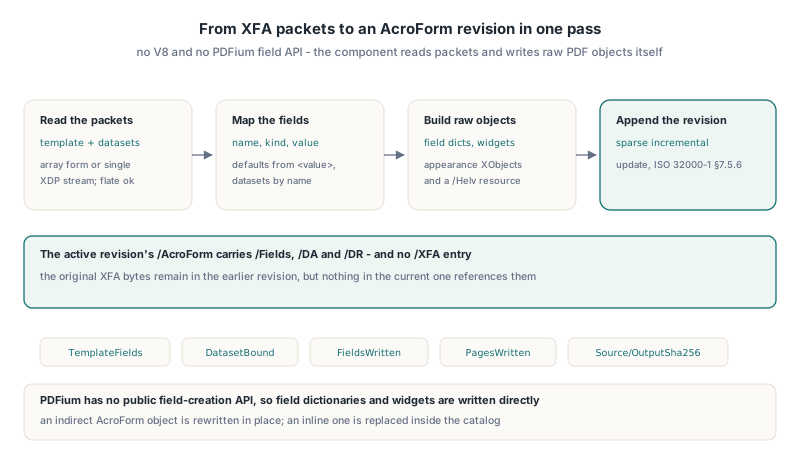
FlattenPdfXfaToAcroForm produces a byte-level AcroForm revision appended to an unchanged copy of the source, never a rewrite of the original file. PDFium exposes no public API for creating form fields, so the component does not go through PDFium for this job at all: it reads the active revision with its own object reader, builds field dictionaries, widget annotations, appearance XObjects and a /Helv font resource as raw PDF objects, and serializes them through a sparse incremental update in the sense of ISO 32000-1 §7.5.6
The new /AcroForm dictionary carries /Fields, /DA and /DR and no /XFA entry. When the source keeps its AcroForm as an indirect object, that object is rewritten in place; an inline dictionary is replaced inside the catalog. Either way the active revision no longer points at the XFA packets, so a viewer that understands both models opens the AcroForm fields instead of trying to lay out the XFA form. The original XFA bytes are still in the earlier revision, which is what an incremental update means, but nothing in the current revision references them
uses
  System.SysUtils, System.Classes, System.IOUtils, FPdfDocumentXfaFlatten;

procedure ConvertXfaForm(const SourceFile, TargetFile: string);
var
  Source: TFileStream;
  Options: TPdfXfaFlattenOptions;
  OutputPdf: TBytes;
  Report: TPdfXfaFlattenReport;
  Fields: TPdfXfaFlattenFields;
begin
  Options := TPdfXfaFlattenOptions.Default;
  Options.MaxFields := 1024;   // default is 512, the allowed range is 1..4096

  Source := TFileStream.Create(SourceFile, fmOpenRead or fmShareDenyWrite);
  try
    if not FlattenPdfXfaToAcroForm(Source, Options, OutputPdf, Report, Fields) then
      raise Exception.Create('XFA conversion failed: ' + Report.ErrorText);
  finally
    Source.Free;
  end;

  TFile.WriteAllBytes(TargetFile, OutputPdf);
  Writeln(Format('%d template fields, %d bound to datasets, %d written on %d pages',
    [Report.TemplateFields, Report.DatasetBound, Report.FieldsWritten, Report.PagesWritten]));
end;
The function returns False and fills Report.ErrorText for any rejected or malformed input, and it restores the source stream position on the way out. Cancellation is the one exception path that propagates: if Options.CancellationToken fires, EPdfOperationCancelled is re-raised after the report is filled. TPdfXfaFlattenReport also carries SourceSha256 and OutputSha256, which is handy when a batch job has to prove which input produced which converted file. TPdfXfaFlattenOptions.Default sets an 8 MiB packet budget, 512 fields and a 512 MiB output ceiling; the source must not be encrypted
Reading the template and datasets packets
PDFium Component accepts both layouts that ISO 32000-1 §12.7.8 allows for the /XFA entry: the array form that alternates packet names and stream references, and the single-stream XDP form where one stream holds the whole <xdp:xdp> document. Packet streams may be uncompressed or /FlateDecode without a predictor, and decompression is bounded by MaxPacketBytes
The single-stream case is where naive XML handling breaks. Designers commonly write <xfa:datasets> with a namespace prefix while the template sits unprefixed, so slicing by literal tag name finds one packet and misses the other. The converter matches element and attribute names by local name, after a separate check that opening and closing tags pair up by their full prefixed name. If you only need to look at the packets rather than convert them, the guide to detecting XFA forms and extracting their packets with PDFium VCL covers that read-only path
Field values come from two places. A <value> element in the template supplies the default, and the datasets packet supplies the filled-in data, bound by field name. Field names repeat in real forms, so the binder compares the chain of named <subform> ancestors with the ancestor path in the data and takes the longest non-conflicting match. When two leaf fields share a name under different subforms, the AcroForm /T becomes SubformPath.Name so the two fields stay distinct after conversion
Why does choiceList need an explicit Combo flag?
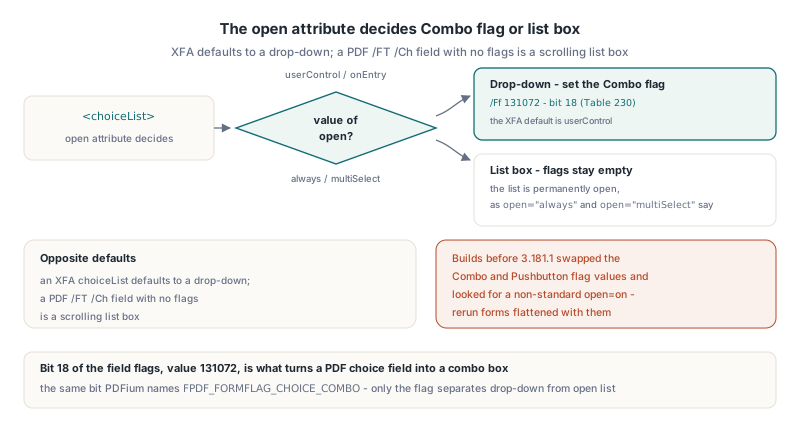
XFA and PDF have opposite defaults for choice fields, so a converter that copies no flags turns every drop-down into a list box. An XFA <choiceList> with the default open="userControl" or with open="onEntry" is a drop-down; a PDF /FT /Ch field with no flags is a scrolling list box, and only the Combo flag (bit position 18 in ISO 32000-1 Table 230, value 131072, the same bit PDFium names FPDF_FORMFLAG_CHOICE_COMBO) makes it a combo box. The converter therefore sets the Combo flag for the drop-down cases and leaves the flags empty only when the template says open="always" or open="multiSelect", which keep the list permanently open. Builds before 3.181.1 swapped the Combo and Pushbutton values and looked for a non-standard open="on", so forms flattened with them are worth re-running
The rest of the UI mapping follows the field flag tables in ISO 32000-1 §12.7.4:
textEdit,numericEditanddateTimeEditbecome/FT /Tx; a multi-line text field gets the Multiline flag (/Ff 4096, Table 228) and a line-split appearance streampasswordEditbecomes/FT /Txwith the Password flag (/Ff 8192) and an appearance that draws one asterisk per Unicode scalar, not per UTF-16 code unitcheckButtonbecomes a/FT /Btncheck box whose value is/Yeswhen the bound data is1and/Offotherwise<exclGroup>becomes one/FT /Btn /Ff 32768radio parent (Table 226) with/V,/DV,/Optand/Kids, plus one child widget per member with its own/ASand two-state/APimageEditbecomes a pushbutton whose appearance paints the image; a baseline JPEG is embedded verbatim under/DCTDecode, while PNG is decoded and re-encoded as/FlateDecodepixels with an extra/SMaskwhen the PNG carries alpha ortRNStransparency
Values that are not plain printable ASCII, including line breaks, are written as <FEFF...> UTF-16BE strings, so a Japanese name or a two-line address survives the trip. The Fields output mirrors what was written, which makes it a convenient audit trail
procedure DumpConvertedFields(const Fields: TPdfXfaFlattenFields);
const
  KindNames: array[TPdfXfaFlattenFieldKind] of string = (
    'text', 'check', 'choice', 'image', 'numeric', 'dateTime', 'password', 'radio');
var
  I: Integer;
  F: TPdfXfaFlattenField;
begin
  for I := 0 to High(Fields) do
  begin
    F := Fields[I];
    Writeln(Format('%s.%s [%s] page %d at %.1f,%.1f size %.1f x %.1f',
      [F.SubformPath, F.Name, KindNames[F.Kind], F.PageIndex + 1, F.X, F.Y, F.W, F.H]));
    case F.Kind of
      fxfkChoice:
        Writeln(Format('  %d items, list box: %s', [Length(F.Choices), BoolToStr(F.ListBox, True)]));
      fxfkRadio:
        Writeln(Format('  %d radio widgets, value "%s"', [Length(F.RadioWidgets), F.Value]));
      fxfkImage:
        Writeln(Format('  %d image bytes', [Length(F.ImageData)]));
    else
      Writeln('  value "' + F.Value + '"');
    end;
  end;
end;
Geometry, measurement units and page routing
XFA geometry is converted to PDF user space by flipping each field against the MediaBox height of its own page, because XFA measures downward from the top of the page and PDF measures upward from the bottom. Offsets from nested <subform> elements accumulate on the way down the template, and every field must end up with positive width and height or the conversion is rejected
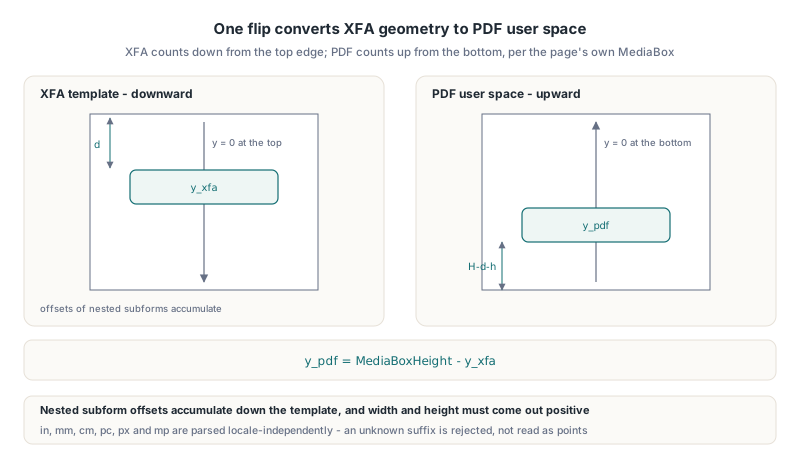
Measurements accept the units that real designers emit: bare numbers and pt, plus in (72 points), mm (72 / 25.4), cm (72 / 2.54), pc (12), px (0.75) and mp (0.001, millipoints). Parsing is locale-independent, so a German Windows installation does not turn 8.5in into nonsense. An unknown unit suffix is rejected instead of being read as points, which would silently misplace the field
Page routing follows the <pageSet>: sibling <pageArea> elements are numbered from one in declaration order and claim the fields nested under them, while fields with no <pageArea> ancestor stay on page one. Each page gets its own /Annots update. A field routed past the last page of the PDF is an error rather than a widget dropped on page one
Which XFA forms does the converter refuse?
The converter refuses anything whose layout cannot be known without running the XFA layout engine. That means a layout attribute other than position on a <subform> or <exclGroup> (flowed tb, lr-tb and friends, which is what dynamic forms are built from), any <script> element, and any UI kind outside the seven listed above. Dynamic forms that grow pages at run time belong to a different toolchain; the article on dynamic XFA repagination and page counts in PDFium Component shows what that live layout involves
The refusal is deliberate. A flowed subform has no fixed coordinates, so any "conversion" would have to invent positions, and a scripted form often calculates totals or toggles visibility that a static AcroForm cannot reproduce. Producing a PDF that looks complete but silently lost a calculated total is worse than a clear error in Report.ErrorText. The XFA 3.3 specification defines far more than this subset, and the converter does not pretend otherwise
Pitfalls when writing and verifying the AcroForm revision
Two problems showed up while building the writer, and both apply to anyone producing incremental updates by hand. The first: the catalog must always be part of the update set, even when its bytes do not change because the AcroForm is an indirect object rewritten elsewhere. The sparse update writer derives the trailer /Root from the objects it carries, and an update without the root object produces a revision that viewers cannot anchor
The second concerns verification. Loading the converted file through the PDFium wrapper triggers form environment initialization as soon as the document has an /AcroForm, and the host pdfium.dll in the test setup lacked the FORM_GetTextDirection export, so initialization failed before a single field could be checked. Read-back checks therefore use the component object reader, which parses the active revision without touching the form layer
uses
  System.SysUtils, System.Classes, FPdfCompress;

function HasActiveAcroForm(const Pdf: TBytes): Boolean;
var
  Stream: TBytesStream;
  Objects: TPdfActiveObjects;
  Revision: TPdfSparseRevisionInfo;
  ErrorText: string;
begin
  Stream := TBytesStream.Create(Pdf);
  try
    if not ReadPdfActiveObjects(Stream, TPdfActiveObjectReadOptions.Default,
      Objects, Revision, ErrorText) then
      raise Exception.Create(ErrorText);
    // the active catalog must reference an AcroForm; an inline AcroForm
    // written by the converter carries no /XFA entry
    Result := Pos('/AcroForm', string(Revision.CatalogDictionary)) > 0;
  finally
    Stream.Free;
  end;
end;
Appearance streams are deliberately simple: Helvetica at 10 points for text and choice values, a stroked square for check boxes, a filled inner square for the selected radio state. They make the converted form readable everywhere, but they are not a pixel copy of the original XFA rendering, so fonts, colors and borders defined in the template are not carried over. If a form must look identical to the designer output, render it once with the XFA build and compare before switching a production pipeline over
FAQ
Does FlattenPdfXfaToAcroForm need the V8 or XFA build of PDFium?
No. FlattenPdfXfaToAcroForm parses the packets and writes the revision with PDFium Component code, so it works with the standard pdfium.dll and does not execute any XFA script
Can the converter handle encrypted XFA documents?
Not directly. An encrypted source is rejected with an error, so decrypt the document first and convert the decrypted copy
Are the converted fields still editable?
Yes. The output contains real AcroForm text, check box, radio, choice and pushbutton fields with values and appearance streams, so users can keep filling the form in any AcroForm-capable viewer
Static XFA conversion, XFA packet extraction and the V8-enabled XFA runtime are all part of the PDFium Component for Delphi and C++Builder, which wraps PDFium for Delphi, C++Builder and Lazarus projects