PDFium Component adds a searchable text layer to scanned PDF pages from Delphi through ApplyOcrSearchLayer. It renders each selected page, hands the pixels to an OCR provider that you supply, and writes the recognized words back as invisible text objects positioned over the words in the scan. The original page image is never decoded, re-encoded or replaced, so the visual result is byte-for-byte the page you started with
The recognition engine is deliberately not part of the library. PDFium exposes page rendering, coordinate mapping, font loading, text object creation and invisible render modes, but it contains no OCR engine, and pretending otherwise would mean bundling somebody's recognition product into a PDF component. Instead, recognition lives behind the IPdfOcrProvider interface: the library passes fixed-layout, top-origin BGRA pixels, and the provider returns Unicode text, confidence values and word quadrilaterals
What exactly is a searchable text layer?
A scanned PDF is a picture of a document. The page content is one large image, and there is nothing to select, search, copy or index. A searchable text layer adds real text objects on top of that image with the render mode set to invisible, so viewers draw nothing but selection, search and extraction find the words exactly where they appear
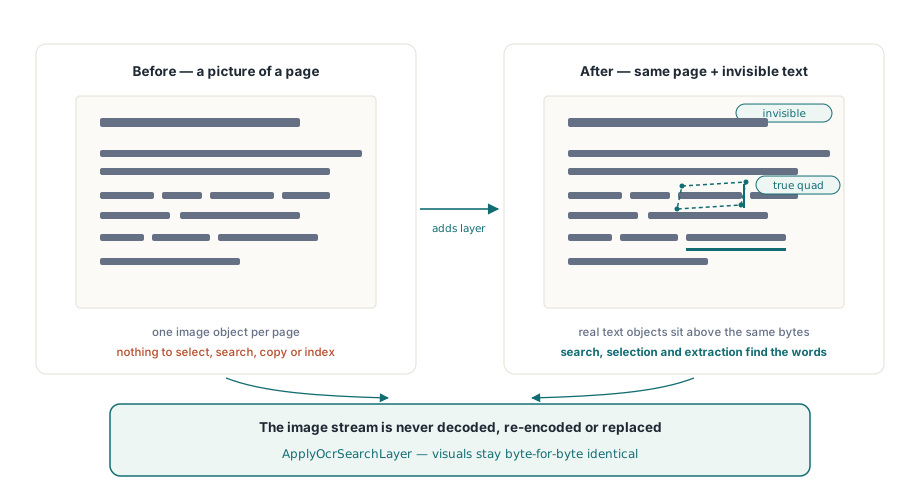
Positioning is the whole game. If the invisible text sits a few points off, selection highlights land beside the words rather than on them, and copying a paragraph produces text in the wrong order. This is why the geometry has to come from the same transforms PDFium uses to render the page rather than from a proportional guess
Implementing the provider
The provider contract is one method. It receives a page image record carrying dimensions, stride, DPI, pixel format and the pixel bytes themselves, plus a cancellation token, and returns words or an error message:
uses
  PDFium;

type
  TMyOcrProvider = class(TInterfacedObject, IPdfOcrProvider)
  public
    function RecognizePage(const Image: TPdfOcrImage;
      const CancellationToken: IPdfCancellationToken;
      out Words: TPdfOcrWords; out ErrorMessage: string): Boolean;
  end;

function TMyOcrProvider.RecognizePage(const Image: TPdfOcrImage;
  const CancellationToken: IPdfCancellationToken;
  out Words: TPdfOcrWords; out ErrorMessage: string): Boolean;
var
  I: Integer;
begin
  // Image.Pixels holds top-origin BGRA rows of Image.Stride bytes.
  // Hand them to your engine, then fill one entry per recognised word
  SetLength(Words, RecognisedCount);
  for I := 0 to RecognisedCount - 1 do
  begin
    Words[I].Text := EngineWordText(I);
    Words[I].Confidence := EngineWordConfidence(I);   // 0..1
    Words[I].Quad := TPdfOcrQuad.FromRectangle(
      EngineLeft(I), EngineTop(I), EngineRight(I), EngineBottom(I));
  end;
  ErrorMessage := '';
  Result := True;
end;
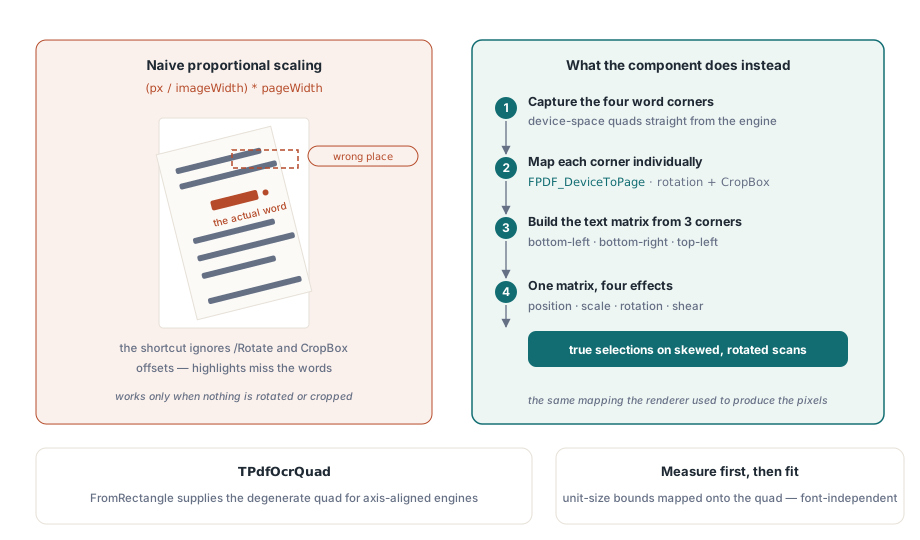
Quads rather than rectangles, because a scan is rarely square to the page. A word on a slightly rotated page occupies a parallelogram, and TPdfOcrQuad carries four corner points so that skewed and rotated words keep an accurate selection region. Engines that report only axis-aligned boxes can use FromRectangle, which builds the degenerate quad
Why can word positions not be scaled proportionally?
It is tempting to convert a pixel coordinate to a page coordinate by dividing by the render width and multiplying by the page width. That works only for pages with no rotation, a CropBox identical to the MediaBox, and an origin at zero, and plenty of scanned documents fail at least one of those conditions
PDFium Component maps each of the four quad corners individually through FPDF_DeviceToPage, the same mapping the renderer used to produce the pixels, so /Rotate entries and offset crop boxes are handled by construction. The affine matrix for the text object is then built from three of the mapped points, the bottom-left, bottom-right and top-left corners, which is exactly enough to express position, scale, rotation and shear
The text object itself is created at unit font size so its real font bounds can be measured, and the measured object bounds are then mapped onto the target quad. Sizing by a guessed point size and hoping it matches the scanned word would drift with every font substitution; measuring first makes the fit independent of which font the layer uses
Running it over a document
The options record controls resolution, filtering and every budget. Confidence filtering matters more than it looks: garbage words at low confidence pollute search results permanently, and unlike a wrong rendering, nobody notices until a search returns nonsense:
var
  Pdf: TPdf;
  Options: TPdfOcrOptions;
  Report: TPdfOcrReport;
  I: Integer;
begin
  Pdf := TPdf.Create(nil);
  try
    Pdf.FileName := 'scanned-contract.pdf';
    Pdf.LoadDocument;

    Options := TPdfOcrOptions.Default;
    Options.Dpi := 300;                  // recognition resolution
    Options.MinConfidence := 0.60;       // drop uncertain words
    Options.SkipPagesWithText := True;   // leave born-digital pages alone
    Options.ContinueOnError := True;     // one bad page must not stop the job
    Options.MaxPixelsPerPage := 40 * 1000 * 1000;

    if Pdf.ApplyOcrSearchLayer(TMyOcrProvider.Create, Options, Report) then
      Pdf.SaveAs('scanned-contract-searchable.pdf');

    for I := 0 to High(Report.Pages) do
      if Report.Pages[I].Status = popsFailed then
        Writeln(Format('page %d failed: %s',
          [Report.Pages[I].PageNumber, Report.Pages[I].ErrorMessage]));
    Writeln(Format('%d word(s) inserted, %d rejected, %d page(s) skipped',
      [Report.InsertedWordCount, Report.RejectedWordCount,
       Report.SkippedPageCount]));
  finally
    Pdf.Free;
  end;
end;
SkipPagesWithText deserves emphasis in mixed archives. A PDF that already carries real text, whether born digital or previously processed, gets a second text layer if you run OCR over it blindly, and the duplicate makes extraction return every word twice. The per-page status popsSkippedExistingText tells you exactly which pages were left alone
Budgets, cancellation and failure containment
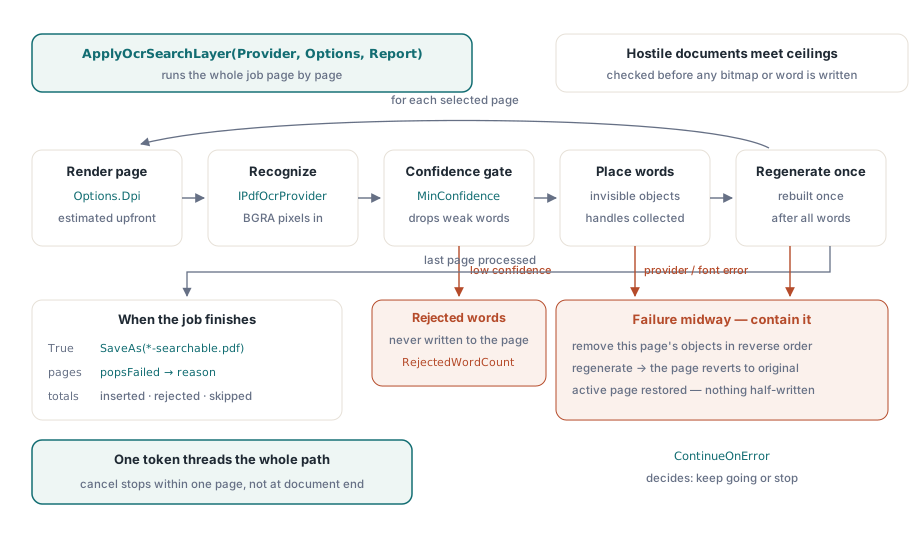
Every quantity that a hostile or merely enormous document can inflate has a ceiling: pixels per page and in total, words per page and in total, and characters per word. All of them are checked before the page is written, not after, and the pixel estimate is computed from page dimensions and DPI before any bitmap is allocated. Raising DPI from 150 to 300 quadruples memory per page, so the per-page ceiling is the parameter to tune first when a batch job starts failing on large formats
The cancellation token threads through the whole path: progressive rendering, the provider call and the per-word insertion loop. That means a user who cancels during recognition of a 400-page file stops within one page rather than at the end of the document, and the same token pattern used elsewhere in the component, described in cancellable progressive rendering, applies here unchanged
Failure containment is per page. The library collects the object handles it inserted on a page and calls FPDFPage_GenerateContent once, after all words are placed. If anything fails midway, whether a provider error or a font problem, the objects inserted on that page are removed in reverse and the page content is regenerated, so a failed page reverts to its original state instead of keeping half a text layer. The document loop then continues or stops according to ContinueOnError, and the active page is always restored
Verifying that the image really was untouched
The strongest check available is also the simplest: render the page before and after applying the layer at the same size and compare the bitmaps. They should be identical byte for byte, because invisible text draws nothing and the image stream was never decoded. Any difference means something other than the text layer changed the page
After that, verify the text side by extracting from the processed file and confirming that word positions land on the scan. The extraction path is the same one described in extracting text from PDF documents, and for a quick visual check of alignment, rendering pages to images as in converting PDF pages to JPEG lets you overlay word boxes on the scan
OCR layering, rendering, extraction and editing all run against the same document object in Delphi, C++Builder and Lazarus; the full API surface is described on the PDFium Component for Delphi page