Most PDF pages rasterize in a few milliseconds and you never think about it. Then a user opens an A1 engineering drawing, a page packed with tens of thousands of vector strokes, or a poster crowded with transparency groups and soft masks, and the single call that paints it takes two or three seconds. If that call runs on the UI thread, the window stops repainting, the title bar grays out, and the operating system offers to kill the application. The work is legitimate. The page really does need that long. The defect is that the render is one indivisible blocking call with no way to come up for air and no way to stop
This article is about exactly one of those two problems: canceling a long single-page render without freezing the UI. The user clicked the next page, or zoomed, or closed the document, and the render in flight is now wasted work that should end at the next opportunity rather than run to completion. Smoothing scroll and zoom by caching what was already rasterized is a separate concern with its own design, covered in the companion article linked at the end. Here the only question is how to make one progressive render answer a cancel request quickly and cleanly
The progressive render API PDFium already ships
PDFium anticipated the freezing half of the problem. Alongside the one-shot FPDF_RenderPageBitmap, it exposes a progressive variant that splits a page into chunks of work. You call FPDF_RenderPageBitmap_Start once to set up the render against a destination bitmap, then call FPDF_RenderPage_Continue repeatedly. Each Continue rasterizes a bounded slice and returns a status. FPDF_RENDER_TOBECONTINUED means there is more to do, FPDF_RENDER_DONE means the page is finished, and FPDF_RENDER_FAILED means it stopped on an error. When the loop ends you call FPDF_RenderPage_Close to release the per-page progressive state. Because control returns to your code between slices, you can pump messages, update a progress indicator, or check whether the work is still wanted
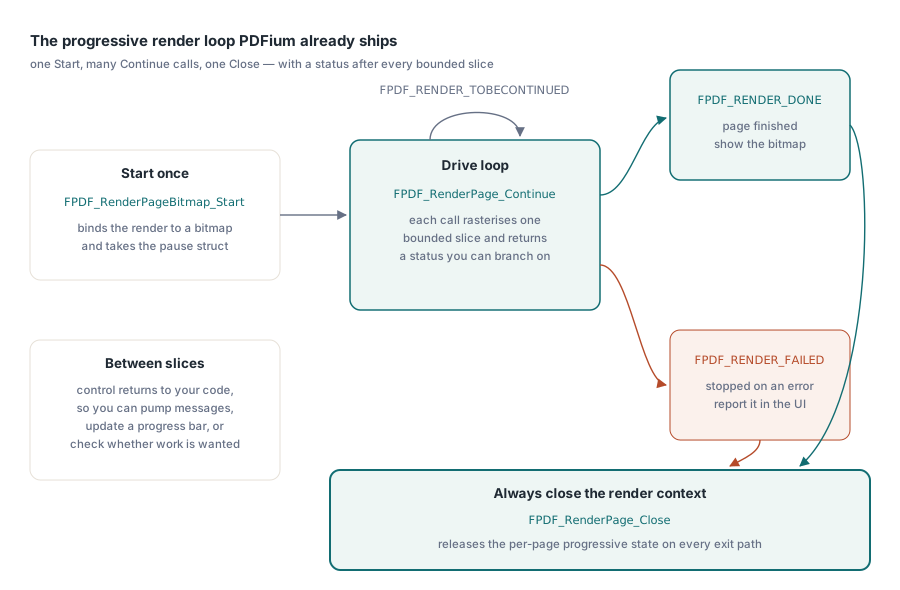
The mechanism PDFium provides for deciding when to yield is a callback struct named IFSDK_PAUSE. You hand it to Start and to every Continue. After each chunk PDFium calls its NeedToPauseNow function pointer, and if that returns a non-zero value, the current Continue stops early and hands control back with FPDF_RENDER_TOBECONTINUED. The struct also carries a version field, which must be set to 1, and a free-form user pointer that PDFium never touches and passes through untouched. That untouched pointer is the whole hinge of the design that follows
Repurposing pause as cancel
The original intent of NeedToPauseNow is time-slicing. Return non-zero when your frame budget is spent, return zero to keep rendering, and PDFium pauses so you can do something else before resuming the same render. The PDFium Component reuses that same signal for a different verb. Instead of answering "should I pause and let you resume," the callback answers "has this work been canceled." The two map onto each other cleanly because of what the loop does when it sees the flag. A genuine pause expects a later Continue; a cancel does not. Once the calling loop observes that the token is canceled, it closes the render context and never calls Continue again, so the same non-zero return that PDFium reads as "stop this chunk" becomes, in effect, "stop for good."
Cancellation is expressed through an interface, IPdfCancellationToken, whose IsCancelled property flips from false to true when some other part of the program asks for the render to stop. The bridge between that Pascal interface and PDFium's C callback is a single pointer. The token's interface reference is written into IFSDK_PAUSE.user, and a static cdecl callback reads it back out and queries it. This is the classic problem of letting a C library call back into Pascal: the callback has to be a plain function with C calling convention, not a method, because PDFium stores and invokes a bare function pointer that knows nothing about Pascal objects or Self

type
  TPdfProgressivePause = record
    Pause: IFSDK_PAUSE;            // PDFium reads this; .user holds the token
    Token: IPdfCancellationToken; // strong ref keeps the token alive
  end;

function ProgressivePauseCallback(pThis: PIFSDK_PAUSE): FPDF_BOOL; cdecl;
var
  Token: IPdfCancellationToken;
begin
  Result := 0;
  if (pThis = nil) or (pThis^.user = nil) then
    Exit;
  Token := IPdfCancellationToken(pThis^.user);
  if Token.IsCancelled then
    Result := 1; // non-zero: PDFium stops this chunk
end;
The callback recovers the token by casting pThis^.user back to the interface type and reads IsCancelled. Nothing in it allocates, locks, or blocks, which matters because PDFium calls it on the rendering thread after every chunk and any work done here is added to the cost of the render itself. The guard against a nil struct or a nil user field means the same function is safe to install even on a render that was never given a real token
Keeping the token alive across the loop
Casting an interface pointer through a raw Pointer and back is where lifetime bugs are born. An IInterface in Delphi is reference counted, and the count only moves when the compiler can see an interface-typed variable being assigned. Storing the token solely as a bare pointer inside IFSDK_PAUSE.user would hide it from the reference counter completely. If the only other reference to that token went out of scope while the Continue loop was still running, the object would be freed underneath the callback, and the next chunk would dereference a dangling pointer
That is why the descriptor is a record holding two things, not one. The Pause field is the struct PDFium reads. The Token field is a real interface-typed reference that the compiler counts, and it exists for no other reason than to pin the token in memory for as long as the record lives. The record is a local variable on the stack of the render routine, so it stays valid for the entire duration of the loop and is torn down only when the routine exits. The bare pointer in user and the counted reference in Token name the same object; one is what PDFium can read, the other is what keeps that object from being collected
var
  Pause: TPdfProgressivePause;
  EffectiveToken: IPdfCancellationToken;
begin
  // ... choose EffectiveToken ...

  // Strong ref first, then publish the same object to PDFium via .user.
  Pause.Token := EffectiveToken;
  Pause.Pause.version := 1;
  Pause.Pause.NeedToPauseNow := ProgressivePauseCallback;
  Pause.Pause.user := Pointer(EffectiveToken);
Closing the render context no matter how the loop ends
Every call to FPDF_RenderPageBitmap_Start allocates progressive state that PDFium associates with the page, and that state is released only by FPDF_RenderPage_Close. There are three ways out of the drive loop. The page finishes and the last status is FPDF_RENDER_DONE. The token trips and the loop exits early reporting cancellation. Something fails and the status is FPDF_RENDER_FAILED. All three must call Close, and the cancellation path is the easiest to get wrong, because the natural shape of "see cancel, break out" tends to skip cleanup on its way to the exit. Leaving Close unreached leaks the per-page state, and a viewer that lets the user cancel render after render would accumulate that leak on every aborted page
The robust shape puts the loop and the result classification inside a try and FPDF_RenderPage_Close in the matching finally. The destination bitmap is destroyed in the same block. Cancellation can leave the loop through an early Exit and the finally still runs, so there is exactly one place that frees the progressive state and it cannot be bypassed
Status := FPDF_RenderPageBitmap_Start(PdfBmp, FPage, Left, Top,
  Width, Height, Ord(Rotation), EncodeRenderOptions(Options), Pause.Pause);
try
  while Status = FPDF_RENDER_TOBECONTINUED do
  begin
    if EffectiveToken.IsCancelled then
    begin
      Result := prsCancelled;
      Exit;
    end;
    Status := FPDF_RenderPage_Continue(FPage, Pause.Pause);
  end;

  if EffectiveToken.IsCancelled then
    Result := prsCancelled
  else if Status = FPDF_RENDER_DONE then
    Result := prsDone
  else
    Result := prsFailed;
finally
  // Frees the progressive state Start allocated; mandatory on every path.
  FPDF_RenderPage_Close(FPage);
  FPDFBitmap_Destroy(PdfBmp);
end;
The loop checks the token before each Continue as well as relying on the callback inside it. The callback shortens the current chunk; the loop check stops the next one from starting. Together they bound how long a cancel takes to take effect to roughly the duration of one chunk
Three outcomes, and what the bitmap holds after a cancel
The public entry point is TPdf.RenderPageProgressive, and it returns a TPdfProgressiveStatus that is one of prsDone, prsCancelled, or prsFailed. The values mirror PDFium's FPDF_RENDER_* constants in Pascal idiom but fold the cancellation case in as a first-class result rather than an error
The point that catches people is what the destination bitmap contains after prsCancelled. It is not blank. PDFium renders progressively into the same bitmap chunk after chunk, so when a cancel stops the loop, the bitmap holds whatever was painted up to that moment, which is a partial image: some bands done, the rest still showing the fill color. Whether that partial result is useful depends on the caller. A viewer that is about to throw the bitmap away because the user navigated elsewhere can simply ignore it. A viewer that wants to show a low-cost preview can keep it. What you must not do is assume prsCancelled implies an empty or undefined bitmap; it implies a truthful snapshot of an unfinished render

var
  Bmp: TBitmap;
  Token: IPdfCancellationToken;
  Status: TPdfProgressiveStatus;
begin
  Bmp := TBitmap.Create;
  try
    // Token starts un-cancelled; flip Token.IsCancelled from elsewhere
    // (a UI action, a navigation event) to abort the render in flight.
    Status := Pdf.RenderPageProgressive(Bmp, 0, 0, PageW, PageH, Token);
    case Status of
      prsDone:      Image1.Picture.Assign(Bmp);  // fully rendered
      prsCancelled: ;                            // partial bitmap, usually discarded
      prsFailed:    ShowMessage('Render failed');
    end;
  finally
    Bmp.Free;
  end;
end;
The nil token and a branch-free callback path
Cancellation is opt-in. A caller that just wants progressive rendering for the message-pumping benefit, with no intention of aborting, should be able to pass nil for the token. The naive way to support that is to scatter "if a token was supplied" checks through the callback and the loop, which means a branch on every chunk and a callback that has to handle both a real token and its absence
The implementation avoids that by substituting a singleton when the caller passes nothing. A nil token is swapped for PdfNoCancellationToken, an interface whose IsCancelled is always false. From that point the callback and the loop have a token to query in every case, so neither needs a nil check and neither needs a special path. The never-cancel token simply always answers false, the callback always returns zero, and the render runs to completion exactly as a non-cancellable one would. Optional behavior is modeled as a token that never fires rather than as the absence of a token, which keeps the hot path uniform
// nil -> never-cancel singleton, so the callback path is identical
// whether or not the caller opted into cancellation.
if AToken <> nil then
  EffectiveToken := AToken
else
  EffectiveToken := PdfNoCancellationToken;
The shape that emerges is small and worth restating, because it is the reusable part. A C library that supports a callback gives you exactly one channel to pass state into that callback, the opaque user pointer. Put a counted Pascal interface reference behind that pointer, keep a second real reference alive next to the struct so the object cannot be collected mid-call, and read the interface back out inside a static cdecl function. Wrap the whole drive loop in a try and free the native context in the finally. The same template carries over to any progressive or callback-driven PDFium operation where Pascal code has to stay in control of lifetime while C holds a pointer
Cancellation is only one half of a responsive viewer. The other half is not re-rendering pages you already drew, and keeping zoom and scroll smooth by serving cached bitmaps, which is covered in our article on render caching and zoom performance. For how the cancellable render fits into a complete viewer alongside navigation, selection, and search, see building a feature-rich PDF viewer with the PDFium Component. The progressive render described here ships as part of the PDFium Component for Delphi and Lazarus alongside the loading, rendering, and form APIs covered elsewhere on this blog