Marked content is the mechanism ISO 32000-1 §14.6 defines for tagging page content, and tagged PDF and PDF/UA are both built on it. PDFium Component exposes it directly: PageObjectMarks reads every BDC tag and its property list off a page object, AddPageObjectMark writes one, RemovePageObjectMark deletes one, and PageObjectMarkedContentID reports the MCID that links content to the structure tree
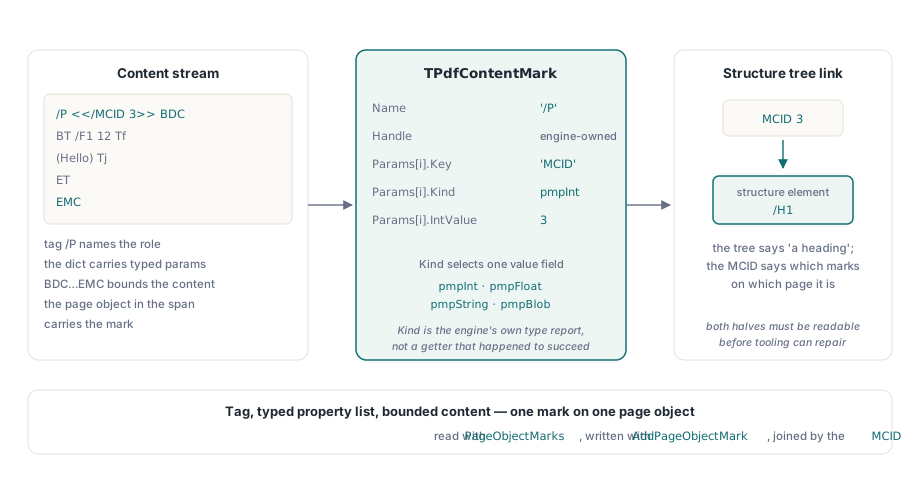
Until the structure tree can be joined back to the content it describes, accessibility tooling is guesswork. The structure tree says "this is a heading"; the MCID says which marks on which page that heading actually is. Both halves have to be readable before an application can check, repair or report on tagging
What is a mark, in bytes?
A BDC operator with a tag name and an optional property list, closed by EMC. In the content stream it looks like /P <</MCID 3>> BDC ... EMC: the tag /P names the role, the dictionary carries properties, and everything between the operators is the marked content. A page object inside that span carries the mark, which is what PDFium hands back and what PDFium Component turns into a record
TPdfContentMark holds a handle, the tag Name, and an array of TPdfContentMarkParam. Each parameter has a Key, a Kind and one meaningful value field selected by that kind: pmpInt, pmpFloat, pmpString or pmpBlob. The kind comes from PDFium's own type report rather than from whichever getter happened to succeed, which is the difference between reading a property list and guessing at one
var
  Marks: TPdfContentMarks;
  M: TPdfContentMark;
  P: TPdfContentMarkParam;
  I: Integer;
begin
  Pdf.PageNumber := 1;                    // PageNumber is 1-based
  for I := 0 to Pdf.ObjectCount - 1 do    // page object indexes are 0-based
  begin
    Marks := Pdf.PageObjectMarks(I);
    for M in Marks do
    begin
      Memo1.Lines.Add('mark ' + M.Name +
        ' (MCID ' + IntToStr(Pdf.PageObjectMarkedContentID(I)) + ')');
      for P in M.Params do
        case P.Kind of
          pmpInt:    Memo1.Lines.Add('  ' + P.Key + ' = ' + IntToStr(P.IntValue));
          pmpString: Memo1.Lines.Add('  ' + P.Key + ' = ' + P.StringValue);
          pmpFloat:  Memo1.Lines.Add('  ' + P.Key + ' = ' + FloatToStr(P.FloatValue));
          pmpBlob:   Memo1.Lines.Add('  ' + P.Key + ' = ' +
                       IntToStr(Length(P.BlobValue)) + ' bytes');
        end;
    end;
  end;
end;
Why pmpUnknown means two different things
pmpUnknown is returned when PDFium reports FPDF_OBJECT_UNKNOWN, and PDFium also returns that for a key that does not exist. The two cases cannot be told apart at this layer, and pretending otherwise would be worse than saying so
The practical consequence for your code: treat pmpUnknown as "no usable value here" rather than as a type you might decode anyway. If a property matters to your workflow, verify it is present with a kind you recognize, and do not infer absence from an unknown — a mark whose property list you cannot read is a mark you should report on, not one you should silently accept
A mark record is a snapshot, not a handle you own
The Handle field belongs to the library. It goes stale the moment the mark is removed, the page object is destroyed or the page is unloaded, so the record is a read-only snapshot with a short life. Cache it across a page switch and you are holding a pointer into memory the engine has reclaimed
This is the same discipline that applies to page object handles generally in PDFium, and it catches people in the same place: a list control populated with mark records, a user navigating to another page, and a crash that looks unrelated to the navigation. Copy out the values you need — the name, the keys, the numbers — and let the handle go. The notes on page object handles going stale after a transform cover the general rule and how it bites elsewhere
Adding a mark, and the save step that is easy to miss
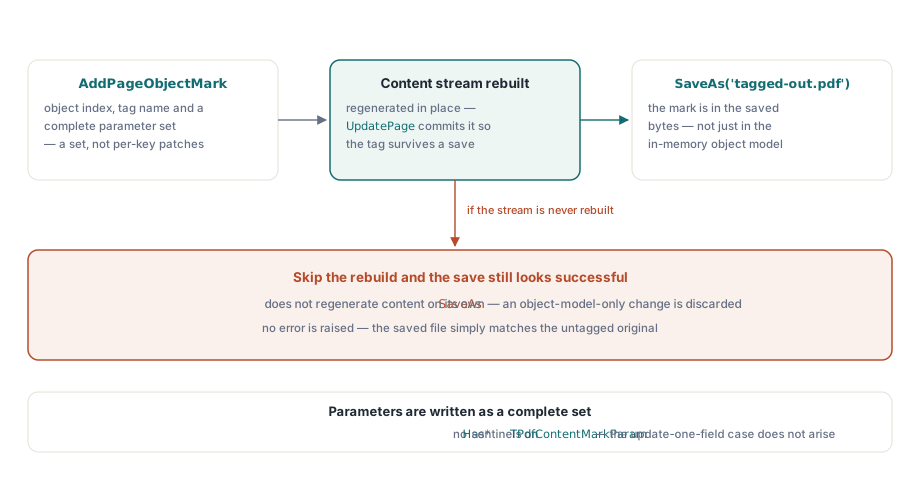
AddPageObjectMark takes the page object index, a tag name and a complete parameter set. Parameters are written as a set rather than patched one key at a time, which is why TPdfContentMarkParam has no Has* sentinels — the "update one field of an existing record" case those would guard does not arise
The part worth stating explicitly: adding a mark rebuilds the page content stream so the tag survives a save. This had to be explicit because SaveAs does not regenerate content on its own — a change that lived only in the object model would be discarded, and the saved file would look exactly like the one you started with. If you have ever added something to a PDFium page and found it missing from the output, this is usually why
var
  Params: TPdfContentMarkParams;
begin
  SetLength(Params, 1);
  Params[0].Key := 'MCID';
  Params[0].Kind := pmpInt;
  Params[0].IntValue := NextMcid;
  Pdf.AddPageObjectMark(ObjectIndex, 'P', Params);   // rebuilds the content stream
  Pdf.UpdatePage;
  Pdf.SaveAs('tagged-out.pdf');
end;
What this does and does not make a document
Marks alone do not make a tagged PDF. A conforming tagged document needs a structure tree whose elements reference these MCIDs, a /MarkInfo entry declaring the document marked, and role names that mean what the standard says they mean. Writing a /P mark with an MCID that no structure element points at gives you content that claims to be tagged and a structure tree that never mentions it
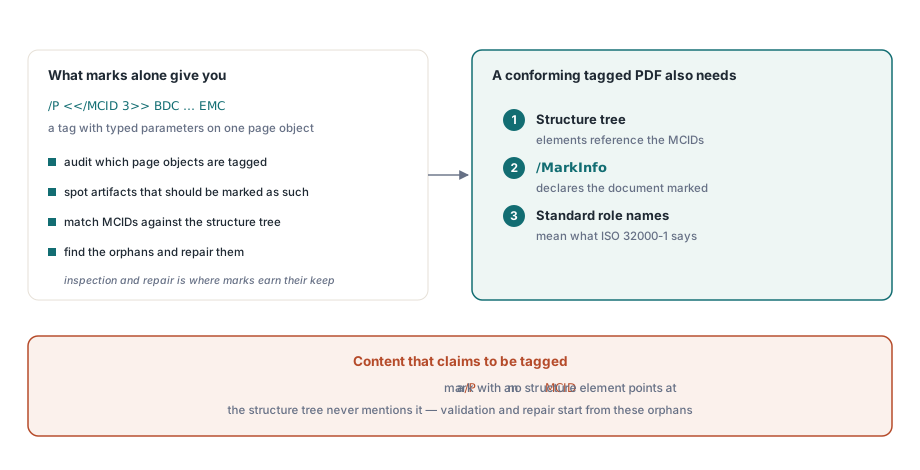
Where marked content genuinely earns its keep at this level is inspection and repair: auditing which page objects are tagged, finding artifacts that should have been marked as such, or matching MCIDs against a structure tree to find the orphans. For the structure-tree half of that work, see the walkthrough of PDF/UA structure tree validation, and for the reading experience the tags are ultimately for, the notes on building an accessible PDF reader in Delphi
PDFium Component gives Delphi, C++Builder and Lazarus applications a high-level VCL API over the PDFium engine, with marked content, structure trees and accessibility validation reachable from ordinary Pascal code — see the PDFium Component product page for the full API surface