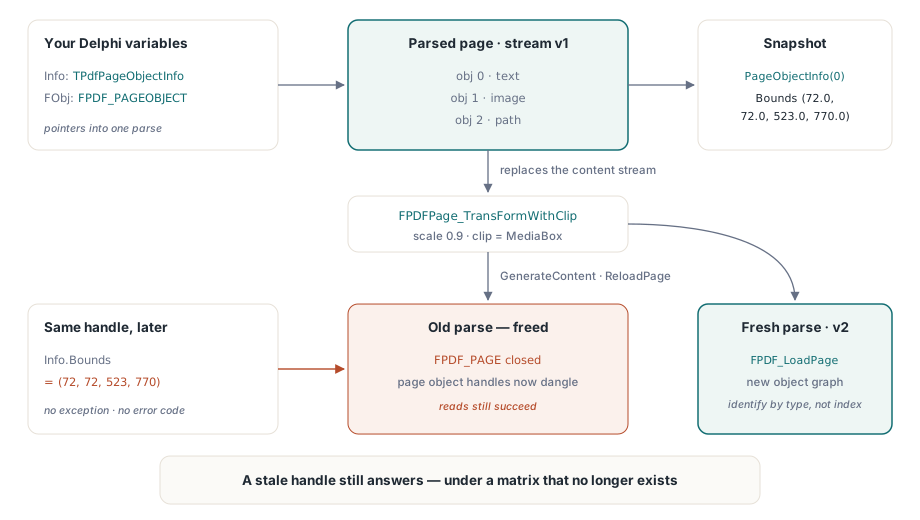
When FPDFPage_TransFormWithClip rewrites a page, every FPDF_PAGEOBJECT handle you already hold still describes the parse from before the transform. The PDFium Component for Delphi and C++Builder solves this inside TransformPageContent, which unloads the text page, regenerates content, then reloads the page so later queries see the new coordinates
The symptom is quiet. You apply a 0.9 scale to add a print margin, then read PageObjectInfo and get exactly the numbers you got before the call. No exception, no error code, nothing in a log. This is a different failure from the cached text page described in the article on stale text pages after an edit: there the cache is a single FPDF_TEXTPAGE handle you can drop and rebuild, here the problem is every page object handle in your own variables, plus a class of getters that report failure through a return code most callers throw away
Why do page object bounds go stale without an error?
Because a page object handle is a pointer into a parsed representation of one particular content stream, and a full-page transform replaces that content stream with a new one. PDFium does not walk your call stack looking for handles to patch. It builds a fresh object graph and leaves the old one exactly as it was, so a read against the old handle is a perfectly valid read of a structure that no longer corresponds to what the file says
ISO 32000-1 §7.8.2 defines the content stream as the sequence of operators that draws a page, and §8.3.3 defines how the current transformation matrix maps user space onto device space. A page-level transform is expressed by wrapping and rewriting those operators, not by editing per-object coordinates in place. So the coordinates the objects carry may not change at all; what changes is the matrix in force when they are drawn. Any handle that was parsed under the old matrix answers geometry questions under the old matrix, and answers them without complaint
What FPDFPage_TransFormWithClip actually rewrites
It rewrites the page, not your snapshots. FPDFPage_TransFormWithClip takes an FS_MATRIX and an FS_RECTF clip rectangle and applies both to the whole page content. It is the right call for margins, imposition scaling, and normalizing an oddly sized page against a target box. It is the wrong call to reach for if you expect existing handles to follow along, and it is also worth remembering that it touches page content only: annotations are a separate layer and need TransformPageAnnotations, which forwards the same six matrix coefficients to FPDFPage_TransformAnnots
var
  Info: TPdfPageObjectInfo;
  Scale: FS_MATRIX;
  Clip: TPdfRectangle;
begin
  Pdf.PageNumber:= 1;
  Info:= Pdf.PageObjectInfo(0);           // snapshot taken before the transform

  Scale.a:= 0.9;   Scale.b:= 0.0;
  Scale.c:= 0.0;   Scale.d:= 0.9;
  Scale.e:= 29.7;  Scale.f:= 42.0;        // 5% margin, A4 in points
  Clip:= Pdf.GetPageBox(pbMedia);
  Pdf.TransformPageContent(Scale, Clip);

  // Info.Bounds still holds pre-transform geometry, and Info.Handle now
  // points into a page that TransformPageContent has already replaced
end;
The refresh order TransformPageContent uses
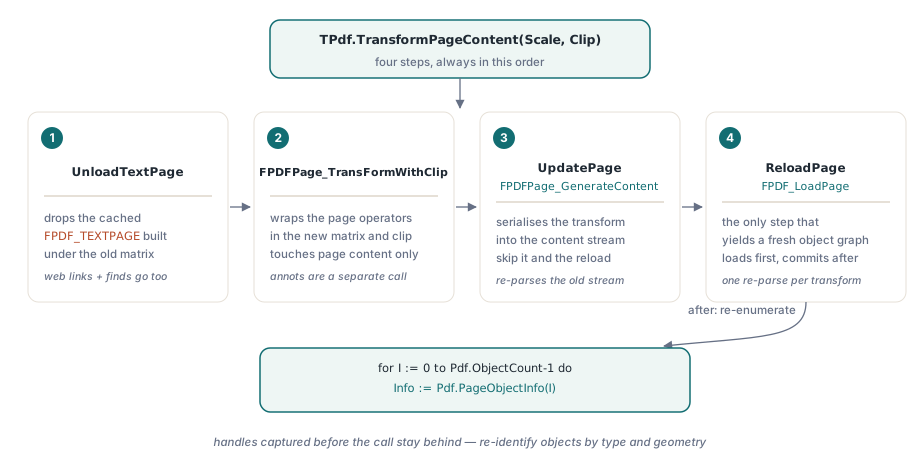
Four steps, in this order: unload the text page, transform, generate content, reload the page. TPdf.TransformPageContent runs exactly that sequence. It calls CheckPageActive, copies the matrix and clip into their native record shapes, calls UnloadTextPage, then FPDFPage_TransFormWithClip, then UpdatePage, which is the wrapper around FPDFPage_GenerateContent, and finally ReloadPage
Each step earns its place. UnloadTextPage goes first because the cached FPDF_TEXTPAGE holds character boxes computed under the old matrix, and it also drops the derived web-link list and any in-progress find session that were built from it. FPDFPage_GenerateContent has to run before the reload, because the transform lives in the in-memory page until it is serialized back into the content stream, and a reload would otherwise re-parse the unmodified stream. ReloadPage closes with FPDF_LoadPage against the current page index, which is the only thing that actually gives you a fresh object graph
// After the transform, re-enumerate. Do not reuse anything captured earlier.
var
  I: Integer;
  Info: TPdfPageObjectInfo;
begin
  Pdf.TransformPageContent(Scale, Clip);   // unload text page, transform,
                                           // generate content, reload page
  for I:= 0 to Pdf.ObjectCount- 1 do
  begin
    Info:= Pdf.PageObjectInfo(I);          // handle and bounds from the new parse
    if Info.Bounds.Right> PageWidth then
      Log('object '+ IntToStr(I)+ ' still overflows after scaling');
  end;
end;
One detail in ReloadPage is worth copying if you ever write this sequence yourself. It loads the new page first and only commits it to the field afterward, so a page load that fails leaves the current native page and all of its derived caches intact rather than dropping you into a half-torn-down state. Reloading is not free — you are paying for a full re-parse of the page — but it is paid once per transform, not once per query, and there is no cheaper correct alternative
Do not carry handles across the reload
After the reload, the old handles are not merely stale, they are dangling. The previous FPDF_PAGE has been closed, and the FPDF_PAGEOBJECT values that belonged to it are pointers into freed memory. TPdfPageObjectInfo exposes the native handle in its Handle field, which is genuinely useful for passing an object straight into a lower-level call, and equally genuinely dangerous to keep in a form field or a list across an operation that reloads the page. Treat a snapshot record as valid only until the next call that regenerates content, in the same spirit as the ownership rules discussed in the notes on ABI and memory safety at the PDFium boundary
Can a getter fail and still look like valid data?
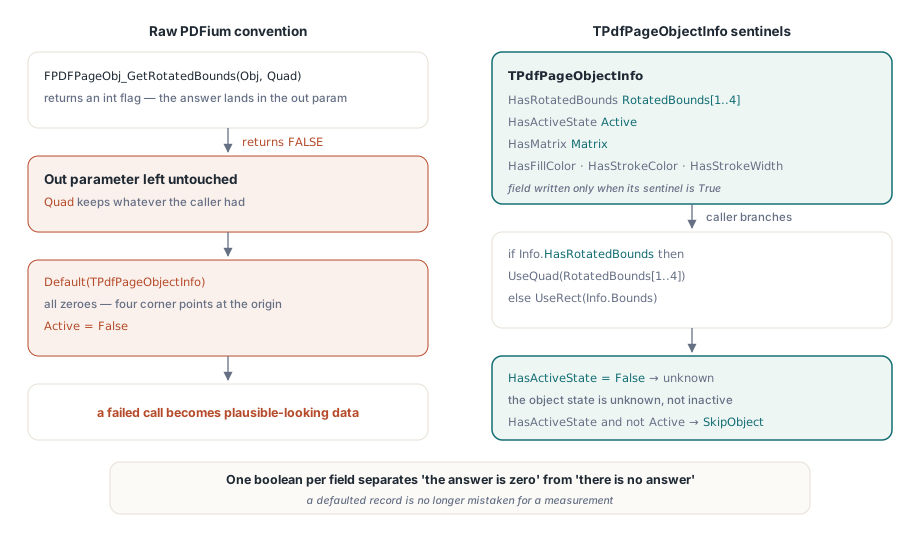
Yes, and this is the second half of the same problem. FPDFPageObj_GetRotatedBounds and FPDFPageObj_GetIsActive are out-parameter getters: they return an int success flag and write the real answer into a reference argument. Both can return FALSE for an object that was created but whose page has not been re-parsed yet. When that happens the out parameter is left untouched, and a Pascal record initialized with Default(TPdfPageObjectInfo) is all zeroes, so the caller sees a quadrilateral with four points at the origin and an Active flag of False. A failed call has been silently promoted into plausible-looking data
TPdfPageObjectInfo answers this with explicit sentinels. HasRotatedBounds carries the result of the FPDFPageObj_GetRotatedBounds call, HasActiveState carries the result of FPDFPageObj_GetIsActive, and the geometry and state fields are only written when the corresponding sentinel is True. The same shape repeats across the record for the other out-parameter getters, so HasMatrix, HasFillColor, HasStrokeColor, and HasStrokeWidth all mean the same thing: the native call succeeded and the neighboring field is meaningful
Info:= Pdf.PageObjectInfo(I);

if Info.HasRotatedBounds then
  // RotatedBounds is array [1..4] of TPdfPoint, in draw order
  UseQuad(Info.RotatedBounds[1], Info.RotatedBounds[2],
          Info.RotatedBounds[3], Info.RotatedBounds[4])
else
  // the native call failed; fall back to the axis-aligned rectangle
  UseRect(Info.Bounds);

if Info.HasActiveState and (not Info.Active) then
  SkipObject(I);         // genuinely inactive
// if HasActiveState is False, the object state is unknown, not inactive
The pattern generalizes to every PDFium getter that follows the return-code-plus-out-parameter convention, and there are a lot of them. If a wrapper collapses that convention into a plain function result, it has thrown away the only signal distinguishing "the answer is zero" from "there is no answer". Carrying one extra boolean per field costs a byte and removes an entire category of bug where a defaulted record is mistaken for a measurement
Where this still bites
Three honest limits. First, the refresh is per page: transform page two and any handles you are holding for page one are unaffected, but you now have two pages parsed at different times and it is on you to remember which snapshots came from which. Second, index stability is not guaranteed across a content regeneration — after the reload, index 3 is whatever index 3 is in the new parse, so re-identify objects by their type and geometry rather than assuming positions held. Third, the clip rectangle in FPDFPage_TransFormWithClip is applied to page content and does not resize any of the page boxes; if you scale content down to create a margin, the MediaBox is still the size it always was, and a viewer will show the original sheet with the drawing shrunk inside it. None of this is exotic — it is the ordinary consequence of a C API that hands out pointers into parsed state and leaves lifetime to the caller. The fix is the one that works everywhere else: define exactly when a snapshot expires, refresh at that boundary, and never let a failed call masquerade as a value
If you are working through matrix behavior more generally, the multiplication order that decides where a transform lands is covered in the article on prepend, append, and pivot with matrices. The transform and page object APIs described here ship with the PDFium Component for Delphi and C++Builder, whose product page carries the full reference for the page object snapshot record and its sentinel fields