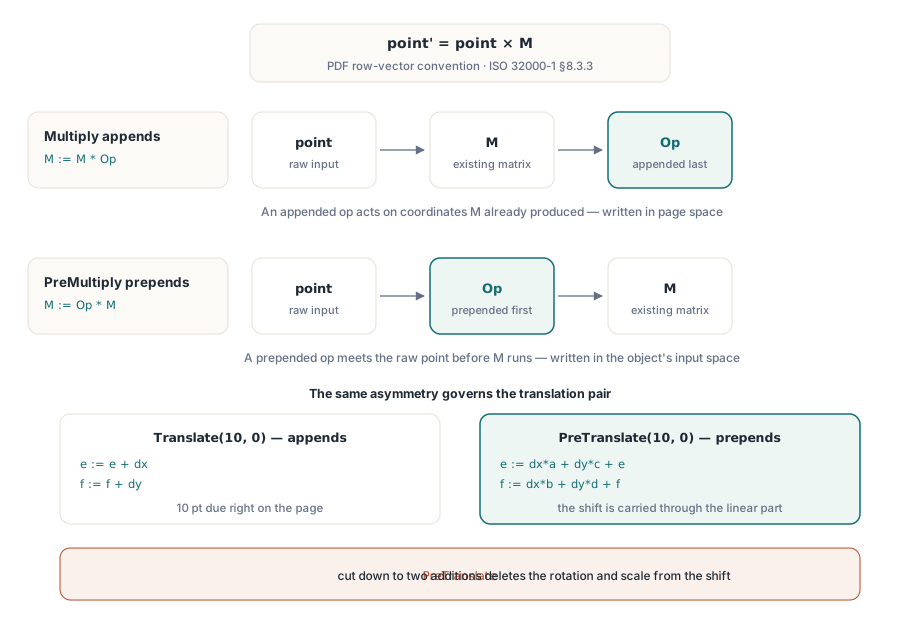
PDF affine matrices use the row-vector convention of ISO 32000-1 §8.3.3, where a point multiplies the matrix from the left: point' = point * M. In the PDFium Component for Delphi and C++Builder that one fact fixes the whole API surface of TPdfMatrix: Multiply appends, so M := M * Op, while PreMultiply prepends, so M := Op * M
Every classic transform bug traces back to that sentence being remembered backwards. The watermark that rotates neatly in your test file and lands half off the page in the customer file. The thumbnail that comes out rotated twice because the page already carried a quarter turn. The stamp whose offset is perfect on A4 and drifts on Letter. None of those are rendering bugs; they are multiplication-order bugs, and they are all fixable once you can say out loud which space each operation is written in
The row-vector convention that sets the rules
TPdfMatrix stores the six spec-named elements and applies them exactly as the format defines them, so the transform itself is where the reasoning starts. TPdfMatrix.TransformPoint computes x' = x*a + y*c + e and y' = x*b + y*d + f, which is the six-element form ISO 32000-1 §8.3.4 defines for the cm operator that concatenates a matrix onto the current transformation matrix. The pair (a, b) is the first row, (c, d) the second, and (e, f) the translation row. Column-vector habits picked up from OpenGL or from a linear algebra course will mislead you here, and they will mislead you silently, because a wrong-order matrix is still a perfectly valid matrix. Read a composite in the row convention left to right and the order of application falls out for free: since point * (M * Op) equals (point * M) * Op, an appended operation acts on coordinates the existing matrix has already produced, which is to say on page space, while a prepended operation acts before the existing matrix runs, in the object own input space
var
  M: TPdfMatrix;
  Pt: FS_POINTF;
begin
  M := TPdfMatrix.Create;                // identity
  try
    // Append order: each call acts on what the previous calls produced.
    M.Scale(0.5, 0.5);                   // M := M * S   half size
    M.Rotate(90);                        // M := M * R   clockwise, degrees
    M.Translate(300, 400);               // M := M * T   then move on the page

    Pt := M.TransformPoint(0, 0);        // x*a + y*c + e, x*b + y*d + f
  finally
    M.Free;
  end;
end;
TPdfMatrix.Rotate defaults to clockwise and to degrees, with ACounterClockwise and AAngleInRadians available when your source data is signed the other way. The read-only a through f properties and the Handle property give you the raw FS_MATRIX back, which is what FPDFPageObj_SetMatrix wants. Nothing in the class hides the six numbers from you, and that is deliberate: when a transform misbehaves, printing a through f is the fastest diagnosis you have
Why does prepending a translation need the linear part?
Because a prepended shift is written in the matrix input space, and it has to be carried through the current linear part before it can join the translation row. TPdfMatrix.PreTranslate therefore computes e := dx*a + dy*c + e and f := dx*b + dy*d + f. Appending is the easy direction: TPdfMatrix.Translate is written in page space, where nothing needs converting, so it only adds dx to e and dy to f. Anyone who "optimizes" PreTranslate down to two additions has just deleted the rotation and scale from the shift
M := TPdfMatrix.Create;
try
  M.Rotate(90);              // a=0, b=-1, c=1, d=0

  M.Translate(10, 0);        // append: e := e + 10
                             // -> 10 points to the right on the page

  M.Reset;
  M.Rotate(90);
  M.PreTranslate(10, 0);     // prepend: e := 10*a + 0*c + e  (unchanged)
                             //          f := 10*b + 0*d + f  (f - 10)
                             // -> 10 points along the stamp own x axis,
                             //    which after the turn points down the page
finally
  M.Free;
end;
The same asymmetry runs through the scale pair, and it is worth knowing which elements each one touches before you debug one at three in the morning. TPdfMatrix.PreScale multiplies rows, scaling a and b by scaleX and c and d by scaleY, and it leaves the translation alone because the shift already happened downstream. The appending TPdfMatrix.Scale multiplies columns instead, taking a, c, e by scaleX and b, d, f by scaleY, so the existing offset scales with everything else. Both are single-purpose paths that skip the general six-element product, and both preserve the composition semantics of the general form exactly
Where do the two translations go in a pivot rotation?
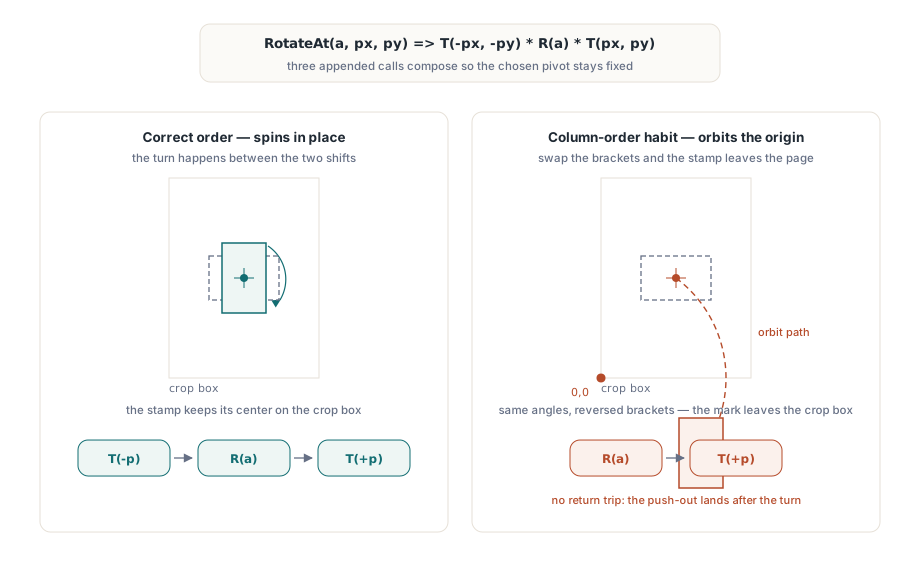
Around the operation, not around the whole matrix, and in that order. TPdfMatrix.RotateAt appends Translate(-pivot), then the rotation, then Translate(+pivot), which under the row-vector convention composes as Translate(-pivot) * Op * Translate(pivot). That sequence is what keeps the pivot fixed under the new operation while still letting the existing matrix produce its coordinates first and hand them on. Write the pair the other way round, as it would be correct in a column-vector library, and the object orbits the origin instead of spinning in place, which is precisely how a centered watermark ends up outside the crop box
procedure RotateStampAboutPageCenter(AObj: FPDF_PAGEOBJECT;
  const AAngleDegrees, APageWidth, APageHeight: Single);
var
  M: TPdfMatrix;
  Raw: FS_MATRIX;
begin
  if not FPDFPageObj_GetMatrix(AObj, Raw) then
    raise Exception.Create('Page object carries no matrix');
  M := TPdfMatrix.Create(Raw);
  try
    // Appends Translate(-pivot) * Rotate * Translate(+pivot) in one call.
    M.RotateAt(AAngleDegrees, APageWidth / 2, APageHeight / 2);
    Raw := M.Handle;
    FPDFPageObj_SetMatrix(AObj, Raw);
  finally
    M.Free;
  end;
end;
The same composition backs ScaleAt, SkewAt, HorizontalFlipAt, VerticalFlipAt, and CentralFlipAt, so once you trust the pattern for rotation you can trust it for the rest. TPdfMatrix.CentralFlip is worth singling out: it negates all six elements to give you a 180 degree turn with no trigonometry at all, which means no cos of a value that should have been exactly zero and no accumulating drift when you apply it in a loop. If you are placing repeated marks rather than turning one, the mechanics of the placement itself are covered in reusable page stamps with Form XObjects, and the matrix work here sits directly on top of it
What does TryDecompose tell you about a matrix?
TPdfMatrix.TryDecompose reports translation, scale, rotation, shear, determinant and a reflection flag under a scale-then-rotation convention, and it reports them honestly enough to be useful for decisions rather than just for logging. ScaleX comes from the length of the first row, Sqrt(a*a + b*b), so it is always positive. ScaleY is then Determinant / ScaleX, which makes it signed. Rotation comes from ArcTan2(-b, a) in degrees, and shear from the two rows dot product normalized by both scales
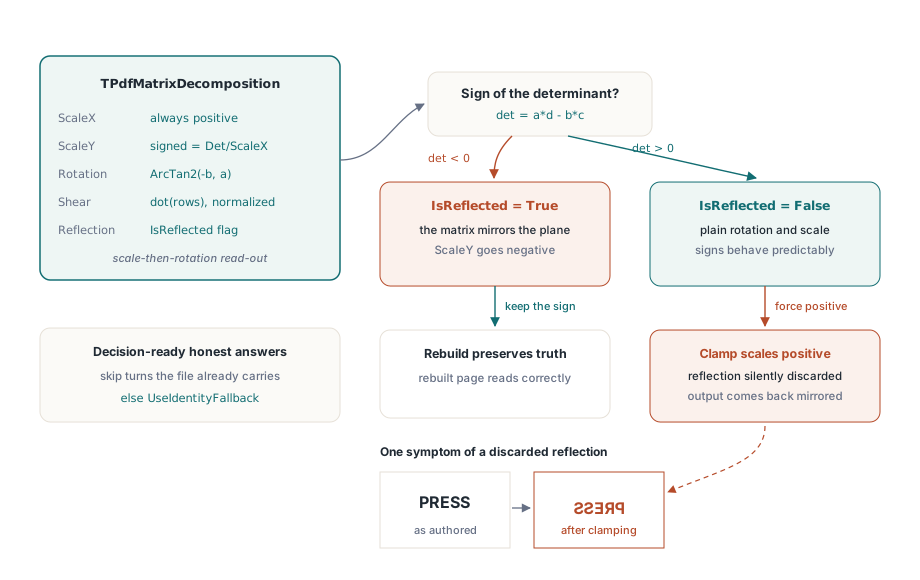
That sign on ScaleY is the part people delete, and deleting it is a real bug rather than a cosmetic one. A negative determinant means the matrix contains a reflection. Force both scale factors positive to make the numbers look tidier and you have thrown the reflection away, so a matrix rebuilt from the decomposition comes back mirrored: text reads backwards, a scanned page flips, an imported logo faces the wrong way. The IsReflected field exists so you never have to infer it. This is also the check that prevents the classic double rotation, where code adds a display turn to a page that already carries one; the viewer-side version of that problem is worked through in thumbnail fit, zoom, and double rotation
var
  D: TPdfMatrixDecomposition;
begin
  if M.TryDecompose(D) then
  begin
    // D.ScaleX is always positive; D.ScaleY carries the determinant sign.
    if D.IsReflected then
      Log('mirrored, ScaleY = %.3f', [D.ScaleY]);

    if Abs(D.RotationDegrees) > 0.5 then
      SkipDisplayRotation;      // the object already carries its own turn
  end
  else
    UseIdentityFallback;        // near-singular or non-finite: no answer
end;
Fitting one rectangle into another without guessing
TPdfMatrix.TryCreateRectMapping builds the source-to-destination matrix for you and takes a TPdfMatrixFitMode of pmfStretch, pmfContain, or pmfCover. It normalizes both rectangles first, because PDF rectangles are not required to arrive with left below right or bottom below top, then derives independent X and Y scales: pmfStretch keeps them independent, pmfContain takes the smaller one and centers the letterbox, pmfCover takes the larger one and centers the crop. The companion MapRectToRect appends the same mapping onto an existing matrix, and NewRectMapping raises EPdfMatrixError where the Try form returns False. This is the primitive underneath every cell placement in N-up imposition and page reordering, where each source page has to land inside a computed cell without you re-deriving the arithmetic per layout
Degenerate matrices and the honest failure path
Finite inputs do not guarantee a finite result, so the fitting code computes in Double and then re-checks the narrowed Single candidate for finiteness before publishing it; a mapping containing an infinity is never handed back as if it were valid. The same discipline governs inversion. TPdfMatrix.TryGetInverse rejects a matrix using a relative threshold, comparing the determinant against the epsilon times the square of the largest linear element rather than against a fixed constant, which is what keeps the test meaningful whether your units are points or micrometers. TryDecompose bails out the same way, refusing when the first row length or the derived ScaleY falls at or below epsilon
Choose the failure style that fits the call site rather than wrapping everything in try-except out of habit. TryInvert, TryGetInverse, TryInverseTransformPoint, TryTransformBounds and TryCreateRectMapping return False and leave their targets untouched, which suits hit-testing and per-object loops where a degenerate object should be skipped, not fatal. Invert, InverseCopy, InverseTransformPoint, MapRectToRect and TransformBounds raise EPdfMatrixError instead, which suits setup code where a singular matrix means the caller computed something wrong. For batch work, TransformPoints and TransformRects allocate their result array exactly once, TransformPointsInPlace and TransformRectsInPlace reuse your storage, and TryTransformBounds accumulates the bounding box in a single pass rather than materializing transformed points first
None of this is exotic mathematics. It is one convention, applied consistently, with the API named so the convention is visible at the call site: Multiply and the plain verbs append, the Pre family prepends, the At family brackets the operation with its pivot pair. Write the order down in a comment next to any composite you build, because the code that reads correctly today is the code someone reverses in six months. The full TPdfMatrix reference, along with the page-object and rendering APIs these transforms feed into, lives with the PDFium Component for Delphi and C++Builder