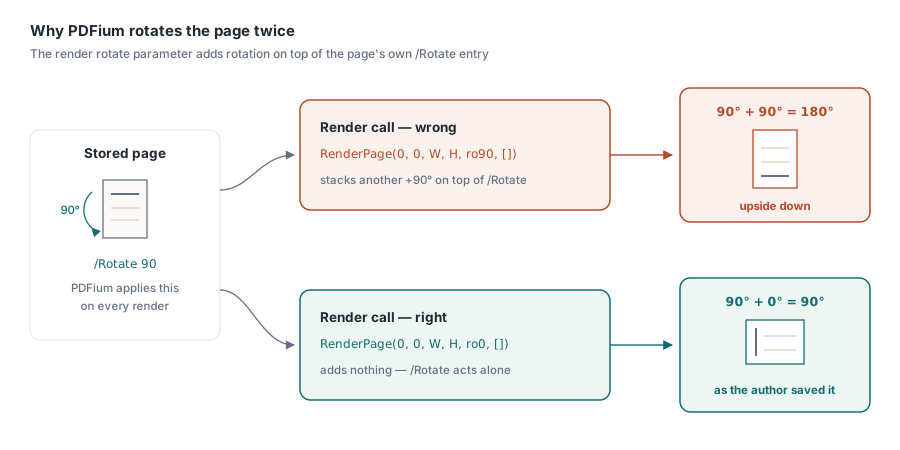
PDFium Component's FPDF_RenderPageBitmap function accepts a rotate argument that PDFium always adds on top of whatever rotation the page already carries in its own /Rotate entry, so reading a page's stored rotation and feeding that same value back into the render call rotates the page twice. The identical mistake shows up in fit-zoom math: sizing a thumbnail from the page's unrotated width and height produces the wrong aspect ratio whenever /Rotate is 90 or 270 degrees, because the rendered bitmap comes out with width and height swapped
The failure is easy to spot once you know what to look for, and easy to miss until then. A batch of scanned invoices arrives with a mix of portrait and landscape originals, someone straightens half of them with a 90-degree rotation in Acrobat before archiving, and the thumbnail strip in a Delphi viewer built on PDFium renders those particular pages sideways, upside down, or squeezed into a box shaped for the wrong orientation. Nothing throws an exception. Nothing logs an error. The pixels are simply wrong, and only for the subset of pages somebody rotated after the fact — exactly the kind of bug that survives a full QA pass against an unrotated test PDF and then turns up in production on page 47 of a real one
Why does PDFium rotate the page twice?
PDFium applies a page's own /Rotate value automatically every time it renders a bitmap, regardless of what gets passed to the renderer. The FPDF_RenderPageBitmap rotate parameter, exposed in PDFiumPas as the TRotation values ro0, ro90, ro180 and ro270 on TPdf.RenderPage, TPdf.RenderTile and TPdf.RenderPageThumbnail, does not set the angle a page should end up at; the rotate parameter sets how much extra rotation to layer on top of whatever the page dictionary already specifies, which is why every one of those methods defaults it to ro0
TPdf.PageRotation reads that same /Rotate value through FPDFPage_GetRotation, and application code often needs it for reasons that have nothing to do with rendering, such as deciding how to lay out an annotation in page space. The trap is a single line: passing PageRotation into the Rotation argument of RenderPage, expecting the call to normalize the page to upright. A page already saved with /Rotate 90 displays correctly, rotated, in any conforming viewer, PDFium included; add ro90 again on top of that and the page swings to 180 degrees instead of the intended 90, while a page with no rotation at all gets spun an unwanted quarter turn for no reason
// Wrong: PageRotation already reflects /Rotate, and PDFium applies
// it automatically on every render -- passing it again as Rotation
// doubles the angle
Bitmap := Pdf.RenderPage(0, 0, TargetW, TargetH, Pdf.PageRotation, []);

// Right: leave Rotation at its ro0 default and let PDFium apply the
// page's own /Rotate exactly once
Bitmap := Pdf.RenderPage(0, 0, TargetW, TargetH, ro0, []);
What the Rotation parameter is actually for
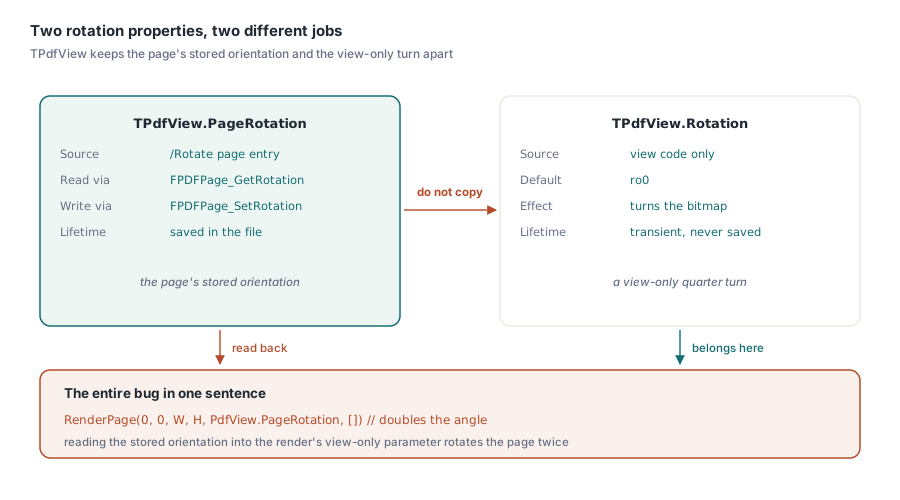
The Rotation parameter earns its place in the API for a genuinely different job: adding a view-only rotation that has nothing to do with a page's stored orientation, the kind a rotate-view toolbar button applies without touching the underlying file. TPdfView keeps the two concepts as two separate properties for exactly this reason. TPdfView.PageRotation mirrors the page's own /Rotate and, through FPDFPage_SetRotation, can write a new value back into the document; TPdfView.Rotation is a transient, view-only property that defaults to ro0 and never touches the file. Reading the first property and writing it into the second is the entire bug in one sentence
// View-only: rotates what the user sees, changes nothing in the file
procedure TViewerForm.RotateViewClick(Sender: TObject);
begin
  case PdfView.Rotation of
    ro0:   PdfView.Rotation := ro90;
    ro90:  PdfView.Rotation := ro180;
    ro180: PdfView.Rotation := ro270;
    ro270: PdfView.Rotation := ro0;
  end;
end;

// Persistent: rewrites the page's own /Rotate entry in the document
procedure TViewerForm.RotatePageClick(Sender: TObject);
begin
  case PdfView.PageRotation of
    ro0:   PdfView.PageRotation := ro90;
    ro90:  PdfView.PageRotation := ro180;
    ro180: PdfView.PageRotation := ro270;
    ro270: PdfView.PageRotation := ro0;
  end;
end;
Why does fit-zoom sizing break the same way?
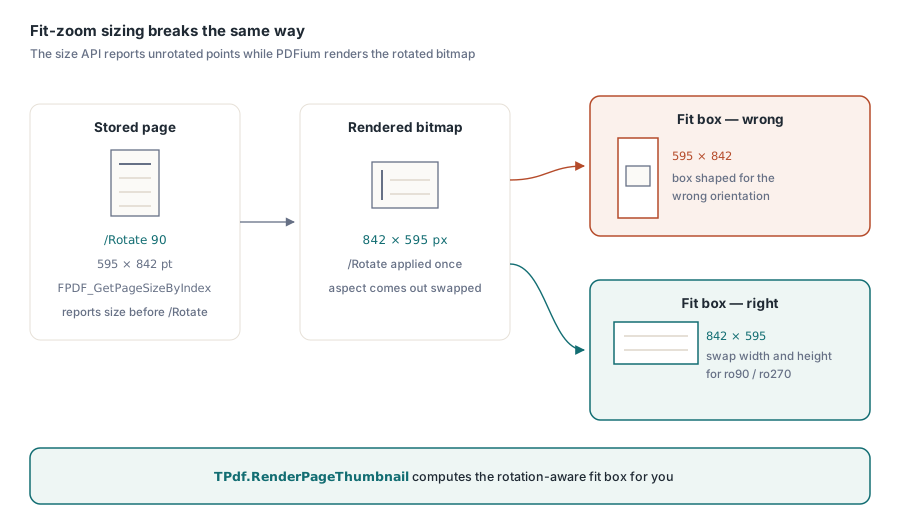
Fit-zoom sizing breaks for a mirror-image reason: the calculation starts from the wrong pair of numbers rather than the wrong angle. A typical way to size a thumbnail box asks PDFium for a page's width and height, compares that aspect ratio to the box available, and computes the largest rectangle that fits inside it — which works cleanly for an unrotated page. The same calculation quietly fails for a /Rotate 90 or /Rotate 270 page when the width and height came from a call that reports the page's intrinsic, unrotated size: an A4 portrait page carrying /Rotate 90 still reports roughly 595 by 842 points, even though PDFium renders it, correctly, at roughly 842 by 595 once the rotation takes effect, and a fit box computed from the unrotated pair ends up shaped for the wrong orientation entirely
FPDF_GetPageSizeByIndex is one concrete example of a call that reports that intrinsic, unrotated size by design, which makes it convenient for scanning page dimensions without loading every page and risky for fit-zoom math that forgets to account for it. The fix follows directly from naming the problem: check the page's rotation before doing the fit arithmetic, swap width and height whenever that rotation is 90 or 270 degrees, compute the fit box from the swapped pair, and still pass ro0 to the actual render call, because PDFium remains the one applying the real rotation
Getting thumbnails right without reinventing the fit math
TPdf.RenderPageThumbnail already carries this fix, so the shortest path to a correct thumbnail is calling it rather than reassembling the fit-and-rotate logic by hand. Given a 1-based page index and a maximum width and height, RenderPageThumbnail computes a fit box, corrects it for a /Rotate of 90 or 270 internally, and returns a caller-owned bitmap without disturbing the document's current page or firing an OnPageChange event — which matters for a thumbnail strip built alongside a live viewer on the same TPdf instance
// PageW, PageH are a page's own (unrotated) dimensions in points, for
// example from FPDF_GetPageSizeByIndex, which reports size before
// /Rotate is applied
function FitBox(PageW, PageH: Double; Rotation: TRotation;
  MaxW, MaxH: Integer; out FitW, FitH: Integer): Boolean;
var
  PgW, PgH, Swap: Integer;
begin
  PgW := Round(PageW);
  PgH := Round(PageH);
  if PgW < 1 then PgW := 1;
  if PgH < 1 then PgH := 1;

  if Rotation in [ro90, ro270] then
  begin
    Swap := PgW;
    PgW := PgH;
    PgH := Swap;
  end;

  Result := (MaxW > 0) and (MaxH > 0);
  if not Result then
    Exit;

  if PgW * MaxH > PgH * MaxW then
  begin
    FitW := MaxW;
    FitH := (MaxW * PgH) div PgW;
  end
  else
  begin
    FitH := MaxH;
    FitW := (MaxH * PgW) div PgH;
  end;
end;
The FitBox helper is worth keeping around anyway, because RenderPageThumbnail only covers the single-bitmap case. A custom thumbnail grid, a print-preview strip, or a page-picker dialog that lays out several pages against independent boxes needs the same rotation-aware fit math without necessarily wanting a fresh bitmap for every tile, and TPdfView's own fit-page and fit-width zoom modes lean on the identical idea internally, choosing between a page's width and height for the zoom-ratio calculation based on the view's current rotation before comparing it against the available client area. If zoom and scrolling performance in that kind of viewer is the next problem on the list, the companion piece on render caching and smooth zoom in a PDFium-based Delphi viewer picks up right where correct sizing leaves off
Spotting a double rotation before a customer does
A double rotation has one reliable visual signature: a page that was rotated 90 degrees on the way in comes out looking rotated 180 relative to the rest of the document, not 90, because the extra ro90 stacked on top of the page's own ro90 instead of replacing it. A test fixture built only from /Rotate 0 pages will never catch this, since adding ro0 to ro0 is still ro0 and the bug stays invisible; a fixture needs at least one page saved with /Rotate 90 and one with /Rotate 270 before a thumbnail or fit-zoom code path can be trusted
The basic page-to-bitmap pipeline covered in rendering PDF pages to JPEG with the PDFium Component already renders rotated pages correctly without any special-case code, precisely because it leaves Rotation at its ro0 default and lets PDFium apply /Rotate on its own. The double-rotation bug only appears once application code starts reading PageRotation back out and feeding it somewhere it does not belong
The rotation-aware render calls and thumbnail sizing described here are part of the PDFium Component for Delphi and C++Builder, alongside the rest of the rendering, viewing, and text-extraction APIs built on the same TPdf and TPdfView classes