A blind user opens a quarterly report in your shiny new Delphi viewer, turns on NVDA, and hears the page footer, then a column of figures, then the title that any sighted reader would have read first. Or hears nothing at all. The page looks perfect on screen, and that is exactly the trap: rendering and reading are different problems solved by different code. The order in which a PDF paints its glyphs has no obligation to match the order a person should hear them, so a viewer built only on rendering calls produces a flawless picture and an unusable narration. PDFium Component, the VCL/LCL wrapper around the PDFium engine for Delphi, C++Builder, and Lazarus, carries a separate set of reading APIs for this reason. The drawing APIs cannot recover a reading order they were never given
An accessible reader stands or falls on three things. It has to extract an order a screen reader can speak, keep a visible word cursor pinned to whatever the voice is saying, and admit when a document was never tagged instead of guessing and pretending. Each one has a clear API to reach for and a failure that bites if you skip the detail
Reading order lives in the structure tree, not the paint order
ISO 32000-1 §14.8 defines logical structure as a tree of elements layered over the page content. PDF/UA (ISO 14289-1) goes further and makes that tree mandatory: every piece of real content has to be reachable through it in reading order, with page artifacts marked as such and skipped. A correctly tagged report knows that "Quarterly Results" is a level-two heading and that the totals grid is a table with header cells. An untagged report is a pile of positioned glyph runs that happen to look like a document
ReadablePageContent walks that structure when it is present and hands back fragments tagged with a semantic Kind, values like cfHeading and cfParagraph, so the UI can say "heading" before the words rather than reading a bold line as ordinary body text. With no usable tree, the same call falls back to heuristic layout analysis: detect columns, cluster baselines, order left to right and top to bottom. That fallback is fine for a single-column memo and shaky for a newsletter, a multi-column form, anything with a sidebar or a pull quote. What matters is knowing which result you got, and the API tells you outright. The TPdfReadableContent record carries a Source field set to rosStructure when the order came from the tagged tree, or rosHeuristic when it was inferred from geometry. Show a guessed order as if it were verified and you have shipped the accessibility version of a passing badge on a build nobody ran
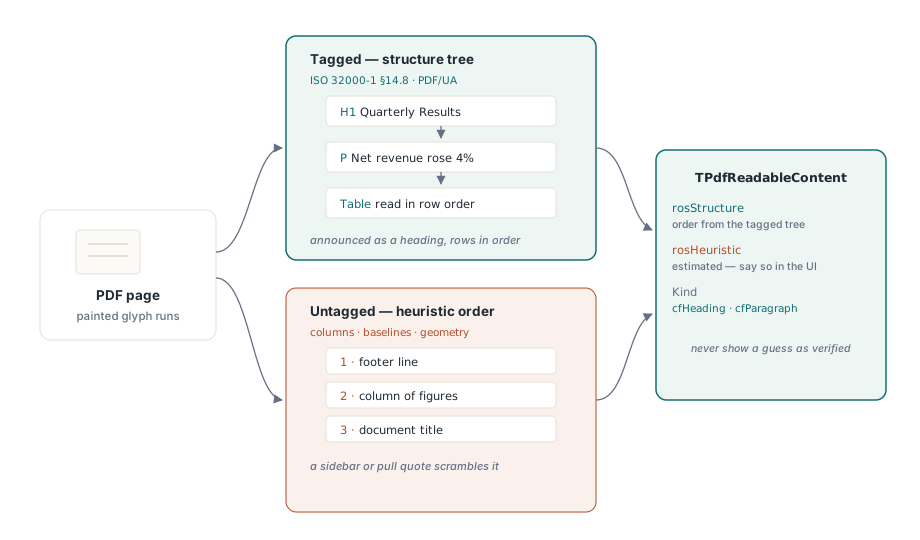
The cheap move at open time is to read IsTagged and call ValidatePdfUa once, then cache the answer. A failed PDF/UA check is not grounds to refuse the file. It is grounds to put "estimated reading order" in the status bar, so that when a customer mails in a complaint about garbled narration, support already knows whether they are looking at a tagging problem in the file or a bug in your code
From page to speech queue with ReadingUnits
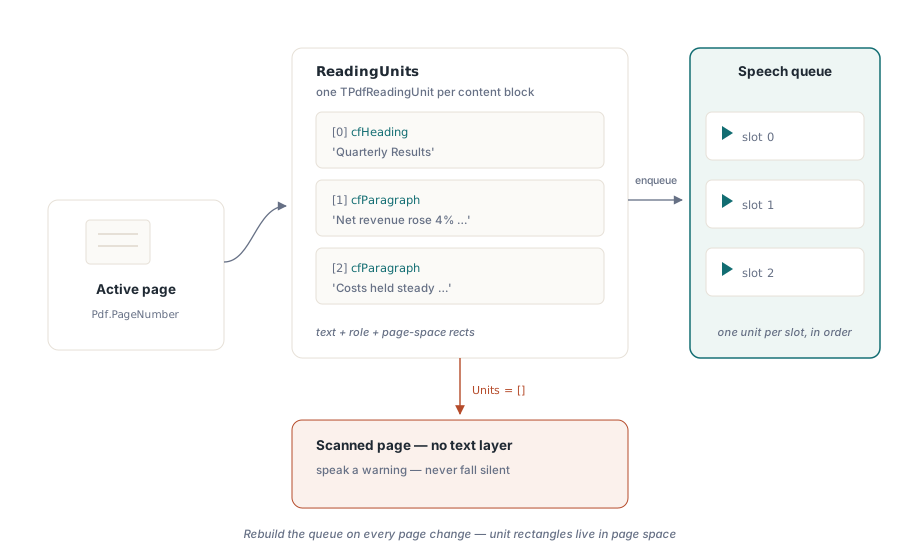
For text-to-speech, ReadingUnits does the heavy lifting. It returns an array of TPdfReadingUnit records for the active page, each one holding the text to speak, its semantic role, and the rectangles that locate it on the page. There is a document-wide companion, DocumentReadingUnits, when you want continuous reading across pages. One unit drops straight into one slot of a speech queue:
procedure TReaderForm.QueuePageSpeech(PageNumber: Integer);
var
  Units: TPdfReadingUnits;
  i: Integer;
begin
  Pdf.PageNumber := PageNumber;   // ReadingUnits works on the active page
  Units := Pdf.ReadingUnits;
  FSpeechQueue.Clear;
  for i := Low(Units) to High(Units) do
    FSpeechQueue.Add(Units[i]);  // text + semantics + highlight rects
  FCurrentPage := PageNumber;
  SpeakNextUnit;
end;
Two things in that loop are easy to get wrong. Keep the queue per page and rebuild it whenever the user navigates, because reading units carry page-space rectangles; a queue left over from page three will paint its highlights onto page four. And treat an empty Units array on a page that clearly has content as your image-only detector. A scanned page is pixels with no text layer underneath, and the right answer is to speak a warning ("this page has no extractable text") rather than fall silent in a way the listener cannot tell apart from a hang
A word cursor that follows the voice
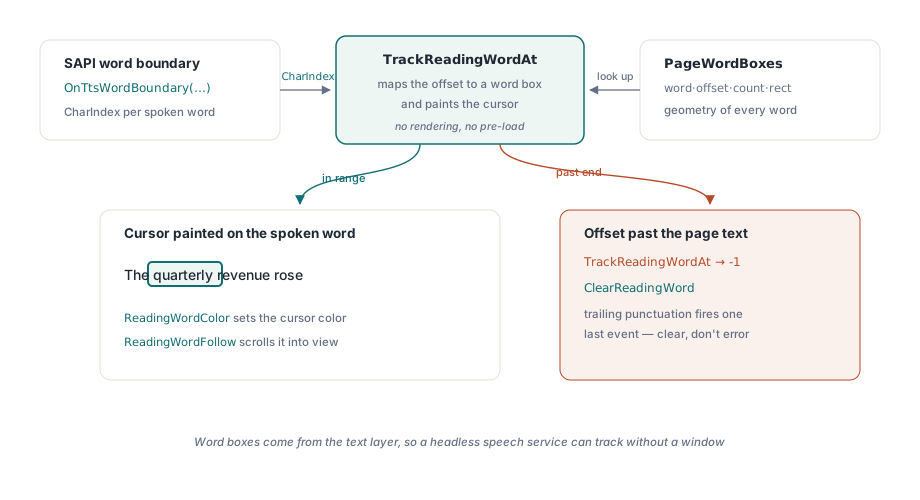
Highlighting a whole paragraph at a time feels sluggish to a low-vision user tracking the words by eye while they are read aloud. Word-level highlighting, the karaoke effect, needs two pieces: the geometry of each word, and a way to map the TTS engine's progress reports onto that geometry. PageWordBoxes gives you the geometry as TPdfWordBox records, each with the word text, its character offset, its character count, and a page-space rectangle. TrackReadingWordAt gives you the mapping. Feed it the character position that SAPI's word-boundary event already reports, and it resolves that offset to an index in the word-box array and paints the cursor on the matching word in one call
procedure TReaderForm.PrepareKaraoke(PageNumber: Integer);
begin
  // The view's word boxes come from the page the view displays.
  // Setting Pdf.PageNumber alone would not move the view
  PdfView.PageNumber := PageNumber;
  FWordBoxes := PdfView.PageWordBoxes;
end;

procedure TReaderForm.OnTtsWordBoundary(Sender: TObject; CharIndex: Integer);
var
  WordIdx: Integer;
begin
  // TrackReadingWordAt maps the offset AND paints the word cursor
  WordIdx := PdfView.TrackReadingWordAt(FCurrentPage, CharIndex);
  if WordIdx < 0 then
    PdfView.ClearReadingWord;  // boundary ran past the page text
end;
The contract is generous on one count and unforgiving on another. The generous part: TrackReadingWordAt keeps its own word-box cache for the page it is tracking, so there is nothing to pre-load, and no rendering happens at all because the word boxes come from the text layer. A headless speech service with no visible window can still track positions. The unforgiving part: the character index has to point into the text the component extracted, not into some cleaned-up string you built yourself. When CharIndex runs past the end of the page text, the function returns -1 rather than raising, which happens all the time when a TTS engine fires one last boundary event for trailing punctuation. Read -1 as "clear the cursor", never as an error
On the display side, ReadingWordColor sets the cursor color. The default amber holds up over most page backgrounds, but test it under every display filter your viewer offers. An amber cursor can vanish completely under color inversion, and inversion running alongside speech is exactly how a low-vision user works, so the one combination you most need to get right is the one a quick demo never exercises. Set ReadingWordFollow to True and the view scrolls the spoken word into sight on its own, which you cannot do without on a zoomed page that spills across screens. Mind one scope rule: SetReadingWord paints only on the active TPdfView page. Decide up front whether manual scrolling pauses speech or the follow behavior overrides it, because picking neither leaves the voice reading on while the cursor sits somewhere off screen
The documents that break your reader
A handful of input shapes defeat a naive implementation reliably enough that they belong as permanent samples in the regression suite, not as one-off bugs you fix and forget
- Untagged but text-rich files. Heuristic order tends to be right for a linear report and wrong the moment a sidebar or pull quote enters. Flag the order as estimated, both in the UI and in your diagnostics log, so the failure is legible later
- Image-only scans. No text layer whatsoever. Catch them through empty reading units and point the user at an OCR step upstream instead of letting the reader narrate an empty page
- Combining characters and mixed scripts. Unicode combining marks do not always collapse one-to-one into visual words, so the word-box count can drift from whatever your own tokenizer expects. Do not index the word-box array with offsets you computed by splitting text yourself; use only the indices
TrackReadingWordAtreturns
Test it like an auditor, not like a demo
"It read my sample out loud" proves nothing. A pass you can defend runs three files through the finished build with NVDA attached: one known-tagged file, where headings are announced as headings and a table is read in row order; one known-untagged file, where the estimated-order indicator is visible; and a scan, where the no-text warning is actually spoken. Each one exercises a path the happy case skips
From there, confirm the word cursor stays locked on at double speech rate and at half, and that ReadingWordFollow scrolling does not wrestle with the user's own scrolling. Then run speech while you cycle through every color filter and watch that the cursor never disappears. The low-vision color filter article covers that rendering path in detail, and the word speech cursor deep dive picks apart the TTS timing
The reading-unit and word-box APIs used above ship with PDFium Component for Delphi and C++Builder (VCL) and Lazarus/FPC (LCL). The product page links the full API reference, including the record layouts for reading units and word boxes behind these examples