In PDFium Component before v3.121.1, reading an annotation through TPdf.Annotation[] and assigning the record back could add empty /R and /D entries to its /AP appearance dictionary, even when the original carried only /N. PDF/A validators reject that dictionary. Since v3.121.1 the getter only reports an appearance it actually read, so an unchanged round trip writes nothing new. The failure is worth understanding in detail, because the usual trigger is a fix meant to make a file more compliant, not less
![Diagram of the PDFium Component annotation round trip where adding afPrint through TPdf.Annotation[] and SetAnnotationData also writes empty /R and /D streams via FPDFAnnot_SetAP, turning a PDF A clean appearance dictionary into one that veraPDF rejects until v3.121.1 reports only the appearances it actually read](../../assets/media/PDFium-Annotation-Appearance-Roundtrip-Leak.svg)
What goes wrong when you write an annotation back unchanged?
The short answer: the annotation gains appearance streams it never had, and a file that passed PDF/A validation before your edit fails it afterward. The typical scenario runs like this. A customer archive arrives with square and text annotations that lack the Print flag, PDF/A requires every annotation to print, so you loop over the pages, add afPrint, and assign each record back. Nothing in that code touches appearances. The record from TPdf.Annotation[] is a TPdfAnnotation, and SetAnnotationData writes every field whose Has* sentinel is set, which is exactly how the HasContents / ContentsText pairs are meant to work. The problem was that the getter set HasAppearanceRollover and HasAppearanceDown to True with empty strings for modes that did not exist, and the setter dutifully wrote two empty streams:
procedure MarkAnnotationsPrintable(const FileName: string);
var
  Pdf: TPdf;
  PageNo, I: Integer;
  A: TPdfAnnotation;
begin
  Pdf := TPdf.Create(nil);
  try
    Pdf.FileName := FileName;
    Pdf.Active := True;
    for PageNo := 1 to Pdf.PageCount do
    begin
      Pdf.PageNumber := PageNo;
      for I := 0 to Pdf.AnnotationCount - 1 do
      begin
        A := Pdf.Annotation[I];
        if not (afPrint in A.Flags) then
        begin
          A.Flags := A.Flags + [afPrint] - [afHidden, afInvisible, afNoView];
          // Before v3.121.1 this assignment also wrote empty /AP/R and
          // /AP/D streams when the source annotation only had /AP/N
          Pdf.Annotation[I] := A;
        end;
      end;
    end;
    Pdf.SaveAs(ChangeFileExt(FileName, '.printable.pdf'));
  finally
    Pdf.Free;
  end;
end;
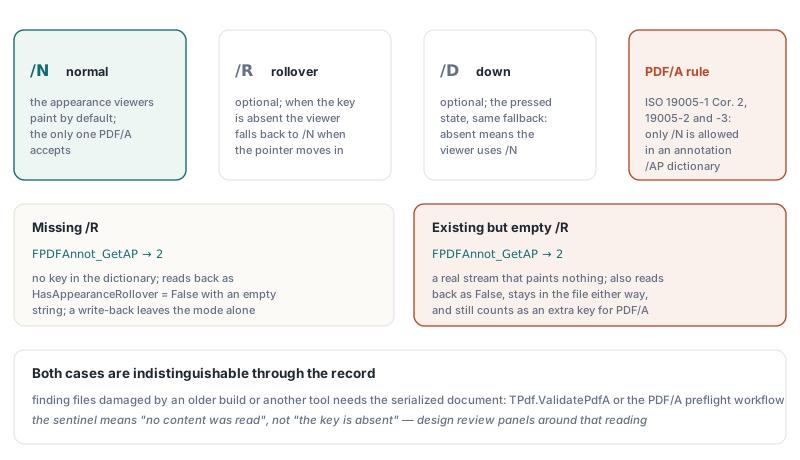
ISO 32000-1 §12.5.5 defines the appearance dictionary with three entries: /N for the normal appearance, /R for rollover, and /D for down. /R and /D are optional, and when they are absent a viewer falls back to /N. An empty /R stream is not absent, though. It is a valid stream that paints nothing, so a viewer that honors rollover appearances shows a blank rectangle the moment the pointer moves over the annotation. PDF/A is stricter still: ISO 19005-1 (with Corrigendum 2) and ISO 19005-2 / 19005-3 allow only /N in an annotation appearance dictionary. veraPDF reports the round-tripped file under rule 6.5.3-4 for PDF/A-1 and rule 6.3.3-2 for PDF/A-2 and PDF/A-3, and the built-in TPdf.ValidatePdfA lists it as pvaiAnnotationApDictViolation. The edit that added the Print flag to satisfy one clause of the standard broke another
Why does FPDFAnnot_GetAP return 2 for a missing appearance?
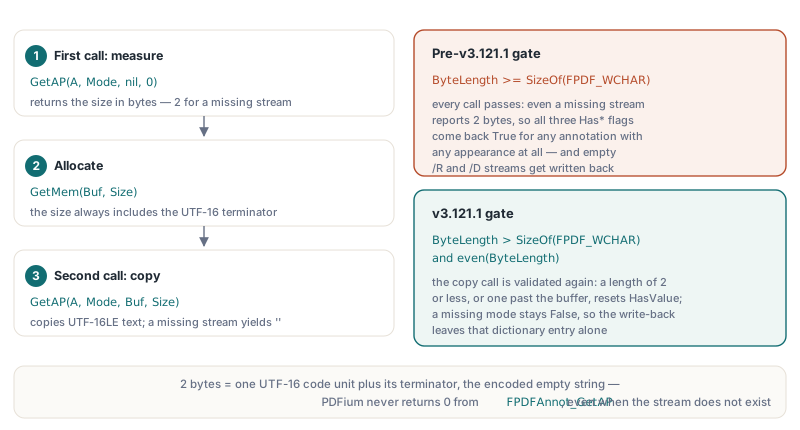
PDFium never returns zero from FPDFAnnot_GetAP, even when the requested appearance stream does not exist. The function follows the usual PDFium two-call pattern: pass a nil buffer to get the required size in bytes, allocate, then call again to copy UTF-16LE text. The size always includes the UTF-16 terminator, so a missing stream reports 2 bytes, an empty string plus its terminator. The pre-v3.121.1 getter tested ByteLength >= SizeOf(FPDF_WCHAR), a check that every call passes, so all three HasAppearance* flags came back True for any annotation with any appearance at all. A round trip through the record then asked FPDFAnnot_SetAP to store an empty string for each mode, and PDFium created the stream to hold it. No exception, no warning, and the visible page looked identical, which is why the defect surfaced in a veraPDF fixture rather than in a viewer
How v3.121.1 decides that an appearance exists
ReadAppearance, the helper inside GetPageAnnotation that fills AppearanceNormal, AppearanceRollover and AppearanceDown, now treats a result as content only when it carries at least one character beyond the terminator. The first call must return more than SizeOf(FPDF_WCHAR) bytes and an even byte count, since an odd length cannot be UTF-16. The second call, which actually copies the text, is validated again: a returned length of 2 or less, or one larger than the buffer that was allocated, resets HasValue to False and leaves the string empty. On the write side nothing changed. SetAnnotationData still calls FPDFAnnot_SetAP only for modes whose HasAppearance* flag is True, so a record read from an annotation that has only /N now writes back only /N. The regression fixture covers both directions: a square annotation with a normal appearance, read and written back unchanged, passes PDF/A-1b, PDF/A-2b and PDF/A-3b, while the same annotation with its Print flag removed fails on the expected flag rule and nothing else
Missing and empty streams look identical, so the getter stays conservative
The native API cannot tell a missing appearance stream from one that exists but is empty, and PDFium Component does not pretend otherwise. Both cases return the same 2 bytes from FPDFAnnot_GetAP, so both read back as HasAppearanceRollover = False with an empty AppearanceRollover. That has two consequences you should design around. First, a False sentinel means "no content was read, so a write-back will leave this mode alone", not "the /R key is absent from the dictionary". Second, the record cannot detect an empty stream that is already in the file: a document damaged by an older build or by another tool reads back clean, and assigning the record back neither repairs nor worsens it. To find those files you need a byte-level check, which is what TPdf.ValidatePdfA and the PDF/A preflight validation workflow with PDFium Component are for
How do you clear an appearance on purpose?
You set the sentinel explicitly and pass an empty string; the setter writes it. Blocking empty strings in SetAnnotationData would have been the blunt fix for this bug, but it would also break callers that clear an appearance deliberately, the same contract HasContents and HasAuthor follow for text. So the fix lives entirely in the getter, and the setter keeps honoring whatever the caller asks for:
// Replace the rollover appearance, then clear it again
A := Pdf.Annotation[0];
A.HasAppearanceRollover := True;
A.AppearanceRollover := 'q Q';
Pdf.Annotation[0] := A;

A := Pdf.Annotation[0];
// A.HasAppearanceRollover is True and the text round-trips as 'q Q'
A.HasAppearanceRollover := True;   // re-assert intent explicitly
A.AppearanceRollover := '';        // write an empty stream on purpose
Pdf.Annotation[0] := A;

A := Pdf.Annotation[0];
// Reads back as HasAppearanceRollover = False with an empty string:
// an empty stream and a missing one are indistinguishable here
Keep in mind that an explicitly emptied /R or /D still counts as an extra key under the PDF/A rules quoted above. If the target is an archive profile, writing a non-empty /N and leaving the other two modes untouched is the only shape that validates. Any workflow that moves annotations between documents, such as XFDF export and import with PDFium Component, should follow the same rule: copy the modes the source actually had and leave the rest of the sentinels False
A read-modify-write pattern that stays PDF/A safe
Upgrade to v3.121.1 or later, leave the appearance sentinels exactly as the getter returned them, and validate the saved file before you ship it. Because a stale empty stream reads back as absent, the verification step has to look at the serialized document rather than at the record, and it is cheap enough to run after every batch:
uses
  PDFium, FPdfPdfa;  // FPdfPdfa declares TPdfAValidationIssue

function AnnotationAppearancesAreClean(Pdf: TPdf): Boolean;
var
  Report: TPdfAValidationResult;
begin
  // Validates the document currently loaded in Pdf, including edits
  // made through Pdf.Annotation[] since it was opened
  Report := Pdf.ValidatePdfA;
  Result := not (pvaiAnnotationApDictViolation in Report.Issues);
end;
The same discipline applies to any panel that recolors or annotates pages for review, a workflow covered in building a Delphi annotation review workflow with PDFium Component: the record is a snapshot of what the engine could read, and a sentinel you did not set yourself should travel back unchanged. The full annotation API, PDF/A preflight and the native PDFium engine ship together in PDFium Component for Delphi, C++Builder and Lazarus