Moving a block of form fields from last year's template onto this year's layout is where FDF and XFDF round-trips stop being enough: the values arrive, but the appearance streams, calculation actions and default resources do not. PDFiumPas answers that case with GraftPdfAcroForm, which clones the entire field object graph out of one PDF and writes it into another
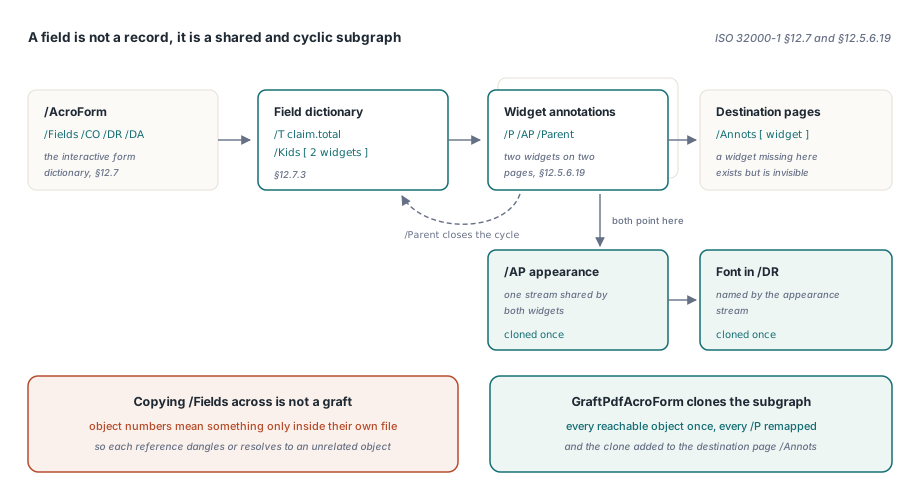
The reason a data-level export cannot do this is structural. A field is not a record, it is a subgraph. ISO 32000-1 §12.7 defines the interactive form dictionary that holds /Fields, /CO, /DR and /DA, §12.7.3 defines the field dictionaries hanging beneath it, and §12.5.6.19 defines the widget annotations that give those fields a visible box on a page. XFDF carries the leaves of that structure. Grafting carries the structure itself
Why copying the /Fields array is never enough
Copying /Fields from one document into another produces a form that is broken in every interesting way, because the array holds indirect references and nothing else. ISO 32000-1 §7.3.10 makes an indirect object addressable by object number plus generation, and those numbers are meaningful only inside the file they came from. Paste the array across and every reference in it either dangles or, worse, silently resolves to an unrelated object that happens to occupy that slot in the destination. Below each reference sits a graph that is both shared and cyclic. A field dictionary points at its kids, each kid points back at its /Parent, a widget points at its appearance streams and at the page that carries it through /P, appearance streams point at fonts in the form's default resource dictionary, and additional-action dictionaries under /AA point at yet more objects. Two widgets on different pages routinely share one font and one appearance XObject. So a correct graft has to walk that graph, clone each reachable object exactly once, redirect every widget's /P at the mapped destination page, and add the cloned widget to that page's /Annots array — otherwise the field exists in the form and is invisible on the page. If you have chased the difference between a field, its widget and the page annotation that displays it, our note on widget index versus annotation index covers exactly that split
What does GraftPdfAcroForm need from you?
It needs three distinct streams and an explicit page mapping. GraftPdfAcroForm takes Source, Destination and Output as separate TStream instances, a TPdfGraftPageMappings array, a TPdfAcroFormGraftOptions record, an optional TPdfCrossDocumentGraftMap, and an out TPdfAcroFormGraftReport. It returns Boolean rather than raising, and on failure the report carries the reason in ErrorMessage. The page mapping is one-based on both sides and is not inferred: every source page that carries a widget you intend to graft must appear in it. Passing nil for the graft map is legitimate — the function then creates and frees a private one for the duration of the call — and TPdfAcroFormGraftOptions.Default gives you CollisionPolicy set to pagcpReject, RenamePrefix set to Imported_, MaxObjects of 100000, MaxDepth of 128 and AllowSignedDestination set to False. Those last three are budgets, and they exist because the object graph you are about to walk came from a file you did not write
uses
  Classes, SysUtils, FPdfCompress;

var
  Source, Destination, Output: TMemoryStream;
  Options: TPdfAcroFormGraftOptions;
  Mappings: TPdfGraftPageMappings;
  Report: TPdfAcroFormGraftReport;
begin
  Source := TMemoryStream.Create;
  Destination := TMemoryStream.Create;
  Output := TMemoryStream.Create;
  try
    Source.LoadFromFile('claim-template-2025.pdf');
    Destination.LoadFromFile('claim-layout-2026.pdf');
    Source.Position := 0;
    Destination.Position := 0;

    Options := TPdfAcroFormGraftOptions.Default;

    SetLength(Mappings, 2);
    Mappings[0].SourcePageNumber := 1;
    Mappings[0].DestinationPageNumber := 1;
    Mappings[1].SourcePageNumber := 2;
    Mappings[1].DestinationPageNumber := 3;

    if GraftPdfAcroForm(Source, Destination, Output, Mappings,
      Options, nil, Report) then
      Output.SaveToFile('claim-2026-with-fields.pdf')
    else
      raise Exception.Create(Report.ErrorMessage);
  finally
    Output.Free;
    Destination.Free;
    Source.Free;
  end;
end;
How does the graft map avoid cloning a shared font twice?
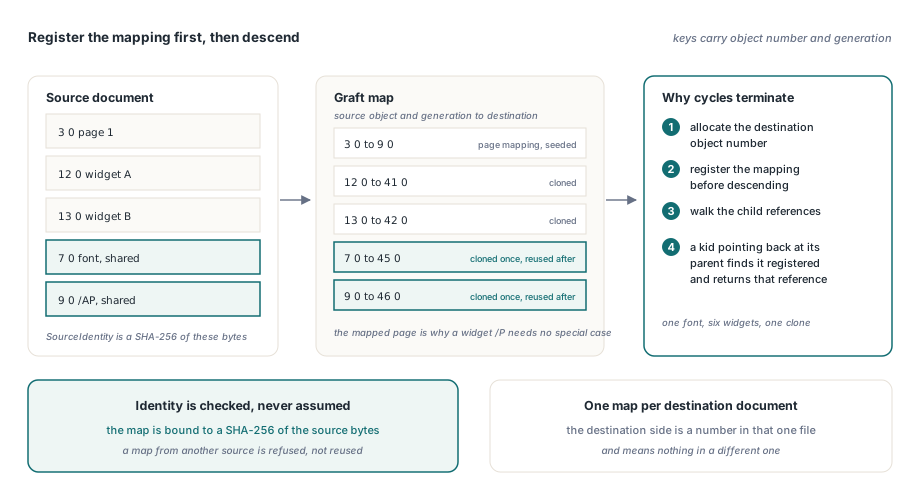
TPdfCrossDocumentGraftMap holds a source-to-destination reference table whose keys carry both object number and generation, and the recursive cloner consults it before it descends. The order of operations is what makes cycles safe: the cloner allocates the destination object number and registers the mapping first, then walks the child references of the source object. A parent that reaches a kid which points back at its parent finds the parent already registered and returns the existing destination reference instead of recursing. The same lookup is what makes a font, an appearance stream or an action shared by six widgets get cloned once and referenced six times. The map is bound to the source document by a SHA-256 hash of the source bytes, exposed as SourceIdentity. If you hand GraftPdfAcroForm a map whose identity does not match the source you passed, it refuses the call rather than reusing references that were never valid for this file. The page mappings are seeded into the same map before cloning begins, which is precisely how a widget's /P ends up pointing at the destination page: the source page object already resolves to the mapped destination page object, so the ordinary reference-rewriting pass handles it with no special case
uses
  Classes, SysUtils, FPdfCompress, FPdfSha256;

var
  GraftMap: TPdfCrossDocumentGraftMap;
  SourceBytes: TBytes;
  EntriesBefore: Integer;
begin
  SetLength(SourceBytes, Source.Size);
  Source.Position := 0;
  if Length(SourceBytes) > 0 then
    Source.ReadBuffer(SourceBytes[0], Length(SourceBytes));

  GraftMap := TPdfCrossDocumentGraftMap.Create(
    AnsiString(SHA256Hex(SHA256Bytes(SourceBytes))));
  try
    EntriesBefore := GraftMap.Count;
    Source.Position := 0;
    if not GraftPdfAcroForm(Source, Destination, Output, Mappings,
      Options, GraftMap, Report) then
    begin
      // Entries added by this call have been rolled back;
      // anything registered before it is still intact.
      Assert(GraftMap.Count = EntriesBefore);
      WriteLn('graft refused: ', Report.ErrorMessage);
    end;
  finally
    GraftMap.Free;
  end;
end;
That rollback is the point of owning the map yourself. PDFiumPas treats a caller-supplied map transactionally: a failed graft discards the entries that call added and keeps every mapping that existed beforehand, so one refusal never leaves behind a cache of references to objects that were never written. Keep one map per destination document, though — the destination side of each entry is an object number in that particular file, and it means nothing in a different one
Field name collisions: reject or rename
Fully qualified field names must stay unique inside a form, and PDFiumPas will not guess what you meant when they clash. TPdfAcroFormCollisionPolicy offers exactly two answers. Under pagcpReject, the default, the first source field whose title already exists in the destination aborts the whole graft with an error and leaves the output stream empty. Under pagcpRename, the colliding source field is renamed by prefixing RenamePrefix and the graft continues, with Report.RenamedFieldCount telling you how often that happened
Options := TPdfAcroFormGraftOptions.Default;
Options.CollisionPolicy := pagcpRename;
Options.RenamePrefix := 'Y2025_';
Options.MaxObjects := 20000;
Options.MaxDepth := 64;

if GraftPdfAcroForm(Source, Destination, Output, Mappings,
  Options, nil, Report) then
begin
  WriteLn('source fields  : ', Report.SourceFieldCount);
  WriteLn('existing fields: ', Report.DestinationFieldCount);
  WriteLn('grafted fields : ', Report.GraftedFieldCount);
  WriteLn('renamed fields : ', Report.RenamedFieldCount);
  WriteLn('cloned objects : ', Report.GraftedObjectCount);
  WriteLn('reused objects : ', Report.ReusedObjectCount);
  WriteLn('mapped pages   : ', Report.MappedPageCount);
  WriteLn('output bytes   : ', Report.OutputByteCount);
end
else
  WriteLn('graft refused  : ', Report.ErrorMessage);
Renaming is not free, and you should decide it deliberately rather than reaching for it to make an error go away. A renamed field is a different field: any JavaScript in the destination that addresses it by name, any calculation entry in /CO that a human wrote against the old name, and any downstream consumer that keys on the field name will need to know about the prefix. If the two documents genuinely describe the same field, the honest fix is usually to reconcile the names upstream, not at graft time. Once the graft lands, walking the merged form to confirm what you actually got is the natural next step, and form field navigation in PDFiumPas covers that traversal
Where the graft deliberately fails closed
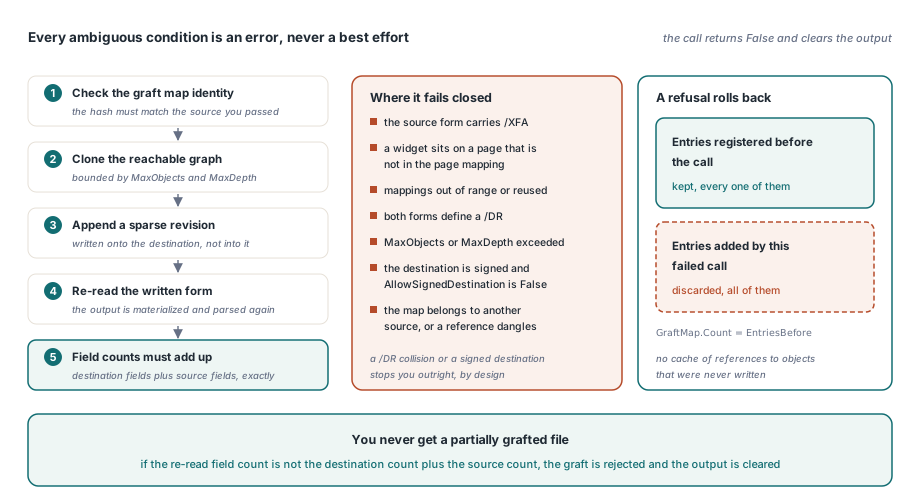
Every ambiguous condition is an error, never a best-effort result, and that is a design decision worth understanding before it surprises you in production. GraftPdfAcroForm returns False, resets the output stream and reports the reason when it hits any of these
- The source form carries an
/XFAentry — XFA packets are a parallel form model and cannot be reduced to AcroForm field dictionaries - A widget lives on a source page that has no entry in the page mapping, which would otherwise silently drop the field or attach it to the wrong page
- Page mappings are out of range, or two mappings reuse the same source or destination page
- Both forms define a default resource dictionary
/DR, because merging two resource name spaces would risk repointing an existing name at a different font - The object graph exceeds
MaxObjectsor the recursion exceedsMaxDepth - The destination contains a signature and
AllowSignedDestinationisFalse - The supplied graft map belongs to a different source document, or a source reference dangles
The write path is equally conservative. PDFiumPas emits the result as a sparse incremental revision appended to the destination, then re-materializes the written output and re-reads its form: if the field count of the result does not equal the destination's original field count plus the source's, the whole graft is rejected and the output is cleared. You never get a partially grafted file. The cost of that policy is real — a /DR collision or a signed destination stops you outright, and you have to resolve it yourself rather than accept a merged approximation — but the alternative is a form that opens fine and computes wrong
When grafting is the wrong tool
Grafting moves structure, so use it when the structure is what you are missing. If both documents already carry the same field set and you only need to move values and annotations between them, the export and import path in the XFDF form data article is lighter, standard and reversible. Reach for GraftPdfAcroForm when the destination has no fields at all, or has a different set, and you need the widgets, appearance streams, actions and calculation order to come across intact. A last practical note on identity: because the graft map keys on object number plus generation and is bound to a SHA-256 of the source bytes, re-saving or optimizing the source between runs produces a different identity and a map that no longer applies. Snapshot the source you graft from and keep it stable for the batch; treat it as an input artifact, not as something a nightly job is free to rewrite
GraftPdfAcroForm, TPdfCrossDocumentGraftMap and the surrounding stream-level PDF toolkit ship with the PDFiumPas Delphi PDFium Component for Delphi, C++Builder and Lazarus, where the product page carries the full API reference for the graft options, report fields and the rest of the document-editing surface