A read-aloud feature has one visible job beyond the voice: as each word is spoken, it must light up that word on the page and keep it in view. To do that you need the bounding box of every word, indexed to the same character stream the speech engine is reading from. Get the boxes but miss the indexing and the highlight drifts a word or two behind the audio; get the indexing but mishandle the page state and the highlight lands on the wrong page entirely. The speech part of this, the synthesizer itself, is the part that rarely breaks. SAPI reports word boundaries to the character. What breaks is the thin mapping layer between a character offset in the speech buffer and a rectangle on the rendered page
PDFium Component ships that mapping for Delphi, C++Builder, and Lazarus, with word boxes available since v1.53 and the tracking cursor since v1.56. The surface is deliberately narrow: a call that returns the word boxes for a page, a tracker that turns a character offset into a painted highlight, and a couple of properties for color and auto-scroll. Narrow as it is, the order you call things in decides whether the feature works, and most of the failures below come from calling the right functions in the wrong sequence
Characters are not words, and TTS engines speak in characters
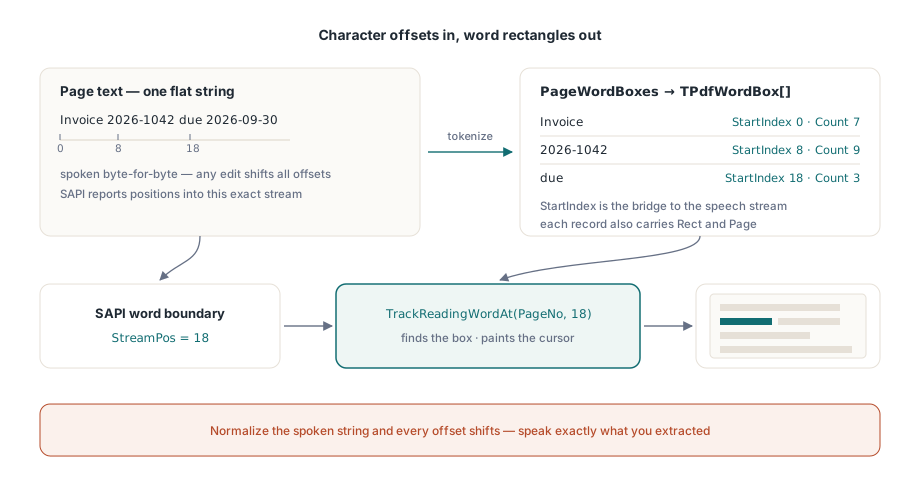
A speech engine consumes a flat string and reports progress as character positions within that string. A PDF page has glyphs placed in page space, where a "word" is a heuristic cluster of glyph runs. The two coordinate systems share nothing unless the text you hand the synthesizer is byte-for-byte the text the word boxes were computed from. That is rule one, and it is unforgiving. Normalize whitespace, strip soft hyphens, or otherwise "clean up" the extracted text before speaking it, and every downstream offset is silently wrong. Speak exactly what you extracted, or keep an explicit offset remapping table. There is no third option that survives real documents
The remapping table is not a hypothetical edge case. The moment your UI inserts a spoken page announcement ("page five") or expands an abbreviation for the synthesizer, the spoken string diverges from the extracted one. Record each insertion's position and length, then subtract the accumulated adjustment before every tracking call. It is maybe twenty lines of bookkeeping, and it is the difference between a highlight that survives the next feature request and one that breaks the first time someone asks for spoken headings
What a word box gives you
Each TPdfWordBox record carries the word's text, its StartIndex and character Count within the page text, a page-space Rect, and the 1-based Page number. The StartIndex field is the bridge between the two coordinate systems: it is the same offset SAPI will hand back as it reads. PageWordBoxes returns the full array for the active page:
procedure TReaderForm.PreparePage(PageNo: Integer);
begin
  PdfView.PageNumber := PageNo;   // the view's word boxes track its displayed page

  FWords := PdfView.PageWordBoxes;
  FPageText := BuildSpeechText(FWords);   // concatenate Word.Text in order

  if Length(FWords) = 0 then
    HandleImageOnlyPage(PageNo);          // a scan with no text layer
end;
The ordering comment is load-bearing. The viewer's PageWordBoxes tokenizes the text layer of the page the view currently displays, so navigate the view first and extract second; no rendering is required, only an open document. (The document component, TPdf, exposes its own PageWordBoxes keyed to Pdf.PageNumber for headless use. The two page numbers are independent, which is its own trap.) An empty result on a page that visibly carries content means an image-only scan. Route it to OCR, or at least announce it ("page 4 contains no readable text"), rather than letting the voice fall silent with no explanation
Wiring SAPI word boundaries to the tracker
TrackReadingWordAt, on the viewer, is the hinge of the whole feature. Give it a page number and a character index; it finds the word box containing that character, paints the reading cursor on it, and returns the word index, or −1 when the index falls between words. SAPI's word-boundary notification supplies exactly the character position it wants:
procedure TReaderForm.OnSpeechWordBoundary(StreamPos: Integer);
var
  WordIdx: Integer;
begin
  // Maps the offset to a word box and moves the highlight in one call
  WordIdx := PdfView.TrackReadingWordAt(FPageNo, StreamPos);
  if WordIdx < 0 then
    Exit;                     // boundary fell outside any word: keep last highlight
end;
Two defensive details earn their keep here. First, TrackReadingWordAt keeps its own word-box cache for the tracked page, rebuilt automatically when the page changes, so the per-boundary cost stays flat no matter how fast the boundaries arrive. Second, it does not bounds-check generously. An index at or beyond the page's character count returns −1 rather than clamping to the final word. Treat −1 as "hold the previous highlight," never as an error, because punctuation runs and inter-word whitespace legitimately produce boundaries that belong to no word. Logging every −1 will bury you. Count them per page instead, and look hard at any page where the ratio spikes, since that usually means a text-normalization mismatch back at rule one
The cursor itself: color, follow, and cleanup
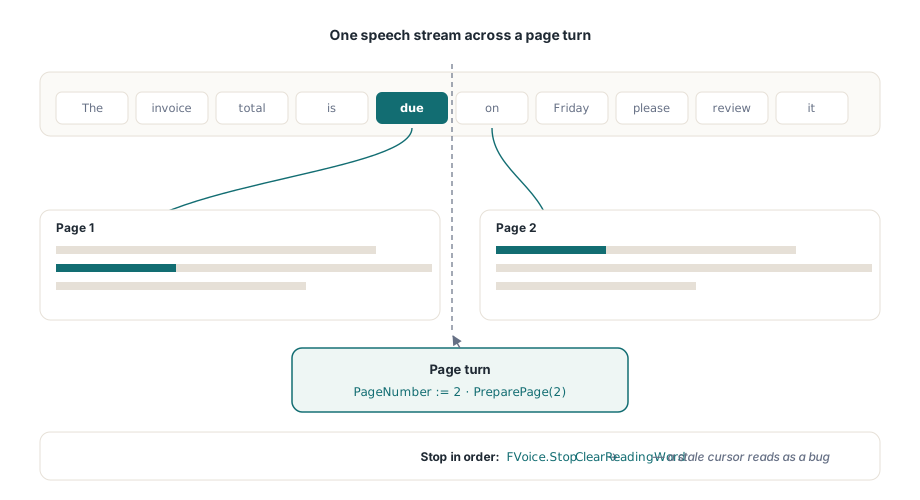
SetReadingWord paints the highlight directly when you hold the word box yourself, ReadingWordColor styles it, and ReadingWordFollow := True scrolls the view just enough to keep the spoken word visible. That last property earns its place. A hand-rolled "center the current word" scroll makes the page lurch on every line break, and motion-sensitive readers will turn the whole feature off inside a minute. The highlight renders only on the page currently shown in the active TPdfView, so multi-page reading has to advance PageNumber in step with speech, then re-run the prepare step for the new page before its first boundary event lands. Skip that and the first few highlights on every page point at stale coordinates
procedure TReaderForm.StopReading;
begin
  FVoice.Stop;                // halt SAPI playback first
  PdfView.ClearReadingWord;   // then remove the highlight; a stale cursor reads as a bug
end;
Symmetry on shutdown is what keeps the highlight honest. Every pause, stop, and page-turn path has to end in ClearReadingWord. Leave it out and an amber rectangle sits on a stopped page looking exactly like a defect, which is the kind of thing every tester will file even though nothing is actually broken
Speech rate stresses this pipeline harder than document size does. At 300 words per minute the boundary events arrive every 200 ms, and at the fastest SAPI rates they come faster than the eye comfortably tracks. The right response is to coalesce, not queue. If a new boundary arrives while a highlight update is still pending, drop the stale one and paint the latest. A cursor that visits every word in order but lags half a second feels broken; one that occasionally skips a word while staying in sync with the voice does not
Edge cases that separate demos from products
A few categories of document expose the seams. Combining characters are the subtlest: Unicode sequences such as a base letter plus a combining diacritic can occupy more character indices than the visual word suggests, so any offset arithmetic that assumes one index per glyph slowly drifts. That is the strongest argument for letting TrackReadingWordAt own the mapping rather than computing word numbers by hand. Hyphenation is more mundane but more common: a word broken across a line break becomes two boxes, and if you speak it as a single token, the boundary event for its second half resolves to the first box. That is usually fine, but it is a decision, so make it on purpose instead of discovering it. Tagging changes the reading order itself. When a document carries proper structure tags (the territory of ISO 14289, PDF/UA), word sequencing follows the logical structure; without them it falls back to layout heuristics, and a two-column untagged page can read straight across both columns. Rotated pages are the last common one: each word's Rect still bounds it correctly in page space, but a viewport-follow policy tuned for horizontal flow scrolls jarringly when the text runs vertically, so keep at least one rotated document in the regression set. For reading-order handling, sentence-level units via ReadingUnits, and the wider assistive stack, see building an accessible PDF reader in Delphi
One platform constraint shapes deployment. SAPI is Windows-only. The word-box and tracking API is byte-for-byte identical under Lazarus and FPC, but Linux and macOS builds need a different synthesizer wired behind the same boundary events; that setup is covered in running the viewer under Lazarus and FPC. Highlight cost also interacts with your page cache once speech rates climb, and the budget arithmetic in render caching and zoom performance carries over here without change
When single-word highlighting is the wrong granularity
Word-level karaoke is not always what a reader wants. At high speech rates the cursor flickering word by word becomes its own visual noise, and some listeners follow a sentence more comfortably than a strobe of single words. For that case the component exposes a coarser unit. ReadingUnits returns sentence- and block-level units, each with its own highlight rectangles, and you paint them with SetReadingHighlight instead of SetReadingWord. The wiring is the same shape: a boundary offset still drives which unit lights up, but the unit you highlight spans a clause or a line rather than a single token. Slower readers and high-rate playback both tend to prefer it, and nothing stops you from offering both modes behind a setting
The version floors are worth pinning down before you build against this: word boxes need PDFium Component v1.53 or later, and the tracking cursor needs v1.56. The full reading API, the sentence-level units, and a working read-aloud demo are on the product page for PDFium Component