Delphi and Lazarus compile the same Object Pascal, and that surface similarity is exactly what makes porting a viewer between them deceptive. The two toolchains diverge in three places that matter for PDF work: the native string type is UTF-16 in Delphi and UTF-8 in an LCL application; VCL and LCL are different visual frameworks with their own controls, dialogs, and form-streaming formats; and a Delphi binary targets Windows while an FPC binary may be headed for Linux or macOS. None of those differences shows up at compile time. A viewer built on PDFium Component, which ships VCL and LCL editions from a single source tree, will compile clean under Lazarus after a handful of unit-name swaps and a few {$IFDEF FPC} blocks. The failures arrive later, when real data and a real deployment expose the assumptions the Delphi build was quietly making
Four of those assumptions account for most of the lost time: text encoding at the UI boundary, the temptation to maintain two copies of the form, the way a native engine binary resolves at runtime, and the moment text-to-speech runs out of platform once SAPI is gone. Each is cheap to handle if you know it is coming and expensive to chase down if you do not
Same Pascal, different string payloads
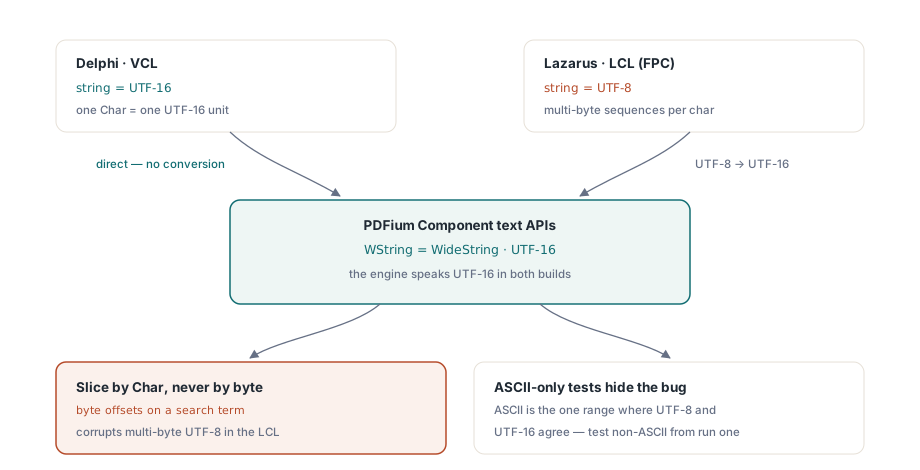
Delphi's native string has been UTF-16 since 2009. Lazarus and Free Pascal default to UTF-8 in LCL applications. The component's text-facing APIs speak UTF-16 through the WString type, which the FPC build aliases to WideString, so every boundary where text crosses between your LCL UI and the PDF engine is a conversion point
The conversions happen automatically in straightforward assignments, and most code never needs to think about them. Two habits keep the encoding bugs out. Pass text straight through without byte-level manipulation: code that slices a search term by byte offset works in Delphi, where one Char is one UTF-16 unit, and corrupts multi-byte UTF-8 in the LCL. And test with non-ASCII data from the first run. A German filename, a Cyrillic search term, an accented author name in the document metadata: pure-ASCII test data hides every encoding defect, because ASCII is the one range where UTF-8 and UTF-16 agree byte for character. The bug is real the whole time; ASCII just keeps it invisible until a customer in Munich opens a file you never tried
One conditional block, not a fork per IDE
After the first dozen IFDEFs the codebase starts to feel like two projects wearing one repository, and forking it per IDE looks tempting. It is the wrong move. The genuine differences collapse into one shared declaration block, and a fork doubles the cost of every bug fix from then on. Keep the conditional layer this small:
{$IFDEF FPC}
uses
  LCLType, Forms, Graphics, Controls;

type
  WString = WideString;   // component text APIs are UTF-16
  TBytes  = array of Byte;
{$ELSE}
uses
  Winapi.Windows, Vcl.Forms, Vcl.Graphics, Vcl.Controls;
{$ENDIF}
Everything below that block compiles identically in both IDEs. Document handling, page navigation, rendering calls: TPdf and TPdfView expose the same surface in the VCL and LCL editions, so the bulk of the viewer never sees a compiler condition. Keeping it that way is a structural discipline rather than a clever trick. Shared PDF logic lives in units that pull in no framework-specific dialogs or panels. The handful of things that genuinely differ, such as print dialogs and file pickers with their platform conventions, hide behind a thin interface implemented once per framework. The IFDEF block becomes the single place future platform divergence is allowed to land, instead of leaking compiler directives across forty units
Build the form in code, not in two designers
Form streaming is where dual-IDE projects quietly rot. A .dfm and an .lfm that claim to describe the same form drift apart property by property until the two builds behave differently for reasons nobody can diff, because the two files are not even in the same format. Constructing the viewer at runtime sidesteps the whole problem. There is one constructor sequence, version-controlled as ordinary code, and it reads the same on both platforms:
procedure TViewerForm.FormCreate(Sender: TObject);
begin
  Pdf := TPdf.Create(Self);

  PdfView := TPdfView.Create(Self);
  PdfView.Parent := Self;
  PdfView.Align := alClient;
  PdfView.Pdf := Pdf;
  PdfView.FitMode := pfmFitWidth;

  if ParamCount > 0 then
  begin
    Pdf.FileName := ParamStr(1);
    Pdf.Active := True;   // opens the document; PageCount valid after this
  end;
end;
The exact order of those assignments matters less than the one line that does the real work. PdfView.Pdf := Pdf binds the visual control to the document component, and from that point page navigation through PageNumber and fit behavior through FitMode respond identically under VCL and LCL. One cross-framework quirk is worth knowing before a user reports it as a bug: assigning Zoom by hand snaps FitMode back to pfmNone on both frameworks. So if your toolbar treats "fit width" as a sticky preference, you have to reassign the fit mode after any programmatic zoom, or the preference quietly stops sticking the first time code touches the zoom level
The binary the IDE never warned you about
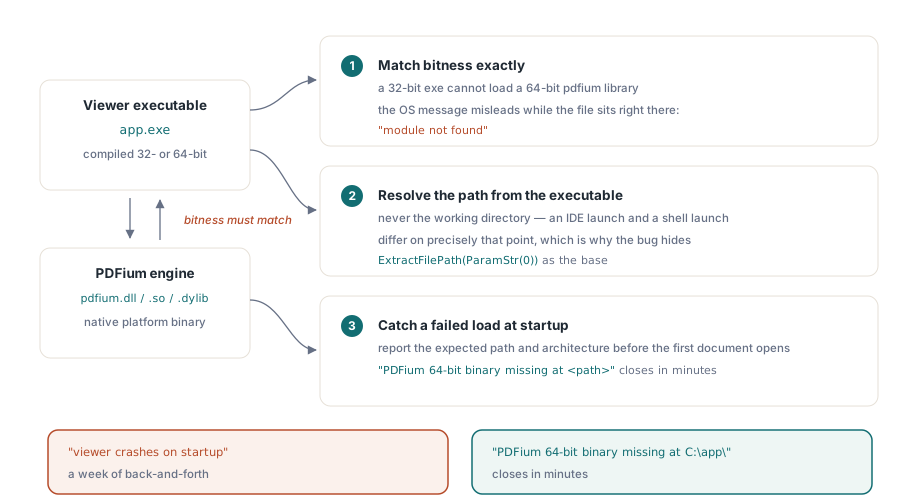
The component wraps the PDFium engine, which ships as a native platform binary, and that binary is the source of nearly every "works in the IDE, fails from the installed shortcut" report. Three rules account for most of them. Bitness has to match exactly. A 32-bit executable cannot load a 64-bit pdfium library, and the message the OS hands back ("module not found" on some Windows versions) actively misleads, because the file is sitting right there next to the executable. Resolve the library path relative to the executable, never the working directory; an IDE launch and a shell launch differ on precisely that point, which is why the bug hides during development. And catch a failed load before the first document opens, then report it with the expected path and architecture spelled out. A support ticket that reads "PDFium 64-bit binary missing at <path>" closes in minutes. One that reads "viewer crashes on startup" turns into a week of back-and-forth
Version the engine binary alongside the executable while you are at it. PDFium moves fast, and an installer that updates the application but leaves a stale library on disk produces crashes nobody in your office can reproduce, for the simple reason that every machine in your office happens to hold the matching pair. Treat the library as part of the build artifact, with the same installer, the same version stamp, and the same rollback path as the executable it loads
Registering components in the Lazarus IDE
Runtime construction needs no design-time registration whatsoever, which is the cleanest setup for a viewer that builds its own UI in code. When you do want the components on the Lazarus palette for design-time work, install the package and let its dedicated registration unit, PDFiumLazReg in Lib/FPC/PDFiumLaz.lpk, handle it. That unit is marked design-time on purpose: it references IDE property-editor interfaces that must never link into your shipping executable
Get this wrong and the symptom is an application that inexplicably depends on IDE packages, which shows up as a deployment failure on the first customer machine that has never had Lazarus installed
Speech and screen readers off Windows
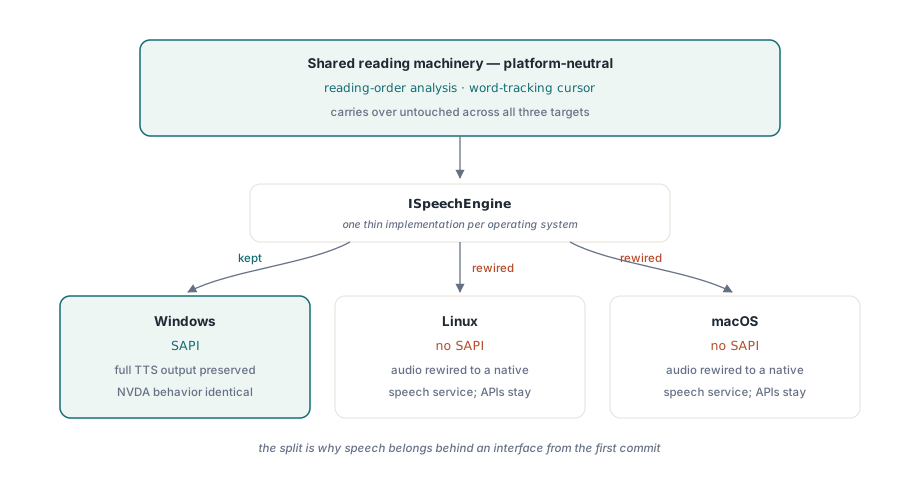
Text-to-speech is the one feature where the cross-platform story breaks, and it breaks at the operating system, not the component. SAPI, the usual TTS backend on Windows, exists only on Windows. A Lazarus build that still targets Windows keeps full SAPI output and the same NVDA-compatible behavior the Delphi original had, so a Windows-to-Windows port loses nothing here, and an NVDA user cannot tell the two builds apart
A Linux or macOS target is a different matter. There is no SAPI to call, so the audio output has to be rewired to a native speech service while the reading APIs above it stay put. That split is the argument for putting speech behind an interface from the first commit: the reading-order analysis and the word-tracking cursor are platform-neutral and carry over untouched, and only the thin layer that actually produces sound has to change per platform. The accessible reader article covers that reading machinery in depth
A parity checklist before you call the port done
The following pass has caught real regressions, listed roughly in the order failures tend to surface. Open a document whose path contains non-ASCII characters. Search for a term with non-ASCII characters and confirm the hits highlight where they should. Exercise mouse-wheel scroll, drag selection, and keyboard page navigation on each widget set you ship, because focus handling and wheel behavior are the most widget-set-dependent corners of the LCL. Check rendering at 100%, 150%, and 200% display scaling. Last, run the installed build, not the IDE build, on a machine that has never had the IDE on it, because that is the only test that exercises binary resolution honestly. Everything else can pass while that one quietly fails
Rendering throughput carries over between the two editions unchanged, so the caching approach from the render cache and zoom performance article applies to the LCL viewer exactly as written for the VCL one
None of this makes the LCL edition a lesser one. The core surface is identical on both sides: TPdf, TPdfView, rendering, forms, text extraction, and the accessibility APIs behave the same regardless of which IDE compiled them. Every difference worth tracking is platform-bound rather than edition-bound. SAPI speech is Windows-only, dialogs follow each framework's conventions, and the binary has to match the architecture it is loaded into. Get the encoding boundaries, the runtime form, and the binary resolution right, and the rest of the port is the mechanical work the compiler already handled for you
The VCL and LCL editions described here ship together as PDFium Component, with source code and identical public APIs for Delphi, C++Builder, and Lazarus/FPC