Hold down the zoom button in a naive PDF viewer and watch the CPU graph. A single press of an auto-repeat zoom control fires a dozen or more zoom steps a second, and if each step kicks off a full-quality re-render of the visible page, the renders pile up faster than they complete. The page rasterizes fine in isolation, perhaps 180 ms for an A4 scan, but you are now running a dozen 180 ms renders against work the user has already moved past. The viewer locks, a core pins at 100%, and by the time the screen catches up the user has stopped at a zoom level four renders ago. The cure is not a faster rasterizer. It is a cache that returns finished pages instantly and a render loop willing to abandon work the moment it goes stale
PDFium Component hands you the parts for both and stays out of the policy. You get caller-owned bitmaps, a progressive renderer that takes a cancellation token, fit modes that recompute zoom on resize, and a tiling call for pages too large to rasterize whole. What it deliberately does not provide is the cache itself, because the right eviction policy depends on your viewport, your platform's memory ceiling, and how your users scroll. That decision is yours to get right, and the consequences of getting it wrong are exactly the freeze and the leak
Where the milliseconds and megabytes go
Put numbers on the cost before you design anything. An A4 page at 96 DPI is roughly 794 by 1123 pixels, about 3.5 MB as a 32-bit bitmap. Zoom to 200% and that quadruples. At 400% on a high-DPI display you are allocating and filling a single page bitmap of 50 to 60 MB, and a continuous-scroll viewer keeps several pages live at once. Rasterization cost tracks output pixels, so each doubling of zoom roughly quadruples both render time and memory together
Two consequences fall straight out of that arithmetic. A cache whose key ignores zoom level is worthless, because the very gesture it needs to accelerate, zooming, produces a new bitmap every time. And an unbounded cache will run a 32-bit process out of address space on precisely the documents where people zoom hardest: dense title-deed scans, engineering drawings, large-format maps. The cache has to be keyed correctly and capped firmly, and neither is optional
What belongs in the cache key
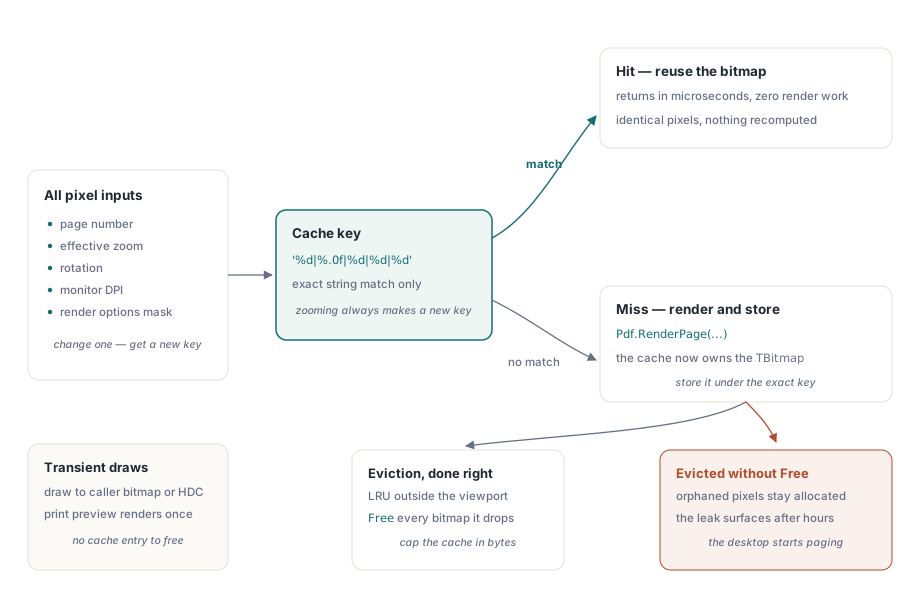
A cached bitmap is safe to reuse only when every input that shaped its pixels still matches. That means the page number, the effective zoom (or equivalently the output pixel dimensions), the rotation, the monitor DPI, and the render options that were in force when it was produced. A page rendered with reAnnotations is a different image from the same page without them, and a grayscale pass through reGrayscale is different again. Drop any one of these from the key and the bugs are predictable: an annotation overlay that lingers after a reviewer deletes the comment, or a page that turns blurry the instant a user drags the window from a laptop panel to an external 4K monitor and the DPI changes underneath a stale bitmap
function TPageCache.Acquire(Pdf: TPdf; PageNo: Integer; ZoomPct: Single;
  Rotation: TRotation; Opts: TRenderOptions): TBitmap;
var
  Key: string;
begin
  Key := Format('%d|%.0f|%d|%d|%d',
    [PageNo, ZoomPct, Ord(Rotation), Screen.PixelsPerInch, OptionsMask(Opts)]);
  if FBitmaps.TryGetValue(Key, Result) then
    Exit;

  Pdf.PageNumber := PageNo;
  Result := Pdf.RenderPage(0, 0, OutputWidth(PageNo, ZoomPct),
    OutputHeight(PageNo, ZoomPct), Rotation, Opts);
  FBitmaps.Add(Key, Result);   // the cache now owns this bitmap
end;
On a hit this returns in microseconds, which is the whole point. The harder question is what happens to the bitmaps that fall out of the cache, and that turns out to be a question about who owns them
Who frees the bitmap
The function form of RenderPage returns a TBitmap that the caller owns. In a one-shot export that ownership is obvious and easy to honor. Inside a cache it becomes the single most common leak in Delphi PDF viewers, because the dictionary now holds the only reference to each bitmap, and a plain TDictionary frees keys and values for you only if they are managed types. A TBitmap is not. Evict an entry without calling Free and the pixels stay allocated with nothing pointing at them
The reason this slips through is timing. A ten-minute smoke test never zooms enough distinct pages to notice; the leak only shows itself after someone has scrolled and zoomed a long document for a couple of hours, at which point the process is holding hundreds of orphaned page bitmaps and the machine starts paging. That is why eviction belongs in the first version of the cache, not a later one. Cap the cache by estimated bytes, computed as width times height times four, evict the least-recently-used pages that sit outside the viewport and the prefetch window, and free every bitmap as you remove it. For draws that are genuinely transient, the overloads that render into a caller-provided TBitmap or straight onto an HDC let you skip the ownership dance entirely. Print preview is the obvious case, since you render each sheet once and caching it buys nothing
Progressive rendering and honest cancellation
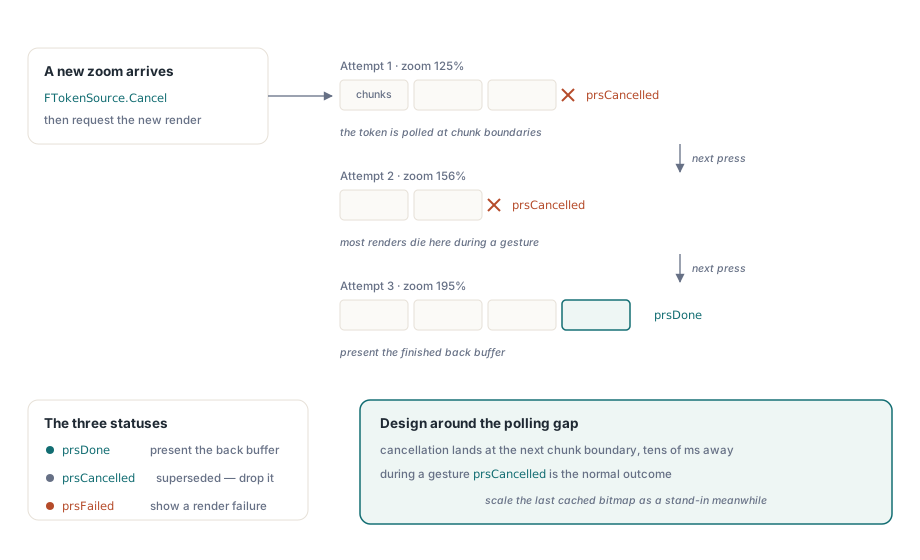
The plain RenderPage overloads block until the page is finished, which is exactly the behavior you do not want while the user is still moving the zoom control. For that you reach for RenderPageProgressive. It takes an IPdfCancellationToken and returns one of prsDone, prsCancelled, or prsFailed. The behavioral detail that catches people out is that cancellation is not instantaneous. The token is polled at chunk boundaries inside the render, so a token you signal in the middle of a chunk takes effect only when that chunk finishes. On a complex page the latency between asking and stopping runs to tens of milliseconds. Design around that gap rather than wishing it away: cancel the previous token the instant a new zoom value arrives, but do not assume the old render halts the moment you ask it to
procedure TViewerForm.RequestRender(TargetZoom: Single);
var
  Status: TPdfProgressiveStatus;
begin
  if FTokenSource <> nil then
    FTokenSource.Cancel;           // abandon the previous in-flight render
  FTokenSource := TPdfCancellationTokenSource.New;  // FPdfAsync unit

  Status := Pdf.RenderPageProgressive(FBackBuffer, 0, 0,
    FBackBuffer.Width, FBackBuffer.Height, FTokenSource.Token,
    ro0, [reAnnotations]);

  case Status of
    prsDone:      PresentBackBuffer;
    prsCancelled: ;                // superseded by a newer request: drop silently
    prsFailed:    ShowRenderFailure;
  end;
end;
During interaction, prsCancelled is the normal outcome, not the exceptional one. Most of the renders a zoom gesture starts will be superseded before they finish, so treat cancellation as routine and drop the result silently. A render queue that logs every cancellation as a warning will bury the one failure that actually matters under thousands of lines of noise. To keep the screen from looking dead while the real render runs, pair the progressive path with a cheap stand-in: scale the previous cached bitmap to the new zoom and present that immediately. It looks soft for a hundred milliseconds or two, but it reads as instant, and it buys the full-quality render the time it needs to either finish or be canceled by the next gesture
The fit mode that zoom quietly turns off
A viewer's FitMode property, set to pfmFitPage or pfmFitWidth, recomputes zoom on every resize so the page keeps fitting as the window changes. The catch is that assigning Zoom directly resets FitMode back to pfmNone. As a default that is correct: a user who deliberately typed 150% does not want the next window resize to throw it away. But it surprises anyone who wires a zoom-in button as Zoom := Zoom * 1.25 and then cannot work out why fit-to-width stopped responding after the first click. If your toolbar offers both explicit zoom and fit modes, you have to remember the user's last fit choice yourself and reassign it when they press the fit button again. The component will not restore a mode that a zoom assignment just cleared, and it is not supposed to
A memory budget you can defend
A budget you can write down is a budget you can argue for in a code review, so start from a concrete scenario. Say continuous scroll keeps the visible page plus one prefetched page above and below, alongside a thumbnail strip. At 100% on a 96-DPI display those three full-size bitmaps come to about 3.5 MB each, which is nothing. At 300% on a 4K display the same three bitmaps are roughly 30 MB each, and that is before the cache has retained a single historical page. The growth is in the gesture, not the document
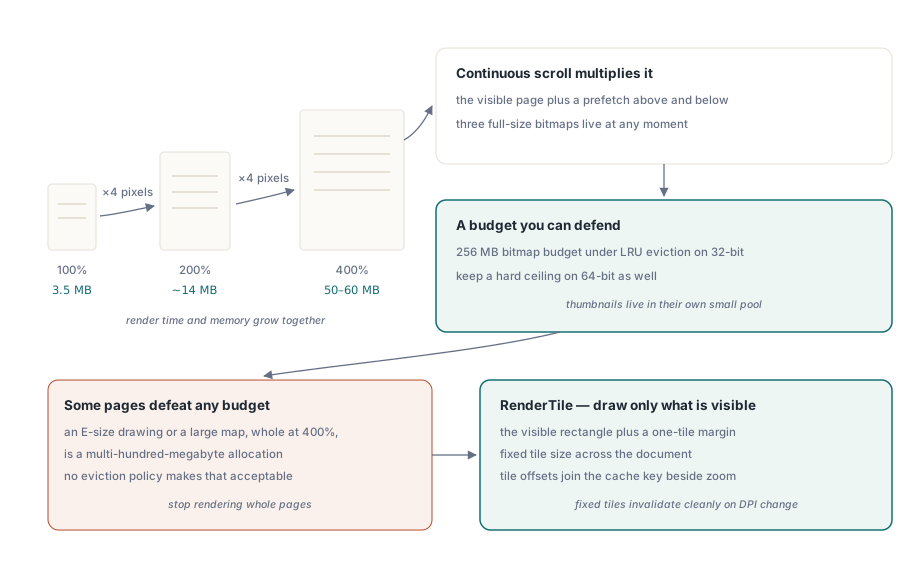
A sound default for a 32-bit Delphi process is a 256 MB bitmap budget under LRU eviction. On 64-bit you can scale with physical RAM, but keep a hard ceiling regardless, because the failure you are guarding against is not your process crashing. It is the whole machine thrashing its page file while your viewer technically keeps running and the user wonders why everything else slowed down. A hard cap fails predictably; an unbounded cache fails by taking the desktop with it. Thumbnails deserve their own treatment: render each one once at its small target size and hold it in a separate pool that the LRU logic never touches. Regenerating a 120-pixel thumbnail by downscaling a 60 MB full-page bitmap is the most wasteful possible way to produce a postage stamp
Some single pages defeat any budget. An E-size engineering drawing or a large map rendered whole at 400% is a multi-hundred-megabyte allocation, and no eviction policy makes that acceptable. The answer there is to stop rendering whole pages. RenderTile rasterizes only the region at pixel offset (Left, Top) within a page notionally scaled to PageWidth by PageHeight, so you render just the visible rectangle plus a one-tile margin around it for smooth panning, and you fold the tile offsets into the cache key alongside zoom. Keep the tile dimensions fixed across the document. Fixed tiles mean a DPI change invalidates the whole grid cleanly, where variable tiles leave you chasing visible seams between regions rendered at slightly different scales
Two adjacent features quietly add to all of this. Color-filter passes such as grayscale or inversion run after rendering and produce a second full-size bitmap each time, doubling the per-page footprint of any view that uses them; that cost is the subject of low-vision color filtering for Delphi PDF viewers. And a viewer that highlights words during text-to-speech invalidates the rendered view on every spoken word, so the interaction between highlight redraws and speech rate matters more than it first appears, as covered in word-by-word TTS highlighting
The rendering overloads, the progressive status codes, and the viewer component itself are documented on the product page for PDFium Component