A PDF intake review workbench is a small program with one job: look at every file before anything downstream is allowed to touch it. To do that job it has to assemble a handful of capabilities into one pass. It opens the file (without trusting it), reads what the file claims about itself, looks for content that will mislead a naive extractor or carry an attack, decides whether there is any extractable text at all, and then routes the document to a queue based on what it found. Skip the inspection and the failures are quiet ones: an owner-password-encrypted PDF that wraps an XFA form sails through a text extractor as empty strings, gets indexed as a blank document, and nobody notices until someone downstream goes looking for content that was never read. PDFium Component is a source-code VCL/LCL viewer and inspection library for Delphi, C++Builder, and Lazarus, and it exposes the introspection calls this workbench needs. The sections below walk through which call answers which question, and the two places where the obvious call gives you a confidently wrong answer
Five questions to answer before a file is routed
Strip away the grid and the thumbnail strip, and intake triage reduces to five questions:
- Can the file be opened at all, and under which password?
- What does it claim to be: title, author, creation date?
- Does it carry active or risky content such as JavaScript, an XFA form, or embedded files?
- Is there extractable text, or is it a scan headed for OCR?
- Given all of that, which queue gets it: straight-through processing, manual review, or quarantine?
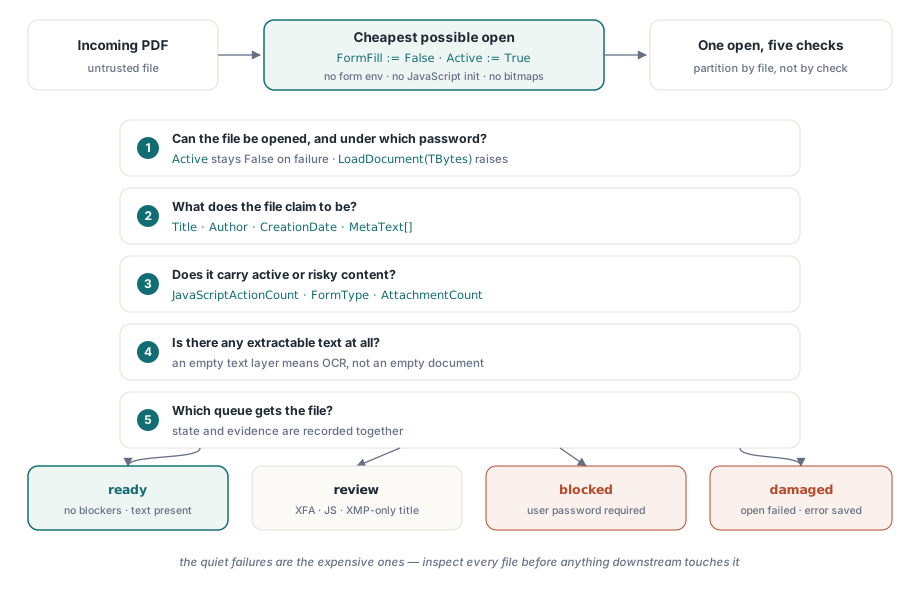
Each question maps onto one or two PDFium Component calls. Two of those mappings have sharp corners that account for most of the misrouted files I have had to debug in production. Document metadata lives in two different places that can disagree, and encryption does not necessarily stop a document from opening
Open cheaply: form fill off, zero pages rendered
Triage should be the cheapest possible open. Setting FormFill := False before Active := True tells the component to skip the form-fill environment entirely. That shortens load time, and (just as important for files of unknown origin) it prevents any document-level JavaScript from initializing. None of the inspection properties used below require rendering a page, so a triage pass never has to produce a single bitmap
procedure InspectIncoming(const IncomingPath: string; var Rec: TIntakeRecord);
var
  Pdf: TPdf;
begin
  Pdf := TPdf.Create(nil);
  try
    Pdf.FileName := IncomingPath;
    Pdf.FormFill := False;     // no form environment, no JavaScript init
    Pdf.Active := True;        // failure is silent: Active simply stays False

    if not Pdf.Active then
    begin
      Rec.OpenFailed := True;  // damaged file or user-password lock
      Exit;                    // the finally block still runs
    end;

    Rec.PageCount := Pdf.PageCount;
    CollectIdentity(Pdf, IncomingPath, Rec);
    CollectRiskSignals(Pdf, Rec);
  finally
    Pdf.Active := False;
    Pdf.Free;                  // never leak the instance on a malformed file
  end;
end;
The check after the assignment is not optional, and it is a check rather than an exception handler for a reason. When the engine cannot load the file, the component swallows the internal EPdfError and leaves Active at False instead of propagating it. Code that waits for an exception will happily read PageCount from a document that never opened. If the rejection workflow needs the engine's actual error text, read the file into a byte array and call the LoadDocument overload that takes TBytes; that path does raise EPdfError with the message, including the password case. The try..finally still earns its place. Intake services run unattended for weeks, and no later exception may leak the TPdf instance or hold a lock that the retry pass will trip over
Throughput rarely becomes the bottleneck. With form fill disabled and no rendering, a triage open is dominated by I/O, and a single worker comfortably inspects several files per second from local disk. If intake volume ever does outgrow one worker, partition the work by file rather than by check. The five questions share one open, and splitting them across processes would multiply the most expensive step instead of amortizing it
Metadata lives in two places, and they disagree
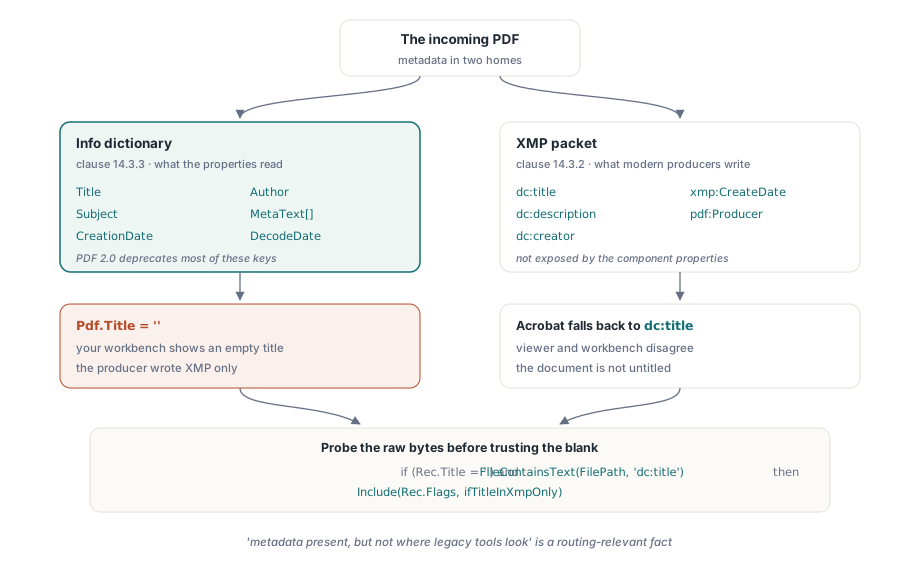
ISO 32000-1 defines two homes for document metadata: the document information dictionary (clause 14.3.3) and an XMP packet attached to the catalog (clause 14.3.2). The Title, Author, Subject, and CreationDate properties read the Info dictionary, with MetaText[] for any other key and DecodeDate to parse the D:YYYYMMDD... date string. The catch is that modern producers increasingly write XMP only, a direction ISO 32000-2 makes official by deprecating most Info dictionary keys in PDF 2.0. The symptom in an intake tool is concrete. Your workbench shows an empty title while Adobe Acrobat displays one, because Acrobat fell back to dc:title inside the XMP packet, which the Info-dictionary properties never touch
procedure CollectIdentity(Pdf: TPdf; const FilePath: string;
  var Rec: TIntakeRecord);
begin
  Rec.Title := Pdf.Title;             // Info dictionary value
  Rec.Author := Pdf.Author;
  Rec.CreatedAt := Pdf.CreationDate;  // raw PDF date string ("D:2026...")

  // An empty Info title does not mean the document is untitled. The
  // component does not expose the XMP packet, so probe the raw file
  // bytes for the dc:title element before trusting the blank.
  if (Rec.Title = '') and FileContainsText(FilePath, 'dc:title') then
    Include(Rec.Flags, ifTitleInXmpOnly);
end;
Even the crude substring probe above earns its keep: "metadata present, but not where legacy tools look" is a routing-relevant fact for any archive pipeline that indexes on title or author. If your downstream index reads only the Info dictionary, files flagged this way will silently become unsearchable
Encrypted files that open anyway
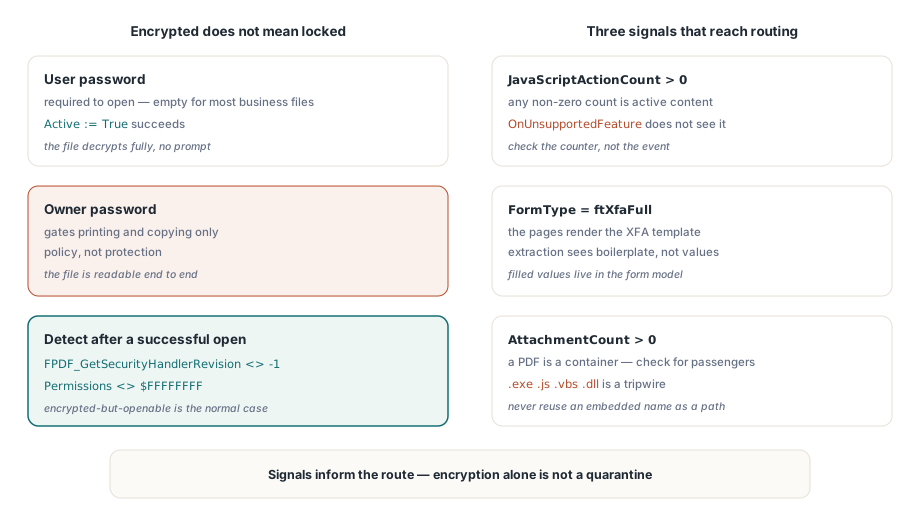
An encrypted document does not necessarily fail to open. The standard security handler (ISO 32000-1 clause 7.6.3) distinguishes a user password, required to open the document, from an owner password that merely gates permissions such as printing and copying. A large share of "protected" business documents are encrypted with an owner password and an empty user password. They open without prompting, decrypt fully, and rely on viewers volunteering to honor the permission flags. That is policy, not protection, and your intake states should reflect the difference
Detecting encryption after a successful open takes one engine call plus a fallback. FPDF_GetSecurityHandlerRevision(Pdf.Document) returns -1 for unprotected files and the handler revision otherwise, and Pdf.Permissions returning anything other than the all-bits-set $FFFFFFFF mask is the corroborating signal. For genuinely user-password-locked files, assign Password before setting Active := True; if the open still fails, route the file to a blocked state that requests credentials from the sender through a secure channel rather than retrying blindly. And resist the temptation to treat "encrypted" as an automatic quarantine. In most document-heavy industries, encrypted-but-openable files are the normal case, not the suspicious one
Active content: JavaScript, XFA, and embedded files
Three findings should always reach the routing decision. First, JavaScript: the OnUnsupportedFeature event reports structural features such as XFA or 3D content as the engine encounters them, but it does not detect JavaScript. Check JavaScriptActionCount instead and treat a non-zero result as active content. Second, XFA: when FormType returns ftXfaFull, the visible pages are often little more than a rendering of the XFA template, and conventional text extraction will see boilerplate rather than the filled values. Third, attachments: a PDF is a container format, and AttachmentCount tells you whether this one is carrying passengers
procedure CollectRiskSignals(Pdf: TPdf; var Rec: TIntakeRecord);
var
  i, PageNo: Integer;
  Ext: string;
begin
  Rec.IsEncrypted := Assigned(FPDF_GetSecurityHandlerRevision) and
    (FPDF_GetSecurityHandlerRevision(Pdf.Document) <> -1);
  Rec.HasForms := Pdf.FormType <> ftNone;
  Rec.IsXfa := Pdf.FormType = ftXfaFull;
  Rec.HasJavaScript := Pdf.JavaScriptActionCount > 0;

  // AnnotationCount is a per-page property; walk the pages to total
  // it. Loading a page object renders nothing, so this stays cheap.
  Rec.Annotations := 0;
  for PageNo := 1 to Pdf.PageCount do
  begin
    Pdf.PageNumber := PageNo;
    Inc(Rec.Annotations, Pdf.AnnotationCount);
  end;

  Rec.Attachments := Pdf.AttachmentCount;

  for i := 0 to Rec.Attachments - 1 do
  begin
    Ext := LowerCase(ExtractFileExt(string(Pdf.AttachmentName[i])));
    if (Ext = '.exe') or (Ext = '.js') or (Ext = '.vbs') or (Ext = '.dll') then
      Include(Rec.Flags, ifDangerousAttachment);
  end;
end;
Two details in that loop deserve attention. The attachment name comes from inside the document, so never reuse it as an output path without sanitizing first; an embedded name like ..\..\start.exe is a path traversal waiting for a careless save call. And an extension blocklist is a tripwire, not a guarantee. Its job is to force a human decision, not to certify the file clean
Turning signals into routing states
A workable state model needs fewer states than most teams expect: ready (no blockers, text present), review (open succeeded but something needs eyes, such as an XFA form, JavaScript, an empty text layer, or a title only in XMP), blocked (user password required), and damaged (open failed). Record the evidence alongside the state. The file hash, page count, the exact flags, and the engine error message for damaged files all matter, because the person who questions a routing decision will do so weeks later, against a file that may since have been replaced or modified
When an operator does need to look at a quarantined file, do not hand it to the default shell viewer. Render it inside a hardened pane with scripting and link handling disabled, the approach described in building a secure PDF preview surface in Delphi. And if your intake feeds an archive with conformance requirements, the triage pass is the natural place to schedule a deeper check; batch preflight validation against PDF/A and PDF/UA profiles picks up exactly where this inspection stops
The component's product page covers licensing, the full inspection API, and the bundled demos, including an intake-style document inspector: PDFium Component