A batch preflight tool is a console program with no window, pointed at a folder of PDFs, that validates each one against the conformance standards you name and leaves behind machine-readable proof of what it found. Nobody sits and watches it. It runs at two in the morning under cron or Windows Task Scheduler, or as a gate in a CI pipeline, and the next person to care about its output is either a scheduler reading an exit code or an auditor opening a report weeks later. That changes what "correct" means. The preflight engine of PDFium Component, a source-code PDF library for Delphi, C++Builder, and Lazarus, makes the validation calls themselves almost trivial. The work that decides whether the tool earns its keep sits around those calls: which profile you checked, what the exit code told the scheduler, and whether the report that would have caught a mistake still exists when someone goes looking for it
The contract: what a scheduler can actually see
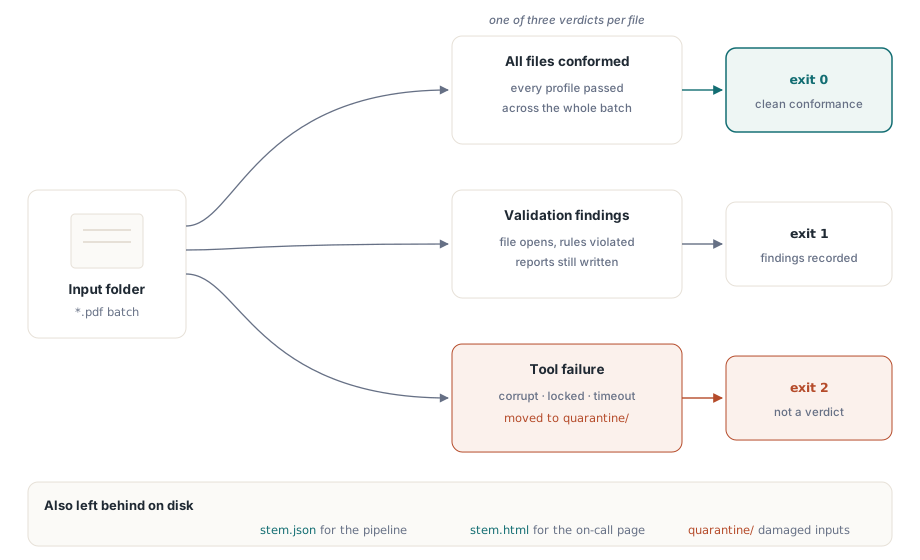
A CI runner or Windows Task Scheduler sees exactly two things from your tool: the exit code and whatever files it left behind. Log lines, console colors, progress output: all of that is for a human watching live, and at two in the morning nobody is. So fix the exit-code vocabulary before you touch the API, and keep it boring:
0: every file conformed to every requested profile1: at least one file produced validation findings2: the tool itself failed on at least one file (corrupt input, lock, crash)
The distinction between codes 1 and 2 is the one teams skip and later regret. A corrupt PDF that will not open is not a validation failure. Fold it into code 1 and a truckload of damaged scans shows up in your dashboards as a sudden conformance collapse, sending someone chasing a standards regression that never happened, when the real story is a busted scanner upstream
Two more items belong in the contract. The first is a per-file timeout. A pathological PDF, thousands of pages with deeply nested object structures, can hold a single validation pass for minutes, and a nightly window has no patience for it. Kill that file's job at the deadline, count it as a tool failure, and keep the batch moving. The second is a quarantine directory: move every timed-out or unopenable input aside instead of leaving it in place. Over a few months that directory quietly accumulates the worst documents your real customers send, and that corpus is worth more to release testing than any synthetic sample you could write by hand
Picking standards, and why the conformance level matters
The TPdfPreflightStandard enumeration covers the families that come up in practice: ppsPdfA for ISO 19005 archival conformance, ppsPdfUa for ISO 14289 accessibility, ppsPdfX for print exchange, plus ppsPdfE, ppsPdfR, and ppsPdfVT for engineering, raster, and variable-data work. Within a family the engine reads the conformance level the document claims and reports it per standard in the result's ConformanceName. Naming the family is rarely enough, because the level is where the real difference lives. PDF/A-2b promises visual reproducibility and nothing more. PDF/A-3a adds a demand for logical structure tagging and allows embedded source files, which is a far harder bar to clear for scanned material that has no tag tree at all. Get this wrong in either direction and the batch lies to you. If your retention policy actually wants PDF/A-2b but you fail files for missing structure tags, the report fills with findings nobody will ever fix. Accept any PDF/A label without checking the level and you sign off on documents that meet a weaker bar than you promised. Accessibility mandates from government buyers increasingly stack PDF/UA on top of all this, which adds no cost to the run because BuildPdfPreflightReport (from the FPdfPreflightReport unit) takes a set of standards:
Report := BuildPdfPreflightReport(Pdf, [ppsPdfA, ppsPdfUa]);One call evaluates both standards and hands back a single consolidated report record
Why an empty findings list is not a pass
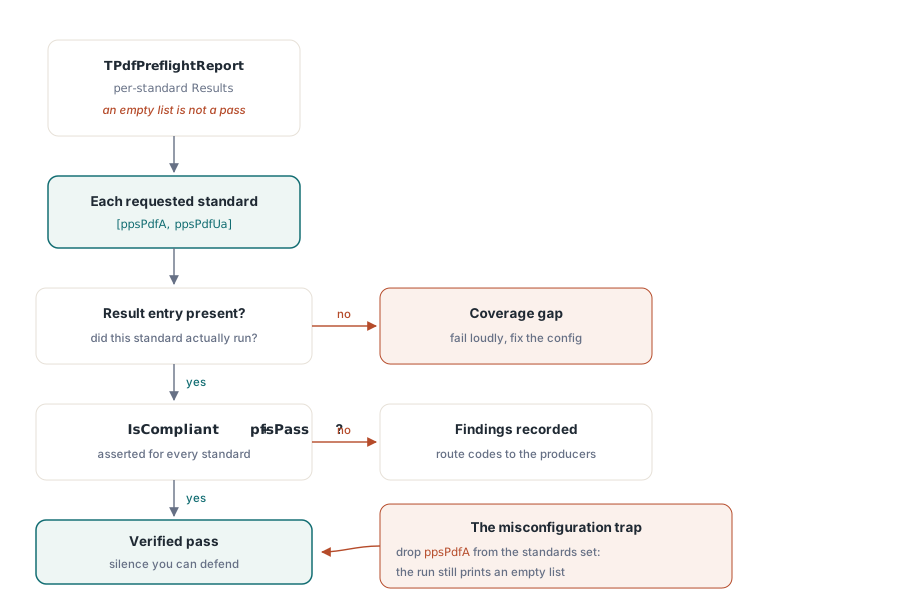
The report enumerates findings per standard, and an empty issue list means only "no problems found in the standards that actually ran." That is a narrower claim than "the file conforms to the standard you care about," and the gap between the two is where batch preflight quietly rots. A configuration typo that drops ppsPdfA from the set produces exactly the same empty issue list as a genuinely clean file. So treat silence as suspect. Walk Report.Results and assert two things for every standard you meant to check: that a result entry for it exists at all, and that its IsCompliant flag, backed by Status = pfsPass, is true. A nightly job that equates "no findings" with "archive ready" without ever confirming which standards were evaluated is the classic way a folder of nonconformant files sails through for months, until an external auditor opens one with veraPDF and the whole archive comes into question
A second trap hides in what a finding even is. Each TPdfPreflightIssue carries a Code, a Category, a Description, and a Recommendation, and it names the rule that was violated, not a page or an object. That is a design choice with consequences for the feedback loop. The report tells the producing team what class of defect exists, an unembedded font or a missing XMP identifier, and finding the specific offending object is the remediation tool's job downstream, not the validator's. Build your report consumers against the stable Code values, never against the human-readable description text, which can be reworded between releases without warning
Report files for machines and for the person on call
The report record writes the same findings in five formats: SaveJsonToFile, SaveCsvToFile, SaveHtmlToFile, SaveTextToFile, and SaveMarkdownToFile, each with a matching ToJson-style function when you want the string in memory rather than on disk. Resist the urge to pick one. Write JSON for the pipeline, so CI can attach it to the job record and parse issue codes and per-standard statuses without scraping text. Write HTML for the human who gets paged, because it opens in any browser with no tooling at all. The two together cost one extra line per file and spare your on-call engineer the single worst task in batch processing, which is reverse-engineering a raw JSON blob at two in the morning to learn which file broke. One discipline matters more than the format choice: derive each report name from the input file name, never from a timestamp, or two parallel runs will interleave reports you can no longer match back to their inputs
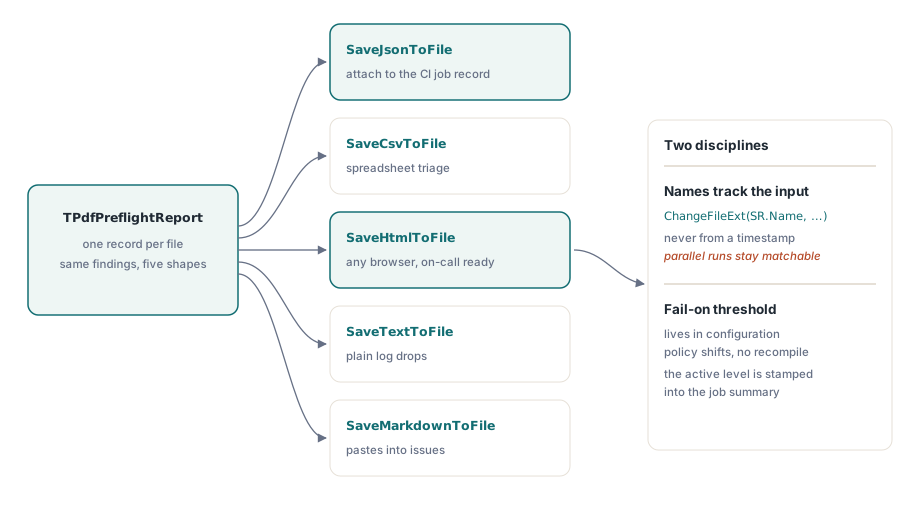
Severity thresholds belong in configuration rather than in code. An annotation with no alternate description is a hard failure for a PDF/UA submission portal and an ignorable note for an internal archive, yet it is the identical finding in both. Expose a fail-on level per profile so the policy can shift without a recompile, and stamp the level that was in force into the job summary itself. Next quarter nobody will remember which threshold last October's batch ran under, and the summary is the only place that memory survives
Isolating files so one bad PDF cannot sink the batch
procedure RunPreflightBatch(const InputDir, ReportDir: string;
  out FilesWithFindings, ToolFailures: Integer);
var
  SR: TSearchRec;
  Pdf: TPdf;
  Report: TPdfPreflightReport;
begin
  FilesWithFindings := 0;
  ToolFailures := 0;
  if FindFirst(InputDir + '*.pdf', faAnyFile, SR) = 0 then
  try
    repeat
      Pdf := TPdf.Create(nil);   // fresh instance per file: no state bleed
      try
        try
          Pdf.FileName := InputDir + SR.Name;
          Pdf.Active := True;
          if not Pdf.Active then  // load failures are silent, not raised
            raise EPdfError.Create('Cannot open ' + SR.Name);
          Report := BuildPdfPreflightReport(Pdf, [ppsPdfA, ppsPdfUa]);
          Report.SaveJsonToFile(ReportDir + ChangeFileExt(SR.Name, '.json'));
          Report.SaveHtmlToFile(ReportDir + ChangeFileExt(SR.Name, '.html'));
          if Report.TotalIssueCount > 0 then
            Inc(FilesWithFindings);
        except
          on E: Exception do
          begin
            Inc(ToolFailures);   // exit-code-2 territory, not a validation verdict
            WriteLn(ErrOutput, SR.Name + ': ' + E.Message);
          end;
        end;
      finally
        Pdf.Free;
      end;
    until FindNext(SR) <> 0;
  finally
    FindClose(SR);
  end;
end;
Three deliberate choices live in that loop. A fresh TPdf per file guarantees that one document which corrupts engine state cannot poison the files that follow it. The explicit Active check earns its place because Active := True swallows load errors instead of raising them; drop the guard and a truncated file drifts on into the validation call before failing somewhere downstream with a misleading message. The inner try..except lives inside the per-file scope on purpose, so a single exception bumps the failure counter and the loop carries on. You want clean reports for the 4,999 good files even when file 5,000 is shredded. And both report formats are written to disk before the verdict is tallied, which means the evidence survives even if a bug later in the summary logic miscounts
The exit-code mapping then collapses to a few lines in the project file:
begin
  RunPreflightBatch(ParamStr(1), ParamStr(2), Findings, Failures);
  if Failures > 0 then
    Halt(2)
  else if Findings > 0 then
    Halt(1);
  // falling through exits with 0: every file conformed
end.
What preflight will not do for you
The engine detects; it does not repair. A finding about an unembedded font or a device-dependent color space is a work order for whoever produces the files, and the validator has no way to patch it in place. So plan the feedback loop deliberately. Reports have to land where the producing team actually reads them, or the same findings reappear every night until someone finally asks why the conformance rate never improves. It also pays to cross-check a sample of verdicts against an independent validator, veraPDF for PDF/A or Acrobat's preflight for PDF/X, before an external auditor cross-checks them for you. When two engines disagree on a real customer file, that document is not a nuisance; it is exactly the regression case your release testing was missing. Keep it, name it, and run it on every build
One more pairing is worth knowing. The same validation engine drives the interactive checks in a review UI, so this headless CLI and an analyst-facing PDF intake review workbench can share a single validation vocabulary instead of drifting apart over time. And because [ppsPdfA, ppsPdfUa] evaluates accessibility in the same pass, the PDF/UA side of the batch lines up cleanly with viewer-side work like building an accessible PDF reader in Delphi. Profiles, report formats, and the full preflight API are documented on the product page for the PDFium Component