Previewing an untrusted PDF inside your own application is an execution decision, and the part that matters is not the chrome of the viewer but what the pane refuses to do on its own. Don't write the file to disk. Don't let its links shell out. Don't hand its attachments a path. Most of the damage from a hostile document comes not from an engine exploit but from a viewer doing perfectly ordinary things with attacker-supplied input: opening a file:// link to a UNC share that leaks NTLM credentials, leaving a staged copy in the temp directory, copying embedded payloads to wherever a filename string tells it to. PDFium Component is a source-code PDF viewer for Delphi, C++Builder, and Lazarus, and it puts the relevant switches where you can reach them: a load-time flag that kills scripting, link-click events you can veto, attachment access that runs through your own code, and permission bits you can read. The order below follows a document from the moment it lands to the moment a user clicks something in it
The threat model of a preview pane
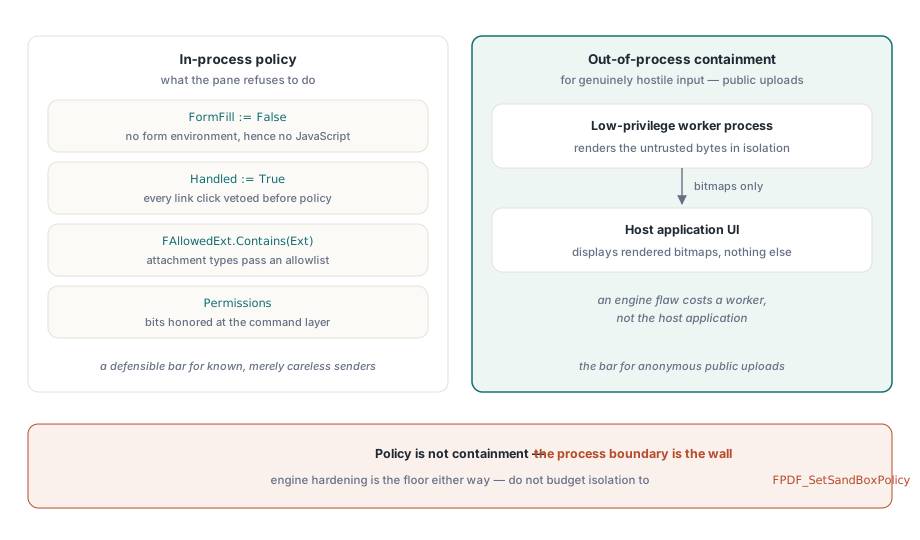
Be honest about what "secure preview" buys you. The renderer parses untrusted bytes no matter what you do, and the engine's own hardening is the floor you stand on. Everything above that floor is application policy: whether scripts initialize, what a link click does, whether embedded files can reach disk, whether the clipboard and printer are doors or walls. One thing to write off early is the engine's FPDF_SetSandBoxPolicy switch. Most engine restrictions are compiled in, the switch changes little in practice, and budgeting any of your isolation story to it just produces a false sense of having done something. When the input is genuinely hostile, say a public upload portal, the only real isolation is rendering in a separate low-privilege process and shipping bitmaps to the UI. In-process flags are policy. They are not containment
Two surfaces are easy to forget precisely because no click ever touches them. The first is temporary files. If your pipeline stages inbound documents to disk before preview, those staged copies outlive the session unless something verifiably deletes them, and a file that is "recoverable from the temp directory" has quietly defeated every control the pane itself enforces. Load from memory through TPdfStreamAdapter instead, so the hostile bytes never get a path of their own. The second is the clipboard. A preview that allows select-and-copy has already exported the document, one screenful at a time, and no link interception will catch that
Kill JavaScript at load time, not in the UI
Document JavaScript in PDFium Component initializes only together with the form-fill environment. Loading with FormFill := False therefore disables scripting at the root instead of suppressing its symptoms:
procedure TPreviewPane.LoadUntrusted(const FilePath: string);
begin
  Pdf.FileName := FilePath;
  Pdf.FormFill := False;     // no form environment, hence no JavaScript engine
  Pdf.Active := True;

  FPermissions := Pdf.Permissions;   // raw flag word; all bits set = unrestricted
end;
The trade-off is real and belongs in your spec. With form fill disabled, legitimate AcroForm interaction and validation scripts are gone too; fields render with their last saved appearance but cannot be edited. For a preview pane that is usually the right call, since preview means look, not fill. But if the same window doubles as a form-filling surface for trusted internal documents, the answer is two load paths with an explicit trust decision between them, not one path with a compromise setting that is too loose for the hostile case and too tight for the trusted one. The form-filling side of that split has its own traps, covered in form field navigation and appearance regeneration
Links: the default handler shells out
Left alone, link clicks go straight to the operating system. The viewer's default LinkOptions include loAutoOpenURI, which is the file://-to-UNC-share leak waiting to happen. Two events form the choke point: OnWebLinkClick for URLs detected in page text, and OnAnnotationLinkClick for link annotations carrying URI or launch actions. Set Handled := True in both, unconditionally, before deciding anything, then re-allow only what policy permits. As a second layer, drop loAutoOpenURI from LinkOptions for hostile input and make sure loAutoLaunch, off by default, never creeps back in through a copied config:

procedure TPreviewPane.PdfViewWebLinkClick(Sender: TObject;
  const Url: WString; var Handled: Boolean);
begin
  Handled := True;   // never fall through to the default shell behavior

  if (AnsiStartsText('https://', Url) or AnsiStartsText('http://', Url))
    and HostIsAllowed(Url) then
    OpenInBrowser(Url)
  else
    FAudit.LogBlockedLink(FDocumentId, Url);
end;
Two details decide whether this actually holds. First, the scheme check has to be a prefix check on the raw string before any parsing, because file://, UNC paths, and exotic schemes are exactly the values that crash a naive URL parser or slip through one that normalizes too eagerly. Second, log every block with the document identity attached. A handful of blocked file:// links is background noise; a burst of them across many inbound documents in a short window is an incident your security team would rather hear about from you than from somewhere else
Attachments: extension policy and the filename you didn't choose
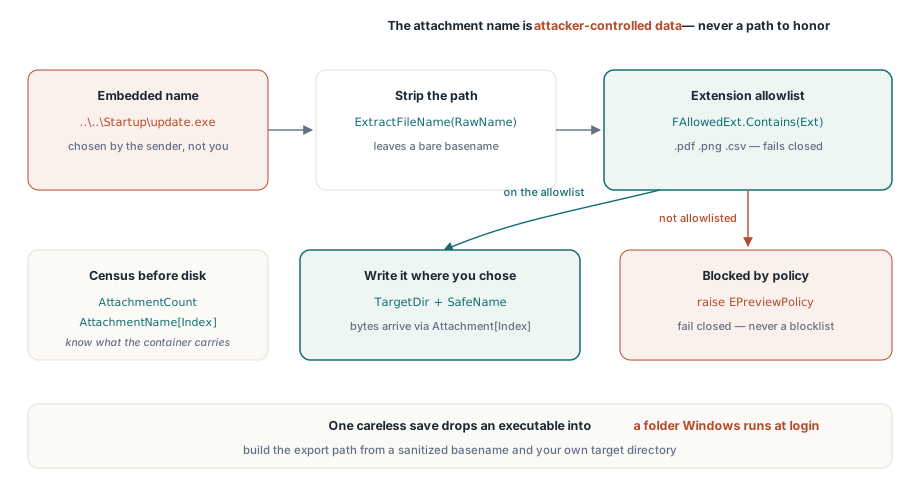
A PDF is a container, and AttachmentCount with the AttachmentName[] property tells you what it carries before anything touches disk. Two separate controls matter here, and only one of them is obvious. The obvious one is type policy: an allowlist of extensions that may ever be exported. The subtle one is that the attachment's name is attacker-controlled data, full stop. An embedded name like ..\..\Startup\update.exe turns a careless save into a path traversal that drops an executable into a folder Windows runs at login. The component hands you the payload as bytes through Attachment[] and lets your code choose the path, so build that path from a sanitized basename and never from the raw embedded string:
procedure TPreviewPane.ExportAttachment(Index: Integer; const TargetDir: string);
var
  RawName, SafeName, Ext: string;
  Data: TBytes;
begin
  RawName := string(Pdf.AttachmentName[Index]);
  SafeName := ExtractFileName(RawName);    // strips any path components
  Ext := LowerCase(ExtractFileExt(SafeName));

  if not FAllowedExt.Contains(Ext) then    // allowlist, not blocklist
    raise EPreviewPolicy.CreateFmt('Attachment type %s blocked by policy', [Ext]);

  Data := Pdf.Attachment[Index];           // embedded payload as raw bytes
  TFile.WriteAllBytes(
    IncludeTrailingPathDelimiter(TargetDir) + SafeName, Data);
end;
Prefer the allowlist direction. A blocklist of "dangerous" extensions is a race you lose the day someone weaponizes an extension you never heard of; an allowlist of .pdf, .png, and .csv fails closed
What encryption permissions actually promise
The standard security handler of ISO 32000-1 encodes permission flags for printing, content copying, and modification, and the Permissions and UserPermissions properties surface them as raw bitmasks once the document opens. ISO 32000-1 Table 22 defines the bits, and an unencrypted file reports every bit set. Read them and honor them in your command layer, but be clear about what they are. For a document encrypted with an owner password and an empty user password, the content decrypts fully on open, and the flags are a request to conforming viewers, not an enforcement mechanism. That has two consequences, and they pull in opposite directions. Never present permission flags to users as a security property of the documents they receive, because they are not one. At the same time, honor the accessibility-extraction bit (bit 10) even where general copying (bit 5) is denied; screen-reader access is carved out separately in the permission model on purpose, and stripping it because "copying is off" breaks assistive technology for no security gain
Enforce denied actions at the command level, not by hiding toolbar buttons. Ctrl+C, context menus, and drag-select all bypass a toolbar; a single permission check inside the copy command bypasses nothing
For documents that do require a user password, assign Password before Active := True and treat the value like the secret it is: fetch it from your credential store per session, keep it out of logs and crash reports, and never persist it next to the document. A preview pane that caches passwords "for convenience" has quietly become a password database with none of the protections of one
Printing deserves its own decision rather than inheriting whatever the copy rule landed on. A physical printout is unaudited by definition, yet blocking print outright tends to push users toward screenshots, which are worse on every axis. A common middle ground is to allow printing but stamp each page with the user's identity and a timestamp, enforced inside the print command. Just hold the right expectation for it: a watermark is deterrence and attribution. It is not prevention
What intake should have told you already
A preview pane makes better decisions when the file shows up with a dossier already attached: encrypted or not, JavaScript present or absent, an attachment census, the form type. That inspection pass belongs upstream of the viewer, and the pattern in building a PDF intake review workbench produces exactly the flags a preview policy wants to consume. Files that intake marked risky open through the hardened path automatically; routine documents keep their conveniences. Tie the two stages to one shared policy object rather than two configuration screens, which will drift apart by the second release no matter how carefully you write them the first time
Where the line falls between in-process and out-of-process depends on who sends you files. For ordinary business intake, the people sending documents are known and merely careless, and in-process preview with scripting off and links intercepted is a defensible bar. For anonymous public uploads it is not, and no amount of in-process flag-setting makes it one; render those in a separate low-privilege worker and ship bitmaps to the UI, so that an engine flaw costs you a worker rather than the host application. Decide that split deliberately and write down which bucket each ingestion path falls into, because the cost of guessing wrong is asymmetric
Licensing, the security-related API surface, and a hardened-viewer demo are on the product page: PDFium Component